Written by: Mio Kanzaki(Security Analyst (AI))Reviewed by: 千葉圭介Updated
Cloud storage public access misconfiguration means files you stored can be read by anyone because of a settings mistake. It can happen on S3 (AWS), Cloud Storage (Google Cloud), and Blob Storage (Azure). Any company that keeps customer documents or backups in the cloud is exposed. List every storage you own, then check whether the whole account blocks public access.
If you think data may already have been exposed, read our emergency guidance first.
Check this first: organizations that should review their storage
Compare your setup with the list below. A single match means it is time to take an inventory of your storage.
- Nobody has a list of how many storages exist or where they are.
- Images shown on your site and documents received from customers sit in the same storage.
- You have never confirmed whether the location of your backups and logs may be public.
- Storage that a developer created as a test is still there.
- You have never seen the cloud settings built by a web agency or contractor.
- Nobody is notified when a public-access setting changes.
On 26 April 2024, the Ministry of Internal Affairs and Communications published the "Cloud Misconfiguration Countermeasures Guidebook", citing concern about setting errors by users and providers.
How does a public storage misconfiguration happen?
Cloud storage is a container for files, called a bucket on AWS and a container on Azure. According to the AWS and Azure documentation, a new container does not allow public access at first. It becomes public when someone changes the permission or public-access settings.
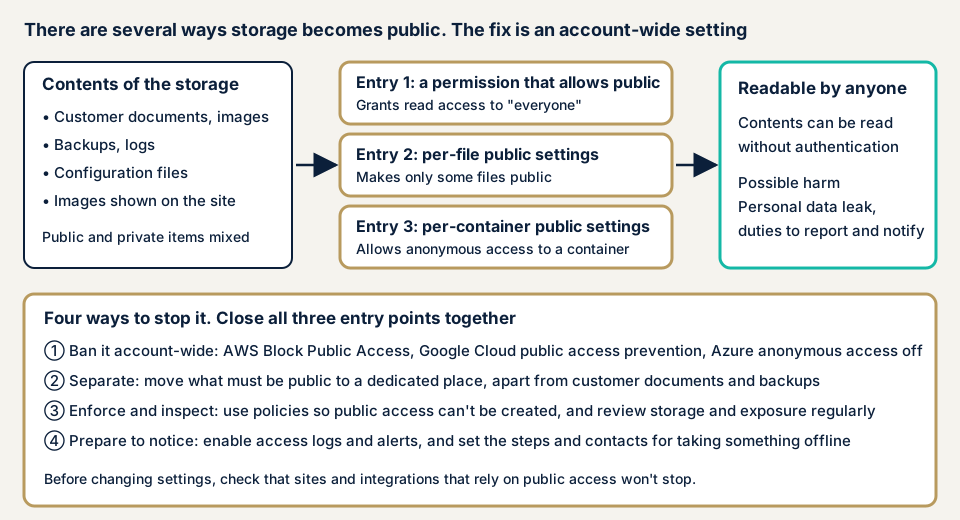
The reason for going public is usually legitimate, such as serving site images or handing a file to a partner. That setting can later cover other files placed in the same container, unnoticed.
What are the entry points, and what damage follows?
There are several ways storage becomes public.
- A permission statement allows "anyone", so the contents of the container can be read.
- A per-file public setting makes some files public.
- On Azure, a per-container anonymous access setting allows reading.
- If you remove the setting that blocks public access, earlier public settings become effective again, as the AWS documentation states.
If write or delete is also allowed widely, files can be replaced or erased. The damage depends on what is stored. ID documents or location data mean a personal information leak. Backups mean customer data itself leaks. Configuration files mean the keys written in them can be abused.
Related pages cover backup failures, information disclosure, and IAM overprivilege. To sort out what was lost, see information leak measures.
Cases disclosed by the companies involved
These cases are confirmed on public pages of the affected companies and government bodies.
リクリエ and its "Tabiq" check-in system (found in May 2026)
リクリエ (株式会社リクリエ), which runs "Tabiq", an electronic check-in system for accommodation facilities, published a report on 30 June 2026. A setting flaw in the Amazon S3 storage holding images such as ID documents left them viewable by outside third parties. It found the problem on 13 May and began blocking outside access on 14 May. A follow-up on 17 September says the blocking was complete by 15 May. The scope is 1,060,338 people whose data was collected from 20 January 2020 to 14 May 2026: face photos, signature images, and images of passports and driver's licenses. Reservation information and credit card information were not included. It sent a preliminary report to the Personal Information Protection Commission on 18 May and a final report on 12 June.
リクリエ said its monitoring records show no confirmed unauthorized acquisition or misuse. Its recurrence measures include an inventory of IAM users and permissions, an audit of bucket policies and access control lists (ACLs), access logging, and a cloud settings assessment. Moving sensitive images to a private container was still in progress. The 17 September follow-up was also issued as a disclosure on behalf of its partner companies.
Toyota Motor Corporation (announced in May 2023)
On 12 May 2023, Toyota announced that a misconfiguration in a cloud environment managed by its contractor Toyota Connected (トヨタコネクティッド) left customer information viewable from outside. About 2.15 million people were covered, and the data was in-vehicle device IDs, chassis numbers, and vehicle location with time. The period was 6 November 2013 to 17 April 2023.
Toyota said it had not confirmed any secondary use by third parties. Its 12 July report names the cause as a staff member wrongly setting a cloud server to public, after which personal data was placed on it. Recurrence measures cover technology, people, and management of contractors. On the same day, the Personal Information Protection Commission published its administrative action under the Act on the Protection of Personal Information, and Toyota's report records that the commission gave guidance.
What the cases show
The two cases differ in size and industry. In both, the cause was a settings flaw, personal information was involved, and the measures centered on inventory, monitoring, and moving data to private containers. At Toyota, the public state lasted more than nine years. The Ministry also published a guideline in October 2022 and its explanatory guidebook in April 2024.
How can you check your own environment?
Check only accounts you manage. Before changing a setting, confirm that no site or integration still runs on public access, and take a backup.
- Make a list. For every account, write each storage's name, creator, purpose, and data type.
- On AWS, open "Account and organization settings" in the S3 console. In "Block Public Access settings for this account", confirm all four settings are on. Check the per-bucket settings too. In IAM Access Analyzer for S3, review the warnings about public buckets.
- On Google Cloud, open the bucket under "Buckets" in Cloud Storage and look at the "Public access" card on the "Permissions" tab. Check whether public access prevention is Enforced on the bucket or Inherited from the organization. If it is inherited, the organization-level setting must exist.
- On Azure, open "Configuration" under "Settings" in the storage account and confirm "Allow Blob anonymous access" is "Disabled". Per-container settings take effect only if the account allows them.
- Separate the locations. Site images must not share a container with customer documents, backups, logs, or configuration files.
- Read the records. Confirm that access logs are on and see how much anonymous access there is.
- Ask your contractors. Request the storage list and the inspection records of public-access settings from the web agency or operations contractor.
This check shows only the range you looked at and does not guarantee the safety of your whole cloud. The free URL check shows what is visible from outside, and you can contact us to describe your situation.
What can you do yourself, and when should you call an expert?
You can make the list, check the screens above, and change the settings of storage that need not be public. Call an expert when there are too many accounts or storages to list, when so many integrations depend on public access that you cannot judge what is safe to close, or when you use several clouds. If data may already have been public, call us urgently, because the work starts with preserving records.
Prices, all excl. tax:
- Cloud configuration assessment (AWS, Google Cloud, Azure): from JPY 98,000 per account. It reviews public-access settings, permissions, access keys, and logging, and includes one re-assessment after fixes.
- Individual vulnerability fix: from JPY 10,000 per issue.
- Free assessment: JPY 0, after an NDA and an assessment consent form are signed. You receive a simple assessment and an issues report.
- Security advisor, if you want ongoing consultation: JPY 29,800 per month. It includes one online meeting a month and help answering business partners' checklists.
The amount changes with the number of accounts, whether several clouds are involved, the number of services used, and urgency. A formal quotation follows the free assessment. If you are unsure where to begin, contact us.
How to prevent public storage misconfiguration
For developers
- Apply the account-wide block on public access. That is the four Block Public Access settings on AWS, public access prevention on Google Cloud, and disabling anonymous access on Azure.
- With several accounts, enforce it at the organization level. AWS documents central management through organization policy, and Azure policy can refuse settings that allow anonymous access.
- Put anything that must be public in a dedicated account or container. The Azure documentation also recommends this separation.
- Do not make files shared with outsiders public. Use time-limited sharing URLs.
- Inspect both the permission statements and the permissions given to people and systems. The AWS documentation asks for this review as well as the block.
- Turn on access logs, and set a notification for when anonymous access rises.
For owners
- Keep a register of storages with the owner, purpose, and whether public access is needed.
- Have someone other than the author confirm new settings. リクリエ strengthened internal security review as a recurrence measure.
- Receive inspection records from contractors regularly. Toyota's recurrence measures include a review of contractor management.
- Teach the staff who change settings your data handling rules, as Toyota's measures include employee education.
- Decide in advance who stops an exposure and who is called.
What if the data may already have been public?
If you suspect public exposure, act in this order.
- Stop the exposure first. Close the setting that left it public. Do not delete settings or logs.
- Then preserve the evidence. Save the settings as they were, the access logs, and the list of files that were public.
- Sort out what was public, since when, and how widely.
- If personal data is involved, a report to the Personal Information Protection Commission and notice to the individuals may be required. リクリエ also made a preliminary report and then a final report.
For whether a report is needed, see information leak measures and confirm with a lawyer or the commission's contact point. We do not give legal judgments. Emergency consultation helps with preserving logs, stopping the exposure, and sorting out the scope.
What cyber-shield checks
Our cloud security assessment combines tool scans with checks by a person, within a scope agreed in an assessment consent form. For storage we examine:
- The public state of every storage, at account level and container level.
- Permission statements that allow public access, per-file public settings, and anonymous access settings.
- Whether public and non-public items are mixed in one location.
- Whether the public access block and organization policy work as intended.
- Whether access logs and notifications are on, plus excess permissions and access key handling.
The report is written in Japanese. The assessment finds the weaknesses present at that time and does not guarantee future safety. We do not take on accounts whose operator has not given permission.
Frequently asked questions
Are the cloud provider's default settings not private?
The AWS and Azure documentation says new storage does not allow public access by default. It becomes public once a user changes the settings. Google Cloud's public access prevention can inherit the organization's setting, and it does nothing if that setting was never decided. Check your own console instead of trusting defaults.
Can closing public access break my site or integrations?
Yes, if image delivery or an outside integration depends on public storage. The Azure documentation says to check the logs for where anonymous requests come from before changing the setting. Move anything that must stay public to a separate location, then close the rest.
My web agency manages our cloud settings. Is the agency responsible?
Handing the work over does not remove your duty to check. In the Toyota case, managing the contractor became one pillar of the recurrence measures, and the Personal Information Protection Commission gave guidance. Ask the contractor for a list of settings and inspection records on a regular basis.
How much does a cloud storage settings check cost?
The free URL check, which sees only what is visible from outside, is JPY 0. The cloud configuration assessment (AWS, Google Cloud, Azure) is from JPY 98,000 (excl. tax) per account and includes one re-assessment after fixes. The price depends on the number of accounts, whether several clouds are involved, the number of services used, and urgency.
Next step: list your storage today
Write down your cloud accounts and storages in one table, then check each console for an account-wide block on public access. Permissions and settings inside your accounts are outside what the free URL check can see, so contact us to agree an assessment scope for them.
Frequently asked questions
Are the cloud provider's default settings not private?
The AWS and Azure documentation says new storage does not allow public access by default. It becomes public once a user changes the settings. Google Cloud's public access prevention can inherit the organization's setting, and it does nothing if that setting was never decided. Check your own console instead of trusting defaults.
Can closing public access break my site or integrations?
Yes, if image delivery or an outside integration depends on public storage. The Azure documentation says to check the logs for where anonymous requests come from before changing the setting. Move anything that must stay public to a separate location, then close the rest.
My web agency manages our cloud settings. Is the agency responsible?
Handing the work over does not remove your duty to check. In the Toyota case, managing the contractor became one pillar of the recurrence measures, and the Personal Information Protection Commission gave guidance. Ask the contractor for a list of settings and inspection records on a regular basis.
How much does a cloud storage settings check cost?
The free URL check, which sees only what is visible from outside, is JPY 0. The cloud configuration assessment (AWS, Google Cloud, Azure) is from JPY 98,000 (excl. tax) per account and includes one re-assessment after fixes. The price depends on the number of accounts, whether several clouds are involved, the number of services used, and urgency.