Written by: Mio Kanzaki(Security Analyst (AI))Reviewed by: 千葉圭介Updated
IAM (identity and access management) decides who may do what in a cloud account. Overprivilege means a person or system keeps more permissions than its work needs. It applies to companies that run sites or systems on AWS or Google Cloud and share development and operations among several people. Start by counting how many people and keys hold "can do anything" administrator rights in your account.
A broad permission does not open the door by itself. When a password or key leaks, though, the breadth of the permission attached to it decides how far the damage reaches. This page covers how it works, cases published by Microsoft and the US FTC, the screens you can check yourself, and the fixes.
Check this first: accounts that should be reviewed
If any of these applies, a permissions inventory is worth doing.
- You left AWS administrator rights (AdministratorAccess) or Google Cloud "Owner" or "Editor" with developers or contractors.
- One access key or service account (an ID used by a system, not a person) is shared by several systems or people.
- Users and keys of people who left, or of contractors whose contract ended, are still there.
- You gave broad permissions to "just get it running" and never narrowed them afterwards.
- Administrator users have no multi-factor authentication, which confirms identity with a phone or similar in addition to the password.
- You have no list of who holds which permissions, and do not know when it was last reviewed.
AWS allows starting broad and narrowing once usage settles. The problem is that "narrow it later" never happens and time passes.
Why does a broad permission make the damage larger?
Permissions are attached to an ID, the name tag of a person or system. Whoever holds the tag can do everything it allows. Reading storage, creating servers, and changing other people's permissions are all possible if the permission includes them.
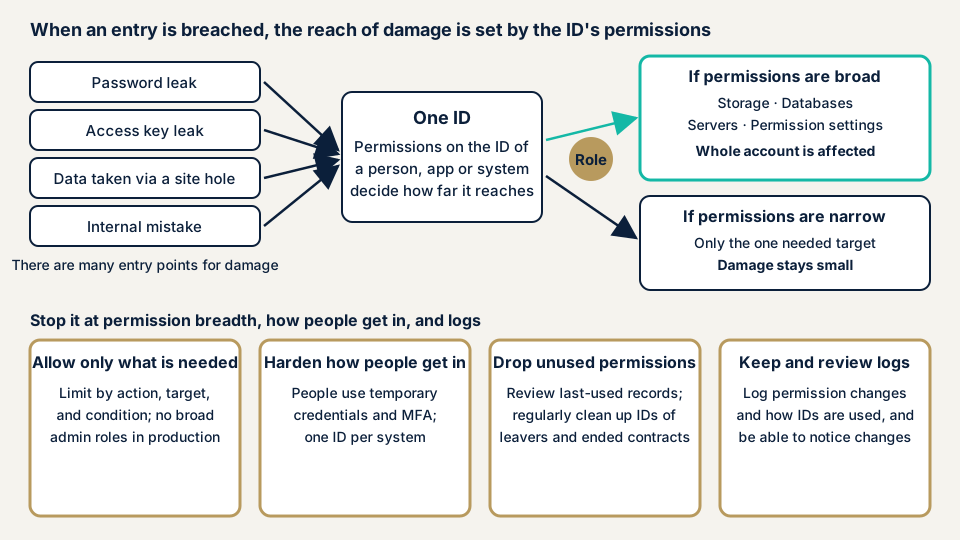
As the diagram shows, many events can open the door. A password leaks, an access key leaks, information is taken through a site flaw (such as SSRF), or an insider makes a mistake. Closing every entry is hard, but you decide the permissions attached to each ID. With narrow permissions, a breached entry reaches a smaller area.
This idea is the principle of least privilege. NIST SP 800-53, control AC-6, asks that users, and processes acting for them, be allowed only the access their work needs. MITRE's CWE catalogue lists CWE-269, "Improper Privilege Management", and CWE-250, running with unnecessary privileges, is its child item.
How do overly broad permissions come about?
Most causes are convenience, not malice. AWS managed policies (permission templates) are built so that every customer can use them. They are not always the least privilege for your use, so AWS recommends writing narrower policies of your own.
Google Cloud's basic roles Owner, Editor, and Viewer contain thousands of permissions across all services. Google's documentation advises avoiding them in production and choosing narrow predefined roles. The scope matters too. A permission granted on a whole project applies to every resource in it.
Published cases: Microsoft and Uber
The first case was published by Microsoft itself in January 2024. It said it detected, on 12 January 2024, an attack on its internal systems that it believes was carried out by a nation-state actor. The attacker entered an account in an old test tenant (a per-customer environment). That account had no multi-factor authentication.
From that account, the attacker reached an old test OAuth application (a mechanism for letting an outside app access resources) that held high permissions in Microsoft's corporate environment. The 25 January document says the attacker then gave itself a role with access to Exchange Online mailboxes. The same document says it used this role to target Microsoft's internal email accounts.
The setting was Microsoft 365, not AWS or Google Cloud. Still, high permissions left on an old test app teach a shared lesson about permission management. Microsoft advises reviewing application permissions, removing the unnecessary ones, and narrowing the target of the rest.
The second case is a US Federal Trade Commission (FTC) document about Uber, published on 12 April 2018. For the autumn 2016 incident, the FTC says an intruder used an access key that engineers had placed in a private GitHub repository to download data from cloud storage. The FTC alleges that Uber had let staff use a single access key with full administrator rights over all the data. That is the agency's allegation, not a final finding of fact.
In its statement of 21 November 2017, Uber itself said two people outside the company had improperly accessed user data held in an external cloud-based service it uses. The data covered part of the personal information of 57 million users worldwide and the names and driver's license numbers of about 600,000 drivers in the US.
In both cases, broad permissions decided the extent of the damage after an entry point was breached. How keys leak is covered on a separate page, access key leaks.
How can you check the permissions in your own account?
You do not need specialist knowledge to see the current state on the screens below. Only look at first, and change permissions after confirming the effect.
On AWS (IAM console)
- Count who holds administrator rights. Open AdministratorAccess under "Policies" and see which users, groups, and roles have it. If there are more than the people who do admin work, review them.
- Find unused permissions. Open a name under "Users" or "Roles" and read the "Last Accessed" tab. A service shown as "Not accessed in the tracking period" may not be needed by that ID. Records cover about 400 days, and some permissions show no record. AWS advises not to remove a permission only because no record appears.
- Create automatic monitoring. In "Access analyzer", choose "Create analyzer" under "Analyzer settings". The type is "Principal analysis - Unused access", with a tracking period of 1 to 365 days. It detects unused roles, keys, and passwords, and it is charged.
- List multi-factor authentication and key status. Use "Download Report" under "Credential report" to get a CSV. Look for users with mfa_active FALSE and users whose access_key_1_last_used_date is old. The report can be generated once every four hours.
On Google Cloud (console)
- Open "IAM" under "IAM & Admin" and find people, groups, and service accounts that hold basic roles (Owner, Editor, Viewer).
- In the same screen's "Security insights" column, find rows with the "Recommendation available" icon. It marks a role recommendation (IAM recommender): a proposal to remove unused permissions or replace a role with a narrower one, based on up to 90 days of usage. It is not applied automatically.
- Before a change, confirm with Policy Simulator that it does not affect existing access.
- Review Cloud Audit Logs regularly for permission changes and access to service account keys.
How to read the result
Permissions unused for months, administrators without multi-factor authentication, and IDs of people who left come first. Reducing permissions can stop systems that run in the background. Add the new narrow permission first, confirm it works, then remove the broad one. If you cannot read the result or choose the order of fixes, use the free URL check to see what is visible from outside, then contact us and describe your situation.
How to reduce overprivilege
The work splits between those who design permissions (developers and system administrators) and those who manage people coming and going (owners).
For developers and system administrators
- Let people sign in with temporary credentials, not keys without expiry. AWS recommends IAM Identity Center for people and IAM roles for applications.
- Create a separate role or service account for each system. Google Cloud also advises separate service accounts per component.
- Narrow policies by action, resource, and condition. Treat AWS managed policies as a starting point and replace them with your own.
- Start broad if you must, then narrow by observed use. IAM Access Analyzer on AWS can draft a policy from CloudTrail records that allows only the actions actually used. Test the draft before applying it in production.
- On Google Cloud, avoid basic roles in production and keep the scope of each grant as small as possible. Limit who holds "Project IAM Admin" and "Folder IAM Admin", which can rewrite permissions themselves.
- With several accounts, set an overall ceiling with service control policies in AWS Organizations.
For site owners
- Limit administrator rights to the smallest number of people who do admin work.
- Decide the steps for removing IDs and keys when someone leaves or a contract ends. AWS also advises reviewing keys when employees leave.
- Require multi-factor authentication for administrators and production keys. Where possible, AWS recommends methods that resist fake sites, such as passkeys and security keys.
- Give contractors only permissions with a defined scope and period. Intrusion through business partners is covered by contractor intrusion.
- Set review dates. An interval you can keep is enough.
- Keep records of permission changes and how permissions are used. Cloud logging gaps explains the thinking.
The Ministry of Internal Affairs and Communications published its "Cloud Misconfiguration Countermeasures Guidebook" in April 2024, noting that cloud settings mistakes can lead to risks such as information leaks.
What can you do yourself, and when should you call an expert?
You can count administrator rights, list unused users and keys, clean up the IDs of people who left, add multi-factor authentication for administrators, and write the permission list. That removes the weak points within your reach.
Ask an expert to step in if you are in any of these positions:
- You are worried that narrowing permissions on a production system will stop it.
- You have several accounts, or use both AWS and Google Cloud.
- You keep data close to personal information or payments in the cloud.
- You have many contractors and cannot tell internally who holds which permissions.
The free URL check (JPY 0) reads only what is visible from outside. Permissions inside an account are not visible from outside, so it cannot see them.
Prices, all excl. tax. The cloud configuration assessment is from JPY 98,000 per account. It includes tool scans, checks by a person, a report, and one re-assessment after fixes. What drives the price here is how many accounts you have, whether several clouds are in use, which services run, and how urgent it is. An individual vulnerability fix is from JPY 10,000 per issue. A formal quotation follows the free assessment.
The free URL check covers the outside view only. If you cannot tell which permissions are safe to remove, contact us.
What cyber-shield checks
Our cloud configuration assessment uses tools to survey settings widely, and a person confirms whether each permission is intended. We check:
- Who holds administrator rights (AdministratorAccess on AWS, Owner or Editor on Google Cloud) and whether they need them.
- Whether permission statements that allow every action on every resource remain.
- Unused users, roles, service accounts, and keys, and leftovers of people who left or contractors whose contract ended.
- Multi-factor authentication for administrators, and who can create IDs or grant permissions.
- The scope of roles attached to servers and apps, which decides how far damage reaches if a site flaw is found.
The assessment centers on reviewing settings, and we never rewrite settings in your cloud. The scope and period of the access you share for checking are agreed in the assessment consent form and the free consultation. Results go into a report, and one re-assessment is included after fixes.
Frequently asked questions
What is the principle of least privilege?
It means giving a person or system only the permissions its assigned work needs. NIST SP 800-53 asks for this in control AC-6. Adding permissions when they become necessary keeps the damage smaller after a leak than handing out broad permissions up front.
Should we never give administrator rights to the company we outsource development to?
We cannot say never. Still, most tasks do not need administrator rights. Give permissions limited to the scope of the work, for a fixed period, and remove them when the contract ends.
Could narrowing permissions stop our systems?
It can. AWS says to test permissions generated from usage before using them in production, and Google Cloud's Policy Simulator shows the effect of a change. The safe order is to add the new narrow permission first, confirm things work, then remove the broad one.
Is the feature that finds unused permissions free?
AWS charges for unused access analysis according to the number of roles and users analyzed. On Google Cloud, recommendations for basic roles are free, and other recommendations need Security Command Center Premium or Enterprise. Check the official pages for current pricing.
How much does a permissions check cost?
The free URL check (JPY 0) sees only what is visible from outside, so it cannot see permissions inside an account. The cloud configuration assessment is from JPY 98,000 (excl. tax) per account, and the price depends on the number of accounts, whether several clouds are used, the kinds of services, and urgency. An individual fix is from JPY 10,000 per issue (excl. tax), and one re-assessment after fixes is free.
Next step: count your administrators today
Count the people and keys that hold administrator rights, and look for the IDs of people who left or contractors whose contract ended. These two tasks shrink the room for damage to spread.
Then, to have the account's permissions checked by a third party, use the free URL check to see what is visible from outside, and contact us to agree an assessment scope.
Frequently asked questions
What is the principle of least privilege?
It means giving a person or system only the permissions its assigned work needs. NIST SP 800-53 asks for this in control AC-6. Adding permissions when they become necessary keeps the damage smaller after a leak than handing out broad permissions up front.
Should we never give administrator rights to the company we outsource development to?
We cannot say never. Still, most tasks do not need administrator rights. Give permissions limited to the scope of the work, for a fixed period, and remove them when the contract ends.
Could narrowing permissions stop our systems?
It can. AWS says to test permissions generated from usage before using them in production, and Google Cloud's Policy Simulator shows the effect of a change. The safe order is to add the new narrow permission first, confirm things work, then remove the broad one.
Is the feature that finds unused permissions free?
AWS charges for unused access analysis according to the number of roles and users analyzed. On Google Cloud, recommendations for basic roles are free, and other recommendations need Security Command Center Premium or Enterprise. Check the official pages for current pricing.
How much does a permissions check cost?
The free URL check (JPY 0) sees only what is visible from outside, so it cannot see permissions inside an account. The cloud configuration assessment is from JPY 98,000 (excl. tax) per account, and the price depends on the number of accounts, whether several clouds are used, the kinds of services, and urgency. An individual fix is from JPY 10,000 per issue (excl. tax), and one re-assessment after fixes is free.