Written by: Mio Kanzaki(Security Analyst (AI))Reviewed by: 千葉圭介Updated
A backup failure means no copy of your data exists, or a copy exists but cannot be restored when damage strikes. Organisations that run websites, servers, or shared files are affected, and ransomware (an attack that encrypts data and demands a ransom) can halt business entirely. Find the last day you actually restored from a backup, and if there has never been one, try a small restore.
You need all three: take, protect, restore. Ransomware damage ranks first for organisations in IPA's Top 10 Information Security Threats 2026.
Check this first: sites that should be reviewed
If you recognise any of these, inspect your backups.
- You take backups but have never tried restoring.
- The storage stays connected to the same network as the original server.
- Nobody checks whether the backup finished normally.
- Backup files sit inside the site's public folder.
- Old copies are overwritten automatically and you do not know how many days back you can go.
- Only one person knows how to back up and restore.
- You have not decided what must be restored, and how far, to resume business.
How do backup failures happen?
There are four types: no backup, a backup that an attack encrypts or erases, a backup that cannot be restored because operation was lax, and a restore that brings back contamination. The National Police Agency's statistics split the reasons for failed restores into encryption or erasure, operational failure, and other.
Ransomware attackers hunt for backups. The agency writes that intruders explore the inside and often encrypt backups too to block recovery (2025 edition, pp. 15-16), and CISA's guide likewise says much ransomware looks for accessible backups to delete or encrypt.
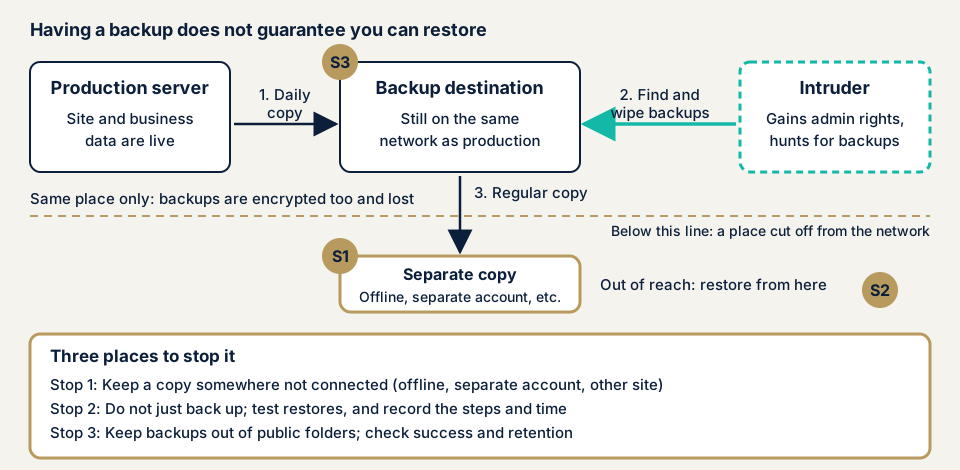
Four ways a restore fails
- No backup was taken. In the agency's statistics, 11 of 116 valid answers on backup status said none.
- A backup exists but stays connected to production, so it is encrypted or erased along with it.
- A backup exists but lax operation prevents restoring. The agency classes this as "operational failure".
- The restore itself is contaminated. IPA says a backup from before the intrusion began is safe, and that telling which one needs saved logs.
How does it differ from similar flaws?
Directory listing lets a backup in a public folder be found in the file list, and MITRE's CWE-530 covers backups left where unauthorised people can reach them. Cloud storage exposure makes the storage itself public, and unpatched software is a way in for those who hunt backups.
What is lost when backups fail?
The National Police Agency counted 226 ransomware damage reports in 2025 (2025 edition, p. 13). JPCERT/CC explains that encrypted files are usually hard to decrypt, so for files with no backup you must plan to continue business by other means. The agency also reports that over half of organisations spent JPY 10 million or more on recovery, and a little over half recovered in under a month (p. 14). Backups do not alone decide these numbers, but restorability affects how long you stop.
You lose posts, images, orders, and business data such as customers, sales, and accounts. Restoring to an earlier state needs manual correction, and recovery costs and the business missed while stopped are lost too.
What do the police statistics show about backups?
These are the 2025 figures from pages 128-130 of the statistics volume. The number of answers differs by item.
- Backup status: of 116 valid answers, 105 had backups and 11 did not.
- Restore result: of 99 valid answers, 20 restored and 79 did not.
- Reasons for failure: of 72 valid answers, 48 were backup encryption or erasure, 19 operational failure, and 5 other.
- Cumulative 2021 to 2025: of 547 valid answers on restore results, 120 restored and 427 did not.
The valid answers vary by year, and the 116 and the 99 are different bases, so they cannot be joined into one ratio. What can be read is that many organisations with backups could not restore, and that encryption or erasure was the commonest reason.
What cases have public bodies and victims published?
Handa Hospital investigation report (2022)
Tsurugi Town's Handa Hospital in Tokushima released an expert panel investigation report on 7 June 2022, covering ransomware damage that began before dawn on 31 October 2021. The report says backup data kept offline up to 2018 was unaffected by the ransomware and was used for recovery (report p. 22).
On 20 December it was confirmed that data on the backup server had been physically deleted since 2018 (p. 13), for reasons the entry does not give. The hospital did not pay the ransom. The disconnected copy gave a foothold for recovery, and you must know before an attack how far back your backups reach.
IPA's interview survey (2026)
IPA compiled lessons from victim interviews. Where backups were compromised, systems could not be restored from them, and some organisations worked on recovery from that state (lessons p. 25). Those that did restore bore a burden too: returning to an earlier state needed manual data correction that wore out front-line staff (p. 26).
How can you check your own backups?
Start with a written list. Check only sites and servers you manage.
- Write down what is backed up, where, when, and for how many generations, in one table.
- Confirm the last success in the hosting admin screen or the backup software's notices.
- Check the storage is not connected to production. The same network or administrator account can mean shared damage.
- Restore into a test area, never over production, and record the time and steps.
- Look inside the public folder in the file manager or over FTP for backups or configuration copies, and move any out.
- Check retention and generations, so automatic overwriting does not erase older copies that escaped damage.
- Check that logs are kept, because logs showing when the intrusion began let you choose a safe restore point.
This shows only what you checked and does not guarantee that all data will restore.
How to prevent backup failures
For developers and server administrators
- Keep a copy somewhere not connected as well. CISA asks for offline, encrypted backups of critical data, and IPA says to isolate backups from the network.
- Separate the storage account from the production admin account, so stolen administrator rights cannot reach backups.
- Storage that cannot be changed or deleted (WORM) is an option, but CISA warns of regulatory mismatch and misconfiguration costs.
- Test the procedure regularly, as CISA and IPA both recommend restore drills, and choose timing and frequency to suit the business (IPA).
- Keep backup equipment and procedure documents for a rebuild (CISA).
- Keep backups out of public folders. CWE-530 suggests a policy against placing source code backups directly under the web root.
For site owners
- Prepare tamper detection and a way back (item 10 on our fix menu).
- Ask your agency and host what is kept where for how many generations, when the last restore was, and how many hours a restore takes.
- Decide an alternative contact route such as email or chat for when systems are down. In IPA's interviews, many organisations used cloud email or chat.
- If an attack is suspected, protect a backup that escaped. JPCERT/CC says to consider disconnecting it until it is confirmed safe. Contact our emergency consultation and do not switch the power off in a panic.
Before recovery, the intrusion route must be closed. JPCERT/CC explains that restoring without closing it can invite another attack.
What can you do yourself, and when should you call an expert?
The steps above find many backups that exist but cannot restore. Call an expert if you run servers and nobody knows the backup configuration, if you hold personal or payment data, if a business system has never had a restore test, or if an attack is suspected. Backups are invisible from outside, so the free URL check cannot confirm them.
All yen amounts exclude tax.
- Server and network assessment: from JPY 49,800 (excl. tax), up to 5 IPs
- Maintenance Lite: JPY 9,800 per month (excl. tax), including daily backups
- WordPress security hardening pack: from JPY 49,800 (excl. tax), applying what you need from the fix menu
The amount depends on scope, the number of targets, page count, and urgency. A re-test after your fixes is free, and a formal quote follows the free assessment.
The free URL check shows what is visible from outside. If you cannot say when you last restored, contact us.
What does cyber-shield check?
Our server and network assessment uses scanners and a reviewer on the scope fixed beforehand in the consent form. Restoring a backup is not part of it, so you or your maintenance provider should run that test. We check for backup or configuration copies visible in public areas, folder contents listed from outside, open ports on backup admin screens or shared devices, and OS and software updates against published flaws. You receive a report, and fixes start only after you accept the quote.
Frequently asked questions
If I keep backups, can I recover from ransomware?
Not always. Of 99 cases that answered on restoring from backup in 2025, 79 could not restore, the National Police Agency reports. The commonest reason was encryption or erasure of the backup (48 of 72 answers), so a backup that stays connected can be a target.
How often should I take backups?
Decide by how much data you can afford to lose. IPA says to consider suitable timing and frequency, and restoring returns data to an earlier state, so estimate the work of making up the gap.
If my hosting company offers backups, do I need to do anything?
Yes, check what is kept and how to restore it, because what is saved, how many generations, and how long a restore takes depend on contract and configuration. Run one restore test and record it.
What should I do if my backups have been encrypted?
If any backup escaped, disconnect and protect it until it is confirmed safe, since JPCERT/CC warns that automatic backup mechanisms can overwrite surviving files. Close the intrusion route before recovery.
How much does it cost to check backups?
Backups are invisible from outside, so the free URL check (JPY 0) cannot confirm them. The server and network assessment is from JPY 49,800 (excl. tax, up to 5 IPs), and Maintenance Lite is JPY 9,800 per month (excl. tax), including daily backups.
Next step
Today, list your backups, find the date of the last success, and book a restore in a test area. These three steps expose many copies that could not restore. The free URL check shows only what is visible from outside, so contact us to agree an assessment scope for how your backups are kept.
Frequently asked questions
If I keep backups, can I recover from ransomware?
Not always. Of 99 cases that answered on restoring from backup in 2025, 79 could not restore, the National Police Agency reports. The commonest reason was encryption or erasure of the backup (48 of 72 answers), so a backup that stays connected can be a target.
How often should I take backups?
Decide by how much data you can afford to lose. IPA says to consider suitable timing and frequency, and restoring returns data to an earlier state, so estimate the work of making up the gap.
If my hosting company offers backups, do I need to do anything?
Yes, check what is kept and how to restore it, because what is saved, how many generations, and how long a restore takes depend on contract and configuration. Run one restore test and record it.
What should I do if my backups have been encrypted?
If any backup escaped, disconnect and protect it until it is confirmed safe, since JPCERT/CC warns that automatic backup mechanisms can overwrite surviving files. Close the intrusion route before recovery.
How much does it cost to check backups?
Backups are invisible from outside, so the free URL check (JPY 0) cannot confirm them. The server and network assessment is from JPY 49,800 (excl. tax, up to 5 IPs), and Maintenance Lite is JPY 9,800 per month (excl. tax), including daily backups.