Written by: Mio Kanzaki(Security Analyst (AI))Reviewed by: 千葉圭介Updated
Missing multi-factor authentication means that login asks only for a password, with no second confirmation such as approval on a smartphone or a fingerprint. Every login screen reachable from outside is covered: email, cloud services, VPN (a private route from outside into the company), and the WordPress admin screen. Administrator accounts are the ones targeted. Start by writing out the accounts with administrator rights and checking whether each has multi-factor authentication.
If you have already seen a login notice you do not recognize, a new administrator, or email sent without your knowledge, read the emergency guidance first and keep the records before deleting or changing anything.
Check this first: organizations that should review their logins
When any line below fits you, check your login entry points. A leaked password would then lead straight to a break-in.
- Administrator accounts for email, cloud, accounting, or banking services can log in with a password alone.
- The entry to a VPN or remote desktop from outside opens with a password alone.
- The admin screen of a site such as WordPress has no confirmation besides the password.
- Some people reuse the same password across several services.
- Accounts of people who left, web agencies, or contractor staff remain without being checked.
- Only some people have multi-factor authentication, and you do not know who is covered.
How does missing multi-factor authentication lead to damage?
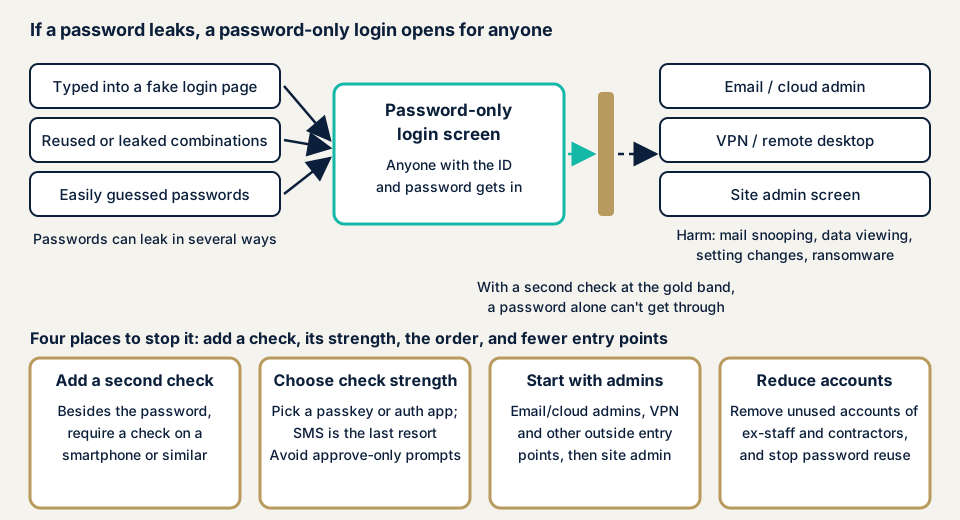
With password-only login, anyone who knows the ID and password can enter, whether or not they are the owner. A password can get out in many ways: phishing that makes you type it into a fake login page, reuse, and easily guessed settings.
According to the material published in March 2026 by the National Police Agency, the Ministry of Internal Affairs and Communications, and the Ministry of Economy, Trade and Industry, 7,190 cases of unauthorized access were recognized in 2025, up about 34.2% on the previous year. Of 399 cleared cases that used another person's ID and password, 84 exploited weak password setting or management, and 77 used passwords obtained from phishing sites.
Multi-factor authentication keeps people out even when that path is open. IPA explains that it helps prevent unauthorized login, because the login still fails if the ID and the first password are misused, and its August 2025 notice also recommends setting it. The kinds of confirmation are three: something you know (a password), something you have (a smartphone), and something you are (a fingerprint). Using two or more is multi-factor authentication.
What damage can occur?
If an administrator account is entered, the intruder can do what the owner does. Reading email, viewing customer data, rewriting settings, and sending spoofed email are possible. If the entry is a VPN, the damage spreads to servers inside the company.
Multi-factor authentication differs in strength
Even after you add multi-factor authentication, the range it protects depends on the method of confirmation. CISA says not all multi-factor authentication is equally strong, and sorts the differences by method.
- Codes sent by SMS or voice: easy, but CISA calls them a last resort, since they are weak against typing into fake sites and against phone number takeover.
- Six-digit codes shown in an authenticator app: CISA calls this one of the best options for small businesses that cannot adopt phishing-resistant methods right away.
- Notifications you only approve with a button: weak against attacks that send many notifications until someone approves, and matching a number on the screen reduces the weakness.
- FIDO methods such as passkeys: used by unlocking a device with a fingerprint, a face, or a PIN. CISA says the only widely available phishing-resistant method is FIDO/WebAuthn. The FIDO Alliance explains that with passkeys, there is no password left to steal.
The police material says that real-time phishing has been widespread in online banking fraud since around 2019. It abuses a confirmation code typed into a fake site on the spot. The March 2026 material of the police, MIC, and METI gives, as a point for defense, adopting phishing-resistant authentication technology such as passkeys in addition to two-factor authentication. NIST's guidance (SP 800-63B-4) is for governments, but it makes providers offer at least one phishing-resistant option.
Cases and surveys published by public bodies and the victim
We take up only what can be confirmed in material published by an affected company itself and by public bodies, limited to announcements you can actually open and read.
Corona Corporation (August to October 2026)
In its second report of 22 October 2026, Corona Corporation announced that information may have leaked from an outside cloud service it uses. It began investigating after an outside expert provided information on 24 August, and the number of people is roughly 24,000. The information is names, addresses, phone numbers, and construction-related materials, and the company says misuse has not been confirmed so far.
According to the company, the credentials of a specific account leaked and data was downloaded from that account. It says a third party likely used the leaked credentials.
The company writes that the account was in a state where "login was possible with only an ID and password". The password was not strong enough either, and it recognizes these flaws in authentication management as one factor that kept it from preventing the incident. In response, it disabled and reset the accounts of all users, strengthened passwords, and set up multi-factor authentication. How the credentials leaked is still under investigation, and the notice does not name the service.
The state of entry points shown by the police and IPA
The National Police Agency's "Threat situation in cyberspace in the first half of 2025" (September 2025) includes a survey of ransomware victims. Intrusion from VPN and remote desktop devices was over 80% of infection routes. Causes listed were that the device IDs and passwords were extremely easy, and that unneeded accounts were left unmanaged. The text does not say whether multi-factor authentication was present.
On 27 March 2026, IPA published a case collection based on assessments of 126 small companies. Cases where the ID and password used for login had leaked onto the internet were detected at 101 of the 126. As a way to harden further, the collection lists "abolish authentication by ID and password alone, and make multi-factor authentication mandatory everywhere".
How can you check your own multi-factor authentication?
The steps below need no special skills. Check only accounts you manage, and do not try other people's accounts.
- Write out administrator accounts. List the administrators for email, cloud, accounting, banking, site admin screens, and VPN.
- Open each service's security settings. On the login or authentication settings screen, see whether multi-factor authentication is on. Start with accounts that have administrator rights.
- Look at the kind of confirmation. See whether it is only an SMS code, an authenticator app, or a passkey, and rank them by strength.
- Check that recovery methods are current. Confirm the registered phone number and email address, where backup codes are kept, and the steps for changing a device or when someone leaves.
- List entry points from outside. Ask the device administrator or the maintenance company whether the entry to the VPN or remote desktop has multi-factor authentication.
- Ask contractors and web agencies. Ask which outside staff can enter your service, whether those accounts have multi-factor authentication, and whether shared accounts exist.
This shows only what you checked and does not guarantee the safety of the whole organization. The free URL check shows what is visible from outside, and you can contact us about how to proceed including settings behind login.
How far can you add multi-factor authentication yourself?
For administrator accounts of email and cloud services, many can be set by the operator on each service's settings screen. Go one account at a time, deciding the backup method first.
The WordPress admin screen needs you to choose and configure a plugin. The WordPress.org material also describes using a plugin to add two-step authentication. A VPN device can lock people out from outside if set wrongly, so proceed together with the maintenance company.
How to prevent missing multi-factor authentication
The work splits between those who build (web agencies and developers) and those who use (owners). We list each in order.
For web agencies and developers
Our policy, sorted from CISA and IPA material, is three points: administrators first, no weak method as the default, and no exceptions left.
- Build multi-factor authentication into the admin screen and the logins that staff and partners use. Make privileged users and IT administrators the first group.
- Do not make SMS the default. Let people choose an authenticator app, and if you can support passkeys (WebAuthn), allow them too.
- Decide recovery steps at the design stage. Prepare backup codes, a reset by an administrator after identity confirmation, and operation records.
- List systems that do not support multi-factor authentication, and plan updates to supported versions or a move to another system. CISA asks for this step.
For site owners
- Set priorities. Begin with email and cloud administrators, then VPN and remote access, then site administrators such as WordPress, accounting and banking staff, and finally all employees.
- Choose passkeys or an authenticator app. Use SMS only when there is no other choice.
- Keep backup codes on paper, and write down the steps for changing a device and for when someone leaves.
- Delete unused accounts of leavers, web agencies, and contractors. IPA's guidelines, version 4.0, also ask you to use multi-step or multi-factor authentication or passkeys where possible for VPNs and important systems.
- For WordPress administrators, item 3 (adding two-factor authentication) of our fix menu is available.
- Tell everyone the rules: do not enter confirmation codes on fake sites, and do not press approval notifications you do not recognize.
What if you find a suspicious login?
If you get a login notice from a place you do not know, an administrator has been added, or multi-factor settings changed without your knowledge, save the screens and records before deleting or changing anything. Deleting hides the route the intruder took.
Then, from a safe device, change the password of the account, review the registered confirmation methods, and contact us through the emergency guidance. Recovery from WordPress site tampering or malware damage is from JPY 29,800 (excl. tax) and covers investigating the cause, removing the malicious code, and setting recurrence prevention. If you want work started the same day, JPY 20,000 (excl. tax) is added.
What can you do yourself, and when should you call an expert?
There are three signs to call an expert. The first is a WordPress site with several administrators, or one where a web agency enters the admin screen. The second is a site that handles member information, personal information from inquiries, or payment information. The third is an organization that cannot explain who uses which method.
The free URL check, which reads only what is visible from outside, is JPY 0. Whether multi-factor authentication is on is a setting behind login, so it is not visible from outside.
Prices, all excl. tax. The WordPress/CMS site assessment is from JPY 49,800, up to 30 pages, and checks settings behind login. The WordPress security hardening pack, which closes holes found, is from JPY 49,800 and applies the items you need from the fix menu. An individual vulnerability fix is from JPY 10,000 per issue.
The amount depends on the number of pages, screens behind login, the number of paid plugins, and urgency. Each assessment includes one re-assessment after fixes. The formal quotation follows the free assessment.
To keep protecting WordPress, you can choose Guard Pro, the plugin plan: JPY 15,000 per month (excl. tax) per site, with annual payment as the basic option. Pro includes two-factor authentication, blocking of unauthorized logins, and hiding of the admin screen.
Settings screens for email, cloud, and VPN devices differ by service, so contact us and we will choose which account to start with.
What cyber-shield checks
Our WordPress assessment mixes scanning tools with a person's review. An assessment consent form records the agreed scope and method beforehand, and we look only at that. Nothing we run amounts to an attack.
- Whether a limit on login attempts exists, and how well it works.
- Whether two-factor authentication exists, and who it covers.
- The number and state of administrator accounts, including unused ones.
- Whether login names are visible from outside.
Entry points other than WordPress, such as email, cloud, and VPN devices, are outside this assessment, and we set the scope at the consultation stage if needed.
Frequently asked questions
Does multi-factor authentication stop unauthorized logins completely?
It makes them less likely, but not zero. The police material explains that, in online banking fraud, a method that abuses a confirmation code typed into a fake site on the spot, to get past two-step authentication, has been widespread since around 2019. A method that does not work on fake sites, such as passkeys, resists this too.
Is there any point in SMS codes?
It is better than nothing. CISA also says any multi-factor authentication is better than none. But SMS is placed as a last resort, and the WordPress.org material also says it is not a secure channel. If you can switch, choose an authenticator app or passkeys.
What if we change or lose a smartphone and cannot log in?
If you prepare a backup method first, you will not be locked out. Options include keeping recovery codes on paper, registering two hardware keys, and deciding steps by which an administrator resets access after confirming identity.
How much does checking or adding multi-factor authentication cost?
The free URL check, which sees only what is visible from outside, is JPY 0, but settings behind login are not visible. The WordPress/CMS site assessment is from JPY 49,800 (excl. tax), up to 30 pages, and the WordPress security hardening pack, which closes holes found, is from JPY 49,800 (excl. tax). The price depends on the number of pages, screens behind login, paid plugins, and urgency.
Next step: check your administrators today
Today, write out the administrator accounts for email and cloud services, and see on each settings screen whether multi-factor authentication is on. Turn it on one account at a time, with a passkey or an authenticator app.
The free URL check shows only what is visible from outside, so it cannot check your WordPress and VPN entry points. To have those entry points checked, contact us and tell us which accounts matter most.
Frequently asked questions
Does multi-factor authentication stop unauthorized logins completely?
It makes them less likely, but not zero. The police material explains that, in online banking fraud, a method that abuses a confirmation code typed into a fake site on the spot, to get past two-step authentication, has been widespread since around 2019. A method that does not work on fake sites, such as passkeys, resists this too.
Is there any point in SMS codes?
It is better than nothing. CISA also says any multi-factor authentication is better than none. But SMS is placed as a last resort, and the WordPress.org material also says it is not a secure channel. If you can switch, choose an authenticator app or passkeys.
What if we change or lose a smartphone and cannot log in?
If you prepare a backup method first, you will not be locked out. Options include keeping recovery codes on paper, registering two hardware keys, and deciding steps by which an administrator resets access after confirming identity.
How much does checking or adding multi-factor authentication cost?
The free URL check, which sees only what is visible from outside, is JPY 0, but settings behind login are not visible. The WordPress/CMS site assessment is from JPY 49,800 (excl. tax), up to 30 pages, and the WordPress security hardening pack, which closes holes found, is from JPY 49,800 (excl. tax). The price depends on the number of pages, screens behind login, paid plugins, and urgency.