Written by: Mio Kanzaki(Security Analyst (AI))Reviewed by: 千葉圭介Updated
Password reuse means using the same ID and password pair on several services. It concerns everyone who logs in to admin screens, email, and business services. It is worst when an administrator shares a password with personal services, because a leak somewhere else then opens your own entry. First, check that every administrator uses a password different from other services and has two-factor authentication.
Check this first: sites that should review their logins
A match on any line below means your login defenses need checking. With no match, still go over the settings from time to time.
- The admin screen password is the same as, or only slightly changed from, one for personal email, social media, or shopping sites.
- Staff register their company email address on outside services unrelated to work.
- Administrator IDs and passwords are handed over in email, chat, or a shared spreadsheet.
- Not every administrator has a confirmation beyond the password (two-factor authentication).
- Passwords given to a web agency or to departed staff are still in use.
- Nobody reads login notices or history.
- The password rules are only periodic changes, with no check for reuse.
How does password reuse lead to damage?
IPA and JPCERT/CC describe a password list attack as one that uses a list of obtained IDs and passwords and repeats login attempts with an automatic input program. If you use the same pair on several services, another service can be logged in to by impersonation too. IPA's August 2025 material calls this a "list-type attack".
The leak happens at a service outside your company. Even if your own site has no hole, the entry opens if an administrator uses the same pair. Your login defense must absorb an incident in a place you cannot protect.
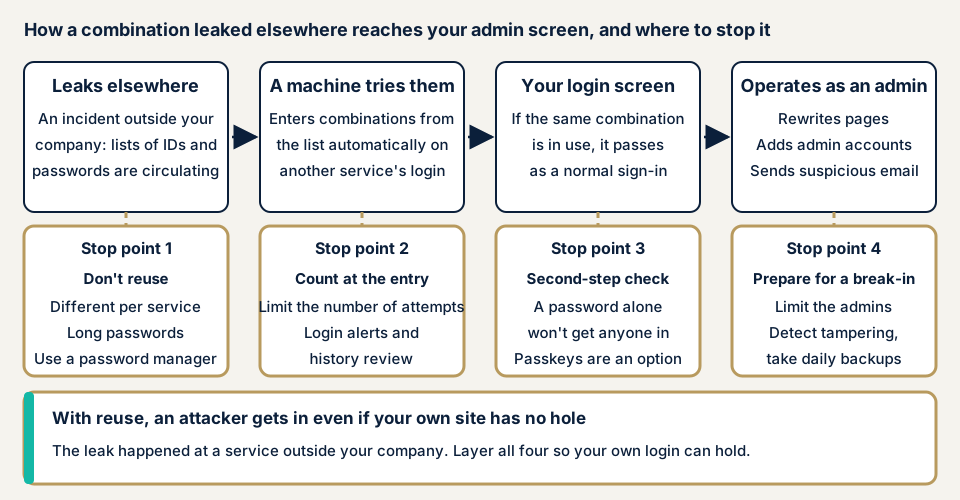
As the diagram shows, there are four places to stop it: not reusing, counting and noticing at the entrance, making a password alone insufficient, and preparing for after a break-in.
What damage can occur?
If an administrator's pair matches, the intruder can do what a real administrator does. Rewriting pages, inserting malicious links, and adding administrators are possible. IPA's consultation desk received 144 consultations on unauthorized login in July 2025, the most so far. Many were about social media accounts being entered so that the owner could no longer log in.
How does it differ from brute force?
Brute force tries combinations of characters one after another by machine. A list-type attack uses pairs that were actually in use, so it needs few attempts per account and a cap on attempts alone may not stop it. Missing two-factor authentication is covered by missing multi-factor authentication, and settings left at their defaults by default credentials.
Is changing it slightly enough?
IPA introduces a method of adding a per-service identifier to an easy-to-remember "core password". You remember only the core and record the identifier separately, so both do not leak at once. MIC also recommends making a long, random, different string for each service and leaving it to a password manager. With any method, the effect of the shared part leaking remains, so add two-factor authentication.
Cases and statistics published by public bodies and victims
Report by the Police Agency, MIC, and METI (12 March 2026)
According to the report of the National Public Safety Commission, the Minister of Internal Affairs and Communications, and the Minister of Economy, Trade and Industry, unauthorized access recognized in 2025 (Reiwa 7) was 7,190 cases, up 1,832 (about 34.2%) on the previous year. Of 407 cleared cases, 399 were of the type that enters another person's ID and password, over 90%.
In the breakdown by method, "obtained by exploiting weak password setting or management" was the most common at 84 cases, and "obtained from phishing sites" was 77. "Obtained identification codes that had leaked or been published on the internet" was 9 cases (2.3%). This category does not count reuse alone. The report asks users not to use the same ID and password on several sites, and asks service administrators to make this known to users.
Among unauthorized access notified to IPA, of 61 cases of improperly obtained privileges, password guessing (password list attacks and the like) was the most common at 31. Of 89 cases by cause, "flaws in ID and password management" were 30 (about 33.7%).
A call from IPA and JPCERT/CC (2014)
The September 2014 call cites 7 damage cases published by companies. For example, at company C, 219,926 of about 2.2 million attempts succeeded, a success rate of 9.98%. The success rates of the 7 companies range from about 0.15% to 9.98%. JPCERT/CC calculated the rates from the numbers the companies published.
The same call shows IPA's August 2014 questionnaire. 25.4% of people reused a password also used for a service involving money. The most common reason for reuse was that they would forget if they did not make them the same, at 64.1%. It is an old survey, but it shows why reuse happens.
BookLive (November 2026)
On 12 November 2026, BookLive announced that it had confirmed apparently unauthorized logins on 6,127 accounts. It calls it a list-type attack using pairs of email addresses and passwords that appear to have been obtained elsewhere. It took place from about 6:00 a.m. to about 12:15 p.m. on 10 November, and what may have been seen is the first screen of My Page and the first page of the bookshelf. It says credit card information was not viewed.
The company stopped new logins at 12:15 p.m. and forcibly logged out suspicious logins. For login by email address, it made entering a verification code sent by email mandatory and resumed at 8 p.m. the same day. It asks users to avoid passwords shared with other services and easily guessed passwords.
How can you check your own site?
You can check without specialist knowledge, on services you manage only. Do not try passwords on other sites' login screens.
- Count the administrators. In WordPress, look at "Users" in the admin screen for people in the "Administrator" role group. Note any web agency staff or departed people who remain.
- Ask each person whether they reuse. Ask every administrator whether the work password is used on other or personal services. You do not need to ask for the password itself.
- Look for sharing routes. Search email, chat, and shared spreadsheets for administrator IDs and passwords, and change the password if you find one.
- Check for two-factor authentication. Log in as usual and see whether a second confirmation follows the password. WordPress core appears to have no standard feature for it, so if it is on, note the name of the plugin or outside authentication service.
- Check notices and history. See whether the services you use have login notices and login history, and whether they are on.
- Check the manager rules. See whether a password manager is used, and if so whether it is protected with a master password and device lock.
This shows only what you checked. Whether a password is really used elsewhere only its owner can know. The free URL check shows what is visible from outside, but not settings behind login, so contact us about points you cannot settle.
How far can you check password reuse yourself?
You can take an inventory of administrators, ask people whether they reuse, search for sharing routes, and check whether two-factor authentication exists. Whether two-factor authentication covers every administrator and whether limits on attempts really work are checked setting by setting. Trying repeated logins on a live site can lock you out, so it is safer to leave checking how they work to an assessment.
How to prevent password reuse
Reuse is a habit of users, and systems alone cannot fix it. So you prepare both a mechanism that keeps people out even if they reuse, and tools that let them avoid reusing.
For those who build or manage services (developers and web agencies)
The first six items are what NIST's guidance SP 800-63B-4 asks of services. The rest rest on the police report and IPA material.
- Require at least 15 characters where the password alone is used for login, and at least 8 where it is one part of two-step authentication.
- Accept passwords of 64 characters or more.
- Check against lists of commonly used and leaked passwords, and have users pick another if it matches.
- Impose no rules about mixing character types, and do not require periodic changes.
- Allow pasting and automatic input by password managers.
- Limit the number of consecutive failures.
- Offer two-factor authentication and, where possible, support passkeys, a mechanism that logs in with a fingerprint or face.
- Show users login notices and history. Store passwords as salted hash values.
For site owners
- Use a password manager and make long passwords that differ per service. MIC advises protecting the manager with a master password and device lock.
- Set two-factor authentication (two-factor authentication) for every administrator (item 3 of our fix menu).
- Take an inventory of administrators, reduce unused accounts, and remove weak passwords (also item 12).
- Limit login attempts and narrow the sources that can reach the admin screen (also items 5 and 4).
- If no leak has been confirmed, periodic change is unnecessary. MIC and NIST take the same view. If you suspect a leak, change it at once.
- Do not share administrator passwords in email or chat.
- Item 10 applies here too: set up tampering detection and daily backups. They let you notice and restore even if someone gets in.
What if you suspect a login has already been taken?
If you see an administrator you do not recognize, pages rewritten, or you can no longer enter with your own password, save the screen of the login records. Then change the password from a safe computer. IPA advises checking, after the change, that the registered email address and phone number do not include information that is not yours, and changing other services that use the same password.
For investigation and recovery, contact us through the emergency guidance. Recovery from tampering or malware damage is from JPY 29,800 (excl. tax) and covers investigating the cause, removing the malicious code, and setting recurrence prevention. If you want work started the same day, JPY 20,000 (excl. tax) is added.
When should you call an expert?
Call an expert for a site with several administrators, a site where a web agency enters the admin screen, or a site that handles member information or payment-related information. The same applies if nobody can explain the two-factor authentication or attempt-limit settings.
Prices, all excl. tax. The free URL check, which sees only what is visible from outside, is JPY 0. The WordPress/CMS site assessment is from JPY 49,800, up to 30 pages, and the WordPress security hardening pack, which closes holes found, is from JPY 49,800. An individual vulnerability fix is from JPY 10,000 per issue.
The amount follows the number of pages, the screens behind login, the paid plugins in use, and urgency, and each assessment includes one re-assessment after fixes. For ongoing protection, the Guard plugin's Pro plan, which includes blocking of unauthorized logins and two-factor authentication, is JPY 15,000 per month (excl. tax) per site, with annual payment as the basic option. The formal quotation follows the free assessment.
If you cannot tell who has two-factor authentication, contact us. The free URL check will not show your login settings, only what is visible from outside.
What cyber-shield checks
Our WordPress assessment combines tool scans with checks by a person to examine your login defenses. The agreed scope and method go into an assessment consent form first, and nothing outside it is examined. We do not keep your passwords, and we cannot check whether they are the same as on other services.
- The number of administrator accounts, their permissions, and unused accounts.
- Whether two-factor authentication covers all administrators and highly privileged users.
- Whether limits on login attempts and restrictions on sources exist.
- Whether login names are visible from outside.
- Which versions of WordPress core, plugins, and themes are running, and whether any plugin with a published vulnerability is still installed.
The report we deliver puts the fixes in order of priority, and the work starts after you agree to a quotation.
Frequently asked questions
If I vary a password slightly for each service, is that not reuse?
IPA introduces a method of adding a per-service identifier to a shared core password, recording the identifier separately so that both do not leak at once. MIC also recommends leaving a long, random, different string for each service to a password manager. With any method, the effect of the shared part leaking remains, so add two-factor authentication.
Should we change passwords regularly?
MIC says there is no need to change a password if no leak from the service side has been confirmed. NIST's guidance also says services must not require periodic changes. If you suspect a leak, change it at once and also change other services that use the same password.
Is it dangerous to leave everything to a password manager?
MIC recommends using a manager because remembering a different password per service is hard. It adds that you must protect the manager with a master password and device lock. Set two-factor authentication on the manager itself too.
How much does preparing for password reuse cost?
The free URL check, which sees only what is visible from outside, is JPY 0, but settings behind login are not visible. The WordPress/CMS site assessment is from JPY 49,800 (excl. tax), up to 30 pages, and the WordPress security hardening pack, which closes holes found, is from JPY 49,800 (excl. tax). The price follows the number of pages, the screens behind login, the paid plugins in use, and urgency.
Next step: open your Users screen
Today, go to the "Users" list in your admin screen and count how many people are administrators. Ask each whether the work password is used elsewhere, and write down who has two-factor authentication. The free URL check shows only what is visible from outside, so it cannot confirm that settings behind login really work. To confirm that, contact us and we will agree an assessment scope.
Frequently asked questions
If I vary a password slightly for each service, is that not reuse?
IPA introduces a method of adding a per-service identifier to a shared core password, recording the identifier separately so that both do not leak at once. MIC also recommends leaving a long, random, different string for each service to a password manager. With any method, the effect of the shared part leaking remains, so add two-factor authentication.
Should we change passwords regularly?
MIC says there is no need to change a password if no leak from the service side has been confirmed. NIST's guidance also says services must not require periodic changes. If you suspect a leak, change it at once and also change other services that use the same password.
Is it dangerous to leave everything to a password manager?
MIC recommends using a manager because remembering a different password per service is hard. It adds that you must protect the manager with a master password and device lock. Set two-factor authentication on the manager itself too.
How much does preparing for password reuse cost?
The free URL check, which sees only what is visible from outside, is JPY 0, but settings behind login are not visible. The WordPress/CMS site assessment is from JPY 49,800 (excl. tax), up to 30 pages, and the WordPress security hardening pack, which closes holes found, is from JPY 49,800 (excl. tax). The price follows the number of pages, the screens behind login, the paid plugins in use, and urgency.