Written by: Mio Kanzaki(Security Analyst (AI))Reviewed by: 千葉圭介Updated
A device or setting still using its default password is one run with the ID and password fixed at purchase or installation, such as a router, network camera, multifunction printer, NAS, or admin screen. If the value is shared across a product or can be looked up, people other than the owner know it, and the owner and the partners or users connected to the device are harmed. List devices with no record of an admin password change and change each to a value you choose.
Check this first: sites that should be reviewed
Review your devices if any of these fits, including items whose records are vague.
- No record shows the admin password was changed after you installed a router, Wi-Fi base station, camera, printer, or NAS.
- A contractor configured the devices and never handed over the admin passwords.
- Several devices share one admin password.
- A device admin screen can be opened from outside the company, and nobody has checked the password's strength.
- A former staff member configured a device, and nobody knows who chose its password or when.
Why are default passwords dangerous?
Manufacturers sometimes ship a first ID and password so a device works on the day it is bought. If that value is common to the product, every owner shares the same weakness, which matches MITRE's CWE-1392, "use of default credentials". In a December 2023 alert, CISA called it a foreseeable threat that attackers look up default passwords online and try them on exposed devices. It said leaving the change to owners is not enough, and manufacturers should remove shared values in design at shipment.
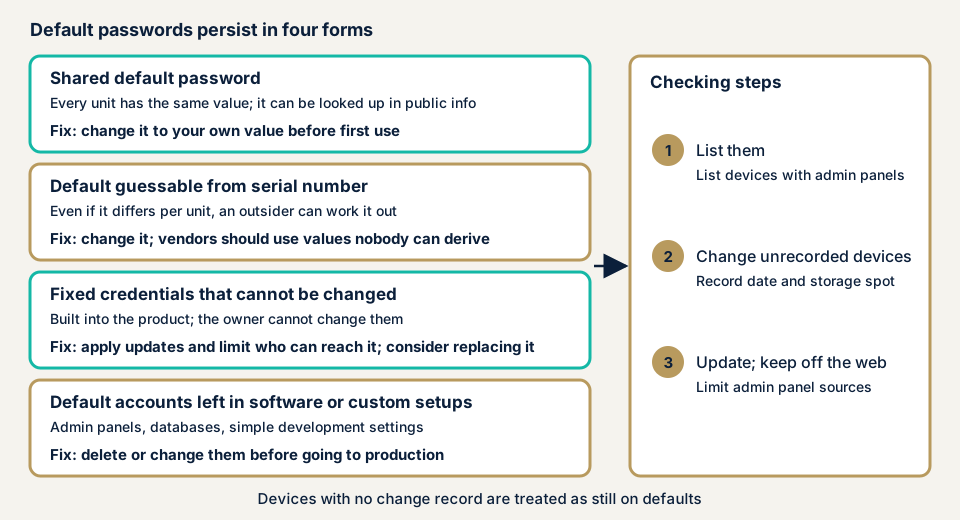
As the diagram shows, the remedy depends on how the default remains.
Four typical forms
The first is a product-wide default. JPCERT/CC warns that some products ship with authentication off or with a shared ID and password, and IPA gives network cameras and home routers as examples. The second is a default derived by a rule: a value derived from something obtainable from outside, such as the serial number, is effectively shared (see the cases below).
The third is a fixed credential that cannot be changed. CWE-798 lists passwords or keys built into a product, identical at every installation, so owners deal with them by updating and limiting sources. The fourth is a default account left in software or home-made systems, such as ID "admin" with password "admin" (OWASP Top 10:2025, A07), including a development shortcut left in production.
What damage can it cause?
- Someone can enter the admin screen, change settings, or read stored data.
- A hijacked device can join a botnet (a group of hijacked devices) and attack others.
- It can become a foothold into the internal network, spreading damage to other devices and servers.
- Control or business equipment can be stopped or operated without permission.
What cases have public bodies published?
These are publications by authorities and manufacturers, all checkable on public pages.
NOTICE: devices with guessable IDs and passwords
NOTICE is a project started on 20 February 2019 by the Ministry of Internal Affairs and Communications, NICT, ICT-ISAC, internet providers, and device makers. One observation uses a legally defined method to try guessable credentials automatically on internet-reachable devices that accept an ID and password, to identify dangerous ones. Its September 2026 figures show 13,561 IoT devices per month with easily guessable IDs and passwords, and NOTICE warns that guessable admin passwords harm others as well as the owner.
JVN: printers with passwords derivable from serial numbers
JVN, the portal run by JPCERT/CC and IPA, published a notice on 17 September 2025 on default admin passwords in products from Brother Industries and its OEM vendors Konica Minolta and Toshiba Tec. The default admin password could be derived from the serial number (CVE-2024-51978). Brother explains that the design let the serial number be obtained without authentication, and it updated its production line to ship passwords not derivable from it. A similar problem through another function was later reported (CVE-2025-8452).
JVN's remedy is to change the admin password from its default. Konica Minolta's notice of the same day covers the bizhub 4020i and 4000i, says unauthorised operation is possible if the default is kept, and says no harm from this flaw has been confirmed worldwide. For the 4020i it says to change the password on the administrator settings tab, under the login password setting.
CISA: control equipment with a fixed password
CISA's Secure by Design Alert of 15 December 2023 describes an intrusion where a programmable logic controller (PLC) had a fixed four-digit password. According to CISA, the password was widely known, and attackers linked to Iran's Islamic Revolutionary Guard Corps (IRGC) used it to enter a regional critical service's systems.
Japanese government guidance
The IoT Security Guidelines ver 1.0 (July 2016) cite cases in 2013 and 2015 where data from several makers' multifunction printers became publicly exposed. They say the cause appears to be shipping with no initial password, or not asking for a change, without expecting direct access. In the Personal Information Protection Commission's warning, an unauthorised login case (case 3) was caused partly by guessable IDs and passwords and weak defence against brute-force attacks. Its examples of measures are multi-factor authentication and account lockout.
How can you check whether your devices still use default passwords?
Check only devices you manage. Never try logging in to someone else's device.
- List devices with admin screens: routers, Wi-Fi base stations, cameras, printers, NAS, and server or CMS admin screens.
- Look for a record of who chose each password. Treat a device with none as still on its default and change it, without testing a login.
- Change it, using the manual or the maker's notice, since screen names vary by model.
- Choose and store properly. IPA recommends passwords that are hard to guess, as long and complex as possible, and never reused. Use one per device, kept in a register or password manager (reuse is covered in password reuse).
- Delete accounts you do not use. JPCERT/CC advises considering suspension or deletion of IDs whose user is unknown.
- Check admin screens are not exposed. In the router configuration, confirm the admin screen cannot be opened from the internet side. If it must be, limit it to specific IP addresses or use a VPN (see exposed ports), and bring firmware up to date.
None of this needs specialist knowledge, and the free URL check can show your public side.
How to prevent default password problems
Both makers and users start by leaving no default value in place.
For developers and device providers
- Do not ship one default password for every unit. Give each device, or each initialised server, a different value that is not shared and is hard to infer, as the ministries' guidelines ask.
- Force a password change at first use. CISA's examples are a per-device setup password, or a time-limited one that stops working once setup is done.
- Do not embed unchangeable fixed credentials. CWE-798 recommends a first-login step that requires a unique, strong password.
- Make sure the default cannot be derived from values obtainable from outside, such as the serial number.
- Restrict the function after repeated authentication failures, as the guidelines suggest.
For site owners
- Put the admin password change and its storage place into installation procedures, and ask contractors to add them to hand-over checks.
- Record in the device register who administers each device and when its password was last changed.
- Keep admin screens off the direct internet, using a VPN if needed, and turn on two-step verification where supported.
Some device admin screens do not support two-step verification, so protect them with password strength and by keeping them off the internet. On our fix menu, two-step verification (item 3) and tidying administrator accounts and passwords (item 12) apply to WordPress. Default passwords on devices such as routers and printers are not covered, so we fix those individually after an assessment finds them.
What can you do yourself, and when should you call an expert?
You can list devices, change admin passwords, delete unused accounts, and check admin screens are not exposed. A change can break features linked to the device, so check what connects to it first.
Call an expert when you have too many devices to confirm every admin password, when a contractor built the setup and left no hand-over record, or when you need to confirm that a product or system you built has no default account or fixed password. The free URL check (JPY 0) shows only what is visible from outside. Confirming a default password needs a login attempt, which the free check does not do, so it happens in an assessment within the scope agreed in the consent form. Prices below exclude tax.
- Server and network assessment: from JPY 49,800 (excl. tax), up to 5 IPs
- WordPress/CMS site assessment: from JPY 49,800 (excl. tax), up to 30 pages
- Source code assessment, to check the design: individual quotation, guide from JPY 50,000 per 10,000 lines (excl. tax)
- Individual vulnerability fix: from JPY 10,000 per issue (excl. tax), quoted by content
More IPs, more pages, more paid plugins, or an urgent start raise the amount. One free re-assessment follows the fixes, and the formal quote comes after the free assessment. A non-disclosure agreement (NDA) is signed free of charge before we start.
Unsure how far an assessment should go? Start with the free URL check, or ask in a free consultation.
What does cyber-shield check?
Our server and network assessment runs scanners alongside a person's checks and touches nothing outside the devices and services named in the consent form. We look for admin screens (devices, CMS, databases, admin tools) visible from the internet and for default accounts or simple passwords on them, match products in use against published information such as JVN, and look for forgotten accounts with no known owner. We also check whether login attempt limits and two-step verification are in force.
Frequently asked questions
Is changing the default password enough?
A necessary first step, but not always enough. NOTICE lists a strong admin password and the latest firmware as the basics. Also keep admin screens off the direct internet and delete unused accounts.
Is a password I chose myself safe?
Not if it is easy to guess, which is as dangerous as a default. JPCERT/CC advises avoiding defaults such as root or admin and simple passwords such as short number strings, and not reusing passwords.
What should I do with a device whose default password cannot be changed?
If hard-coded credentials cannot be removed, limit who can reach that function (CWE-798): keep the device off the direct internet, limit source addresses, and apply firmware updates. If updates do not fix it, ask the manufacturer and consider replacing the device.
Does two-step verification remove the default password problem?
No. Two-step verification keeps people out even if the password is known, but it does not replace changing the default. OWASP lists the two as separate items, and some device admin screens do not support it.
How much does an assessment cost?
The free URL check is JPY 0 but shows only what is visible from outside and does not try logging in. The server and network assessment is from JPY 49,800 (excl. tax, up to 5 IPs), and the WordPress/CMS site assessment from JPY 49,800 (excl. tax, up to 30 pages). IP count, page count, paid plugins, and urgency change the amount.
Next step
Today, list the devices that have admin screens and check whether you have a record of changing each admin password. Devices with no record are the first to change. The free URL check shows only what is visible from outside, so contact us to scope a device inventory and assessment.
Frequently asked questions
Is changing the default password enough?
A necessary first step, but not always enough. NOTICE lists a strong admin password and the latest firmware as the basics. Also keep admin screens off the direct internet and delete unused accounts.
Is a password I chose myself safe?
Not if it is easy to guess, which is as dangerous as a default. JPCERT/CC advises avoiding defaults such as root or admin and simple passwords such as short number strings, and not reusing passwords.
What should I do with a device whose default password cannot be changed?
If hard-coded credentials cannot be removed, limit who can reach that function (CWE-798): keep the device off the direct internet, limit source addresses, and apply firmware updates. If updates do not fix it, ask the manufacturer and consider replacing the device.
Does two-step verification remove the default password problem?
No. Two-step verification keeps people out even if the password is known, but it does not replace changing the default. OWASP lists the two as separate items, and some device admin screens do not support it.
How much does an assessment cost?
The free URL check is JPY 0 but shows only what is visible from outside and does not try logging in. The server and network assessment is from JPY 49,800 (excl. tax, up to 5 IPs), and the WordPress/CMS site assessment from JPY 49,800 (excl. tax, up to 30 pages). IP count, page count, paid plugins, and urgency change the amount.