Written by: Mio Kanzaki(Security Analyst (AI))Reviewed by: 千葉圭介Updated
A brute-force attack is a machine trying login names and passwords one combination after another until one works. Any site with a login screen can be hit, and the damage lands on admin screens with short passwords, no two-step login and no limit on attempts. Check whether your login limits attempts and whether every administrator uses two-step login. If you already see unfamiliar administrators or cannot log in, read our emergency guide first.
Check this first: sites that should be reviewed
Check your login defences if your site matches any of these points.
- The login screen has no limit on attempts.
- An administrator's login name is easy to guess (admin, the company or site name).
- An administrator's password is short or shared with another service.
- Not every administrator has a second check besides the password (two-step login).
- Accounts of agency staff or former employees remain unused.
- An unused entry point such as xmlrpc.php is still open.
- Nobody looks at the server access logs.
IPA's 20-item guide to safe website operation covers this in items 8 (unauthorized login measures), 11 (deleting unneeded accounts) and 12 (checking simple passwords, administrators first).
How does a brute-force attack work?
WordPress.org describes a brute-force attack as an automated attack that repeats combinations until one succeeds. WordPress is targeted often because it is widely used, but anything with a login screen is a target. Attempts often arrive spread across a botnet, a group of hijacked computers, and even failed ones can slow your site. MITRE's CWE-307 defines the weakness as too little defence against repeated authentication failures in a short time.
What damage can it cause?
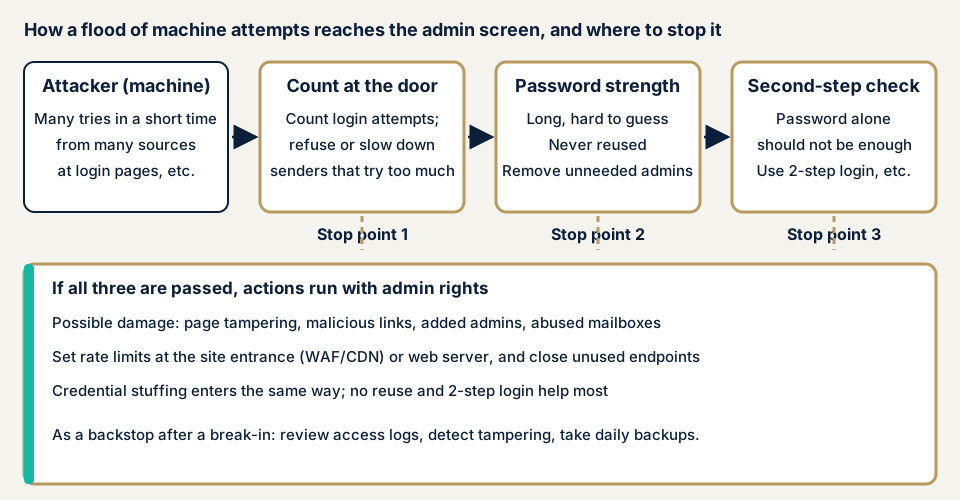
A successful guess gives an administrator's powers: pages rewritten, malicious links inserted, administrators added. As the ESPEC case shows, a mail account can also be entered to send suspicious mail.
How it differs from similar attacks
IPA's August 2025 notice lists brute force, dictionary attacks, list attacks (trying leaked ID and password lists) and phishing as unauthorized login methods. The first two hit simple passwords, while list attacks make password reuse the cause. The defences overlap. See also missing multi-factor authentication, attacks on the WordPress admin and missing rate limits.
Public statistics and disclosed cases
Report by three Japanese authorities (12 March 2026)
According to the report from the National Public Safety Commission and two ministers, 399 of 407 arrests in 2025 for unauthorized access (over 90%) were for entering another person's ID and password. The most common way of obtaining them was exploiting weak password setting or management (84 cases), then phishing sites (77). These categories do not count brute force alone, but the top cause shows strong passwords are the basic defence.
In unauthorized access reports to IPA, 31 of 61 cases of gaining privileges involved password guessing (including list attacks), the most common. Among 89 cases by cause, "flaws in ID and password management" led with 30 (about 33.7%). The report recommends not reusing passwords, adopting multi-factor authentication, and warning or blocking on mass login attempts.
ESPEC (April 2026)
On 21 April 2026 ESPEC disclosed unauthorized access to one employee's mail account. On 10 April it found suspicious mail going from that account to several recipients and stopped using it. The email address and parts of the signature (company and personal name) may have been viewed, and no other damage was confirmed. The company believes an outside brute-force attack stole the credentials.
BookLive (November 2026)
On 12 November 2026 BookLive disclosed suspected unauthorized logins to 6,127 accounts using email and password pairs apparently obtained elsewhere. It calls the method a "list attack", which differs from brute force. It ran from about 6:00 to 12:15 on 10 November, and the first My Page screen and first bookshelf page may have been viewed. No credit card information was viewed. BookLive stopped new logins at 12:15, forced suspicious connections to log out, required an authentication code for email logins and resumed at 20:00 that day. The method differs, but the response centred on entrance limits and two-step login.
How can you check your own site?
Check only a site you manage, and only view the login screen.
- Count administrators. In WordPress, open Users and see who holds the Administrator role. Note unused accounts, former staff and old agency contacts.
- Look at login names for guessable ones such as admin.
- Check two-step login. Sign in the way you normally do and note whether a code or approval is asked for after the password. WordPress core has none, so note the plugin or outside service in use.
- View the login screen from outside your office and see whether it has an anti-automation check such as CAPTCHA. Do not type passwords repeatedly to test limits, because you can lock out the administrator.
- Read the access log from your hosting panel. Look for dozens of requests to the login screen from one source in a short time.
- Ask your agency and host. Are attempt limits at the site entrance or on the server? Are access sources restricted? Is xmlrpc.php used, and if not, stopped?
Only what you checked is covered here, which is not a guarantee for the whole site. For the outside view alone, run the free URL check. Where you cannot tell what a result means, contact us.
How far can you go yourself?
Counting administrators, reviewing passwords, checking two-step login, skimming the access log and questioning your agency are all within reach. Whether attempt limits really work, and whether the source restriction has gaps, means checking settings one by one, and repeated logins on a live site can lock you out. Leave that to an assessment.
How to prevent brute-force attacks
WordPress.org and CWE-307 give three rules: count and refuse at the entrance, use passwords that cannot be guessed, and do not rely on passwords alone.
For agencies and developers
- Limit attempts at the site entrance (WAF or CDN) or the web server, since WordPress.org says plugin limits run PHP and leave a load under heavy attempts.
- WordPress.org's Nginx example rate-limits /wp-login.php and /xmlrpc.php to 10 requests per minute, after testing in staging.
- CWE-307 lists cutting the connection, making users wait and locking the target account after repeated failures, without locking out genuine users.
- Set up two-step login for every administrator. If you support passkeys (sign-in by fingerprint or face), register at least two methods per person.
- Add an anti-automation check such as CAPTCHA to the login screen.
- Stop xmlrpc.php if unused, and use revocable application passwords for outside integrations.
- Avoid admin as a login name, keep few administrators, and treat hiding the login URL as a minor aid.
For site owners
- Delete accounts nobody uses, and give the rest long passwords used nowhere else (item 12 of our fix menu).
- Add two-step login (item 3), so a guessed password alone does not get in.
- Limit login attempts and narrow where admin access can come from (items 5 and 4). Counting and refusing attempts is called rate limiting.
- Change the login URL and stop unused entrances (items 2 and 7).
- Add tamper detection and daily backups (item 10) to notice and restore after a break-in.
- Turn on login notifications, login history checks and authentication codes where a service offers them, as IPA and JPCERT/CC advise.
What if you suspect someone has already logged in?
If administrators appeared that you do not recognise, or your own password no longer works, save the logs and the current state before deleting anything, because deleting hides the intruder's route. Then, from a safe computer, change the password of each administrator you keep, and use our emergency contact. Recovery from tampering or malware starts from JPY 29,800 (excl. tax) and covers investigation, removal of malicious code and settings against recurrence. Starting on the same day adds JPY 20,000 (excl. tax).
When should you call an expert, and what does it cost?
Call an expert if the site has several administrators, an agency that enters the admin screen, or member or payment-related data, or if nobody can explain the two-step login or attempt-limit settings. The free URL check (JPY 0) looks only at what is visible from outside, so it cannot show settings behind login.
All amounts exclude tax. The WordPress/CMS site assessment starts from JPY 49,800 for up to 30 pages, and the WordPress security hardening pack, which closes what the assessment finds, starts from JPY 49,800. Fixing an individual vulnerability starts from JPY 10,000 per issue.
Your amount follows the page count, the login-protected screens, the paid plugins installed and how soon you need the work. For continuous protection, Guard Pro for the plugin costs JPY 15,000 per month (excl. tax) for one site, billed yearly in principle, and includes blocking of unauthorized logins, two-step login and hiding the admin screen. We issue the formal quotation only once the free assessment is done. Your fixes are then re-checked once at no extra charge.
The free URL check shows what is visible from outside. For login settings behind the screen, contact us.
What cyber-shield checks
Our WordPress vulnerability assessment combines a tool scan with checks by a person, inside the scope set in the consent form. No test we run amounts to an attack.
- How many entrances exist and how they look, including login screens and unused endpoints.
- Whether attempt limits and source restrictions exist, and their settings.
- Whether two-step login covers every administrator and high-privilege user.
- An inventory of administrator accounts: number, rights and unused accounts.
- Versions of the core, plugins and themes, and plugins with published flaws.
The report ranks the fixes, and repairs start only after you approve the quotation.
Frequently asked questions
How is a brute-force attack different from a credential list attack?
A brute-force attack lets a machine try character combinations one after another. A list attack tries ID and password lists leaked from other services. The login screen is the same, but the second exploits reused passwords, so never reusing them matters most. Attempt limits and two-step login help against both.
Is locking the account after a few failed logins enough?
No. WordPress.org says login-limiting plugins run PHP, so heavy attempts still load the site. Add limits at the site's entrance (WAF or CDN) or the web server, then layer two-step login and strong passwords on top.
Does changing the login URL stop brute-force attacks?
No. WordPress.org says hiding the login URL can cut noise but is not enough alone. Set up attempt limits, two-step login and strong passwords first.
How much does it cost to prepare for brute-force attacks?
The free URL check (JPY 0) sees only what is visible from outside, not settings behind login. The WordPress/CMS site assessment starts from JPY 49,800 (excl. tax, up to 30 pages), and the WordPress security hardening pack from JPY 49,800 (excl. tax) closes what the assessment finds.
Next step: count your administrators
Today, open Users in your admin screen, count the administrators and list accounts nobody uses. Then check each remaining person's password length and two-step login. To have attempt limits and source restrictions checked, contact us. The free URL check shows what is visible from outside.
Frequently asked questions
How is a brute-force attack different from a credential list attack?
A brute-force attack lets a machine try character combinations one after another. A list attack tries ID and password lists leaked from other services. The login screen is the same, but the second exploits reused passwords, so never reusing them matters most. Attempt limits and two-step login help against both.
Is locking the account after a few failed logins enough?
No. WordPress.org says login-limiting plugins run PHP, so heavy attempts still load the site. Add limits at the site's entrance (WAF or CDN) or the web server, then layer two-step login and strong passwords on top.
Does changing the login URL stop brute-force attacks?
No. WordPress.org says hiding the login URL can cut noise but is not enough alone. Set up attempt limits, two-step login and strong passwords first.
How much does it cost to prepare for brute-force attacks?
The free URL check (JPY 0) sees only what is visible from outside, not settings behind login. The WordPress/CMS site assessment starts from JPY 49,800 (excl. tax, up to 30 pages), and the WordPress security hardening pack from JPY 49,800 (excl. tax) closes what the assessment finds.