Written by: Mio Kanzaki(Security Analyst (AI))Reviewed by: 千葉圭介Updated
An unnecessarily open port is a numbered entry (a door through which a machine accepts traffic) that is unused, or need not be visible, yet can be reached from the internet. Companies that run their own servers, routers, NAS, security cameras, or VPN devices are affected, and the owner and the partners or users who entrusted data to those machines are harmed. List the entries you use and treat any whose purpose you cannot explain as candidates to close.
Check this first: sites that should be reviewed
Consider reviewing your entries if any of these fits, including items with vague records.
- You rent a VPS or cloud server and run it as it was when built.
- You created a router rule passing internet traffic inside, with no record of when, by whom, or why.
- Remote management reaches SSH, remote desktop, or a database directly from the internet.
- A NAS, camera, or printer can be used from outside the company.
- A cloud inbound rule still allows every source address.
- A predecessor or agency built the setup and nobody knows the current configuration.
Why do open ports matter?
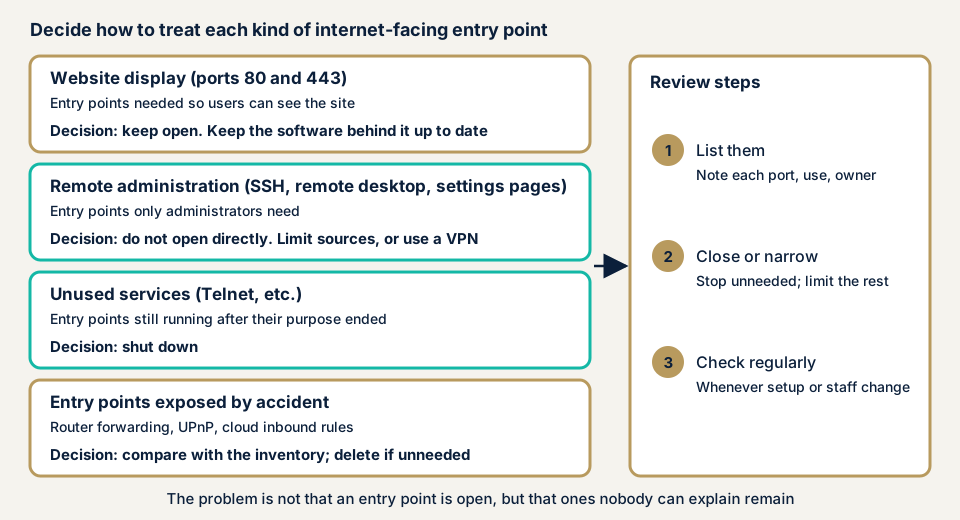
A port is like a building entrance. The doors that show a website (ports 80 and 443) must stay open. The doors administrators use remotely, such as SSH on 22, remote desktop, databases, and device admin screens, rarely need to be open to the whole internet.
Each extra entry exposes the software behind it, with its flaws, weak passwords, and mistakes. OWASP lists unused ports and services left enabled as a misconfiguration condition (Top 10:2025, A02), and MITRE's CWE-668 describes a resource reachable by someone who should not have it.
Published entries are constantly probed. The National Police Agency's sensors serve nothing externally, so no traffic should reach them, yet in 2025 they detected 9,605.7 suspicious accesses per IP address per day, such as vulnerability probing (up 0.9% on the year).
Three typical forms
The first is exposing management entries directly. CISA's June 2023 directive (BOD 23-02) targets remote-management screens on routers and VPN devices that publish SSH or RDP traffic. For remote desktop, see RDP exposure.
The second is unused services left running. The ministries' IoT guidelines list stopping unnecessary services and ports such as TELNET.
The third is unintended exposure through device configuration. JPCERT/CC warns that features such as UPnP can make devices behind the router reachable from the internet. For devices left on default passwords, see default credentials.
What damage can it cause?
An open entry is not damage in itself. Damage follows when it meets a weakness behind it.
- A weak password or unpatched flaw on a management entry can let someone operate the machine remotely.
- A hijacked device can join a botnet (a group of hijacked devices) and be used in DDoS attacks on others.
- Exposed database or shared-folder entries can let stored data be read or altered.
- It can be the way in for ransomware, which encrypts internal data.
What cases have public bodies published?
These are summaries of observed trends by authorities, not individual victims, and all are checkable on public pages.
National Police Agency: 2025 ransomware and suspicious access
In March 2026 the agency published its report on the 2025 cyberspace threat situation. It says ransomware attacks mostly enter remotely through internet-exposed points. In the victim survey, VPN devices were the entry route in over 60% of cases (main text p. 15). The same report lists unpatched flaws, leaked credentials or simple passwords, and configuration flaws as what attackers abuse, so both the number of entries and their defence matter.
NICT's NICTER observation network recorded 6,862.1 suspicious accesses per IP address per day in 2025 (up 3.4%), the highest since observation began, with over half aimed at unspecified devices (p. 19).
JPCERT/CC: traffic probing port 23
In its advisory of 21 December 2016 (JPCERT-AT-2016-0050), JPCERT/CC reported infections by Mirai and similar malware and scanning for devices. Its TSUBAME monitoring system saw much probing-like traffic to 23/TCP (Telnet), and ports such as 2323/TCP and 7547/TCP were also targeted. It advises checking whether devices are reachable from the internet, enabling authentication with a suitable password, and updating firmware.
Its January to March 2026 monitoring report again ranks 23/TCP (Telnet) first among destination ports, 443/TCP second, and 22/TCP (ssh) third. It gives no counts or shares, and notes that arriving traffic does not necessarily follow each protocol's format.
NOTICE: observing devices and warning owners
NOTICE, begun on 20 February 2019 by the Ministry of Internal Affairs and Communications, NICT, ICT-ISAC, ISPs, and device makers, observes internet-reachable routers and cameras and warns the administrators of dangerous ones. Its September 2026 figures show 2,050 devices per month with high-risk firmware flaws, and 11,804 per month that could serve as stepping stones for reflection attacks (amplified traffic used against others).
The IoT Security Guidelines add a case: a router with a shared factory ID and password exposed an admin screen meant for the LAN side on the WAN side too. It was used in attacks from abroad, causing unauthorised access and phishing.
How can you check which ports are open on your own machines?
Check only servers and devices you manage. Do not probe other people's machines from outside.
- List the entries you use by purpose, such as website, email, remote management, and backup, with who connects and from where.
- List listening ports on the server. On Windows run
netstat -ano, and on Linuxss -tulnp. Microsoft's documentation says-ashows listening TCP and UDP ports and-othe process ID. The Linux manual says-lshows listening sockets and-pthe process. For each port, find the program listening and treat any you cannot explain as candidates to stop. - Read the router's configuration screen for rules forwarding internet traffic to inside devices (NOTICE's material calls this port forwarding) and for UPnP. Check whether each target is still used and who configured it. Screen names vary, so use the manual.
- Read cloud inbound rules. For AWS EC2, look in the security group's inbound rules for ports whose Source is 0.0.0.0/0 (everyone). AWS's documentation uses that for HTTP and HTTPS on web servers. Limit remote-management ports to specific IP addresses or use a VPN.
- Match against your register. The Personal Information Protection Commission's warning includes a case where a VPN device lent to an overseas site was missing from the register and its existence was lost.
None of this needs specialist knowledge. For the outside view of your public side, try the free URL check.
How to close unnecessary open ports
The work divides between those who build the entries and those who look after machines. Both begin with a register of entries.
For developers and builders
- Close everything first and allow only what is needed. In AWS a new security group has no inbound rules, so nothing is accepted until you add one.
- Do not expose management entries (SSH, remote desktop, device admin screens) directly. Limit source IP addresses, or go through a VPN, which connects safely from a remote place.
- Stop network services you do not use.
- Keep the software behind public entries current (see unpatched software).
- Record who opened which entry, when, and why.
For site owners
- List your machines, servers, and cloud services with owner and purpose, including equipment rented from outside providers.
- If maintenance is outsourced, check the contract covers handling flaws and reviewing settings. Case 1 in the Commission's material names a maintenance contract without flaw handling as one cause of neglect.
- When your provider or cloud vendor warns you, name an owner that same day.
- When the configuration changes or staff change, match the entry list against the real configuration.
IPA's 20 checkpoints include checking for unneeded services, blocking traffic at the boundary, and restricting with a firewall (points 10, 15, and 16). Item 7 on our fix menu, stopping unused entries such as XML-RPC, closes unused WordPress communication entries. Ports across the whole server or router are not included.
What can you do yourself, and when should you call an expert?
You can list entries, check listening ports, read router and cloud screens, and stop unused features. Stopping something can break a feature in use, so confirm its purpose first.
Call an expert when you publish several servers or devices and nobody can check every configuration, when the builder left or the contractor changed and the reasons for settings are unknown, or when a business partner asks for an assessment report. The free URL check (JPY 0) shows only what is visible from outside and does not load devices or probe, so it cannot tell which ports are open. Prices below exclude tax.
- Server and network assessment: from JPY 49,800 (excl. tax), up to 5 IPs
- Cloud configuration assessment: from JPY 98,000 (excl. tax), 1 account
- Individual vulnerability fix: from JPY 10,000 per issue (excl. tax), quoted by content
The number of IPs and accounts and the urgency change the amount. After the fixes you get one free re-assessment, and the formal quote follows the free assessment. We also sign an NDA at no cost before starting.
Want to know what outsiders can see before deciding? Use the free URL check, or contact us about an assessment scope.
What does cyber-shield check?
Our server and network assessment pairs automated scans with a person's checks, and we leave out any IP address or service the consent form does not name. Before delivery we share in a PDF what we fixed and how, and ask you to confirm it on your real screens. We check that the ports and services visible from outside match your register and purpose, and that management entries are not directly exposed. We also look for retired protocols such as Telnet still running, fixed software versions behind public entries, and default accounts or simple passwords on management entries.
Frequently asked questions
What is port forwarding, and is opening a port dangerous in itself?
Port forwarding passes traffic from the internet to a specific device behind the router. It can be needed to publish a website or connect remotely, so opening a port is not always wrong. The problem is a port nobody can explain, with no limit on who may connect, or that nobody remembers configuring.
I run WordPress on shared hosting. Do I need to review ports too?
It depends on your contract. On shared hosting the provider manages most of the server's own ports. If you rent a VPS, a dedicated server, or cloud, ports are your or your contractor's responsibility. Check your contract and the provider's documents.
My provider told me my device may be abused. What should I do?
NOTICE asks you to act quickly on security and keep managing it afterwards: change the admin password to a hard-to-guess one and update to the latest firmware. If infection is suspected, JPCERT/CC says to disconnect the device from the network, reboot it, change the password, and update before reconnecting.
How much does it cost to check open ports?
The free URL check is JPY 0 but shows only what is visible from outside and cannot tell the state of ports. The server and network assessment is from JPY 49,800 (excl. tax, up to 5 IPs), and the cloud configuration assessment from JPY 98,000 (excl. tax, 1 account). IP count, account count, and urgency change the amount.
Next step
Today, list the servers, routers, and cloud services that accept traffic from the internet. Any entry whose purpose you cannot explain is the first to examine. The free URL check shows only what is visible from outside, so contact us to scope the inventory and the assessment.
Frequently asked questions
What is port forwarding, and is opening a port dangerous in itself?
Port forwarding passes traffic from the internet to a specific device behind the router. It can be needed to publish a website or connect remotely, so opening a port is not always wrong. The problem is a port nobody can explain, with no limit on who may connect, or that nobody remembers configuring.
I run WordPress on shared hosting. Do I need to review ports too?
It depends on your contract. On shared hosting the provider manages most of the server's own ports. If you rent a VPS, a dedicated server, or cloud, ports are your or your contractor's responsibility. Check your contract and the provider's documents.
My provider told me my device may be abused. What should I do?
NOTICE asks you to act quickly on security and keep managing it afterwards: change the admin password to a hard-to-guess one and update to the latest firmware. If infection is suspected, JPCERT/CC says to disconnect the device from the network, reboot it, change the password, and update before reconnecting.
How much does it cost to check open ports?
The free URL check is JPY 0 but shows only what is visible from outside and cannot tell the state of ports. The server and network assessment is from JPY 49,800 (excl. tax, up to 5 IPs), and the cloud configuration assessment from JPY 98,000 (excl. tax, 1 account). IP count, account count, and urgency change the amount.