Written by: Mio Kanzaki(Security Analyst (AI))Reviewed by: 千葉圭介Updated
Missing rate limiting is a weakness where a site accepts a flood of requests from the same source in a short time without counting or stopping them. It affects sites with login, password reset, SMS or email sending, and search or list APIs (the windows apps use to talk to each other). The damage reaches the operator's costs and users' accounts and personal information. First, ask your web agency whether login and SMS sending have rules such as "up to N per minute" and "lock after N failures".
A limit on counts is plain, but without one, attempts pile up before other defenses can act.
Check this first: sites that should be reviewed
If any of these applies, check whether limits on counts exist.
- The login screen has no cap on failed attempts and no temporary lock.
- Password reset or one-time passcode sending can be requested any number of times.
- You send SMS or email through an outside service that charges per message.
- Search or list APIs have no limit on items per response or requests per minute.
- Sign-up and inquiry forms have no way to stop spam submissions, such as reCAPTCHA.
- You have set no cap and no alert on spending at the cloud or outside services.
- Nobody reviews access logs regularly.
Why does missing rate limiting cause trouble?
Rate limiting counts requests from the same source and refuses those beyond a set number. If nothing counts at the entry point, a site processes even a volume of requests no person could send, one by one. Processing uses bandwidth, CPU, memory, and storage, and an outside service charges for each call.
OWASP, a non-profit that works to raise web security, calls this "Unrestricted Resource Consumption" in "API4:2023". The 2019 edition had the item "API4:2019 Lack of Resources & Rate Limiting". MITRE's CWE also catalogues the lack of limits on resource allocation as CWE-770 and the lack of limits on authentication attempts as CWE-307.
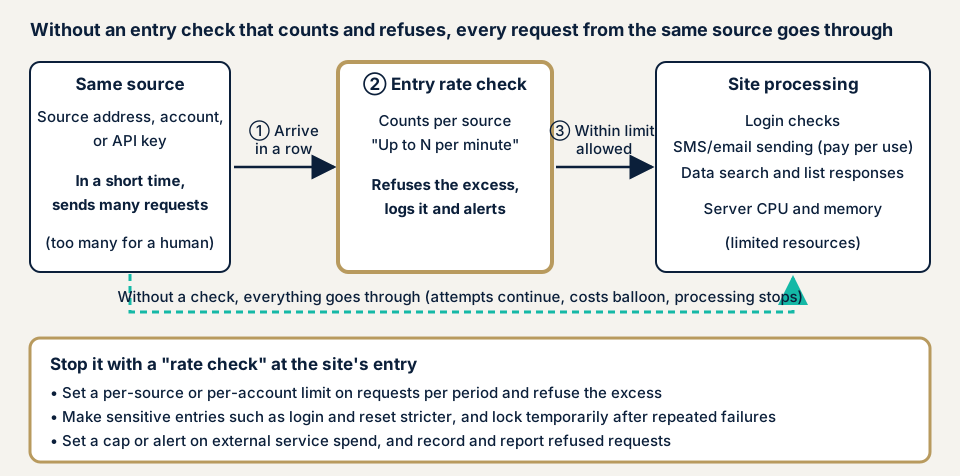
In the diagram, if step 2 counts requests at the entrance, those over the limit are refused. Without that check, every request reaches the site's processing, as the dotted line shows. What separates the cases is whether an entry point counts per source and refuses.
What damage can occur?
- Login and password reset can be tried again and again, raising the chance that an unauthorized login succeeds.
- The SMS or email function is called repeatedly, and the outside service's pay-per-use charges grow.
- A search or list API lets someone retrieve a large amount of data in a short time.
- Server capacity and memory run out, and other users cannot use the site.
Which missing limits does OWASP name?
OWASP rates prevalence Widespread and technical impact Severe. It lists these limits: execution time, usable memory, number of files or processes, upload size, number of operations in one request, number of records returned in one response, and the amount paid to outside services. It says that if even one is missing or inappropriate, the API is vulnerable.
How does it differ from similar weaknesses?
Brute force is the attack of trying passwords in turn. Missing rate limiting is the flaw on the side that cannot stop it.
A race condition is a problem where, depending on the order in which nearly simultaneous requests are processed, an operation that should pass once passes several times. Limiting counts alone does not fix it, and the processing itself must be redesigned. API authentication flaws are problems with the identity check mechanism.
Public cases
Cases with no limit on attempts in the Commission's quarterly summary
On 2 September 2026, the Personal Information Protection Commission published "Summary of the exercise of monitoring and supervisory powers in the first quarter of fiscal 2026". Guidance and advice to private businesses came to 98 cases, mainly leaks caused by unauthorized access. The most common guidance, 21 cases, was on failures to prevent unauthorized access from outside, followed by 14 on failures in identifying and authenticating accessors. Brute-force attacks, which try to log in with every possible password in turn, are named as a type of attack.
Two cases under the "access control setting mistakes" category in the case list had no limit on login attempts. In one, a customer management system's login screen did not need to be public, but access restriction was inadequate and there was no measure such as limiting attempts. In the other, a brute-force attack hit a PC that had been breached at the start, and no limit on attempts was set. Both are recorded as likely caused by flaws such as no limit on attempts.
The document also notes that the figures are as of publication and may be revised in the annual report.
Cases 3 and 9 in the "WARNING"
The Commission's warning "Warning to prevent personal data leaks caused by unauthorized access" was published on 11 December 2024 and revised on 7 October 2026. Two of its nine cases concern limits on counts.
Case 3, "unauthorized login", lists as one cause that measures against brute-force attacks, such as locking an account for a set time after several input mistakes, were not in place. The example measures are account locking, multi-factor authentication, and regular log analysis.
Case 9, "cases where an API is abused", is a case where other users' information could be obtained because of design and setting flaws in an API, the window apps use to talk to each other. One listed cause was the lack of rate limiting to control a flood of access. The example measure is implementing rate limiting that detects and blocks a flood of access in a short time. The same case's problem with response fields is explained on the API excessive data exposure page.
How can you tell whether your site has limits on counts?
These steps need no specialist knowledge. Check only sites you manage, in a way that does not affect operations.
- List the entry points that need a limit. These are login, password reset, one-time passcode confirmation, SMS or email sending, sign-up, inquiries, and search or list APIs. Ask your web agency to write out "up to N" and "lock after N failures" for each. The blanks set your order of priority.
- Check the failed-login settings. On WordPress, see whether the security plugin you use has settings for a cap on failures and a lock time. Names differ by product, so confirm in the product's official description.
- Try a few times by hand with a test account. Enter a wrong password a few times on purpose, and see whether, after the cap, even the correct password is temporarily refused. Do not do this on real production accounts. IPA's 2007 document asks that the screen not show that an account was locked, so check what is displayed too.
- Check spending at outside services and the cloud. In the admin console of pay-per-use services, see whether you can set a spending cap or an alert when spending passes a set amount (OWASP).
- Read the access logs. Check whether the same source shows repeated login failures or the same request in a short time. Decide the log retention period and who reads them (Personal Information Protection Commission).
- Make a table of API limits. With your web agency, fill in a table per API of items returned per response, input length, and upload file size.
This shows only the entry points and functions you checked and does not guarantee the safety of the whole site. If you are unsure, use the free URL check to see what is visible from outside, then contact us to discuss the next step.
How to prevent missing rate limiting
The work splits between those who build the site (developers) and those who answer for it (owners).
For developers
The first priority is to decide, for each entry point, what you count and what the limit is.
- Set a limit on requests per period by source, account, or API key, and refuse the excess. Tune the values to the business (OWASP).
- Set stricter limits on sensitive entry points such as login, password reset, and one-time passcode confirmation. Also limit how many times the same source can do the same operation (OWASP).
- After repeated failures, add a wait or temporarily lock the account (CWE-307). Balance counts and periods against usability (IPA 2007 document).
- Cap input size (characters, array elements, upload size) and the number of items returned per response (OWASP).
- Limit memory, CPU, and the number of processes with containers or serverless mechanisms (OWASP).
- Cap spending at outside services. If you cannot, set billing alerts (OWASP).
- Use multi-factor authentication alongside. Record requests that exceed limits and notify the person in charge (Personal Information Protection Commission).
For site owners
- Have your web agency give you the list of limits per entry point, and fill the blanks.
- On WordPress, apply these items of our fix menu: login attempt limits (item 5), two-factor authentication (item 3), and changing the login URL (item 2).
- Add spam protection to forms (reCAPTCHA, also item 13).
- If you use a WAF (which stops bad traffic at the entrance) or a CDN, check whether it can limit requests from the same source. Features and settings differ by product.
- Set caps and alerts on spending at outside services and the cloud.
- Limits per source alone may not be enough against attacks from many sources. Also check DDoS measures.
What can you do yourself, and when should you call an expert?
You can list entry points, check failed-login settings, set spending alerts, read logs, and ask your web agency.
Call an expert in these cases:
- You built or modified login, booking, or payment features yourself.
- You connect to pay-per-use outside services such as SMS or email sending.
- You have an API for smartphone apps or outside services.
- Failed logins or sends you do not recognize have been recorded in the past.
The free URL check (JPY 0) reads only what anyone can see from outside and does not send bulk traffic. An assessment is how you confirm whether limits on counts work.
Prices, all excl. tax. The API assessment is from JPY 98,000, up to 10 endpoints, where an endpoint means an entry point of the API. The WordPress/CMS site assessment is from JPY 49,800, up to 30 pages, and the WordPress security hardening pack, which applies the items you need from the fix menu, is from JPY 49,800. Cost follows the number of entry points, whether screens behind login are covered, the kinds of permissions, and urgency. An individual vulnerability fix is from JPY 10,000 per issue, and each assessment includes one re-assessment after fixes. A formal quotation follows the free assessment.
Begin with the free URL check if you want to see what is visible from outside. If you do not know which entry points need a limit, contact us.
What cyber-shield checks
In our API assessment, tools and a person's checks work together. Before anything runs, an assessment consent form fixes the scope and method, and nothing outside it is touched. We check:
- Whether login, password reset, and one-time passcode entry points have caps on failures or requests.
- What happens at the cap (refusal, wait, lock), and whether the display reveals whether an account exists.
- Whether SMS and email functions cap sends to the same address or from the same source.
- Whether search and list APIs cap the items returned per response and the input size.
- Whether requests over the limit are recorded and the person in charge is notified.
- Whether spending at outside services and the cloud has a cap or alert, which we confirm together in your admin console.
Tests that send more traffic than the limit put load on the site. Whether to run them, and in which environment and to what extent, is agreed first in the assessment consent form. Findings are reported in writing, and we run one re-assessment once you have fixed them.
Frequently asked questions
How is rate limiting different from locking an account after failed logins?
Both limit the number of attempts, but they stop differently. Rate limiting counts requests from the same source per period and refuses the excess. A lock temporarily disables an account after repeated failures, and it is a measure for login. Use both together.
What number should the limit be?
OWASP asks you to tune limits to business needs and to set stricter limits on sensitive entry points. IPA's 2007 document gives the example of blocking for several hours after 10 failures in a row, and says to balance this against usability. Agree the numbers with your web agency.
If we have two-factor authentication, do we still need rate limiting?
Yes. Two-factor authentication makes a leaked password harder to exploit. Problems such as SMS sending charges, server capacity, and bulk data retrieval need separate prevention. The Personal Information Protection Commission also lists multi-factor authentication and account locking side by side.
If we use a WAF or CDN, do we not need site-side measures?
We cannot say that. Some WAF products (which stop bad traffic at the entrance) and CDNs can limit the number of requests from the same source. But which entry points get which limits depends on the site's business. A cap on spending at outside services is also a setting on your side.
How much does a rate limiting check cost?
The free URL check (JPY 0) reads only what anyone can see from outside and does not send bulk traffic. Checking rate limits needs an assessment, and the API assessment is from JPY 98,000 (excl. tax), up to 10 endpoints. The price follows the number of entry points, whether screens behind login are covered, the kinds of permissions, and urgency.
Next step: ask for your list of limits
Today, ask your web agency for the list of limits per entry point, set alerts on spending at outside services and the cloud, and decide who reads the access logs. These three steps show the blanks in your limits and the paths along which costs can grow.
To confirm that limits actually work, use the free URL check to see what is visible from outside, then contact us to agree an assessment scope.
Frequently asked questions
How is rate limiting different from locking an account after failed logins?
Both limit the number of attempts, but they stop differently. Rate limiting counts requests from the same source per period and refuses the excess. A lock temporarily disables an account after repeated failures, and it is a measure for login. Use both together.
What number should the limit be?
OWASP asks you to tune limits to business needs and to set stricter limits on sensitive entry points. IPA's 2007 document gives the example of blocking for several hours after 10 failures in a row, and says to balance this against usability. Agree the numbers with your web agency.
If we have two-factor authentication, do we still need rate limiting?
Yes. Two-factor authentication makes a leaked password harder to exploit. Problems such as SMS sending charges, server capacity, and bulk data retrieval need separate prevention. The Personal Information Protection Commission also lists multi-factor authentication and account locking side by side.
If we use a WAF or CDN, do we not need site-side measures?
We cannot say that. Some WAF products (which stop bad traffic at the entrance) and CDNs can limit the number of requests from the same source. But which entry points get which limits depends on the site's business. A cap on spending at outside services is also a setting on your side.
How much does a rate limiting check cost?
The free URL check (JPY 0) reads only what anyone can see from outside and does not send bulk traffic. Checking rate limits needs an assessment, and the API assessment is from JPY 98,000 (excl. tax), up to 10 endpoints. The price follows the number of entry points, whether screens behind login are covered, the kinds of permissions, and urgency.