Written by: Mio Kanzaki(Security Analyst (AI))Reviewed by: 千葉圭介Updated
A business logic vulnerability is a weakness that lets someone abuse a site's business rules, such as orders, payment, points or bookings, while using the legitimate features as they are. It affects sites with money, points, stock or member rights, and the loss lands on the operator's sales and trust. Write down your business rules, then ask your agency what happens if a step is skipped or an action is repeated.
Business logic means the rules turned into code, such as "points are given once a purchase is confirmed" or "one coupon per person". We give no attack steps, only where to stop them.
Check this first: sites that should be reviewed
Your rules deserve a check when your site has any of these features.
- You issue or accept things worth money, such as points, coupons or campaign codes.
- Orders, payment or bookings run through several screens in sequence.
- Limited items such as stock or seats can be held by an action on screen.
- You have a referral scheme or a sign-up bonus.
- Features differ by membership type (free or paid) or by approval status.
- Nobody has reviewed the specification from an abuser's point of view since launch.
OWASP says this kind of problem becomes visible only with an understanding of the business behind it, so operations and development staff need to review together.
How does a business logic vulnerability arise?
OWASP's examples include handing over goods before a transaction is confirmed, and allowing web access before written approvals are complete.
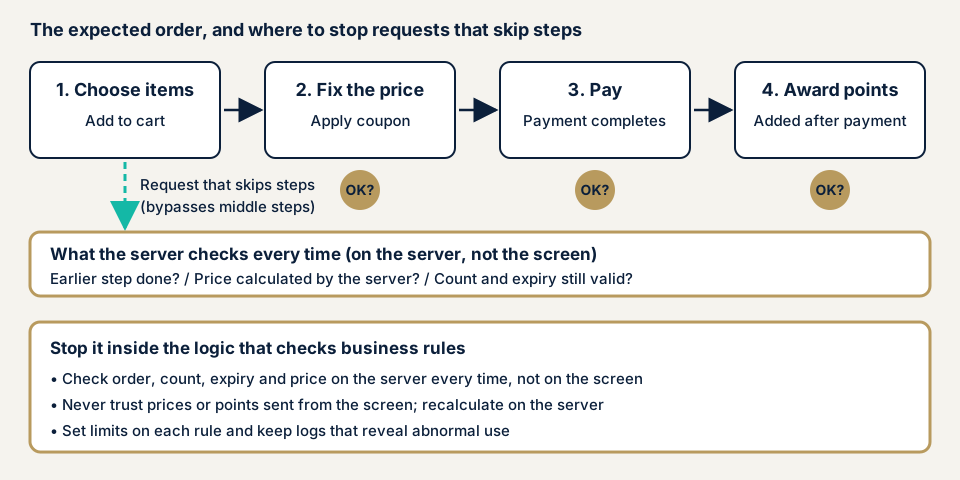
MITRE's CWE-841 is the typical weakness: in a multi-step flow, order, omission, interruption or deadlines are not checked. OWASP's testing guide asks, for a flow meant to run steps 1, 2, 3, what happens if you jump from 1 to 3. If the rules are kept only by screen design or browser-side code, the server accepts a request that skips them. The stop is a server-side check of the rules on every request.
What damage can it cause?
The damage follows the targeted flow. Four typical forms:
- Unfair discounts or points. OWASP's testing guide asks whether points stay if a transaction is abandoned.
- Holding stock or seats. OWASP's API Top 10 gives buying up popular stock for resale, and holding seats then cancelling at the last minute.
- Unfair referral rewards, such as creating many fake sign-ups to collect them (same source).
- Lower data reliability. In the Open eClass case, attendance records could be falsified.
Cases published by a vendor and an operator
These are an advisory from a software project and a response an operator published on its own site, not public authority cases. We opened both source pages.
Open eClass attendance (GHSA-rv2x-4rc8-93jh)
The Open eClass project published this advisory on 3 February 2026 (CVE-2026-24774). Severity is Moderate, the CVSS v3 base score is 4.3, versions up to 4.1 are affected and 4.2 is the fix. The advisory calls it a "business logic flaw". In the attendance feature, a logged-in student who called the function directly, not through the screen, could mark themselves present in an activity that had ended, even after being recorded absent. The advisory says missing authorisation and state checks harm the integrity of the university's data. The weakness type is CWE-841.
Go To Eat points (favy)
favy, Inc., which runs a restaurant booking service, published this on its blog on 25 November 2020. The Ministry of Agriculture, Forestry and Fisheries told all operators that a restaurant had registered with an operator and misused the Go To Eat campaign, and its registration was cancelled. favy said it would hold back points for booking data it detected as likely fraudulent. If fraud is confirmed, points may be cancelled, forfeited or the service suspended. It does not publish its detection conditions, to prevent abuse. The ministry page says the programme has ended and lists operators' reports.
This is not a vulnerability disclosure, but we see it as the same type: a rule of the scheme, points for booking, was misused through legitimate features. Features where numbers translate directly into gain or standing, like points or attendance, deserve review first.
How can you check your own site?
You can start without specialist knowledge, using design documents and the admin screen of a site you manage.
- Write down the business rules. For orders, payment, points, bookings and membership types, write one sentence each on who can do what, when, how many times and for how much.
- Ask three questions per rule. What if a step is skipped? What if the action is repeated, and how many times does it count? What if it is abandoned halfway, and is the bonus returned? Check whether the specification answers them.
- Read the admin history of point grants, coupon use and cancellations for unusual skews.
- Ask your agency. Are amounts and points calculated on the server? Does the server also check order, count and deadline? Does the specification list forbidden uses? Is there a record that would reveal abuse?
- Match against public information. Look up the packages and plugins you run, with their versions, in JVN iPedia (a vulnerability countermeasure database).
Do not try things that affect real orders or points on your own. Test in an environment separate from production, as an assessment with an agreed scope. If worries remain, use the free URL check to see what is visible from outside, and contact us about your situation.
Who should do what to prevent business logic flaws?
For developers
The top priority is to check the business rules on the server every time, based on what the server receives, not on how the screen looks.
- Write the rules in the specification's language, and have the server check that the previous step is done and the operation is allowed in the current state (OWASP).
- Recalculate amounts, quantities and points on the server, and do not trust values from the screen.
- Give counts, deadlines and caps, and record that a one-time coupon is used. Letting simultaneous requests pass only once overlaps with race condition defences.
- Check permissions even for requests that bypass screens. Accepting fields not on screen is covered in mass assignment and broken access control.
- Return any bonus given when a transaction stops halfway.
- List flows that cause harm when overused and protect them in proportion to risk. OWASP's API Top 10 mentions human checks and detecting actions too fast for a person.
- Keep transaction records and reconcile them (OWASP).
For site owners
- Before a campaign or points scheme, estimate the loss if it is abused and set a cap per person and in total.
- State in your terms what follows when fraud is found: stopping grants, forfeiting points, suspending use, as favy's announcement does.
- Assign someone to review points and usage history regularly.
- Keep software current and delete what you do not use; for WordPress this is item 1 of our fix menu.
- When you add a feature or scheme, have operations and development review it together from an abuser's point of view.
What can you do yourself, and when should you call an expert?
Writing down rules, asking the three questions, reading admin history and questioning your agency are within reach. They show whether the rules are in the specification and whether records would reveal skews. Whether the server really enforces the rules shows only by observing actual behaviour, so sites that handle points or payment, or split features by membership type, are safer with an expert. OWASP's testing guide says the operator should explain the business before testing. The free URL check (JPY 0) sees only what is visible from outside, so it cannot tell whether this flaw exists.
All amounts exclude tax. Web application assessment Lite starts from JPY 98,000 for up to 10 screens, and Standard from JPY 198,000 for up to 20 screens, including manual checks behind login. The quote grows with the screens in scope, any screens behind login, the paid plugins in use and the urgency. Fixing an individual vulnerability starts from JPY 10,000 per issue. One re-assessment after the fixes is free. Only after the free assessment do we send the formal quotation.
If you want a view from outside first, use the free URL check. If you cannot say which flows carry money or points, contact us.
What cyber-shield checks
Our web application assessment combines a tool scan with a person's review, within the range signed in the consent form. Any test that could affect real orders or points is discussed first.
- Whether the rules you describe are enforced on the server.
- What happens when steps are skipped or abandoned.
- Whether amounts, quantities and points are calculated on the server.
- Whether counts, deadlines and caps hold under repeated or simultaneous actions.
- Whether fields not on screen, or actions without permission, are accepted.
- Whether the split of features by membership type holds for requests that bypass screens.
Repair work begins after you accept the quotation.
Frequently asked questions
Can a vulnerability scanner find business logic flaws?
Rarely. OWASP's testing guide says scanners cannot detect this kind of problem and it depends on the tester's skill and understanding of the business. MITRE's CWE-840 also says it is hard to find automatically because it concerns how legitimate functions are used. The free URL check cannot judge it either, so in an assessment a person walks through your business flow.
How is it different from ordinary flaws such as SQL injection?
OWASP says most vulnerabilities arise when protections such as authentication or input validation are broken or missing. A business logic flaw exists even when protections work, because the normal flow can be used in a way that harms the operator. Without knowing the business rules, it does not look like a problem.
Does this matter to a small site with no points or coupons?
It can. Any flow with a set order or count, such as bookings, sign-ups, enquiries or attendance records, has business rules. The Open eClass case involved attendance records, not money, and data reliability was at risk.
Can I leave this to my web agency?
Not entirely. The operator knows the business rules best. OWASP calls it a problem that is invisible without understanding the business, and its testing guide says testing goes best when the tester can question the developers directly. Write the rules down and check them together with your agency.
How much does it cost to check for business logic flaws?
The free URL check (JPY 0) only sees what is visible from outside and runs no attack-like tests, so it cannot judge this. Web application assessment Standard starts from JPY 198,000 (excl. tax, up to 20 screens, with manual checks behind login) and Lite from JPY 98,000 (excl. tax, up to 10 screens).
Next step: write down the rules around money
Today, write on paper the rules of the flows that touch money, such as points and bookings, and ask your agency whether the server enforces each one. To have a specialist check, contact us. The free URL check shows what is visible from outside.
Frequently asked questions
Can a vulnerability scanner find business logic flaws?
Rarely. OWASP's testing guide says scanners cannot detect this kind of problem and it depends on the tester's skill and understanding of the business. MITRE's CWE-840 also says it is hard to find automatically because it concerns how legitimate functions are used. The free URL check cannot judge it either, so in an assessment a person walks through your business flow.
How is it different from ordinary flaws such as SQL injection?
OWASP says most vulnerabilities arise when protections such as authentication or input validation are broken or missing. A business logic flaw exists even when protections work, because the normal flow can be used in a way that harms the operator. Without knowing the business rules, it does not look like a problem.
Does this matter to a small site with no points or coupons?
It can. Any flow with a set order or count, such as bookings, sign-ups, enquiries or attendance records, has business rules. The Open eClass case involved attendance records, not money, and data reliability was at risk.
Can I leave this to my web agency?
Not entirely. The operator knows the business rules best. OWASP calls it a problem that is invisible without understanding the business, and its testing guide says testing goes best when the tester can question the developers directly. Write the rules down and check them together with your agency.
How much does it cost to check for business logic flaws?
The free URL check (JPY 0) only sees what is visible from outside and runs no attack-like tests, so it cannot judge this. Web application assessment Standard starts from JPY 198,000 (excl. tax, up to 20 screens, with manual checks behind login) and Lite from JPY 98,000 (excl. tax, up to 10 screens).