Written by: Mio Kanzaki(Security Analyst (AI))Reviewed by: 千葉圭介Updated
Mass assignment is a weakness where an app or API writes the fields that arrive from a user into data on the server in bulk, without checking them carefully. It affects operators of sites and APIs with update functions for member information or orders. The more a service has fields users must not rewrite, such as permissions, amounts, and status, the more harm reaches users and operators. First, ask your development company whether, for each update entry point, the fields it allows to be rewritten are decided in a list.
The name comes from "mass" and "assignment". Frameworks (the foundations for building apps) have a convenient feature that connects arriving fields to internal data automatically. The problem comes from using it wrongly. The name differs by framework. In OWASP's document, Rails and Node.js say mass assignment, and Spring MVC and ASP.NET MVC say autobinding. In PHP it is called object injection.
Check this first: sites that should be reviewed
Read this list against your update screens and APIs.
- You use forms or an API to update member information, orders, or posts.
- You built registration or update entry points with a framework feature that receives arriving fields in bulk.
- Your data holds fields such as whether someone is an administrator, a member's rank, points or balance, whether payment is done, or public versus private.
- API responses show even the names of fields the screen never displays.
- No record shows a developer choosing, one by one, the fields an update entry point may accept.
- You have added new fields to the data each time a feature was added.
- The fields that may be changed differ by user type, such as a lender and a borrower.
Why does mass assignment happen?
Take a member changing their address. The screen has only "name" and "address" input boxes, and the server writes whatever arrives straight into the member data. If the same data also has "permission" or "balance" fields, they too can be rewritten unless they were excluded from the write. Having no input box on the screen is no protection, because a request can be sent to the entry point directly, bypassing the screen.
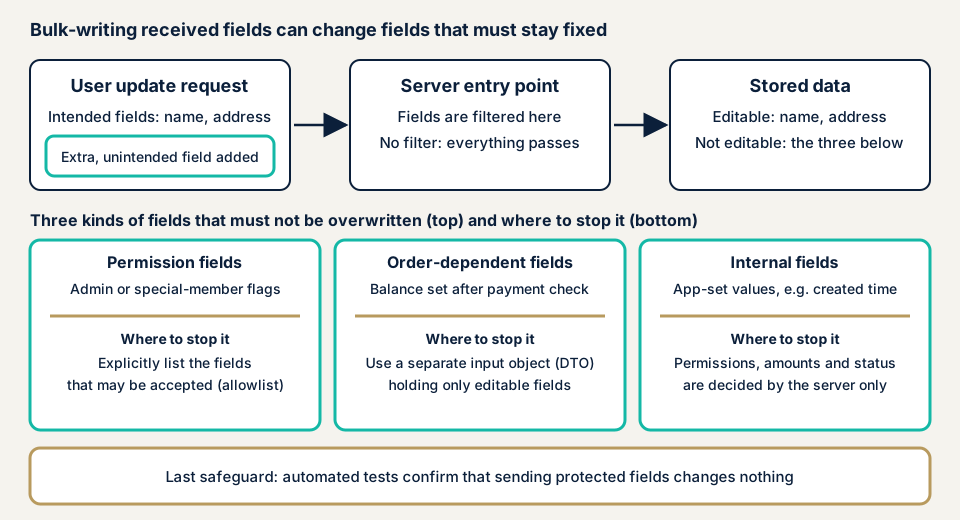
OWASP's "API Security Top 10 2019" lists this as "API6:2019 Mass Assignment". It becomes a hole when an entry point converts arriving fields to internal fields without considering their importance. The same document divides the fields that must not be rewritten into three kinds. The first is fields tied to permissions, such as an administrator or special-member flag that only administrators should set. The second is fields that depend on process order, such as a balance that should be set only after payment is confirmed. The third is internal fields, such as a creation time that the app itself should set.
The same document also says that in an API the field names are visible in the specification and responses, which makes this hole easier to abuse.
What damage does it cause?
OWASP lists privilege escalation (raising permissions above what is intended), data tampering, and bypassing of security mechanisms. For the operator, the trouble is that the request takes the form of a user's operation, so it is hard to tell from an ordinary update.
Where does it sit in public documents?
In the 2023 edition, OWASP merged this risk into "API3:2023 Broken Object Property Level Authorization". The 2019 items "Excessive Data Exposure" and "Mass Assignment" became one item. The former means fields you must not read are visible, and the latter means fields you must not rewrite can be changed.
MITRE is a US non-profit research body. Its CWE-915, "Improperly Controlled Modification of Dynamically-Determined Object Attributes", is the weakness of accepting input that updates several fields at once without limiting which fields may change. CWE lists mass assignment and autobinding as alternate names for this weakness.
How does it differ from similar weaknesses?
Business logic flaws widely mean holes in assumptions about how a feature flows. Mass assignment can be seen as one form of them, where fields can be rewritten at will. Excessive data exposure is a hole in the reading direction. Broken access control is a hole in the decision on whether someone may see or operate on the data at all, and an allow list of fields does not replace it.
A published case: GitHub's public key form
There is a case in which the affected party itself acknowledged mass assignment as the cause. It is GitHub's official blog post "Public Key Security Vulnerability and Mitigation", dated 4 March 2012. The author is Tom Preston-Werner.
In the company's account, on the morning of 4 March a user used a flaw in the public key update form to register their own key to the rails organization and wrote a new file to a project to demonstrate the problem. The cause was that fields arriving from the form had not been checked properly, and the company calls it a mass assignment vulnerability. Three accounts were affected, including rails. The company writes that the other two looked like demonstrations.
After detecting the attack, the company removed the unauthorized key and suspended that user. It released a fix at 9:53 a.m. Pacific time and began investigating the effects. It also began an audit of its whole code base to look for other holes of the same kind. The post does not say whether users' information was viewed.
Two things stand out. The first is that a single flaw in one form led to writing into an organization managed by someone else, and it happened at a large, widely used service.
The second is that, besides releasing a fix, the company began an audit of the whole code base. Other entry points built the same way may exist, so after a fix you also need to find the entry points of the same kind on your own site.
Scenarios shown by OWASP
These are not real incidents, but OWASP gives examples. One is a ride-hailing app. A user adds a field that cannot normally be sent to a profile update and gains usage credit without paying. Another is a booking site, where a lender adds an amount field to a booking approval and overcharges the borrower. The third is a video app, where a user changes a takedown field while updating the description of their own video and lifts the takedown. In all of them, the entry point did not narrow the fields.
How can you check your own site?
You can check in the order below. Check only in a test environment you manage, and do not rewrite production data.
- Have a list of update entry points made. Ask your development company to find the entry points behind "save", "update", "register", and "approve". Include entry points that create new records.
- Ask whether each entry point has a list of fields that may be changed. The preferred form is a list that names allowed fields one by one (an allow list) in the code.
- Sort the data fields into four kinds. Ask for the list of fields and mark those tied to permissions, amounts, status, and internal use. Confirm that the marked fields cannot be changed by a user's operation.
- Ask whether a framework feature is used. As allow-list features, OWASP's documents cite Rails strong parameters and similar. For Spring MVC it is setAllowedFields, and for Laravel it is $fillable.
- Have them try with an ordinary user's permission in a test environment. Check that an update with an added field not on the screen is refused or ignored. Also check that permission and amount values have not changed after the update.
- Review the field names in responses. Check whether fields the screen never shows are returned. Visible field names can also be a clue for someone trying to rewrite them.
A clean result covers only the entry points you tried, not the whole site. If the list stalls or an odd result appears, the free URL check gives the outside view, and you can contact us with the details.
Where should you start preventing mass assignment?
Responsibility divides between the developers who build the entry points and the owners who answer for the service.
For developers
OWASP's cheat sheet and CWE give these policies.
- Name the fields you accept in an allow list. OWASP's document treats the allow list as the preferred method.
- Make a separate container to receive input (a DTO) that holds only the fields users may edit. Avoid connecting arriving input straight to internal data.
- Do not rely on a deny list, a list of fields forbidden to rewrite. A field added later and missing from the list can be rewritten as is.
- Decide the input format (a schema) and reject requests that do not match it.
- Let only the server decide permission, amount, status, and internal fields. For example, the server sets a balance after payment is confirmed.
- An allow list and a DTO narrow the fields that can be written. Whether this person may operate on this data is an authorization check, and you do it separately.
- On the response side too, choose the fields to return one by one. Avoid generic features that convert data and return it as it is.
- Add an automated test that a value does not change when a forbidden field is sent. Include a review of the allow list in the steps whenever a field is added.
For site owners
- Have your development company include the list of update entry points and the fields each allows in what it delivers.
- Agree that any change that adds fields includes a review of the allow list in its checks.
- Confirm whether operations that change permissions or member classes are limited, by design, to a separate operator-only entry point.
- Keep a history of changes to permissions, balances, and status, and build a way to notice changes that should not occur.
- Design so that amounts and stock are recalculated on the server. Do not trust numbers that arrive from users as they are.
- Check update notices for frameworks and outside components. For a WordPress site, item 1 of our fix menu covers updating the core, themes, and plugins and deleting unused plugins.
What can you do yourself, and when should you call an expert?
You can make the list of update entry points, check whether allowed fields exist, sort fields, review field names in responses, and check the change history. That reduces the holes within your reach.
Expert help makes sense in these cases:
- The service has fields that may be changed only by some user types.
- You have entry points that handle payments, points, balances, or permission fields.
- You built update entry points relying on a framework's automatic feature.
- You have never had the API assessed.
The free URL check (JPY 0), which reads only what is visible from outside, cannot see how update entry points behave after login. We check them within an assessment scope that we agree.
Prices, all excl. tax. The API assessment is from JPY 98,000, up to 10 endpoints. Price moves with the number of endpoints, how much behind login is checked, and urgency. An individual vulnerability fix is from JPY 10,000 per issue. Each assessment includes one re-assessment after fixes. A formal quotation follows the free assessment.
The free URL check offers a first look at what is visible from outside. If you cannot decide what to ask your developers, contact us.
What cyber-shield checks
Our API assessment uses tools first and then has a person confirm what they found. The assessment consent form sets the scope and method up front, and we stay within it. We use test accounts and do not rewrite users' real data. We check:
- Whether requests to create and update entry points with an added field not on the screen are refused or ignored.
- Whether permission, amount, status, and internal fields cannot be changed by an ordinary user's operation.
- Whether the distinction of fields that may be changed by user type is kept.
- Whether the field names that appear in responses stay within the needed range.
- Whether other entry points built the same way remain.
You receive a report, and we check the fixes once more afterwards.
Frequently asked questions
Are mass assignment and broken access control the same thing?
They are different. Mass assignment is the hole of not narrowing which fields may be rewritten. Broken access control is the hole of missing the decision on whether that person has the right to operate on that data. You need both for a safe update. OWASP also says narrowing fields does not replace authorization checks.
Is a list of fields that may not be rewritten enough?
Not enough. OWASP asks you not to rely on a deny list alone, because a field added later or one that was overlooked stays rewritable. An allow list that names the fields you accept is the preferred method.
Where is it in OWASP's latest list?
In the 2023 edition it is merged into API3:2023 Broken Object Property Level Authorization. The 2019 items API6:2019 Mass Assignment and API3:2019 Excessive Data Exposure became one item. The 2019 documents are still published.
How much does a mass assignment check cost?
The free URL check is JPY 0, but it cannot see how update entry points behave after login. The API assessment is from JPY 98,000 (excl. tax), up to 10 endpoints, and the price depends on the number of endpoints, the range of checks behind login, and urgency.
Next step: two requests to your developers
Start today with two requests to your developers. First, ask for the list of update and registration entry points. Second, ask them to explain, per entry point, whether a list of the fields it allows to be rewritten exists.
How update entry points behave after login is outside what the free URL check can see. Contact us to agree the scope of an assessment.
Frequently asked questions
Are mass assignment and broken access control the same thing?
They are different. Mass assignment is the hole of not narrowing which fields may be rewritten. Broken access control is the hole of missing the decision on whether that person has the right to operate on that data. You need both for a safe update. OWASP also says narrowing fields does not replace authorization checks.
Is a list of fields that may not be rewritten enough?
Not enough. OWASP asks you not to rely on a deny list alone, because a field added later or one that was overlooked stays rewritable. An allow list that names the fields you accept is the preferred method.
Where is it in OWASP's latest list?
In the 2023 edition it is merged into API3:2023 Broken Object Property Level Authorization. The 2019 items API6:2019 Mass Assignment and API3:2019 Excessive Data Exposure became one item. The 2019 documents are still published.
How much does a mass assignment check cost?
The free URL check is JPY 0, but it cannot see how update entry points behave after login. The API assessment is from JPY 98,000 (excl. tax), up to 10 endpoints, and the price depends on the number of endpoints, the range of checks behind login, and urgency.