Written by: Mio Kanzaki(Security Analyst (AI))Reviewed by: 千葉圭介Updated
Broken access control is a flaw that lets users view or do things they were never allowed to. Sites with member pages, order histories, admin screens, or an API (the window apps use to talk to each other) are affected, and registered members and customers are harmed. Ask your agency whether the server checks "may this person see this?" every time after login. A hidden button and a refused action are different things.
Check this first: sites that should be reviewed
If any of these applies, check whether permission checks exist.
- Member, account, or order history URLs contain a number or ID
- There are several permission levels, such as administrator, editor, and member
- Permission differences are shown by hiding buttons or menus
- A smartphone app or outside service connects by API
- Accounts of people who left, or of finished business partners, were never deleted
- A screen shows personal information from an email address alone
- Screens behind login were never tested per permission level
IPA names three traits of vulnerable sites: personal information viewable from an email address alone, a user ID in the URL or form used to search the database, and an order number accepted without an ownership check.
What is broken access control and how does it work?
Login checks who you are (authentication). Deciding whether that person may see this data is a separate mechanism (authorisation). A site with authentication but no authorisation lets a logged-in person reach other people's data just by changing the target. IPA's typical case trusts a user ID or order number received in the URL or form and operates on the database with it. To the site this is a valid request from a logged-in user.
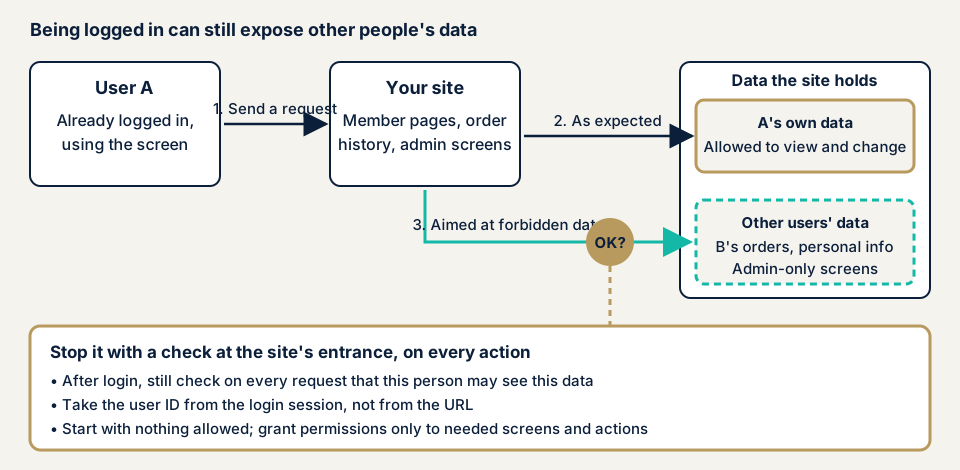
In step 2 the request reaches only the user's own data. In step 3 a request pointing at a forbidden target reaches other users' data or admin-only screens. The difference is a server check on every request. OWASP says the server, not the screen, must make access decisions.
What damage can it cause?
IPA and OWASP list the following:
- Personal information that only the owner should see is seen by other users
- Other users' order details are viewed
- A logged-in user impersonates another user
- APIs that create, update, or delete data lack checks, so others' data is changed
- Ordinary users can use administrator functions
The operator faces inquiries, an investigation, and a report to the Personal Information Protection Commission where required.
How is it different from similar flaws, and how common is it?
BOLA/IDOR means missing checks on individual data in an API, a form of this flaw. Session management flaws concern the login state itself. Privilege escalation is an ordinary user gaining administrator rights. Two-factor authentication cannot stop authorisation flaws.
In OWASP's Top 10:2021, broken access control rose from fifth place to first, with the most occurrences in the data. The incidence rate (the share of applications where it was found) averages 3.81% and reaches 55.97%. These are 2021 figures, but the problem is not rare.
Public cases: a member page and a WordPress plugin
A member page case from Japan's privacy regulator
On 11 March 2026 the Personal Information Protection Commission published its summary of supervisory actions for Q3 of fiscal 2025 (October to December 2025). One case concerns a company's member page, accessed without authorisation, with a risk that members' personal data and entrusted personal data had leaked. The likely cause was a design flaw: after login, altering a My Page parameter let a user view other members' information. The guidance point was technical safety management measures, meaning preventing leaks when information systems are used.
Missing checks after login let members see each other's data, updates alone do not fix a design flaw, and entrusted personal data was affected.
A WordPress plugin case from JVN
On 30 March 2022 JVN published a flaw in the WordPress plugin "Advanced Custom Fields". Versions before 5.12.1, including the paid Pro edition, are affected. JVN says users such as editors, contributors, and authors may view database data they should not access. It is CWE-862, with a CVSS v3 base score of 6.5 and CVE-2022-23183. The remedy is updating to 5.12.1 or later. Low-privilege internal users need attention too, and updating plugins is the first defence.
How can you check your own site?
Check only sites you manage.
- Check pending updates under Dashboard, then Updates, in the WordPress admin, and delete unused plugins.
- Audit accounts. Under Users, delete accounts of people who left and keep only needed administrators.
- Make a permission table. List permissions down the side (logged out, member, editor, administrator) and screens and actions across the top, and write who may do what. Show it to your agency.
- Ask your agency three questions. Does the server check permission on every action, beyond hiding buttons? Is the user's number taken from login data, not the URL? Were permission-level tests run before delivery?
- Test with two test users. Logged in as A, confirm a screen pointing at B's data does not open. Logged out, confirm a login-only URL goes to the login screen. Use test data only.
- Compare plugins with public information. Search JVN iPedia for authorisation or missing-authentication entries.
If you are technical, check the access logs for permission errors (403 or 401) repeating from one user. These checks cover only what you tried and do not guarantee the whole site.
How to prevent broken access control
For developers
First priority: authorisation checks in every process, not only authentication.
- Take the user ID from server-side login data (the session), not the URL or form. If you use an outside value, check it matches the logged-in user each time (IPA).
- Check each time that target data, such as an order number, may be viewed or operated by the logged-in user (IPA). Putting the owner in the database search condition is surest (OWASP).
- Check on the server for every request, including AJAX, API calls, and create, update, and delete actions (OWASP).
- Deny by default except what is public, and give minimum rights (OWASP).
- Put permission checking in one reusable place, since one miss per screen becomes a hole (OWASP).
- Log permission errors, alert administrators on repeats, and rate-limit APIs, as part of your audit log design (OWASP).
- Add automated tests per permission level that confirm refused actions are refused (OWASP).
In WordPress plugins or themes, call current_user_can() at the entrance of each process. A CSRF nonce is no substitute.
For site owners
- Update the core, plugins, and themes, and delete unused plugins (item 1 of our fix menu).
- Reduce administrator accounts to what you need and remove weak passwords (item 12), giving each person minimum rights.
- Two-factor authentication at login (item 3) helps against takeover but does not limit what a logged-in person may see.
- Keep backups and internal files out of the public folder, and turn off folder listing (OWASP; item 6).
- A WAF (a filter that stops suspicious traffic at the entrance) and source restrictions are not decisive, since requests come from logged-in users.
- Ask your agency to review the delivered code, with your permission table and screen list.
What can you do yourself, and when should you call an expert?
You can update, tidy accounts, make a permission table, question your agency, and read logs. Call an expert for custom or modified member pages, order histories, or admin screens, many members with personal data, API links, and three or more permission levels. The free URL check (JPY 0) reads only what is visible from outside, so it cannot show missing permission checks.
- Web application assessment, Lite: from JPY 98,000 (excl. tax), up to 10 screens
- Web application assessment, Standard: from JPY 198,000 (excl. tax), up to 20 screens, with manual checks behind login
- API assessment: from JPY 98,000 (excl. tax), up to 10 endpoints
- WordPress/CMS site assessment: from JPY 49,800 (excl. tax), up to 30 pages
- Individual vulnerability fix: from JPY 10,000 per issue (excl. tax)
The amount grows with the number of screens, screens behind login, the types of permission, paid plugins, and urgency. Each assessment includes one re-assessment after fixes, and a formal quotation follows the free assessment.
Not sure which screens need a permission check? Contact us. The free URL check shows only what is visible from outside.
What cyber-shield checks
Our web application assessment combines tool scans with checks by a person, within a scope agreed in a signed consent form. We check:
- Screens and actions per permission level against the design
- Whether requests pointing at another user's data are refused, using test accounts
- Whether admin-only screens are reachable when logged out or without permission
- Permission checks on requests that bypass screens, including create, update, and delete APIs
- Backups, internal files, and folder listing in the public folder
- Logging of permission errors and reporting of repeats
- Plugin versions against published vulnerabilities
Findings are delivered as a report, followed by one re-assessment after your fixes.
Frequently asked questions
What is the difference between authentication and authorisation?
Authentication checks who you are. Authorisation decides whether that person may see this data or perform this action. IPA asks sites to implement authorisation as well as authentication.
Does two-factor authentication prevent broken access control?
No. It checks that the person logging in is who they claim to be, not which data a logged-in person may see. It reduces takeover, but authorisation checks must be built separately.
Is a long, hard-to-guess ID in the URL safe enough?
No. OWASP says to check permission on every access to individual data, even when IDs are hard to guess. Treat such IDs as a supplement and always check on the server.
Does hiding a button restrict access?
No. OWASP says access decisions must not rely on the screen. If the request reaches the server, it is processed unless the server checks.
How much does an access control check cost?
Screens behind login are not visible from outside, so the free URL check (JPY 0) cannot test them. The Standard web application assessment is from JPY 198,000 (excl. tax), up to 20 screens, with manual checks behind login. API assessment is from JPY 98,000 (excl. tax), up to 10 endpoints.
Next step: three checks you can do today
Check pending updates, audit your accounts, and put the three questions to your agency. Use the free URL check to see what is visible from outside, then contact us to agree an assessment scope for the screens behind login.
Frequently asked questions
What is the difference between authentication and authorisation?
Authentication checks who you are. Authorisation decides whether that person may see this data or perform this action. IPA asks sites to implement authorisation as well as authentication.
Does two-factor authentication prevent broken access control?
No. It checks that the person logging in is who they claim to be, not which data a logged-in person may see. It reduces takeover, but authorisation checks must be built separately.
Is a long, hard-to-guess ID in the URL safe enough?
No. OWASP says to check permission on every access to individual data, even when IDs are hard to guess. Treat such IDs as a supplement and always check on the server.
Does hiding a button restrict access?
No. OWASP says access decisions must not rely on the screen. If the request reaches the server, it is processed unless the server checks.
How much does an access control check cost?
Screens behind login are not visible from outside, so the free URL check (JPY 0) cannot test them. The Standard web application assessment is from JPY 198,000 (excl. tax), up to 20 screens, with manual checks behind login. API assessment is from JPY 98,000 (excl. tax), up to 10 endpoints.