Written by: Mio Kanzaki(Security Analyst (AI))Reviewed by: 千葉圭介Updated
Cache poisoning is a problem in which a cache, the mechanism that reuses pages in front of your site, is made to remember a response it should not, and then serves it to other visitors. It affects sites with a CDN or reverse proxy in front, and the victims are the many users who visit. List which caches sit in front of your site, and ask your agency or provider whether screens behind login stay out of the cache.
A cache keeps a response once made and returns it when the same request arrives. A CDN (a network that keeps copies of pages at sites around the world) is the typical one, and a reverse proxy (a server that receives outside traffic and hands it to servers behind it) may act as one. We give no attack steps or strings, only where to stop it.
Check this first: sites that should be reviewed
Look at your cache conditions when these describe your setup. The more of them that fit, the higher the priority.
- You use a CDN but have never seen which pages it stores.
- A reverse proxy or cache server sits in front of the site.
- You switched on a WordPress caching plugin or a host's speed-up feature without checking what it does.
- Screens behind login, or screens that change per member, share one URL.
- You use Apache forwarding rules (settings that hand part of a URL to another server) or a framework such as Next.js.
RFC 9111 (the HTTP caching specification) says the cache key, the clue a cache uses to choose a response, is at minimum the request method and the target URI. Many caches use the URI alone, so a site whose content changes for the same URI needs particular care.
How does cache poisoning arise?
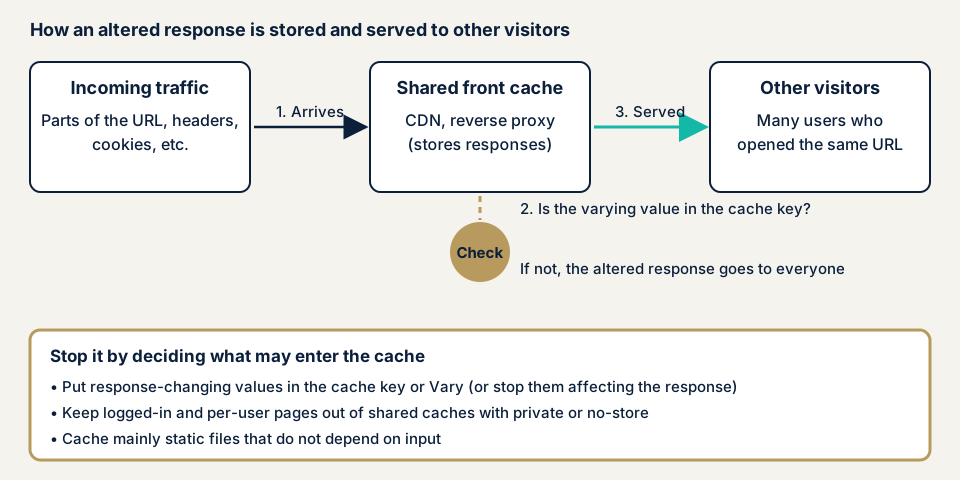
For each request, the cache looks at the cache key (the condition for deciding it is the same request) and decides whether to use a stored response. When responses vary, a Vary instruction can add headers to that condition.
Trouble arises when a value outside the cache key changes the content of the response. Cloudflare's documentation describes an attack in which the origin server is made to return a harmful response under the same cache key as a normal request, and the CDN stores it and serves it to others. RFC 9111 section 7.1 says damage spreads to many users more easily in a shared cache.
RFC 9111 gives as an entry point a mismatch in how an intermediary and the user's software read traffic, a weakness MITRE organises as CWE-444. OWASP assumes a flaw that lets extra lines into a response header (HTTP response splitting, the same kind as HTTP header injection), and says the fake response goes to everyone until it is cleared.
What damage can it cause?
The damage depends on what gets stored. There are four main forms.
- The screen breaks or stops working. The Next.js case below left redirects unusable.
- Fake content or injected scripts appear. Cloudflare says reflecting untrusted header values into the body can lead to XSS through the cache.
- A screen meant for one person is served to others. RFC 9111 section 7.3 warns that implementation or setting mistakes can store private information.
- You receive reports of odd screens although you changed nothing.
A similar problem is cache deception. If a URL that looks like a static file returns a personal screen, a CDN that looks only at the extension stores it, and the private content can be taken (Cloudflare). Poisoning teaches the cache a fake response, while deception teaches it a genuine personal screen.
Cases from JVN and software vendors: Apache and Next.js
These involve caches or proxies in front of a site, published by JVN (the vulnerability notice site run by JPCERT/CC and IPA) and the vendors. We checked each source.
Apache HTTP Server (JVNVU#94155938)
On 8 March 2023 JVN reported that The Apache Software Foundation had released 2.4.56. Versions up to 2.4.55 are affected. CVE-2023-25690 is an HTTP request splitting issue in mod_rewrite and mod_proxy. The possible impacts include bypassing proxy access control and cache poisoning. The remedy JVN gives is to move to the latest release.
Apache rates it "important". It affects setups with mod_proxy enabled and rewrite rules (RewriteRule or ProxyPassMatch) that are too broad, so part of the URL re-enters the target URL. The version is not the only factor, because how the settings are written decides the impact too.
Next.js redirects (GHSA-3g8h-86w9-wvmq)
The Next.js project published this advisory on 6 May 2026 (CVE-2026-44572). Severity is Low, the CVSS 3.1 base score is 3.7 and the weakness is CWE-349. Versions from 12.2.0 up to but not including 15.5.16, and from 16.0.0 up to but not including 16.2.5, are affected. The fixes are 15.5.16 and 16.2.5.
According to the advisory, when outside traffic carries a header meant only for internal use, a redirect instruction is replaced by an internal one that browsers do not follow. If a CDN in front stores the redirect without telling by this header, the unusable redirect is served to later visitors until it expires or is purged. The workaround is to add that header to the cache key.
Both cases had the hole outside the owner's own code, and the starting point was updating along the vendor's information. A low score still means a wide area can stop working once a shared cache serves it.
How can you check your own site?
No specialist knowledge is needed to begin. Use a site you manage.
- List the caches in front. Include the CDN, the host's speed-up feature, WordPress caching plugins and any reverse proxy. If you do not know, ask your agency.
- Look at response headers. In the browser's developer tools Network view, open a screen behind login and check Cache-Control, Vary and Age. If personal screens lack private or no-store, tell your agency. Age shows the response came from a cache, not the origin (RFC 9111 section 5.1).
- Read the CDN's storing conditions. In Cloudflare, the cache key settings sit in Cache Rules, the screen for building cache rules. Check that HTML and API responses are not all stored.
- Match against public information. Search JVN iPedia (a vulnerability countermeasure database) for your Apache, Next.js and CMS names and versions, and read the vendor advisories.
- Ask your agency. What is in the cache key? Do screens behind login stay out of shared caches? Are headers used to vary responses listed in Vary? Is there a procedure to clear the cache?
Do not send crafted values to a live site yourself. A fake response left in a cache reaches visitors other than you. If you are still unsure, contact us and describe your setup.
Who should do what to prevent cache poisoning?
The test is whether the content changes with the person or the input.
For developers
The top priority is to separate responses that may be cached from those that must not be.
- Give personal and login screens Cache-Control private or no-store. RFC 9111 says private keeps a response out of shared caches and no-store keeps it out of all caches. A response with Set-Cookie may still be cached.
- Put inputs that change a response into the cache key or Vary. If you cannot, stop those inputs affecting the response, and do not reflect untrusted header values into the body.
- Cache mainly static files that do not depend on input. Do not let a non-existent path with a static-looking extension return a personal screen. Cloudflare's Cache Deception Armor refuses to store responses whose extension and content type disagree.
- Do not trust framework-internal headers just because they arrived. The Next.js fix also stopped trusting that header on its own.
- Make an intermediary and the server behind it split traffic the same way. As mitigations CWE-444 lists a strictly parsing server, encrypted traffic only, and not caching pages.
For site owners
- Keep the platform current: plugins, frameworks, server software and the CDN. This is where item 1 of our fix menu starts. If you want updates handled for you, Maintenance Lite is JPY 9,800 per month (excl. tax).
- Name someone to watch vendor vulnerability notices, and search JVN iPedia once a month.
- Decide in advance who purges the cache and how, because a fake response is served until it expires or is cleared.
- A WAF (a filter that stops suspicious traffic at the entrance) helps (item 9 of the fix menu), but the cache conditions still need review.
- If you built your own forwarding rules or cache settings, give your agency the list and ask for a review.
What can you do yourself, and when should you call an expert?
You can update, delete unused plugins, list your caches, read response headers, read vendor information and question your agency. That shows whether you match a known vulnerability and whether the setup looks fragile.
Whether every entrance puts the value that changes a response into the cache key has to be confirmed without affecting live visitors. If you use a CDN with screens behind login, or built your own forwarding or cache rules, an expert is safer. The free URL check (JPY 0) sees only what is visible from outside and runs no attack-like tests, so it cannot judge this.
All amounts exclude tax. The WordPress/CMS site assessment starts from JPY 49,800 for up to 30 pages. Web application assessment Lite starts from JPY 98,000 for up to 10 screens, and Standard from JPY 198,000 for up to 20 screens with manual checks behind login. Four things move the amount: the number of screens, screens behind login, the number of paid plugins and urgency. Fixing an individual vulnerability starts from JPY 10,000 per issue. A formal quotation is sent after the free assessment has been done. A re-assessment after fixes is part of the assessment.
Want a first look? Start with the free URL check, which shows what is visible from outside. If you cannot tell whether your cache holds login screens, contact us.
What cyber-shield checks
Our web application assessment pairs a tool scan with a person's review, and tests only what the consent form names.
- Whether screens behind login carry private or no-store and stay out of shared caches.
- Whether inputs that can change a response (headers, cookies, parts of the URL) are in the cache key or Vary.
- Whether the CDN, the reverse proxy and the site itself disagree in cache settings.
- Whether static-looking URLs return personal screens.
- Whether front-end server software has published vulnerabilities.
- Whether forwarding rules pass part of the URL straight to the target.
We put the findings in a report and run one re-assessment after the fixes.
Frequently asked questions
How is cache poisoning different from HTTP header injection?
HTTP header injection lets extra lines be added to the head of a response. Cache poisoning is the harm when a fake response is stored in a cache in front of your site and served to other visitors. A tampered header is only one way in. As in the Next.js case, it can also happen when a response varies by a value the cache does not tell apart.
Is a site safe if it uses a CDN?
Not necessarily. A CDN (a network that keeps copies of pages at sites around the world) is also a place where caches live, and it protects or exposes you depending on what it stores and what it treats as the same request. Cloudflare's documentation advises limiting what is stored to static files and not trusting headers that are not in the cache key.
Does this apply to WordPress sites?
It can. If you use a caching plugin, a host's speed-up feature or a CDN, a shared cache sits in front of your site. The public cases on this page concern Apache and Next.js, not WordPress itself. Still, a site with screens behind login or per-member screens is worth checking for cache conditions.
How much does it cost to check for cache poisoning?
The free URL check (JPY 0) sees only what is visible from outside and runs no attack-like tests, so it cannot judge this. Web application assessment Standard starts from JPY 198,000 (excl. tax, up to 20 screens, with manual checks behind login) and Lite from JPY 98,000 (excl. tax, up to 10 screens). The WordPress/CMS site assessment starts from JPY 49,800 (excl. tax, up to 30 pages).
Next step: list the caches in front of your site
Today, list the caches in front of your site and look at the response headers of a screen behind login. Those two steps tell you whether the setup looks fragile. To have a specialist check the cache conditions behind login, contact us. The free URL check shows what is visible from outside.
Frequently asked questions
How is cache poisoning different from HTTP header injection?
HTTP header injection lets extra lines be added to the head of a response. Cache poisoning is the harm when a fake response is stored in a cache in front of your site and served to other visitors. A tampered header is only one way in. As in the Next.js case, it can also happen when a response varies by a value the cache does not tell apart.
Is a site safe if it uses a CDN?
Not necessarily. A CDN (a network that keeps copies of pages at sites around the world) is also a place where caches live, and it protects or exposes you depending on what it stores and what it treats as the same request. Cloudflare's documentation advises limiting what is stored to static files and not trusting headers that are not in the cache key.
Does this apply to WordPress sites?
It can. If you use a caching plugin, a host's speed-up feature or a CDN, a shared cache sits in front of your site. The public cases on this page concern Apache and Next.js, not WordPress itself. Still, a site with screens behind login or per-member screens is worth checking for cache conditions.
How much does it cost to check for cache poisoning?
The free URL check (JPY 0) sees only what is visible from outside and runs no attack-like tests, so it cannot judge this. Web application assessment Standard starts from JPY 198,000 (excl. tax, up to 20 screens, with manual checks behind login) and Lite from JPY 98,000 (excl. tax, up to 10 screens). The WordPress/CMS site assessment starts from JPY 49,800 (excl. tax, up to 30 pages).