Written by: Mio Kanzaki(Security Analyst (AI))Reviewed by: 千葉圭介Updated
DNS misconfiguration means the DNS (the directory that turns names into addresses) or its admin screen is weakly protected, so visitors and email can be steered elsewhere. Every owner who uses their own domain name for a site or email is affected, and the harm ranges from fake-site redirects to email being read, reaching customers. Turn on two-step verification on the domain admin screen, list your DNS records, and check each target is still in use.
Check this first: sites that should be reviewed
The more of these that fit, the sooner you should check.
- You do not know how many people can log in to the domain admin screen, or whether two-step verification is on.
- The domain was registered under one person's name or a leaver's email, so renewal notices reach nobody.
- You remember changing hosting or agency without removing the previous company's name server entry.
- DNS may still hold records for external services or campaign sites you no longer use.
- You run your own DNS server and have never checked who may query it.
- Domain renewal is done by hand at each staff change or card expiry.
Why does DNS misconfiguration cause harm?
DNS turns a name such as example.jp into a server address (IP address). It is consulted first whenever a site opens or email is sent. If it is rewritten or old records linger, visitors who type the right name are guided elsewhere.
JPRS lists abuses possible after unauthorised rewriting of registration data: phishing, malware injection, email theft, and sending spoofed email. There is more than one entry point, and the diagram groups them in four.
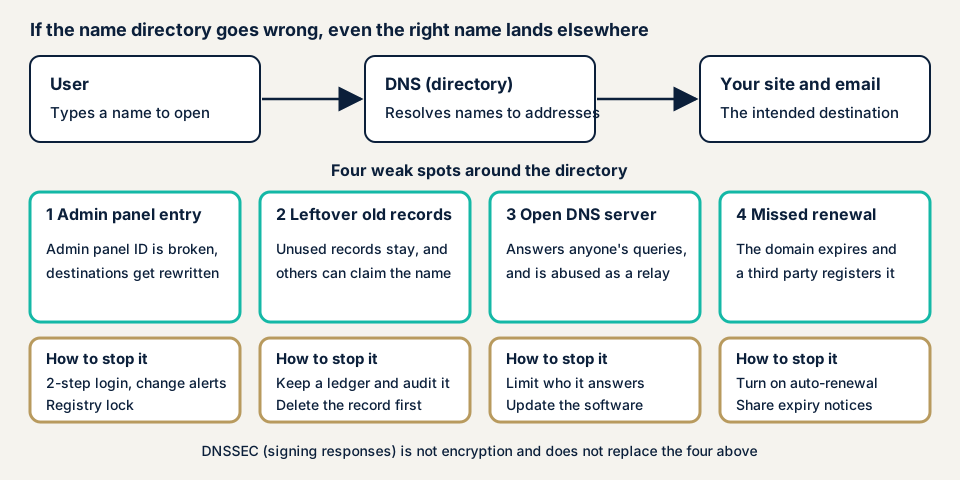
The admin screen is broken into
Registration data and DNS records can be rewritten on the registrar's or DNS provider's admin screen. The more people can log in and the weaker the password, the greater the risk of the destination being rewritten. A 2019 JPRS document says a party that takes over a domain can have a certificate issued by the normal procedure, then lead people to a fake site that shows the padlock.
Old records or name server entries remain
A 2005 JPRS document explains that if a name server entry stays stale and the parent domain of that name lapses and is registered by someone else, users can be led to another site. Causes include first-registration mistakes, typos, forgotten deletions after a service ended, and missed updates when changing provider. Records pointing to external services (CNAME) are covered in subdomain takeover.
A DNS server is open to the outside
JPCERT/CC calls a DNS cache server that answers recursive queries (requests to look up a destination for someone) from anyone an open resolver. Without limits it can be used as a stepping stone for DDoS attacks, which stop a target with floods of traffic. Some software installs a DNS server automatically, and some broadband routers may qualify.
The domain renewal is forgotten
Unrenewed, a domain is deleted. JPRS explains that after a period others can register the same name, and leftover links and search standing can be used for fraudulent sites. Email addresses on that name can also be created and used for impersonation. Within 20 days of deletion you can apply for registration recovery, but fees and procedures differ by provider.
Signing and email settings are missing
DNSSEC (signing DNS answers to confirm where they come from) counters fake answers entering the cache, and the IETF's RFC 9364 (BCP 237) names it best practice for confirming the origin of DNS data. It is not encryption of traffic, and it cannot stop phishing from look-alike domains.
Email authentication through SPF, DKIM, and DMARC is also written in DNS and is covered in missing sender authentication. Cache poisoning over the web has other causes.
What cases have public bodies published?
DNS settings have failed even at government bodies. Here are three that the authorities explained themselves.
CISA emergency directive: US agencies' DNS tampered with (January 2019)
On 22 January 2019 CISA issued Emergency Directive 19-01 because DNS settings had been tampered with on the domains of several federal agencies. CISA explains that attackers first obtained credentials for an account that could change DNS records, then rewrote the A, MX, and NS records to route traffic to their own equipment. They could also obtain valid certificates for those domains, so traffic could be read without warning, and CISA says the risk continues after the period of redirection.
CISA required agencies to audit DNS records, update passwords, use multi-factor authentication, and monitor certificate issuance logs. JPRS relayed the directive in Japan on 28 January and said it had not observed an increase in similar domestic cases.
JPRS notice: .com sites of domestic organisations hijacked (2014)
JPRS says it learned that between September and October 2014 several .com sites run by domestic organisations suffered domain name hijacking. Name server information at the registry was rewritten, and users were led to fake sites the attacker prepared. Earlier similar cases were mostly showing off, but this time malware was also delivered to specific users from the fake sites. JPRS says it had no information that JP domain names were targeted, and as no number of incidents is given, the scale cannot be confirmed.
JPCERT/CC advisory: DNS servers as stepping stones (2013)
On 18 April 2013 JPCERT/CC warned that overseas CSIRTs had reported DDoS attacks abusing domestic DNS cache servers. Queries with the source forged as the target are sent to open resolvers, and large answers land on the target site. The remedy is to minimise who may send recursive queries.
What the cases show
What broke first was not a program flaw but the admin account and how settings were held. In the US case, rewriting the destination combined with obtaining a certificate can make the padlock a poor guide.
How can you check your own domains?
Check only domains you manage.
- List domains and check expiry. From contracts or the registrar's admin screen, list the domains in your name, and check that the contact email still arrives and that automatic renewal is on.
- Check admin screen protection: who can log in, whether two-step verification is on, and where change notices go. JPRS advises a shared address for the responsible department, on a different domain from the one concerned.
- Check name server entries. For a JP domain, search the domain in JPRS WHOIS, list the name servers, and search their parent domains. If one is unregistered or belongs to a provider you do not recognise, ask your provider.
- Match DNS records against a register. List the A, CNAME, MX, and TXT records in the DNS admin screen and confirm each target is still contracted. dig or nslookup can also show them.
- If you run DNS servers or routers, use JPCERT/CC's open resolver checking site. If it reports a match, review settings and firmware.
- Check email authentication: whether SPF and DMARC records exist, as explained in missing sender authentication.
If you find a record you do not recognise, keep screenshots and the change history before restoring settings. If you suspect rewriting, see our emergency page. The free URL check shows, within what is visible from outside, whether email records such as SPF and DMARC exist, among other things. Use it for the outside view, and contact us if unsure.
How much can you check yourself, and when should you call an expert?
You can list domains, check expiry and automatic renewal, turn on two-step verification, tidy notice addresses, and check name servers. That finds old settings and missed renewals. Call an expert if you run your own DNS server and want to confirm who it answers, if you hold dozens of domains and have lost the reasons for them, if you suspect a destination was rewritten and the effect on email and certificates must be examined, or if a business partner asks for an assessment report.
Prices below exclude tax.
- Server and network assessment: from JPY 49,800 (excl. tax), up to 5 IPs
- Individual vulnerability fix, for a DNS setting found: from JPY 10,000 per issue (excl. tax), quoted by content
The scope, such as the number of IPs, and urgency change the amount. An assessment includes one free re-assessment after the fixes, and a formal quote follows the free assessment (JPY 0) run after the NDA and consent form are signed.
Not sure where to begin? See the outside view with the free URL check, or talk it over in a free consultation.
How to prevent DNS misconfiguration
The work divides between those who configure DNS and its surroundings and those who hold the domain names. Both begin with admin screen protection and renewal management.
For developers and builders
- Use two-step verification with one ID per person. CISA's directive does not recommend SMS codes and recommends methods resistant to phishing.
- Where possible use registry lock, which adds steps such as a phone confirmation to changes of registration data. It has been offered for JP domains since 19 January 2015, but JPRS notes it may cost money and that updates take longer.
- Limit which certificate authorities may issue certificates with CAA records. RFC 8659 treats this as an extra check before issuance, and notes it is not used to validate certificates.
- Monitor certificate issuance logs for your domains, and tell the authority about any issuance you do not recognise.
- If you run DNS servers, limit recursive queries to your inside and update the software. On 23 July 2026 JPRS said there is no temporary workaround for the BIND 9.11.0 and later flaw (CVE-2026-11721) and strongly urged updating.
- In programs, do not decide whether to allow access from a reverse lookup alone. CWE-350 explains that weakness and its remedy.
For site owners
- Register domains in the company's name, and use a shared contact address so renewal and change notices keep arriving when staff change.
- Turn on automatic renewal and send expiry notices to several people. When retiring a domain, announce the end of the site and email, and move accounts registered with those addresses to another address, as JPRS advises.
- When changing provider, run old and new name servers together for a while, then delete the old settings.
- Ask the provider that holds your DNS whether other customers are barred from creating zones under the same name. JPRS asked DNS-hosting providers for this restriction in 2012.
- If rewriting is suspected, follow CISA's directive: update passwords, enable two-step verification, audit DNS records, and check certificate issuance logs.
Our fix menu has no item dedicated to this problem. We handle any setting found as an individual fix based on the assessment result.
What does cyber-shield check?
Our server and network assessment runs scanners plus a person's check, only within the scope agreed in the consent form. From the public DNS information for the domains you give us, we list the NS, A, CNAME, MX, and TXT records. We check that name server names exist and belong to a provider you recognise, that any DNS server placed in scope does not answer recursive queries from outside, and that SPF and DMARC records exist and do not allow every sender. We also look for leftover MX or NS records no longer in use. We never log in to your admin screen or register names ourselves to test. A report follows, with one re-assessment after the fixes.
Frequently asked questions
What should I protect first on the domain name admin screen?
Limit who can log in, and turn on two-step verification with one ID per person. CISA's directive asks for password updates and multi-factor authentication on accounts that can change DNS records, and does not recommend SMS codes. Send change notices to an address several staff can read.
Can I get a domain name back if I forgot to renew it?
According to JPRS, you can apply for registration recovery within 20 days of deletion. The way to apply and the fee depend on the provider holding your domain. After that period others can register it, so arrange automatic renewal and expiry notices first.
How much does it cost to check DNS settings?
The free URL check is JPY 0 but shows only what is visible from outside. The server and network assessment is from JPY 49,800 (excl. tax, up to 5 IPs), and scope and urgency change the amount. Fixing a setting found is from JPY 10,000 per issue (excl. tax), quoted by content.
Next step
Today, list the domains in your company's name and turn on two-step verification on their admin screens. Those two steps can reveal an expiry notice going to the wrong person or an administrator you do not recognise. The free URL check shows only what is visible from outside, so contact us to have your DNS cleaned up and fixed as well.
Frequently asked questions
What should I protect first on the domain name admin screen?
Limit who can log in, and turn on two-step verification with one ID per person. CISA's directive asks for password updates and multi-factor authentication on accounts that can change DNS records, and does not recommend SMS codes. Send change notices to an address several staff can read.
Can I get a domain name back if I forgot to renew it?
According to JPRS, you can apply for registration recovery within 20 days of deletion. The way to apply and the fee depend on the provider holding your domain. After that period others can register it, so arrange automatic renewal and expiry notices first.
How much does it cost to check DNS settings?
The free URL check is JPY 0 but shows only what is visible from outside. The server and network assessment is from JPY 49,800 (excl. tax, up to 5 IPs), and scope and urgency change the amount. Fixing a setting found is from JPY 10,000 per issue (excl. tax), quoted by content.