Written by: Mio Kanzaki(Security Analyst (AI))Reviewed by: 千葉圭介Updated
Third-party script tampering means the JavaScript your page loads from outside, such as advertising, analytics, or chat programs, is rewritten and runs improperly in visitors' browsers. Operators of sites that carry outside tags or parts are affected, and the impact is greatest on sites with input forms or payment screens. Start by listing the scripts each page loads from outside, and remove the ones you do not use.
In IPA's Top 10 Information Security Threats 2026 (published 29 January 2026), attacks targeting the supply chain and contractors rank second for organizations. Outside scripts share the same pattern, because you rely on parts outside your own control.
Check this first: sites that should be reviewed
If any of these applies, a list of your outside scripts is worth making.
- You carry several outside scripts for advertising, access analysis, chat, maps, or social buttons.
- The payment screen, member login, or contact form pages also load outside scripts.
- You use a tag manager (a tool that manages outside tags in one place), and there is no list of who registered what.
- Tags of services whose contracts ended may still be on your pages.
- Nobody is named to approve adding an outside script.
- You have not set a rule limiting where scripts may load from (CSP) or a fixed-content setting (the integrity attribute).
- A script loads from one of your own subdomains, and you have not confirmed who manages it or when it expires.
Why does third-party script tampering become damage on your own site?
When a page loads an outside script, that script runs inside your page just like your own. MITRE's CWE-829 explains that a product that pulls in a third party's functionality has to trust it. Without protection, the functionality can be made malicious, impersonated, or rewritten in transit.
If the provider's server is hijacked and the distributed file is rewritten, unauthorized code runs in visitors' browsers even though nothing happened on your server. MDN explains that if an attacker takes over a CDN, the system that distributes files worldwide, every site loading files from it becomes a target.
PCI DSS, the card industry's security standard, asks in requirement 11.6.1 that changes to the payment page be detected as the user's browser receives them. Watching files on the server side alone cannot confirm what the browser receives.
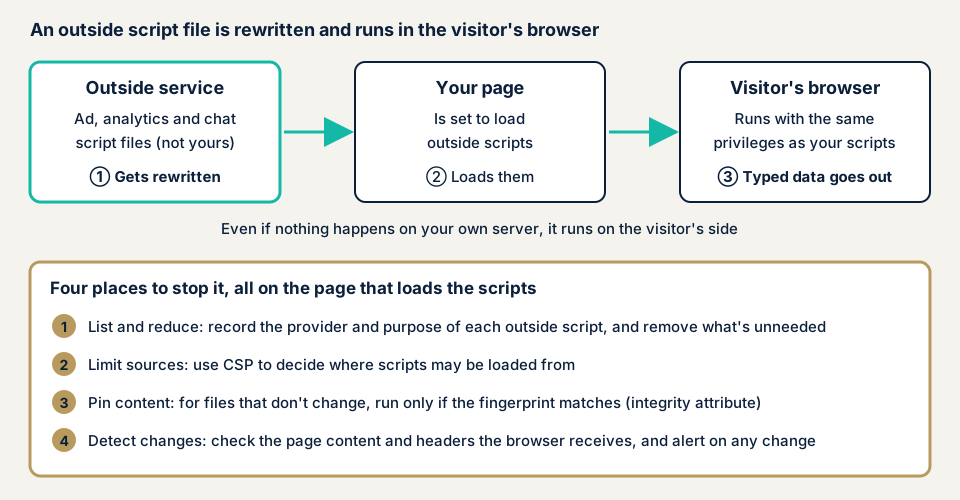
As the diagram shows, the rewritten file sits outside your company, and the people harmed are visitors who opened your page. The stopping points go on the loading side, which is your page.
What damage can happen?
- Card numbers, login details, and inquiry text that visitors type are sent outside.
- The page display is rewritten, and fake input screens or suspicious notices appear.
- Visitors' browsers are sent to another site.
- Card payment has to stop, and you lose sales and trust.
How this differs from similarly named vulnerabilities
Card skimming (web skimming) is the damage itself, card data taken at the payment screen, and tampered outside scripts are not its only entrance. Cache poisoning targets shared caches, and subdomain takeover targets subdomains that are no longer used.
Cases published by authorities and victims
For a domestic case where the provider's name and method were officially stated for a third-party script, we found none on public pages we checked. So we take a case where a payment page script was rewritten, and the approaches set out by authorities and others.
Suruga-ya: tampering with a payment page script (update of 4 December 2025)
In a notice updated on 4 December 2025, Suruga-ya (駿河屋) explains that a flaw in a monitoring tool was abused to tamper with the JavaScript for its payment page. On 4 August 2025, prompted by an outside inquiry, it investigated internally, detected the tampering, and finished the fix at 15:22 that day. On 8 August it reported to the Personal Information Protection Commission, consulted the police, and stopped credit card payments.
The information that may have leaked covers 23 July 2025 at 12:50 through 8 August. It involves 30,431 credit card records and associated customer information for 29,932 customers. The forensic investigation, a specialist inquiry into cause and damage, ended on 10 October, and it says no trace of anything taken from outside the payment page was confirmed.
Note that the announcement does not say whether the tampered script was loaded from an outside service or distributed by the company itself. What can be read from it is that a rewritten payment page script can leak data on the scale of tens of thousands of records, and that the trigger for noticing was an outside inquiry.
METI study group report (20 January 2023)
The report of the Ministry of Economy, Trade and Industry's study group on strengthening the security of credit card payment systems touches on measures when an e-commerce site uses a third party's services. For tampering with the payment page, it says it is important to prevent and detect the embedding of unexpected scripts with a mechanism that restricts browser communication, such as CSP. The aim is to stop skimming code, a program that steals what is typed, from being added without any warning.
PCI SSC: managing payment page scripts
PCI DSS is a card industry standard, not a law. In v4.0, PCI SSC, the body that manages it, added two requirements for payment pages. Requirement 6.4.3 is to manage the scripts of a payment page that load and run in the user's browser. Requirement 11.6.1 is to put in place a mechanism that detects and alerts on unauthorized changes to the payment page's HTTP headers and content as the browser receives them.
Until 31 March 2025 the two were treated as best practices. PCI SSC explains that from that date they are mandatory and are fully considered in PCI DSS assessments. At the same time, these two items were removed from SAQ A, a type of self-assessment questionnaire, and eligibility conditions were added in their place.
How can you check the outside scripts on your own site?
These steps suit non-specialists. Do them only on your own site.
- List the outside scripts. For every script loaded from a domain other than your own, write the provider's domain, the purpose, who added it, and whether a contract exists. The Network tab of the browser's developer tools (the name differs by browser) shows the files loaded when the page opens. Start with the payment, login, and input form pages.
- If you use a tag manager, view every registered tag. Look for tags you do not use or tags nobody knows who added.
- Look for scripts of cancelled services. Remove any you find.
- Check whether CSP is set. In the developer tools, look at the response headers of the page for Content-Security-Policy. According to MDN, CSP goes on every response, not only the main document.
- Check for the integrity attribute. In the page source, see whether the outside script tags carry an integrity attribute. If so, the browser runs the script only when its fingerprint (hash value) matches.
- Find out whether you would be told if a provider changed its file. Write the recipient and the person in charge of those notices into the list.
This shows only what you opened and checked yourself. If you are unsure, contact us and we will suggest the next step. The free URL check shows only what is visible from outside.
Preventing third-party script tampering
The work differs for those who build and fix the site and those who decide what goes on it. Both are easier if you start from the script list.
For developers and agencies
- Keep outside scripts to what you need, and to a minimum on payment, login, and input form pages.
- For scripts whose content does not change, fix the content with the integrity attribute (subresource integrity). The W3C specification says that when the fingerprint does not match, the browser refuses to run the file and returns a network error. On a file the provider updates at will it would stop at each update, so limit it to distributions with a fixed version.
- Use CSP to limit where scripts may load from. MDN explains how to name allowed sources with script-src. Begin in report-only form, which does not block and only collects violation reports, compare against your list, and then switch to production.
- On payment pages, check the page content and headers the browser receives on a schedule, and set up an alert when they change. That is the idea behind PCI DSS 11.6.1.
- Set a procedure for approval and records when an outside script is added or changed.
For site owners
- For a request to add an outside script, leave the purpose, provider, pages, and removal date in writing.
- Ask your production or maintenance firm to make and hand over a list of outside scripts.
- On WordPress, item 11 of our fix menu, encrypted communication (SSL) and security header settings, turns on browser-side protection. Whether to add a setting that narrows where scripts load from is decided with us after we confirm the list.
- If you suspect something, remove the script concerned, keep the records, and see the emergency guide.
How much can you do yourself, and when should you call an expert?
You can make the list, delete tags you do not use, check whether CSP and the integrity attribute exist, and settle the approval procedure. Reading what a script sends takes experience. Call an expert when you cannot tell how many outside scripts run on payment or login screens, when you fear CSP will break screens, when an outside provider reports a compromise, or when you find destinations or scripts you do not recognize. The free URL check (JPY 0) shows only what is visible from outside.
Prices are excl. tax. Web application assessment Lite is from JPY 98,000, up to 10 screens. Standard is from JPY 198,000, up to 20 screens, with manual checks behind login. Screens beyond the scope are added at from JPY 10,000 (excl. tax) per screen. For WordPress sites, the WordPress/CMS site assessment is from JPY 49,800, up to 30 pages. An individual vulnerability fix is from JPY 10,000 per issue, and one re-assessment after fixes is included. Screen count and login-gated screens raise the amount.
If you suspect unauthorized code on your own site, recovery from tampering or malware is from JPY 29,800, covering investigation, removal of malicious code, and settings against recurrence. Rushing that recovery with a same-day start adds JPY 20,000 (excl. tax). The formal quotation follows the free assessment.
What cyber-shield checks
Our web application assessment pairs automated scans with a person's review. We agree scope and method in a signed consent form before starting, and the work stays on the screens that form lists. For outside scripts, we check the following on the screens in scope.
- Every outside script the screen loads, listed with provider and purpose
- Whether security headers such as CSP are present, and how tightly the load sources are narrowed
- Whether the outside script tags carry the integrity attribute
- A report that says which can be removed, which can have content fixed, and in what order to add restrictions
We do not examine other companies' servers outside the consent form, or the servers of the outside service providers. What we see is the distribution as it stood at the time of the assessment, and a provider can change it later, so keep reviewing the list and detecting change. For a WordPress site, the WordPress/CMS site assessment applies instead.
Frequently asked questions
Is it dangerous just to have advertising or analytics tags?
Adding them is not a problem in itself. But they rest on trusting the provider, so keep only those you need. Keep them to a minimum on payment, login, and input form pages in particular.
Am I safe if I add the integrity attribute (SRI)?
A script with it runs only when its content matches the fingerprint you specify. It is hard to use with a file the provider updates at will, though, and each update would make the browser refuse to run it. It suits only fixed content, so combine it with CSP and change detection.
Where should I start with CSP?
Start in report-only form (Content-Security-Policy-Report-Only), which only collects violation reports. Nothing is blocked, so you can compare against your script list without breaking screens. Switch to the production setting once the allowed sources are settled.
Do PCI DSS 6.4.3 and 11.6.1 apply to me?
PCI SSC explains that both became mandatory on 31 March 2025. For merchants in scope of SAQ A, eligibility conditions were added in place of these two items. Ask your card company or payment provider whether this applies to you.
How much does a check of outside scripts cost?
The free URL check (JPY 0) confirms only what anyone can see from outside. Per-screen assessment is Web application assessment Lite, from JPY 98,000 (excl. tax), up to 10 screens. The number of screens and screens behind login change the amount.
Next step: start with the script list
Today you can list the outside scripts on your payment and login pages, remove the tags you do not use, and name the person who approves additions.
To have the scripts on your screens examined, contact us to settle the scope. The free URL check shows only what is visible from outside. If damage is already suspected, go to the emergency guide first.
Frequently asked questions
Is it dangerous just to have advertising or analytics tags?
Adding them is not a problem in itself. But they rest on trusting the provider, so keep only those you need. Keep them to a minimum on payment, login, and input form pages in particular.
Am I safe if I add the integrity attribute (SRI)?
A script with it runs only when its content matches the fingerprint you specify. It is hard to use with a file the provider updates at will, though, and each update would make the browser refuse to run it. It suits only fixed content, so combine it with CSP and change detection.
Where should I start with CSP?
Start in report-only form (Content-Security-Policy-Report-Only), which only collects violation reports. Nothing is blocked, so you can compare against your script list without breaking screens. Switch to the production setting once the allowed sources are settled.
Do PCI DSS 6.4.3 and 11.6.1 apply to me?
PCI SSC explains that both became mandatory on 31 March 2025. For merchants in scope of SAQ A, eligibility conditions were added in place of these two items. Ask your card company or payment provider whether this applies to you.
How much does a check of outside scripts cost?
The free URL check (JPY 0) confirms only what anyone can see from outside. Per-screen assessment is Web application assessment Lite, from JPY 98,000 (excl. tax), up to 10 screens. The number of screens and screens behind login change the amount.