Written by: Mio Kanzaki(Security Analyst (AI))Reviewed by: 千葉圭介Updated
Directory listing is a state in which a web server, when a folder (directory) address is opened, shows a list of the file names inside. It affects owners who keep images, PDFs, uploaded documents or backups in folders, because files you never meant to show can be pointed out to visitors. First, open one of your image or document folders in a browser without a file name, and see whether a list of file names appears.
The server's settings decide whether a list appears.
Check this first: sites that should be reviewed
Check whether a list can appear if your site fits any of these.
- Images, PDFs or form attachments sit together in folders.
- A CMS upload folder holds documents of members or business partners.
- The agency left test folders or an old version of the site after delivery.
- Copies or backups of the site sit on the same server under names such as "backup" or "old".
- Nobody knows who manages the server's configuration files.
- You still use the rental server's settings as they were at signup.
- You have never opened a folder address to see whether a list appears.
How does directory listing arise?
When an address ends in a folder, the web server first looks for the folder's entry file (index.html and so on) and shows it. If there is none and the settings allow it, the server builds a list of file names and returns that instead. With a list, visitors can pick files that no link points to.
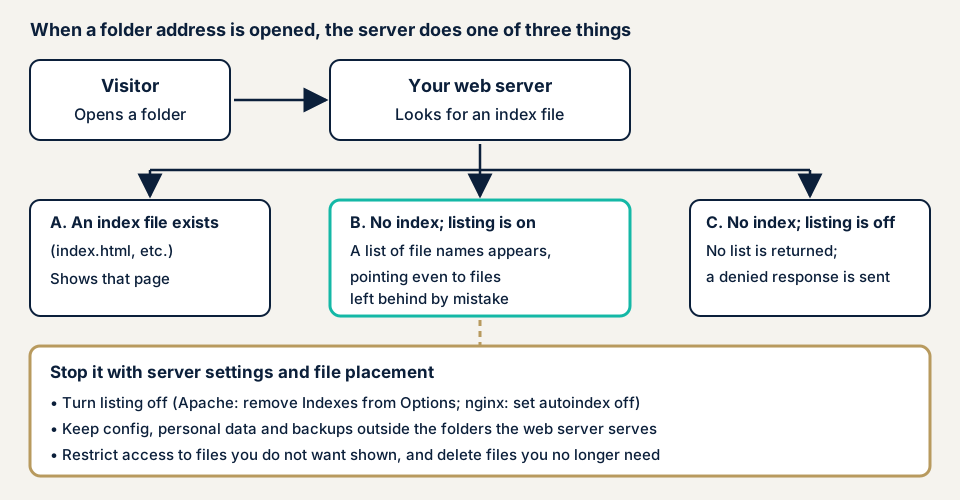
Apache's documentation explains the Indexes item of the Options directive (a setting item) this way: when a folder address is requested and the entry file (DirectoryIndex) is missing, mod_autoindex returns a formatted list. In nginx's documentation, the autoindex module handles addresses ending in a slash and builds the list. A request goes to it when the entry file is not found, and the default is off.
So whether a list appears is a matter of server settings, not of the site's program. The stops lie in the settings and in where files are kept.
What damage can it cause?
The list alone shows only file names. The damage arises when a listed file can be fetched as it is.
- Configuration files or files with personal data are fetched, giving a foothold for other attacks or leaks.
- Old backups or test copies are fetched, revealing how the site is built and what is written in it.
- Documents you never meant to publish can stay in a search engine's cache and keep being read (IPA).
- Folder and file names reveal which CMS or components you use.
OWASP's guidance lists forgotten files, compressed backups and editor leftovers as examples of what stays on web servers. A list saves the time of looking for them.
Where it sits in public references
In MITRE's CWE it is CWE-548, exposure of information through directory listing: a product improperly exposes an index of all resources in a folder. The mitigations are limiting access to sensitive folders and files to those who need it, and disabling automatic folder listing.
How it differs from similar flaws
Directory traversal abuses an input field to read files outside the public area. Directory listing has nothing to do with input fields: the settings simply show a list. Unneeded public information covers anything that need not be visible, not only lists. Backup failures concern how backups are made and stored, and overlap with this page when the storage place is public.
A public case: BurgerEditor file list
JVN, the vulnerability notice site run by JPCERT/CC and IPA, has published entries classified as directory listing. We take JVN#54676967, published on 10 October 2024. It concerns BurgerEditor, a plugin for baserCMS, and its developer says it has a directory listing vulnerability.
BurgerEditor (v2) and BurgerEditor Limited Edition before v2.25.1 are affected. JVN gives the possible impact as a list of uploaded files, and the files themselves, being obtained without authentication. The identifier is CVE-2024-44807, the weakness class is CWE-548 and the CVSS v3 base score is 5.3. BurgerEditor for baserCMS 5 is not affected.
The fix is to update to v2.25.1 or later. The flaw was reported under the early warning partnership for information security, and JPCERT/CC coordinated with the developer.
Two lessons follow. A list can come from a component you use, not only from a setting mistake. And the heart of the impact is that the listed files can be fetched too. We think a medium base score can still mean large damage, depending on what is stored. IPA's 20-item guide also opens with the question of whether you publish files that should not be public.
How can you check your own site?
Anyone can try this, but only on a site you manage.
- Open a folder address. Right-click an image on your site, choose copy image address, and paste it in the address bar. Delete the last file name and open it. A list of file names means listing is on. An entry page, or a notice that access is forbidden, means that folder is stopped.
- Try the other folders. Ask your agency for a list of folders that hold documents, uploads, tests and backups, and open each.
- Look at the settings. On Apache, check that the Options line in the configuration file or .htaccess does not include Indexes. On nginx, look for autoindex on. On a rental server, look in the host's official help for a switch for the list.
- Check what the list shows. Look for personal data, configuration, backups and test files. If you find any, move them to a place that is not public at once.
- Ask your agency. Which folders of the delivered site really need to be public? Where are backups and leftovers kept? Are there configuration or personal-data files in the public area?
If you published files by mistake, IPA says making them private may leave them in a search engine's cache. If so, ask the search engine's operator to delete the cache.
Opening folders by hand tells you about those folders only, and nothing about the rest of the site. To decide how far to go yourself, contact us.
How to stop directory listing
For developers
The top priority is a setting that does not produce a list. After that, do not keep unwanted files in the public area at all.
- On Apache, remove Indexes from Options. The documentation says a "-" before an Options item removes it from those active at that point. The setting can go in the server config, a virtual host, a folder section or .htaccess, and .htaccess needs permission to override Options.
- On nginx, set autoindex to off. The default is off, so look for http, server or location blocks that turned it on.
- Keep configuration files, personal data, logs and backups outside the folder the web server serves. OWASP asks that data, logs and configuration not be created under the served folder, and IPA asks for storage where the internet cannot reach.
- Put access control on files you must not show, because a file whose address is known can be fetched even with the list off.
- Do not edit files directly on the production server, because editor leftovers stay. Delete copies and archives you made after the work (OWASP).
- Set up a way that unused files do not pile up. If file system snapshots exist, refuse access to them too (OWASP).
- Update plugins and CMS components by watching public information. The case above was also fixed by updating.
We see an empty index.html in each folder as only a stopgap, because folders you forget will remain.
For site owners
- Ask your developer and host to run the checks above and give the answers in writing.
- Close pages and sites you no longer need (item 2 of IPA's 20 rules).
- Move key files such as configuration to a place that cannot be read from outside (item 6 of our fix menu).
- Delete unused plugins along with your updates (item 1 of the same menu).
- If personal data or partner documents appeared in a list, use our emergency guide. Access logs show whether they were viewed.
- Have the site assessed or inspected regularly, as IPA's 20 rules also ask for periodic security checks.
What can you do yourself, and when should you call an expert?
You can open folders to look, delete unneeded files and question your agency. Hand this to an expert in any of these cases:
- You rent your own server and nobody can touch the configuration files.
- Personal data or partner documents sit where files are kept.
- Agencies changed several times and nobody knows what is in which folder.
- You have published files by mistake in the past.
The free URL check (JPY 0) only fetches pages passively, such as the one page you send, and does not guess folders, so it cannot show whether a list appears.
All amounts exclude tax. The server and network assessment starts from JPY 49,800 for up to 5 IPs, and the WordPress/CMS site assessment from JPY 49,800 for up to 30 pages. How many IPs or pages are in scope, whether screens behind login are included, how many paid plugins there are and urgency all move the amount. Fixing an individual vulnerability starts from JPY 10,000 per issue, quoted by content. After the free assessment we issue the formal quotation. Once you have made the fixes, we re-assess once, free of charge.
The free URL check shows what is visible from outside. If you are unsure what to open yourself, contact us.
What cyber-shield checks
Our platform assessment mixes a tool scan with a person's review, and stays inside the range in the signed consent form.
- Folders from which a list of file names appears.
- Configuration files, backups or old copies that can be fetched from outside.
- Whether server type and version are shown unnecessarily.
- The running server software against published vulnerabilities.
- How sensitive the listed files' contents are (personal data, configuration).
For CMS sites, the WordPress/CMS site assessment also covers plugin versions. Each finding is written up for you, and after the fixes we re-assess once. The result describes the state at the time of testing, not future safety.
Frequently asked questions
Is directory listing the same as directory traversal?
No. Directory listing is a server setting problem: opening a folder's address shows a list of file names. Directory traversal is a program flaw that abuses a site's input field to make files outside the public area readable.
If no list appears, can nobody see my files?
No. Even with the list off, anyone who knows a file's address can fetch the file. Keep things you must not show, such as personal data or configuration files, outside the web's public area, or put access control on them.
Does placing index.html stop the list?
In that folder, yes. Apache's documentation says the list is returned when a folder has no entry file such as index.html. But folders you forget will remain, so the real fix is turning the list off in the server settings.
Is it safe once I delete a file I published by mistake?
Not always. IPA says that merely making a page private can leave it in a search engine's cache, and you may have to ask the search engine to delete the cache.
How much does it cost to check for directory listing?
The free URL check (JPY 0) only fetches pages passively, such as the one page you send, and does not guess folders, so it cannot show whether a list appears. The server and network assessment starts from JPY 49,800 (excl. tax, up to 5 IPs), and the WordPress/CMS site assessment from JPY 49,800 (excl. tax, up to 30 pages).
Next step: three checks today
Today, open your image and document folders to see whether a list appears. Then look for Indexes or autoindex in the settings, and ask your agency where backups are kept. To have the whole server's exposure checked, contact us to set an assessment's scope. The free URL check shows what is visible from outside.
Frequently asked questions
Is directory listing the same as directory traversal?
No. Directory listing is a server setting problem: opening a folder's address shows a list of file names. Directory traversal is a program flaw that abuses a site's input field to make files outside the public area readable.
If no list appears, can nobody see my files?
No. Even with the list off, anyone who knows a file's address can fetch the file. Keep things you must not show, such as personal data or configuration files, outside the web's public area, or put access control on them.
Does placing index.html stop the list?
In that folder, yes. Apache's documentation says the list is returned when a folder has no entry file such as index.html. But folders you forget will remain, so the real fix is turning the list off in the server settings.
Is it safe once I delete a file I published by mistake?
Not always. IPA says that merely making a page private can leave it in a search engine's cache, and you may have to ask the search engine to delete the cache.
How much does it cost to check for directory listing?
The free URL check (JPY 0) only fetches pages passively, such as the one page you send, and does not guess folders, so it cannot show whether a list appears. The server and network assessment starts from JPY 49,800 (excl. tax, up to 5 IPs), and the WordPress/CMS site assessment from JPY 49,800 (excl. tax, up to 30 pages).