Written by: Mio Kanzaki(Security Analyst (AI))Reviewed by: 千葉圭介Updated
Directory traversal (also called path traversal) is a flaw in which a value from outside decides which file on the server a site uses, so files never meant to be public can be read or written. Sites that load files to build pages, or offer downloads and uploads, are affected. Ask your agency whether any feature takes a file name from a URL or input field.
The page looks unchanged while files leave the server, so you tend to notice only after information has circulated.
Check this first: sites that should be reviewed
If any of these applies, check how file names are handled.
- A URL carries a value that looks like a file name, such as file, template, page, or path
- Downloads, image display, or report output work by passing a file name
- Page designs or per-language text are loaded from files
- A feature writes user input into a named server file
- Personal or configuration information sits in server files
- Custom features or long-unupdated plugins handle files
- Screens that handle files have never been assessed
IPA says any site that names a server file from an outside value is in scope, whatever the operator, and sites storing personal data in files need particular care.
What is directory traversal and how does it work?
A site opens files on its server, for example to load a design template or let someone download a document. If it takes the file name from a URL or form value and uses it as is, a visitor can name a file the author never expected. Folders form a hierarchy, and a name containing an instruction to go up a level can reach files outside the chosen folder. IPA warns that joining a name onto a fixed folder does not stop this.
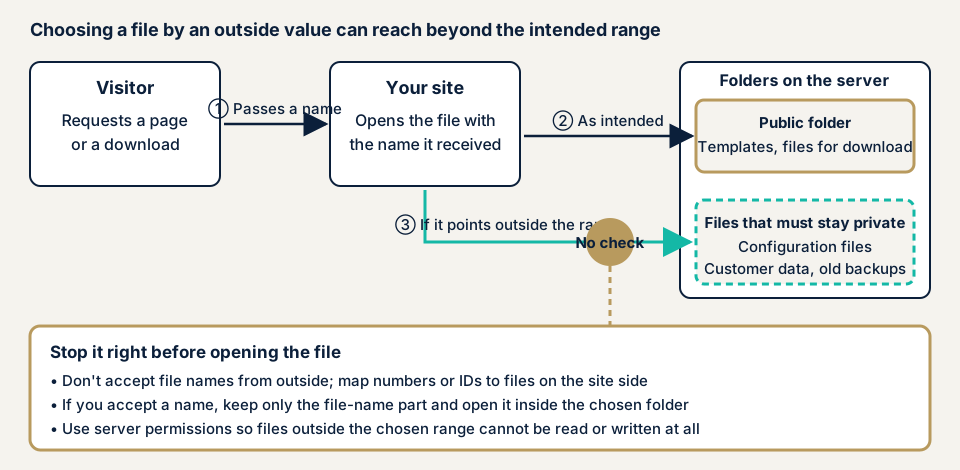
In step 2 of the diagram only the chosen folder is opened. In step 3 a name pointing outside gets through. The difference is whether the site checks, just before opening, that the file is in range.
What damage can it cause?
IPA and CWE list more than reading:
- Configuration files or customer data are read, and information leaks
- Configuration files, data files, or the programs themselves are tampered with or deleted
- A rewritten file used as a program makes unauthorised processing run
- Files break or vanish, and the site stops
Configuration files can hold database connection details. After a leak the operator must investigate, explain to users, and rebuild trust.
How is it different from similar flaws?
A file upload flaw concerns the received file or where it is stored. Directory traversal reads or rewrites files already on the server by naming them. Both defects in one feature spread damage more easily. Directory listing shows a folder's contents from outside, hinting at which files exist. Error screens that reveal file locations are covered under unnecessary public information.
A public case: Snow Monkey Forms, a WordPress plugin
On 27 June 2023 JVN, the disclosure site run by JPCERT/CC and IPA, published a directory traversal flaw in the WordPress plugin "Snow Monkey Forms". JVN says a remote third party may delete arbitrary files on the server, and JPCERT/CC's analysis expects files other than web content to be affected. It is classified CWE-22, with a CVSS v3 base score of 5.8 and CVE-2023-32623. JVN's remedy is updating to the latest version.
What this case shows: the damage was deletion, not reading, so a file-name flaw can cause data loss as well as leaks. A moderate score can still mean deleted files. And the fix was not finished at once: the first notice listed 5.1.0 and earlier, but a 14 July addendum said the fix was incomplete, released 5.1.2, and changed the affected range to 5.1.1 and earlier. After updating, confirm on the JVN page that your version is the fixed one.
IPA says this type is a few percent of website vulnerability reports, but reports have continued since it began accepting them. It names frameworks and virtualisation products, not only plugins, among fixed products.
How can you check your own site?
Check only sites you manage.
- Check pending updates. In the WordPress admin, open Dashboard, then Updates, and delete unused plugins.
- Compare plugins with public information. List each plugin and version, search JVN iPedia for directory traversal or CWE-22, match affected versions, and read any addendum.
- Ask your agency three questions. Does any screen take a file name or path from a URL or input field and read or write it? Are received names mapped to numbers or a prepared list? Is the web server's read and write access limited to needed folders?
- Look inside the public folder (such as public_html) in your file manager or FTP client. Check for files with database connection details, old backups, or customer lists. Consult your agency before moving any.
- Open a folder URL, such as an image folder, in a browser. A list of files means the settings need review.
If you are technical, read the access logs for rapid requests to one screen with a changing file-name value, or with instructions to go up a level, plain or encoded. If you find them, keep the logs and contact us.
These checks do not guarantee the whole site. Try altered input values only in a backed-up test environment, after the scope is agreed.
How to prevent directory traversal
For developers
The first priority is to redesign so that file names are not received from outside.
- Question whether naming a file from outside is needed. IPA cites templates named through a hidden form field, which can be rewritten to output unexpected files.
- Decide choices with a table mapping numbers or identifiers to allowed files. Receive only the number, never the name (CWE, OWASP).
- If you must receive a name, fix the folder and strip folder parts so only the file name is used. IPA recommends functions such as basename().
- Validate with an allowlist of permitted names, character types, and extensions, and stop on anything else, not a list of forbidden characters (CWE).
- Normalise the path (one fixed form) before validating. IPA asks you to mind the timing of URL decoding, since encoded forms can become valid.
- Give the server process minimum rights. Fences such as chroot, AppArmor, and SELinux can help (CWE).
- Keep file locations and internal details off error screens, and prefer proven frameworks' standard features to home-made code (CWE).
For site owners
- Update the core, plugins, and themes, delete unused plugins (item 1 of our fix menu), and confirm the fixed version afterwards.
- Move configuration files out of outside reach and review permissions (item 6). Keep old backups and customer data out of the public folder, and turn off folder listing.
- A WAF (a filter that stops suspicious traffic at the entrance) buys time but does not replace fixing the code.
- Ask your agency to review the delivered code, with a list of screens that open files.
What can you do yourself, and when should you call an expert?
You can update, delete unused plugins, tidy the public folder, and question your agency. Call an expert for custom download or template-loading features, personal data kept in server files, and file-handling screens never assessed. The free URL check (JPY 0) reads only what is visible from outside, not file-name handling.
- WordPress/CMS site assessment: from JPY 49,800 (excl. tax), up to 30 pages
- Web application assessment, Lite: from JPY 98,000 (excl. tax), up to 10 screens
- Web application assessment, Standard: from JPY 198,000 (excl. tax), up to 20 screens, with manual checks behind login
- Individual vulnerability fix: from JPY 10,000 per issue (excl. tax)
Assessments cost more when there are more screens, when login-protected screens are included, or when you run many paid plugins. Urgency adds to the price. We re-assess once after fixes at no extra charge, and a formal quotation follows the free assessment.
Wondering whether any screen of yours opens files by name? Contact us. The free URL check shows only what is visible from outside.
What cyber-shield checks
Our web application assessment combines tool scans with checks by a person, within a scope agreed first in a signed consent form. We check:
- Screens and requests that receive file names or paths, and whether they reach files outside the chosen range
- How downloads, image display, report output, and template loading are built
- Where uploaded files are stored, and how stored names are decided
- Configuration files, backups, or customer data in the public folder
- Folder listing, and what error screens reveal
- Plugin versions against published vulnerabilities
You receive a written report, and we re-assess once after the fixes.
Frequently asked questions
Are directory traversal and path traversal the same thing?
Yes, two names for one flaw. IPA says "unchecked path name parameters / directory traversal" and MITRE's CWE-22 says "Path Traversal". In both, an outside value decides a file's location, so files outside the intended area can be reached.
Does a WAF stop directory traversal?
Not completely. CWE treats an application firewall (a filter that inspects traffic, like a WAF) as a supplementary defence. The root fix is to stop choosing files by names received from outside.
If I restrict file permissions, do I still need to fix the code?
Yes. IPA calls permission management an insurance measure. Permissions narrow what the site can reach but cannot protect what is inside folders the site may read and write. Do both.
What should I do if a WordPress plugin is affected?
Update to the developer's latest version, read any addendum on the JVN page, and confirm your version is the fixed one. Delete unused plugins. If information may have leaked, keep the logs and contact us.
How much does a directory traversal check cost?
The free URL check (JPY 0) reads only what is visible from outside, so it cannot find flaws on individual screens. The WordPress/CMS site assessment is from JPY 49,800 (excl. tax), up to 30 pages. The Lite web application assessment is from JPY 98,000 (excl. tax), up to 10 screens.
Next step: three checks you can do today
Check pending updates, look inside the public folder, and put the three questions to your agency. Use the free URL check to see what is visible from outside, then contact us to agree an assessment scope for file-handling screens.
Frequently asked questions
Are directory traversal and path traversal the same thing?
Yes, two names for one flaw. IPA says "unchecked path name parameters / directory traversal" and MITRE's CWE-22 says "Path Traversal". In both, an outside value decides a file's location, so files outside the intended area can be reached.
Does a WAF stop directory traversal?
Not completely. CWE treats an application firewall (a filter that inspects traffic, like a WAF) as a supplementary defence. The root fix is to stop choosing files by names received from outside.
If I restrict file permissions, do I still need to fix the code?
Yes. IPA calls permission management an insurance measure. Permissions narrow what the site can reach but cannot protect what is inside folders the site may read and write. Do both.
What should I do if a WordPress plugin is affected?
Update to the developer's latest version, read any addendum on the JVN page, and confirm your version is the fixed one. Delete unused plugins. If information may have leaked, keep the logs and contact us.
How much does a directory traversal check cost?
The free URL check (JPY 0) reads only what is visible from outside, so it cannot find flaws on individual screens. The WordPress/CMS site assessment is from JPY 49,800 (excl. tax), up to 30 pages. The Lite web application assessment is from JPY 98,000 (excl. tax), up to 10 screens.