Written by: Mio Kanzaki(Security Analyst (AI))Reviewed by: 千葉圭介Updated
An open redirect is a flaw in which a site's redirect feature accepts an outside destination chosen by the visitor without checking it. It affects sites with a return-to-page setting after login or a relay page to outside sites, and the victims are users who trust the link. Ask your developer whether any redirect lets the destination be set from outside.
The flaw does not take your data directly. Its main use is phishing (a scam that leads people to a fake screen to type in their details) that starts from a link on your genuine domain.
Check this first: sites that should be reviewed
If any of these applies, check how your redirects are built.
- After login, users return to their original page, passed in as a value.
- A relay page sends users to outside sites, or a redirect page counts clicks.
- Sign-up, password reset or payment completion screens move users on automatically.
- Newsletter or ad links pass through your domain.
- You use a home-made redirect or long-unupdated plugins.
- Nobody knows who built the part that decides the destination.
OWASP says the problem arises when user input is part of how the destination is decided. Redirects multiply unnoticed, in login, post-payment and relay pages, each built differently.
How does an open redirect work?
A site can move users to another page automatically, such as back to the original page after login. In some builds the destination comes from a value in the link, and if it is not checked, the site sends users wherever the link says. The link the user opened starts on your genuine domain, so they are less likely to notice the move to another site.
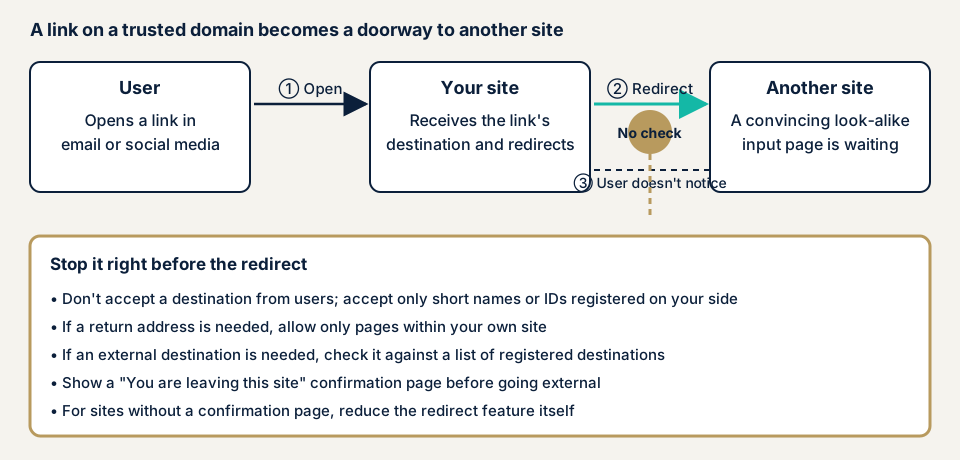
Step 2 in the diagram is the fork: run the redirect as is, or check first that the destination is allowed. OWASP's first advice is not to let users choose it. Mapping a short name or number to the real URL on the site's side is the strongest defence.
What damage can an open redirect cause?
OWASP and CWE name two main effects. The first is phishing: the link starts on a trusted domain, so users more easily believe a fake screen, and whatever they type there is in someone else's hands. The second is getting around access limits. OWASP says a similar flaw in forwards, which switch screens inside the site, could reach screens that need permission. CWE also mentions pages that host malware.
For owners, the harm happens outside your site. Your logs show only access to your genuine domain, and you may learn of it only when a user says your link led to a fake site.
How it differs from XSS and HTTP header injection
XSS slips another person's commands into your screen, while an open redirect swaps the destination. CWE says nonce defences (one-time check values) for redirects can be bypassed if XSS exists, so fix both. HTTP header injection slips outside values into the header part of the response, where the destination is set. For phishing as a whole, see the phishing page.
Two public cases from JVN in 2026
JVN, the vulnerability notice site run by JPCERT/CC and IPA, keeps publishing open redirects. Two from 2026 follow. Neither is WordPress, but the hole looks the same in any framework.
JVN#23669411 (5 March 2026) covers django-allauth, an authentication library for the Python web framework Django, before version 65.14.1. JVN says the issue arises when one form of single sign-on is enabled. That form starts from a SAML IdP (the side that manages login information). A crafted URL could send users to any outside site. The feature is off by default. The CVE is CVE-2026-27982 and the type is CWE-601. The CVSS v3.0 base score is 4.3.
JVN#46925341 (5 February 2026) covers the Python web framework web2py, version 2.27.1-stable+timestamp.2023.11.16.08.03.57 and earlier. The CVE is CVE-2026-25198 and the CVSS v3.0 base score is 4.7. JVN says it is an additional fix for an earlier notice (JVN#02158640).
In both, JVN's fix is to update to the developer's latest version. A low score does not mean there is no hole that sends users elsewhere. A login mechanism built for safety can miss the check. A part fixed once may need another fix.
How can you check your own site?
Work only on a site you manage.
- List your redirects. Write down screens that move automatically after login, sign-up, password reset, payment and form submission.
- Check pending updates. In WordPress, open Dashboard, then Updates, and delete unused plugins.
- Match against public information. Search JVN iPedia (a vulnerability countermeasure database) for your plugin names and versions with "open redirect".
- Ask your developer three questions. Is the destination taken from the user? If so, is it limited to your own screens or a registered list? Is there a confirmation screen before leaving for an outside site?
The browser's developer tools (network view) show which values decide a redirect after login. Do not test by rewriting destinations on a live site, even your own, since it can affect users' screens.
Redirects you did not spot are not covered, so a clean result is not proof the whole site is safe. Three things need screen-by-screen operation. One is whether every redirect goes through the check. Another is whether the registered list has gaps. The last is whether some redirect appears only after login or payment. Sites with many login-protected screens suit an expert.
How to prevent open redirects
For developers
The top priority is not to let users specify the destination.
- If a redirect is unnecessary, remove it. OWASP lists this as the first option.
- If you need one, keep a table of short names or numbers and real URLs on the site's side, and take only the short name from users.
- For the return page after login, allow only screens inside your own site, using the framework's standard function for refusing other sites if it has one.
- If outside destinations are needed, split the URL into parts and compare against a list of what is allowed (CWE). Matching only the start or end of the string leaves loopholes (OWASP).
- Before leaving, show a "you are leaving this site" screen with the destination for the user to confirm (OWASP, CWE).
- Check that the destination is not also taken from cookies or hidden form fields, which CWE says developers wrongly assume are safe.
In WordPress plugins or themes, use wp_safe_redirect() instead of wp_redirect(). WordPress's documentation says it checks that the destination belongs to your site and, if not allowed, returns to the admin screen. To reach an outside domain, add it to the allowed list.
For site owners
- Update the core, plugins and themes, and delete unused plugins (item 1 of our fix menu).
- Keep only the tracking links and relay pages on your domain that you need.
- Tell users not to log in from links in unfamiliar emails, since opening from a bookmark or official app reduces harm.
- A WAF (a filter that stops suspicious traffic at the entrance) is a backstop. CWE rates it moderate, as defence in depth or an emergency measure, so the destination check still has to be written.
- Ask your developer to review delivered code, attaching the redirect list from step 1.
When should you call an expert, and what does it cost?
Call an expert if you have a home-made or modified redirect, many screens behind login or payment, or links on your domain handed out widely by email or social media. The free URL check (JPY 0) looks only at what is visible from outside, so it cannot cover redirects behind login.
The WordPress/CMS site assessment starts from JPY 49,800 (excl. tax) for up to 30 pages. Web application assessment Lite starts from JPY 98,000 (excl. tax) for up to 10 screens, and Standard from JPY 198,000 (excl. tax) for up to 20 screens with manual checks behind login. Redirects after login or payment mean more screens to walk through, which raises the amount, as do paid plugins and urgency. Fixing an individual vulnerability starts from JPY 10,000 (excl. tax) per issue. The formal quotation is issued after the free assessment, and one re-assessment after fixes is included.
The free URL check looks only from outside. If you cannot tell whether login or payment screens redirect safely, contact us. If users may already have been sent to a fake site, use our emergency contact.
What cyber-shield checks
Our web application assessment combines a tool scan with checks by a person, and the tested range is limited to what the consent form lists.
- Every redirect before and after login, sign-up, payment and form submission.
- Whether the destination comes from the user, and how it is checked.
- Gaps or excess in how allowed destinations are written.
- Whether a confirmation screen appears before leaving for an outside site.
- Whether HTTP header injection or XSS affects redirect handling.
- Plugin and library versions with published flaws.
Findings come in a report.
Frequently asked questions
Can an open redirect be used to steal my site's data?
The flaw itself does not read data from your site. The harm is that visitors are sent to a look-alike screen and made to enter passwords. OWASP and CWE name the main effect as links from a trusted domain making phishing more convincing.
Is a plain link from my member page to an outside site dangerous?
A fixed link that an administrator chose is not the issue. The concern is a redirect whose destination the visitor can specify, such as a return page after login or a relay page to outside notices.
Does a WAF stop open redirects?
CWE lists application firewalls as defence in depth or an emergency measure, and rates their effectiveness as moderate. They are not decisive. The basic fix is not to accept a destination, or to accept only your own screens or a registered list.
How much does it cost to check for open redirects?
The free URL check (JPY 0) looks at what is visible from outside. Redirects behind login need an assessment such as Web application assessment Standard (from JPY 198,000, excl. tax, up to 20 screens). The WordPress/CMS site assessment starts from JPY 49,800 (excl. tax, up to 30 pages).
Next step: list your redirects
Today, list your redirects and put the three questions to whoever built them. After that, contact us to choose the screens to test, or look at your outside view with the free URL check.
Frequently asked questions
Can an open redirect be used to steal my site's data?
The flaw itself does not read data from your site. The harm is that visitors are sent to a look-alike screen and made to enter passwords. OWASP and CWE name the main effect as links from a trusted domain making phishing more convincing.
Is a plain link from my member page to an outside site dangerous?
A fixed link that an administrator chose is not the issue. The concern is a redirect whose destination the visitor can specify, such as a return page after login or a relay page to outside notices.
Does a WAF stop open redirects?
CWE lists application firewalls as defence in depth or an emergency measure, and rates their effectiveness as moderate. They are not decisive. The basic fix is not to accept a destination, or to accept only your own screens or a registered list.
How much does it cost to check for open redirects?
The free URL check (JPY 0) looks at what is visible from outside. Redirects behind login need an assessment such as Web application assessment Standard (from JPY 198,000, excl. tax, up to 20 screens). The WordPress/CMS site assessment starts from JPY 49,800 (excl. tax, up to 30 pages).