Written by: Mio Kanzaki(Security Analyst (AI))Reviewed by: 千葉圭介Updated
Phishing is a method of luring people to a fake site with emails or SMS that pose as real companies or agencies, and making them enter IDs, passwords, or card numbers that are then stolen. It concerns everyone who uses email or SMS. For a company, it brings two kinds of damage: employees' work accounts are stolen, and your own company name is used on fake sites. First, share a rule that nobody opens the link and everybody enters through the official site or app, and put authentication that does not rely on a password alone on important logins.
Check this first: companies that should review their phishing defenses
If any of these applies, a review is worthwhile. The more that apply, the sooner we recommend checking.
- Employees sometimes open email or SMS links and log in to services used for work.
- Online banking, securities, or cloud logins are protected by a password and a confirmation code only.
- Some employees may reuse the same password across several services.
- You send email from your own domain, but have never checked its SPF or DMARC settings.
- You have not decided how to respond when a caller who claims to be from a bank asks for an email address.
- You have not decided whom to tell when a suspicious email arrives.
- Customers have contacted you about fake emails or fake sites that use your company name.
How does phishing turn into damage?
According to the National Police Agency, phishing is a method of leading people, through links in email or SMS that pose as real organizations, to fake websites and illegally obtaining account information, credit card numbers, and the like. What is obtained is used for unauthorized remittance through online banking and for unauthorized use of credit cards.
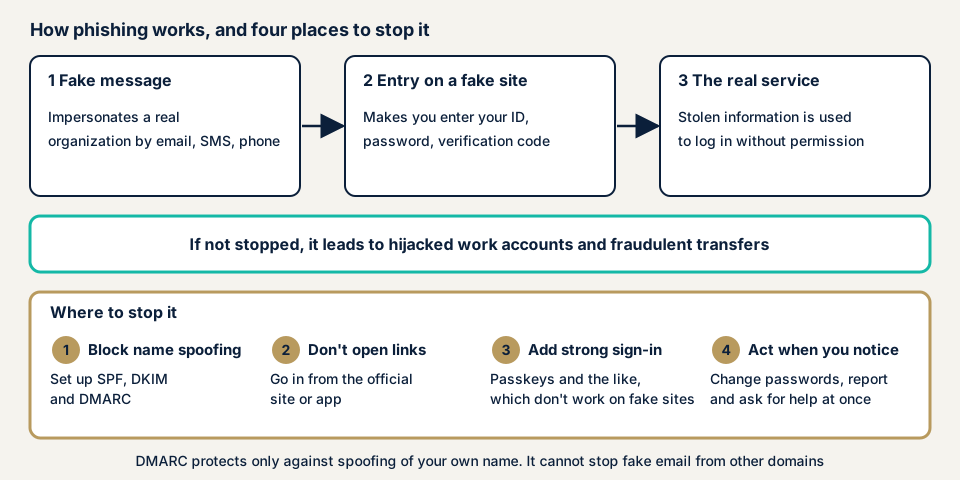
The flow is a fake message, entry on a fake site, and then unauthorized login to the real service. There are four places to stop it: preventing impersonation of your company name, recipients not opening links, putting phishing-resistant authentication on logins, and acting at once when you notice.
Methods are not limited to email and SMS
| Method | Flow | Main way to stop it |
|---|---|---|
| Email and SMS | Pose as orders, deliveries, payments, or identity checks and lead from a link to a fake site | Do not open the link, enter from the official site or app |
| Phone (voice phishing) | A caller claiming to be a bank gets an email address and then sends an email with a link | Call back the bank's official contact to confirm |
| Real-time | A confirmation code typed into a fake site is used on the real site on the spot | Authentication such as passkeys that does not work on fake sites |
| Lure to a fake app | An email posing as an app update or application makes people install a malicious app | Install from the official store, not from email links |
The Police Agency writes that a method that gets past two-step authentication through real-time phishing has been widespread since around 2019.
It is getting harder to tell
According to the Council of Anti-Phishing Japan's September 2026 report, many messages pose as orders, deliveries, payments, detection of unauthorized use, identity verification, or expiring points, and emails that look unnatural even to a person are conspicuous. Yet emails that mix in invisible characters to avoid filters while looking tidy on screen have also been confirmed. It adds that wording and brands are switched every few days.
The Police Agency's material for the first half of 2026 takes the view that, with advances in AI, text is more natural and impersonation more accurate, so phishing that is hard to spot has increased. CWE-451 in the CWE software weakness catalogue is the weakness where a screen fails to show the user important information correctly, and it is often an element of phishing. Those who build services also need to show senders and link destinations without misleading.
What statistics and cases have public bodies published?
All figures come from material published by the Police Agency, the FSA, and the Council of Anti-Phishing Japan. IPA's "Information Security 10 Major Threats 2026" also lists "theft of personal information by phishing" among threats to individuals.
It kept rising through 2025, and the first half of 2026 was lower than a year earlier
According to the Police Agency's 2025 material, reports of phishing to the Council totaled 2,454,297 in 2025. The Police Agency writes that the rise continues.
The material for the first half of 2026 puts the number of reports in the same period at about 730,000. That is lower than in the first half of the previous year.
In the Council's monthly report, reports for September 2026 were 94,661, up about 15.0% from the previous month. By sector, e-commerce was about 47.9%, credit and consumer finance about 35.0%, and government-related about 5.2%.
Unauthorized remittance: 4,747 cases and about JPY 10.397 billion in 2025
According to the Police Agency, unauthorized remittance through online banking in 2025 was 4,747 cases, with total damage of about JPY 10.397 billion, and phishing accounted for about 90% of the methods. The FSA's material gives 4,369 cases and about JPY 8.7 billion for the previous year, so damage rose.
Securities accounts: a surge from March to May 2025
The Police Agency writes that from March to May 2025, the sending of phishing emails posing as securities firms, unauthorized access to securities accounts, and unauthorized trades surged. According to the FSA and the Council, 2025 saw 17,668 cases of unauthorized access, 9,824 unauthorized trades, and about JPY 740.8 billion in unauthorized buying and selling.
Reports of phishing emails posing as securities firms were 316,414. In July 2025, the FSA asked the financial institutions it supervises to strengthen measures, including adopting multi-factor authentication that resists phishing.
Voice phishing: damage that starts with a phone call
The Police Agency writes that unauthorized remittance from corporate accounts surged from autumn 2024 to April 2025. A criminal group phones a company, poses as a procedure such as renewing online banking, gets an email address, and sends a phishing email.
No damage was seen from May to October, but it surged again in November, and many smaller regional financial institutions suffered damage too. The Police Agency's advice includes calling back a branch or main number to confirm when a bank phones you.
How can you check your own company?
You can check in the order below without specialist knowledge, using only your own accounts and the domain you manage.
- Write out the login method for each service used for work. For online banking, securities, cloud, accounting, and email, pick out those you can enter with a password alone.
- Check how strong each login is. In each service's settings, see whether it uses confirmation codes or phishing-resistant authentication such as passkeys. The Council's guidelines for businesses ask for passkeys, biometric authentication, and resistant one-time passwords.
- Check your email authentication. Send from an address on your domain to your own Gmail, open the email, and expand the arrow under the sender name. According to Gmail Help, an authenticated message shows the sending and signing domains, and an unauthenticated one shows a question mark. See also missing email authentication.
- Pick one suspicious email and inspect it. Look at the whole address, not the display name, and at wording that rushes you. Do not open the link. Open the official site from a search result or bookmark and see whether the same notice exists.
- Decide the reporting window. Decide whom in the company employees forward a suspicious email to. The Council's reporting page advises forwarding the email without clicking the link.
- Decide the steps for when you learn of a fake site with your name. Decide in advance how to report the URL to the Council, warn customers, and guide people who may have entered information.
If a point stays unclear, use the free URL check to see what is visible from outside, and contact us.
How far can you check yourself, and when should you call an expert?
You can write out login methods, strengthen authentication, build the reporting rule, and tell employees. Leave the following to an expert for greater certainty.
- You want to strengthen DMARC but fear legitimate email will stop.
- A fake site with your name was found, and you want to sort out how to notify customers and in what order. An early consultation helps.
- An employee may have typed in information, and you want to check whether it was used elsewhere.
- If your work accounts already show login records you do not recognize, use emergency consultation before an assessment.
Prices, all excl. tax. The server and network assessment is from JPY 49,800, up to 5 IPs, and checks your domain's email authentication and the login protection of admin screens and remote connections. Fixing the settings found is an individual vulnerability fix, from JPY 10,000 per issue, quoted by content.
The price rises mainly with the number of IP addresses, whether devices need login, and urgency. The formal quotation is based on the result of the free assessment (JPY 0) after we sign an NDA and an assessment consent form.
The free URL check is the easy way to see the outside view. If you cannot decide what to do next, contact us.
How to defend against phishing
The work splits between those who build services and email (developers and setup staff) and those who use them (owners). We organize it with reference to the five key items that the Council's fiscal 2026 guidelines list for businesses.
For developers and setup staff
- Let people choose phishing-resistant multi-factor authentication such as passkeys for login. The Council's guidelines explain that passkeys store the secret tied to the domain name, so genuine information is not sent to a fake site.
- Send email to users with no links, or in plain text. The guidelines point out that HTML makes it easier to disguise how a link looks.
- Set SPF, DKIM, and DMARC on your domain's email, starting DMARC at none and aiming for reject.
- If you send SMS, use a sending service that connects directly to Japanese mobile carriers, with a shared number, and announce the sender number beforehand.
- Provide a view of usage history, notices when assets are moved, and extra authentication for unusual logins. The guidelines list all of these.
- Fix redirect destinations so that your URL is not used to relay people to fake sites. See open redirect.
- Show important information such as the sender and the link destination on screen without misleading. This avoids the weakness CWE-451 points out.
For site owners (the using side)
- Share with everyone the rule not to open links and to enter through the official site or app. The Police Agency and the Council both give the same response.
- For important logins, use passkeys where possible, and add multi-factor authentication where that is hard. See missing multi-factor authentication.
- Do not reuse passwords, and use a manager. See also password reuse.
- When a bank or similar calls you, call back its official contact to confirm, and do not give your email address on the spot.
- If you notice you have typed something in, change that service's password at once, change other services that use the same password, and tell the person in charge in the company.
In our fix menu, item 3 (adding two-factor authentication) and item 12 (tidying administrator accounts and passwords) prepare you for stolen passwords. Login settings at financial institutions and other companies' clouds are for you to make on each service's settings screen.
What cyber-shield checks
Our server and network assessment (platform assessment) uses tool scans and checks by a person to examine the following, within a scope agreed first in an assessment consent form.
- For the domain you tell us, we check from public DNS whether SPF and DMARC exist, their policy, and the report destination.
- We check DKIM as far as you can tell us the key names.
- We see whether multi-factor authentication is on at the login of admin screens and remote connections.
- We check whether domains that do not use email have a reject setting.
An assessment measures settings, not whether employees will be fooled. Simulated phishing training and takedown of fake sites are outside the scope, and we do not send spoofed email to test. The report records the findings, and one re-assessment follows after you fix them.
Frequently asked questions
Can you tell a phishing email by its appearance?
Relying on appearance alone is dangerous. The Council's September 2026 report says emails that look unnatural even to a person are conspicuous, but it also confirmed emails that mix in invisible characters to avoid filters while looking tidy. The Police Agency's material for the first half of 2026 says advances in AI have made more of them hard to spot. Do not open the link, and enter through the official site or app.
Are we safe if we use one-time codes or two-step authentication?
Safer than without, but not enough. The Police Agency writes that a method that gets past two-step authentication through real-time phishing has been widespread since around 2019. In July 2025 the FSA asked financial institutions to adopt multi-factor authentication that resists phishing, and the Council's guidelines name passkeys and similar.
If we set DMARC on our domain, will our customers no longer meet phishing?
What it stops is impersonation that claims your domain. In the Council's September 2026 count, about 62.2% of cases came from a company's own domain without impersonation, and about 98.9% of those passed DMARC authentication. Mail that arrives under someone else's domain cannot be stopped by DMARC.
What should we do if an employee opened a link and typed something in?
Change the password of the service they typed into at once. Change other services that use the same password, and tell the person in charge in the company. If financial or card information was entered, contact each company's window. If login records show entries you do not recognize, contact us through the emergency page.
How much does checking phishing defenses cost?
The free URL check is JPY 0, but it checks only what anyone can see from outside. The server and network assessment is from JPY 49,800 (excl. tax), up to 5 IPs, and the price depends on the number of IP addresses, whether devices need login, and urgency. Fixing settings found is from JPY 10,000 per issue (excl. tax), quoted by content.
Next step: write out your logins and your forwarding address
Today, write out the login method of each service used for work, and decide where employees forward suspicious email. These two steps alone show important logins protected by a password only, and the lack of a reporting route.
To see what is visible from outside, use the free URL check. If you want to hand over a review of email authentication or login protection, contact us to agree the scope.
Frequently asked questions
Can you tell a phishing email by its appearance?
Relying on appearance alone is dangerous. The Council's September 2026 report says emails that look unnatural even to a person are conspicuous, but it also confirmed emails that mix in invisible characters to avoid filters while looking tidy. The Police Agency's material for the first half of 2026 says advances in AI have made more of them hard to spot. Do not open the link, and enter through the official site or app.
Are we safe if we use one-time codes or two-step authentication?
Safer than without, but not enough. The Police Agency writes that a method that gets past two-step authentication through real-time phishing has been widespread since around 2019. In July 2025 the FSA asked financial institutions to adopt multi-factor authentication that resists phishing, and the Council's guidelines name passkeys and similar.
If we set DMARC on our domain, will our customers no longer meet phishing?
What it stops is impersonation that claims your domain. In the Council's September 2026 count, about 62.2% of cases came from a company's own domain without impersonation, and about 98.9% of those passed DMARC authentication. Mail that arrives under someone else's domain cannot be stopped by DMARC.
What should we do if an employee opened a link and typed something in?
Change the password of the service they typed into at once. Change other services that use the same password, and tell the person in charge in the company. If financial or card information was entered, contact each company's window. If login records show entries you do not recognize, contact us through the emergency page.
How much does checking phishing defenses cost?
The free URL check is JPY 0, but it checks only what anyone can see from outside. The server and network assessment is from JPY 49,800 (excl. tax), up to 5 IPs, and the price depends on the number of IP addresses, whether devices need login, and urgency. Fixing settings found is from JPY 10,000 per issue (excl. tax), quoted by content.