Written by: Mio Kanzaki(Security Analyst (AI))Reviewed by: 千葉圭介Updated
Cross-site scripting (XSS) is a flaw in which a site prints values on a page without converting them, so a malicious script (a small program that runs on a page) executes in the visitor's browser. The people harmed are mostly those who open the page. Check where your site shows user input and how your cookies are set.
The facts here come from IPA (Japan's Information-technology Promotion Agency) and OWASP (a non-profit that researches web security). No attack strings are included. If you think a visitor has already been harmed, see our emergency guide.
Check this first: sites that should be reviewed
A site that matches any of these deserves a closer look.
- Visitors' comments or reviews are shown as written, or your search prints the search term back
- Confirmation or error screens display values the user entered
- You have member login, screens that take card details, or an admin list of contact form entries
- Plugins or themes have stopped receiving updates, or payment and member screens load external scripts for ads or analytics
IPA says any site can be a target. Sites that keep users logged in with cookies need particular care.
What is cross-site scripting? How it works, in everyday terms
Picture a station notice board where staff pin up visitors' notes without reading them. A note saying "anyone who reads this should follow these instructions" may be obeyed. A site that prints values unconverted is in the same position. The browser runs a script on the page as if the site provided it. OWASP classes XSS as a kind of injection.
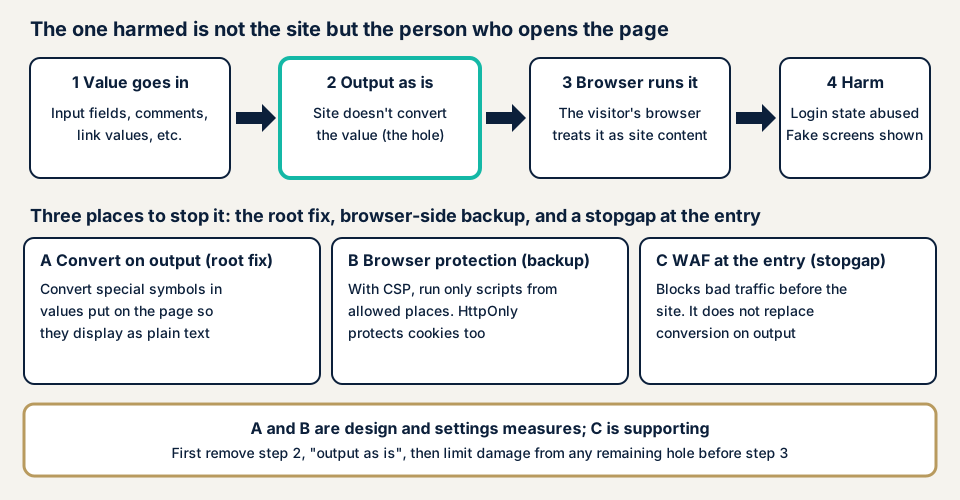
In the diagram, step 2 is where the flaw lies. Converting the value there prevents what follows.
Three types
OWASP divides XSS into reflected, stored, and DOM-based. Reflected XSS returns a supplied value within a single response, typically when someone opens a crafted link. Stored XSS saves the value on the server, so everyone who opens that page is affected, as with comment fields. DOM-based XSS arises when the site's own browser-side code handles a value carelessly.
What damage can it cause?
IPA names three threats. A fake page can be shown on top of the real site, which leads to phishing. Cookies can be stolen, and a stolen session ID (the token that marks you as logged in) allows impersonation. Arbitrary cookies can also be planted as a foothold for other attacks. OWASP says even read-only sites can be affected. Hijacked logins can combine with CSRF.
What do public statistics show?
The numbers below come straight from the original sources. IPA's "How to Create a Secure Website" says XSS made up about half of website reports cumulatively through Q4 2014. JVN iPedia, IPA's vulnerability database, registered 11,605 Japanese-language entries in Q1 2026. CWE-79, which covers XSS, accounted for 1,163, the most of any cause type. Most entries describe software products. In OWASP's Top 10:2021, XSS sits inside injection, which ranked third.
IPA names confirmation screens, search results, error displays, and comment fields as common places. The harm lands in the visitor's browser, so an owner who opens the page may notice nothing.
How can a site owner check for it?
Screens and browser tools can answer some questions. Please do not try attack strings on your live site, since that can stop it or corrupt data.
- List the screens that show user input, including the admin contact list. The list doubles as an assessment scope.
- On WordPress, open Plugins, then Installed Plugins, and look for update notices. Delete unused plugins and themes.
- In Google Chrome, right-click your page and choose Inspect. In the Network tab, reload and select the top item. Look under Response Headers for Content-Security-Policy. In the Application tab, open Cookies and check whether the login cookie is marked in the HttpOnly column. Without the mark, scripts can read it.
- Ask your agency whether printed values are converted in one shared component. Ask whether automatic conversion is switched off anywhere, and how visitor-entered HTML is neutralised.
Flaws on individual screens show up only in an assessment.
How to prevent cross-site scripting
For developers: convert values on output
IPA separates the root fix from supporting measures. The root fix is to convert (escape) each value for the place where it is printed. HTML body text, attribute values, URLs, and JavaScript have different rules.
- Convert special characters in HTML body text so they display as plain characters
- Wrap attribute values in double quotes and convert quotes inside the value
- Allow only http or https URLs for links and images
- Use the framework's automatic conversion, and keep raw-output escape hatches to a minimum
- Prefer commands that treat a value as text (such as textContent) over those that write HTML
Letting visitors enter HTML is the hardest case. IPA treats parsing the markup and keeping only allowed elements as the root fix. OWASP recommends a maintained sanitising library.
Some measures only reduce damage. Add the HttpOnly attribute to cookies so scripts cannot read them. Set a Content-Security-Policy, which OWASP calls an additional defence designed per application. Declare the character set in Content-Type. Treat input checks as a supplement. None of these prevents XSS alone.
For site owners: layer it through operations
Update WordPress, its plugins, and its themes. Remove external scripts you do not need. Set up detection for changes to payment and member screens, as described in website tampering measures. A WAF (a filter in front of the site) buys time, but it does not replace conversion on output.
What can you do yourself, and when should you call an expert?
You can check updates, cookie settings, and security headers yourself. Whether each printed value is converted correctly needs an assessment. All prices exclude tax, and "from" means the lowest price.
- Free URL check: JPY 0 (shows whether headers such as CSP exist, not flaws on individual screens)
- WordPress/CMS site assessment: from JPY 49,800 (excl. tax), up to 30 pages
- Web application assessment, Lite: from JPY 98,000 (excl. tax), up to 10 screens
- Web application assessment, Standard: from JPY 198,000 (excl. tax), up to 20 screens, with manual checks behind login
- Individual vulnerability fix: from JPY 10,000 per issue (excl. tax), quoted by content
- Recovery from tampering or malware: from JPY 29,800 (excl. tax), including investigation and removal of malicious code
Member sites may suit Standard, because XSS can occur behind login. The formal quotation comes after the free assessment.
To see where you stand, try the free URL check, which needs only your site's URL. If you are unsure whether an assessment is needed, contact us.
What cyber-shield checks
A tool scan covers the site broadly, and a person then checks the screens by hand. For XSS, we list every screen that prints user input, including admin lists and error displays. We test whether each printed value is converted, and we review CSP and HttpOnly. An NDA and a consent form are signed first. Risky checks run only in an agreed time window.
You receive a report, and we can make the fixes. One re-test after the fix is free. We test only with the owner's permission. A result describes the day of testing and is not a guarantee of future safety. Details are on the web application vulnerability assessment page.
Frequently asked questions
What is cross-site scripting (XSS), in one sentence?
A site prints input or externally supplied values on a page without converting them properly, so a malicious script runs in the visitor's browser. IPA says this can lead to fake pages being shown and cookies being stolen.
Who is harmed by XSS, the site owner or the visitor?
The direct harm falls on the visitor who opened the page. The owner still has to explain, investigate, and repair lost trust. The type or size of the site makes no difference.
Do CSP and a WAF stop XSS?
Both are supplements. OWASP treats CSP (a browser rule limiting where content may load from) as an additional defence only, and a WAF does not replace converting values on output. The root fix is converting each value for where it is printed.
How can I tell whether my site has an XSS flaw?
The free URL check shows whether security headers such as CSP are present, but not flaws on individual screens. An assessment finds those, using tools plus a person's review, after a signed consent. The Lite web application assessment starts from JPY 98,000 (excl. tax).
What should I do first if I find XSS damage?
Take the affected screen offline, and keep the server logs and the screen's state as they are. If login or card details are involved, consider asking users to change passwords and reporting to the authorities.
Next step: list the screens that show user input
Write down where your site prints what users entered, such as search results, confirmation screens, comments, and admin lists. That list can serve as the scope of an assessment. Then run the free URL check to see your security headers. If you need screen-by-screen checks, contact us.
Frequently asked questions
What is cross-site scripting (XSS), in one sentence?
A site prints input or externally supplied values on a page without converting them properly, so a malicious script runs in the visitor's browser. IPA says this can lead to fake pages being shown and cookies being stolen.
Who is harmed by XSS, the site owner or the visitor?
The direct harm falls on the visitor who opened the page. The owner still has to explain, investigate, and repair lost trust. The type or size of the site makes no difference.
Do CSP and a WAF stop XSS?
Both are supplements. OWASP treats CSP (a browser rule limiting where content may load from) as an additional defence only, and a WAF does not replace converting values on output. The root fix is converting each value for where it is printed.
How can I tell whether my site has an XSS flaw?
The free URL check shows whether security headers such as CSP are present, but not flaws on individual screens. An assessment finds those, using tools plus a person's review, after a signed consent. The Lite web application assessment starts from JPY 98,000 (excl. tax).
What should I do first if I find XSS damage?
Take the affected screen offline, and keep the server logs and the screen's state as they are. If login or card details are involved, consider asking users to change passwords and reporting to the authorities.