Written by: Mio Kanzaki(Security Analyst (AI))Reviewed by: 千葉圭介Updated
XML external entity (XXE) is a flaw in which an XML parser (the component that reads XML) is set so loosely that it follows the data to files or servers it points at. It affects systems that receive XML through web APIs, single sign-on or imported files, and products that handle XML. List where your systems receive XML, then ask your developer whether external entities are switched off.
XXE rarely shows on screen: the server just reads the XML it was given, so config files or account data can leave unnoticed.
Check this first: sites that should be reviewed
If any of these applies, check the XML-reading parts.
- Partners or outside services send XML to an API or integration endpoint (SOAP, core-system links).
- Single sign-on (one login for several services) uses XML-based SAML.
- The system imports XML files such as applications, forms or accounting data.
- The server reads uploaded files, and SVG images and Office documents are XML inside.
- File-sharing or online-storage products run on your servers, and nobody receives their update notices.
- You use unsupported versions or libraries you have not updated.
OWASP names the cause as untrusted input reaching a parser that does not restrict external entities, including parts you use.
How does XXE work?
XML has a notation called DTD (document type definition) that can define named parts called entities. An external entity keeps a part's content elsewhere, such as in a file or at a URL, to split big documents.
The problem arises when outside XML goes to a parser that does not limit this. MITRE's CWE-611 describes a parser pulling in documents beyond the intended scope, which looks like ordinary data to the server.
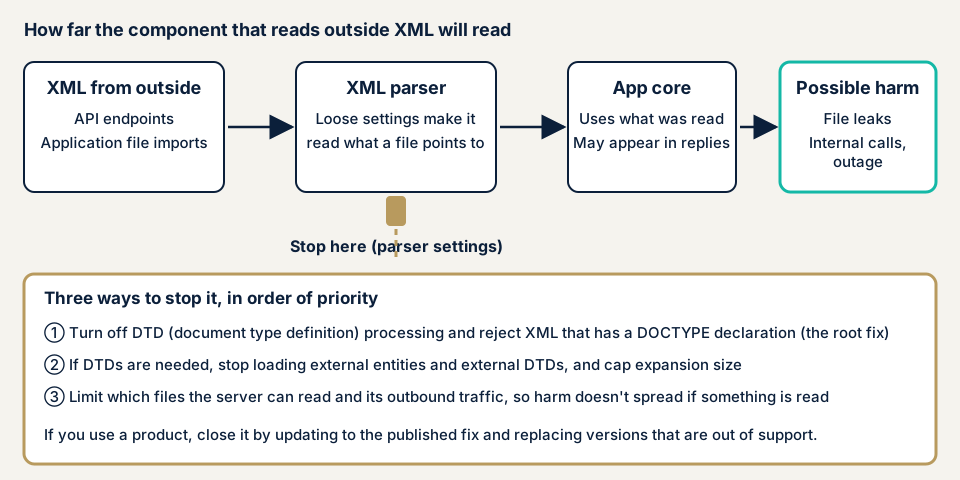
The stop is the parser setting: you do not block the entrance, you decide not to read what a document points at.
What damage can XXE cause?
OWASP names three kinds.
- Reading files on the server, which can include config files and account data.
- SSRF: making the server contact destinations that cannot be reached from outside, such as internal devices.
- Denial of service, where expanding XML uses up the server's capacity.
OWASP warns that stopping external entities does not prevent every XML-related outage, so also cap expansion and input size.
How it relates to other flaws
MITRE says XXE and SSRF are closely related, since both can trigger requests to unintended destinations (see SSRF). Path traversal also exposes unintended files. OWASP warns against Java's java.beans.XMLDecoder on untrusted input, since building objects from XML can lead to insecure deserialization.
Two public cases: Proself and e-Tax software
JVN, the vulnerability notice site run by JPCERT/CC and IPA, has published XXE in several products. Two from 2023 follow, without steps.
Proself (October 2023)
In October 2023 the developer of Proself, an online-storage package, disclosed an XXE vulnerability (CVE-2023-45727). IPA says malicious XML in a crafted request could let server files be stolen, including account data. The CVSS v3 base score is 7.5, and JVN rated it "urgent".
The developer reported attacks exploiting it. JPCERT/CC's alert (JPCERT-AT-2023-0022, 10 October 2023) says all editions and versions were affected. The three IP addresses it lists were observed from August 2023.
The fix is to update: Enterprise and Standard Edition Ver5.63 (17 October 2023), Gateway Edition Ver1.66, Mail Sanitize Edition Ver1.09. Until then, apply the developer's interim measures. JPCERT/CC also explains how to check logs under the installation folder. Enterprise and Standard Edition Ver4 and earlier get no fix, so JVN asks owners to move to Ver5 or later.
e-Tax software (November 2023)
On 2 November 2023 JVN published an XXE flaw in the National Tax Agency's e-Tax software, Version 3.0.10 and earlier (CVE-2023-46802). The cause is how the bundled XML parser is implemented, and a crafted XML file could let any file in the system be read. The fix is to update by the Agency's procedure.
The CVSS v3 base score is 2.5, lower than Proself, because it assumes local use and user action. Even so, a product that reads XML can have the same kind of hole without being a server. In both cases the cause lay in a product, not the owner's own code. Without someone watching for updates, unsupported versions stay in use.
How can you check your own site?
Use these steps on systems you manage.
- List where XML comes in. Include APIs, single sign-on, file imports and uploaded-file handling. A place nobody can explain is your first task.
- List products and versions. File sharing, online storage, form products and frameworks.
- Match them against public information. Search JVN iPedia (a vulnerability countermeasure database) for product names and "XML external entity".
- Find unsupported versions that will get no fix, and plan their replacement.
- Ask your developer whether DTDs and external entities are switched off where XML is read, and if not, why.
If you read code, look at where XML is parsed. In Java, check the DocumentBuilderFactory and SAXParserFactory settings. In PHP, check that simplexml_load_string and DOMDocument loading avoid the options that substitute entities or load DTDs (LIBXML_NOENT, LIBXML_DTDLOAD). In Python, check for defusedxml.
You have only reviewed what you listed, so this is no guarantee for the whole site. Whether parser settings are actually safe must be checked entrance by entrance, including login-protected screens, which outside information cannot show. If this is too much, contact us.
How to prevent XXE
For developers
OWASP's basic fix is a parser setting that does not process DTDs. Where you can, reject XML that carries a DOCTYPE declaration.
- If DTDs are needed, disable external entities and external DTDs, and cap the amount expanded.
- Limit external references in schema validation and XSLT too, not only at loading.
- Disable XInclude unless needed.
- If your parser version lacks a setting, fail instead of reading untrusted XML half-protected.
- Pass data as a stream, not an outside file name or URL, since entity limits do not cover the first file read.
Settings differ by language. In Java, reject DOCTYPE in the DOM and SAX factories. JPCERT/CC's Java rule says default parsers may process external entities, so it advises restricting them. .NET 4.5.2 and later default to the safe side, but your own XmlResolver brings the risk back. For Python, defusedxml is recommended. Without a reason to use XML, a format such as JSON is an option.
For site owners
- Update your products. Decide who receives update notices and where to look (JPCERT/CC, JVN, maker announcements), as in item 1 of our fix menu.
- Replace unsupported versions, since some, like Proself Ver4 and earlier, get no fix.
- Limit the server's permissions, so readable files and outbound traffic are only what is needed.
- A WAF (a filter that stops suspicious traffic at the entrance) only lowers the noise, so keep fixing the parser settings.
- Ask your developer to review delivered code, with a list of where XML is read.
When should you call an expert, and what does it cost?
Call an expert if you built XML links with outside systems, file imports or single sign-on yourself, or keep personal or payment-related data on the server. The free URL check (JPY 0) looks only at what is visible from outside, so it cannot see internal XML processing.
Web application assessment Lite starts from JPY 98,000 (excl. tax) for up to 10 screens. Standard starts from JPY 198,000 (excl. tax) for up to 20 screens, with manual checks behind login. Source code assessment is quoted individually, from JPY 50,000 (excl. tax) per 10,000 lines. The amount moves with the number of screens, whether login-protected screens are included, how wide the scope is, and how urgent the work is. Fixing an individual vulnerability starts from JPY 10,000 (excl. tax) per issue. The formal quotation arrives after the free assessment. A re-assessment after fixes is included once.
The free URL check covers only the outside view. If you want your XML entry points tested, contact us.
What cyber-shield checks
Our web application assessment combines a tool scan with checks by a person, and the scope is fixed in the diagnosis consent form before we start.
- Every XML entrance: APIs, integrations, file imports and uploaded-file handling.
- Whether the parser is set not to process DTDs or external entities.
- Whether data with external references leaks file contents or causes unintended requests.
- Products with published flaws, and unsupported versions.
- Combinations with SSRF and file-reading flaws at the same entrance.
If you can share your source code, the source code assessment follows the XML-reading settings directly.
Frequently asked questions
How is XXE different from SSRF?
SSRF is the general flaw of making a server contact another destination. XXE is a loose XML parser setting that lets files be read or the server make requests. MITRE says the two are closely related, so check XML handling together with SSRF.
Does XXE matter if we only use JSON?
Your own JSON-only API is out of scope. But SAML single sign-on, SVG images and Office documents are XML inside, and file-sharing products read XML internally. Check the update status of products and components you use.
Does a WAF stop XXE?
No. A WAF (a filter that stops suspicious traffic at the entrance) reduces risky traffic but cannot fix the flaw. OWASP's fix is a parser that does not process DTDs or external entities, so parser settings and product updates are still needed.
What should I do if XXE is announced in a product I use?
Update to the maker's fixed version, applying its interim measures until you can. In the 2023 Proself case, unsupported versions got no fix and had to be replaced. If exploitation is confirmed and logs look suspicious, use our emergency contact.
How much does it cost to check for XXE?
The free URL check (JPY 0) sees only what is visible from outside, not internal XML processing. Web application assessment Lite starts from JPY 98,000 (excl. tax, up to 10 screens). Source code assessment is quoted individually, from JPY 50,000 (excl. tax) per 10,000 lines.
Next step: list where XML comes in
Today, list where your systems receive XML and your product versions, which shows missed updates. Once the list exists, contact us to decide which entry points to test. The free URL check can show the outside view first.
Frequently asked questions
How is XXE different from SSRF?
SSRF is the general flaw of making a server contact another destination. XXE is a loose XML parser setting that lets files be read or the server make requests. MITRE says the two are closely related, so check XML handling together with SSRF.
Does XXE matter if we only use JSON?
Your own JSON-only API is out of scope. But SAML single sign-on, SVG images and Office documents are XML inside, and file-sharing products read XML internally. Check the update status of products and components you use.
Does a WAF stop XXE?
No. A WAF (a filter that stops suspicious traffic at the entrance) reduces risky traffic but cannot fix the flaw. OWASP's fix is a parser that does not process DTDs or external entities, so parser settings and product updates are still needed.
What should I do if XXE is announced in a product I use?
Update to the maker's fixed version, applying its interim measures until you can. In the 2023 Proself case, unsupported versions got no fix and had to be replaced. If exploitation is confirmed and logs look suspicious, use our [emergency contact](/en/emergency).
How much does it cost to check for XXE?
The free URL check (JPY 0) sees only what is visible from outside, not internal XML processing. Web application assessment Lite starts from JPY 98,000 (excl. tax, up to 10 screens). Source code assessment is quoted individually, from JPY 50,000 (excl. tax) per 10,000 lines.