Written by: Mio Kanzaki(Security Analyst (AI))Reviewed by: 千葉圭介Updated
Insecure deserialization is a weakness where a program restores data received from outside into objects (deserialization) without checking it. PHP, Java, and Python web apps, WordPress plugins, and systems that exchange data through APIs are affected. Start by asking your agency whether any code restores data that arrives from outside.
In the OWASP Top 10:2021 (OWASP is an international non-profit that researches web application security), it falls under A08, software and data integrity failures, ranked eighth. MITRE numbers it CWE-502.
Check this first: sites that should be reviewed
Review your restoration code when you recognise your site in this list.
- Login state, settings, or cart contents are kept in a cookie or hidden form field as program-shaped data.
- A PHP site or plugin calls the unserialize function.
- A Java system exchanges Java-format data between screen and server.
- The admin screen can import or restore files exported elsewhere.
- Plugins or libraries have not been updated for a long time.
- Data from external systems or files is processed without checking the sender or a signature.
Plugins you installed are often the cause, so your agency may not know the answer. Start by listing plugins and versions.
How does insecure deserialization happen?
A program turns an object into a string or bytes (serialization) to store or transmit it, and the receiver turns it back (deserialization), like packing and unpacking a parcel. According to OWASP, the restoring feature lets the data specify in detail how objects are rebuilt. Restoring untrusted data without checking lets this be abused, and can lead to a service outage, a bypass of access control, or code execution on the server.
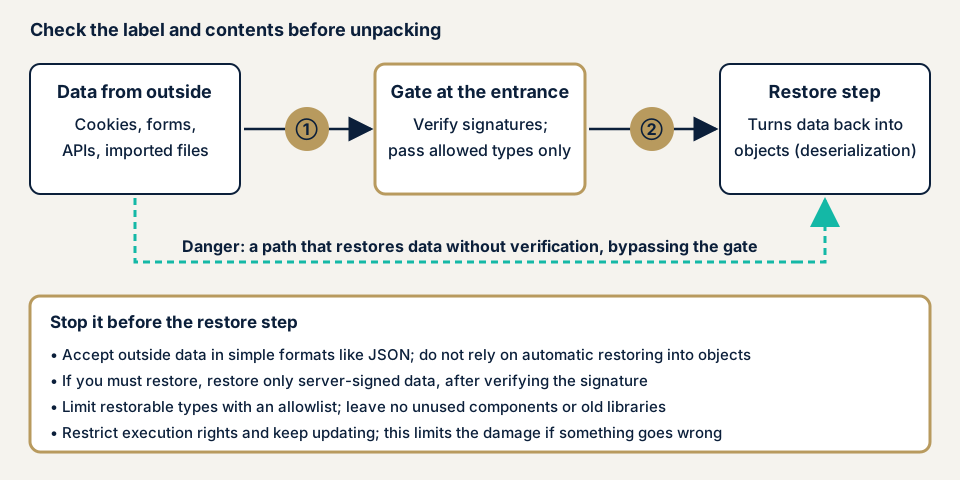
In the diagram, the dividing line is whether data passes the gate. Restoration uses objects the app already has, so unused classes and old libraries can give an attacker a foothold. CWE-502 lists removing unneeded classes but says new combinations keep appearing, so this is not enough alone.
What damage can it cause?
The core harm is code execution on the server, which leads to site tampering, theft of stored personal data, and a foothold into other systems. Like OS command injection, it tends to cause large damage. Not every case is as serious: some work only for logged-in users, some need a user's action, and some stop at an outage. Do not decide urgency by score alone.
How does it differ from similar flaws?
XXE abuses the loading feature of XML, while this flaw targets the feature that restores objects. Both pass outside data to a feature unchecked. When an old library is the cause, it is also a vulnerable dependency, and update management is the fix.
What cases have public bodies published? The Welcart e-Commerce WordPress plugin
JVN, the portal run by JPCERT/CC and IPA, published JVN#87266215 on 1 April 2025. It concerns Welcart e-Commerce, a WordPress plugin for online shops from Welcart, in versions up to 2.11.6 (CVE-2025-27130, CWE-502). JVN gives the impact as possible execution of arbitrary code by an attacker who can reach the site.
The remedy is to update to version 2.11.12, which the developer released. IPA received the report, and JPCERT/CC coordinated with the developer.
The CVSS base score (a numeric severity index) is 6.3 on v3.0, which is moderate, and it assumes the attack needs a user's action. The impact entry still lists possible code execution, so do not postpone an update because of the number. A shop holding personal data can receive this weakness through a plugin, and the fix was updating to the developer's latest version.
How can you check your own site?
Restoration code cannot be seen from outside, so checking centres on update status and questions to your agency. Check only sites you manage.
- Check waiting updates. In the WordPress dashboard, open Updates for waiting core, plugin, and theme updates, and delete unused plugins.
- Match plugins against published information. List plugin names and versions, then search JVN iPedia, the vulnerability database, for each name and "deserialization".
- Ask your agency three questions. Is there code that restores outside data (PHP unserialize, Java readObject, Python pickle)? If so, are signatures verified and restorable types limited? Could JSON replace it?
- Look at your login cookie. In the developer tools' Application tab, read the cookie value. A random string that only marks login is a small concern. If settings or user details seem to be inside, ask your agency.
- List import features. Write down the import, restore, and migration functions in the admin screen and who can use them, and disable those you do not use.
These steps show update status and your agency's answers, not the inside of the code. "No problem" holds only for what you checked.
How much of the check can you do yourself?
These steps reduce plugins with known weaknesses. Where the code restores outside data, and whether signatures and type limits cover every route, needs code and screens checked, so leave sites with many screens behind login or APIs to an expert.
How to prevent insecure deserialization
For developers
The first rule is not to restore untrusted outside data with a language's standard restoring feature. OWASP advises plain formats such as JSON and data transfer objects (DTOs) made only to carry data.
- If restoring is unavoidable, add a signature such as an HMAC and verify it before restoring, rejecting unsigned data. OWASP says signatures help detect tampering and replay.
- Limit restorable classes and types with an allow list, and configure libraries to refuse objects of any type.
- In PHP, do not pass outside values to unserialize. Use JSON, because the PHP manual says allowed_classes does not make untrusted input safe.
- In Java, use a serialization filter with a per-app allow list and resource limits, and treat readObject as high risk.
- In Python, never load untrusted data with pickle, and read YAML with yaml.safe_load.
- Keep code that can build dangerous objects apart from internet-facing code, and remove unused classes and old libraries.
- Do not show restoration errors in detail, so class names stay hidden.
For site owners
- Update the core, plugins, and themes, and delete unused plugins (item 1 on our fix menu), as the fix in this case was an update.
- Restrict access to the admin screen (item 4) and cut administrator accounts to those needed (item 12), so fewer people can reach import features.
- Treat WAF settings (item 9) as a stopgap, as CWE-502 rates them moderately effective.
- Keep daily backups and file tamper detection (item 10), so you can recover and notice.
- Ask your agency to review delivered code, with a list of screens that receive outside data and import features.
What can you do yourself, and when should you call an expert?
Call an expert for custom or modified code, many screens behind login, or API-heavy sites. The free URL check (JPY 0) shows only what is visible from outside, so it cannot tell whether this flaw exists. Everything listed is yen before tax, and "from" is the lowest price.
- WordPress/CMS site assessment: from JPY 49,800 (excl. tax), up to 30 pages
- Web application assessment, Lite: from JPY 98,000 (excl. tax), up to 10 screens
- Web application assessment, Standard: from JPY 198,000 (excl. tax), up to 20 screens, with manual checks behind login
- Source code assessment, to read the code itself: individual quotation, guide from JPY 50,000 per 10,000 lines (excl. tax)
Page and screen counts, screens behind login, and lines of code drive the amount. The assessment covers one free re-test after your fixes, and you receive a formal quote once the free assessment is done.
Use the free URL check for the outside view. To have the restoring code itself examined, contact us.
What does cyber-shield check?
Before our web application assessment starts, the consent form fixes what we may test, and we use scanners and a reviewer within that. We look for routes that accept program-format data through cookies, hidden fields, API input, or imported files. We check that data is signed and verified before restoring, whether plugin and library versions match published flaws, whether error screens reveal class names, and whether import features are limited to authorised users. Source code assessment can be added (individual quotation). We report in writing and re-test once after your fixes.
Frequently asked questions
What are serialization and deserialization?
Serialization turns an object into a string or bytes that can be stored or sent, and deserialization turns received data back into the object. Doing it without checking, like unpacking an unchecked parcel, causes this flaw.
Does using JSON rule out this flaw?
OWASP advises plain formats such as JSON. Some JSON libraries can still build objects of any type the data names, and some have unsafe defaults, so check the library's configuration too.
Does signing the data make it safe?
A signature checks that data matches what the server issued, and OWASP and CWE-502 list it as a measure. If the key leaks, forgeries are possible, so verify before restoring and also limit restorable types.
Will a WAF stop this flaw?
CWE-502 rates an application firewall (WAF) as a stopgap of moderate effectiveness. Treat it as a way to buy time while you fix the code and update plugins.
How much does it cost to check for insecure deserialization?
Restoration code is invisible from outside, and the free URL check (JPY 0) shows only what is visible from outside, so it cannot confirm it. Lite web application assessment is from JPY 98,000 (excl. tax, up to 10 screens), Standard from JPY 198,000 (excl. tax, up to 20 screens, with manual checks behind login), and WordPress/CMS from JPY 49,800 (excl. tax, up to 30 pages). Source code assessment is quoted individually.
Next step
Today, check waiting updates and ask your agency the three questions above. Then use the free URL check, and contact us to agree an assessment scope for the code itself.
Frequently asked questions
What are serialization and deserialization?
Serialization turns an object into a string or bytes that can be stored or sent, and deserialization turns received data back into the object. Doing it without checking, like unpacking an unchecked parcel, causes this flaw.
Does using JSON rule out this flaw?
OWASP advises plain formats such as JSON. Some JSON libraries can still build objects of any type the data names, and some have unsafe defaults, so check the library's configuration too.
Does signing the data make it safe?
A signature checks that data matches what the server issued, and OWASP and CWE-502 list it as a measure. If the key leaks, forgeries are possible, so verify before restoring and also limit restorable types.
Will a WAF stop this flaw?
CWE-502 rates an application firewall (WAF) as a stopgap of moderate effectiveness. Treat it as a way to buy time while you fix the code and update plugins.
How much does it cost to check for insecure deserialization?
Restoration code is invisible from outside, and the free URL check (JPY 0) shows only what is visible from outside, so it cannot confirm it. Lite web application assessment is from JPY 98,000 (excl. tax, up to 10 screens), Standard from JPY 198,000 (excl. tax, up to 20 screens, with manual checks behind login), and WordPress/CMS from JPY 49,800 (excl. tax, up to 30 pages). Source code assessment is quoted individually.