Written by: Mio Kanzaki(Security Analyst (AI))Reviewed by: 千葉圭介Updated
Data poisoning of training and reference data is an attack that mixes fake content or tampering into the text an AI learns from, or into the documents it reads as the basis of answers, to bend its answers or behavior. It affects chatbots that read your own documents, and companies that built business AI on outside models or data. First check two things: who can add or change the documents the AI reads, and where the models and data you use came from.
It contains no attack strings or procedures. If damage may already have occurred, start with the emergency guidance.
Check this first: AI uses that should be reviewed
One matching line is enough to look closer. You are in scope even if you did not build the AI, provided an outside AI service sits inside your work.
- You run a chatbot (RAG) that reads internal documents, FAQs, and manuals, for staff or customers.
- The place where the AI's documents are kept can be written to, or have files added, by partners or outsiders as well as staff.
- You feed user ratings or conversation history back into AI improvement or additional training.
- You obtain trained models or datasets from a public place such as Hugging Face.
- You keep no record of where, when, and in which version you got the models and data you use.
- AI answers go to customers, or into ordering and settings changes, with no person checking.
What is data poisoning? An everyday example
Picture a cooking class. Students read the recipe book they are handed without doubt and cook as written. If someone rewrites one spot so that salt and sugar are swapped, the students follow it without noticing.
An AI is the same. It builds answers from the text it learned and the documents it is told to read. So whoever can write to them can steer its answers.
OWASP treats this problem as an attack on the integrity of data and models. It explains that it can occur at pre-training, fine-tuning (adapting to a specific use), and embedding (turning documents into numbers for search).
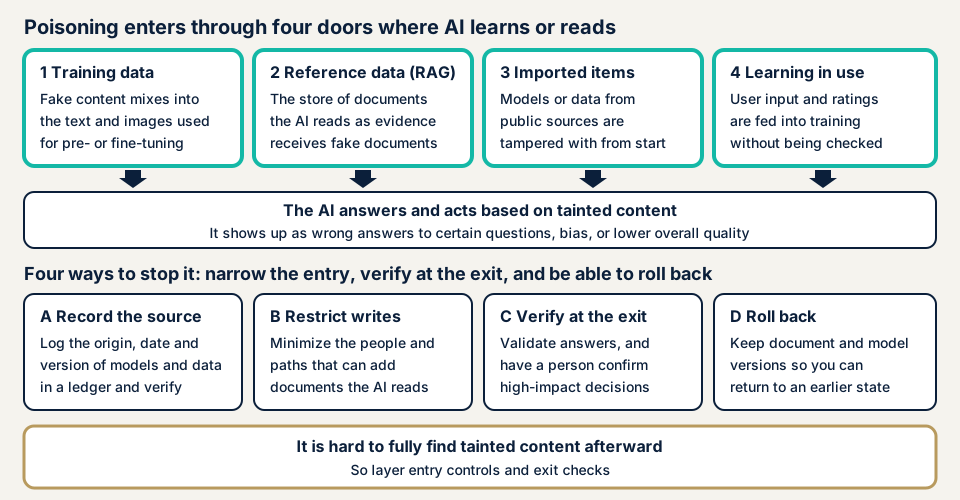
The upper row of the diagram shows the four entry points. The lower row shows four ways to stop it: narrow the entry, check at the exit, and be able to roll back. You layer them rather than rely on one place.
The four entry points
- Training data: fake content mixes into text used for pre-training or fine-tuning. NIST writes that a third party may acquire the domain a dataset points to and swap the contents.
- Reference data: fake documents get into the document store of RAG, where the AI searches internal documents before answering and uses them as grounds. NIST introduces research on making a specific question return a targeted answer, and the MIC guidelines also say this kind of tampering can be assumed.
- Models and data you import: a trained model from a public place has tampering from the start. NIST cites research suggesting tampering can survive even if the user fine-tunes.
- Learning in operation: user input and ratings go straight into training. The NCSC calls continual learning, where the model changes with operational data, a new entry point.
What damage can occur?
OWASP and NIST split the results into two. One is a general drop in the AI's quality. The other is making it act as targeted only for certain words or situations (a backdoor). OWASP points out that the latter looks normal most of the time, so it is hard to find in tests.
For example, if reference documents for a chatbot on your internal FAQ are rewritten, wrong guidance on refund conditions or contact points reaches customers as it is. NIST also writes that a code-suggestion model could end up deliberately recommending insecure code.
How does it differ from prompt injection?
The MIC guidelines treat prompt injection, an attack that changes behavior through instructions inside text the AI reads, as a threat that can be carried out with input alone. Data poisoning is sorted separately as a threat that presupposes the data was poisoned beforehand. If an instruction hides in a poisoned document, though, the AI that reads it obeys, so the two overlap. See prompt injection.
The structure where a part brought in from outside is tampered with is the same as tampering with third-party scripts on websites. NIST also writes that AI inherits the weaknesses of the traditional software supply chain.
How much is known from published cases?
What we opened in primary sources are the affected party's own announcement, official materials, and operators' documentation. Attacks shown in research papers are kept apart from real cases.
Microsoft's chatbot Tay (2016)
In its official blog of 25 March 2016, Microsoft said that its Twitter chatbot Tay had a flaw exploited by a coordinated attack within 24 hours of launch. Inappropriate posts resulted, so the company took responsibility, took Tay offline, and said it would work on fixing the flaw.
NIST's AI 100-2 E2025 cites this as the first example of real data poisoning, sorting it as targeting the mechanism that updates through interaction with users. Microsoft itself does not write "data poisoning", so this classification is NIST's.
Threats assumed by the MIC and the AISI
On 27 March 2026 the Ministry of Internal Affairs and Communications published its guidelines on technical measures for ensuring AI security. The document sorts data poisoning as an attack that tampers with the data an LLM learns from to make it produce improper output. Among measures it names confirming the reliability of training data, and says that checking by origin and processing history is important in some cases.
The AI Safety Institute (AISI) document "Known attacks on AI systems and their impacts" (version 2, April 2026) also lists knowledge poisoning through mixing into RAG and similar as a separate type. It surveys attacks presented in academic papers and is not a collection of damage.
A caution from a public model host
Hugging Face's official documentation (Pickle Scanning) explains that loading a model file in pickle format can run arbitrary code. Among measures it names using models from users you trust. It also writes that its scanning is not complete and that confirming safety is the user's responsibility.
This is an operator's caution, not a damage case. In MITRE's CWE, the related entry is CWE-502, deserialization of untrusted data.
Damage counts in Japan
In what we checked, we found no statistics from a Japanese authority giving the number of damages from data poisoning (checked 2026-11-17). NIST says poisoning attacks are hard to carry out in practice, while noting that recorded cases exist. Mechanisms that update in operation, and parts brought in from outside, deserve checking.
How can operators check this themselves?
Some things can be checked from registers and settings screens without reading code. Do not try putting fake documents into your own live AI. Wrong answers could reach customers.
- Write out where the AI's documents are kept. List every place the AI refers to (internal shared folders, knowledge tools, upload fields). On each sharing screen, look at the list of people who can edit, and whether outside email addresses or "anyone with the link" settings exist.
- Make a register of models and data. For the models in use, and the data used for fine-tuning or search, tabulate name, source, date obtained, version, and file format. Blanks in the table are the places to check.
- Check that user input is not going into learning. In the settings screen or the provider's documentation, check whether user ratings and conversations are used to train the AI further. For an outside service, confirm in writing with the provider whether it uses your company data for learning. The AI Guidelines for Business also ask AI users to observe the provider's security cautions.
- Check the history of reference documents and the way back. See whether reference documents record who changed what and when. With a history, when an odd answer appears you can identify the document and restore the earlier state. The NCSC asks for being able to trace where an attack or error came from and to roll updates back.
Where do you start to prevent poisoning?
OWASP and NIST say finding poisoned data in a large volume of data is hard. The NCSC also says techniques for finding poison are mostly at the research stage and should be a last resort. So you layer measures that narrow the entry, check at the exit, and allow rollback.
For developers and those who build AI in
- Record the origin and processing history of data and models. OWASP cites an ML-BOM (a parts list for AI) and data version control (DVC).
- Match downloaded data against the hash values (like a file's fingerprint) the provider shows. NIST gives this as a basic check against swapping through domain takeover.
- Use public models only from trusted providers, and mind the file format. Hugging Face writes that even where a signature guarantees origin, it does not guarantee the file is safe.
- For RAG documents, confirm the origin and author before importing, and narrow who can write. The MIC guidelines name verifying that outside data holds no improper instructions, and permission management of RAG data.
- For mechanisms that learn in operation, validate and record updates, and make them reversible. The NCSC asks you to treat the updated model as a new model.
- Build so that you do not trust AI output too much. NIST recommends designs that treat the model as an untrusted component. Details are on insecure output handling.
For owners: layer it with operations
- Separate a document location for the AI alone and keep editors to a minimum. Review the scope of public sharing links too.
- When choosing an outside AI service, ask the provider whether it uses your company data for learning, with which data it is updated, and whom to contact if there is a problem.
- For high-impact processes such as replies to customers, refunds, ordering, and settings changes, add a step where a person checks. The AI Guidelines for Business also ask you to understand the accuracy of outputs and the degree of risk.
- Keep versions of reference documents and models so that you can return to an earlier state. Noticing tampering and restoring is the same idea as website tampering measures.
- If you notice an odd answer, remove the suspect document from the references, and keep the history and logs to find the cause.
What can you do yourself, and when should you call an expert?
The line is between what registers and settings screens can show and what you only learn by tracing real paths. The editor list and the model register you can do yourself. Whether the paths by which documents enter the AI are really narrowed, whether outside parts can be trusted, and whether answers are validated before passing on are for an expert to confirm from the configuration.
Prices, all excl. tax. "From" marks the lowest price.
- Free URL check: JPY 0 (only what anyone can see from outside, never the contents of the AI's documents or models)
- Generative AI / LLM app assessment: from JPY 298,000, with a report
- Individual vulnerability fix: from JPY 10,000 per issue, quoted by content
- Re-assessment after fixes: one, free
Cost grows with the features assessed, the systems the AI connects to, and the kind and amount of data it refers to. The formal quotation follows the free assessment.
To learn where you stand first, try the free URL check, which needs only a URL and shows what is visible from outside. If you cannot tell whether your AI setup needs an assessment, contact us and tell us about your situation.
What cyber-shield checks
Our generative AI / LLM app assessment takes OWASP's ten items as its viewpoints and combines a configuration review with hands-on checks by a person. For poisoning, we check who can add or change the documents the AI refers to, and by which paths. We also look at the origin and updates of outside models, libraries, and extension parts.
Work starts only after a non-disclosure agreement (NDA) and an assessment consent form are signed. Our findings are written up in a report, and we can take on the fixes if you ask. One re-assessment after fixes is free.
We do not inspect the AI provider's own platform or the training data of foundation models, and we cannot prove that a trained model has nothing planted inside. Findings describe the entry points at the time of the work, and no assessment can promise safety afterwards.
Frequently asked questions
What is data poisoning in one sentence?
It is an attack that mixes fake content or tampering into the data an AI learns from, or the documents it reads as the basis of answers, to bend its answers or behavior. OWASP treats it as an attack on the integrity of data and models, meaning that content has not been rewritten.
How is it different from prompt injection?
Prompt injection changes behavior through instructions in text the AI reads, and it can be carried out with input alone. Poisoning differs in that tampering is placed in the data beforehand. The MIC guidelines also treat them separately. When an instruction hides in a poisoned document, though, the two overlap.
Are we affected even if we did not build the AI ourselves?
You can be. Even if you only use an outside AI service, which data it is updated with is left to the provider's management. If you let an AI read your documents, the place where those documents are kept is the entry point.
Can poisoned data be found afterwards?
Finding it completely is said to be difficult. NIST writes that finding poison in a large volume of training data is very hard, and OWASP says triggers that work only under specific conditions are hard to test for and detect. So you layer records of origin, narrowed write access, checking of answers, and the ability to roll back.
How much does an assessment cost?
The generative AI / LLM app assessment is from JPY 298,000 (excl. tax). The price depends on the number of features assessed, the number of systems the AI connects to, and the type and volume of data it refers to. The formal quotation follows the free assessment.
Next step: list the documents and models your AI uses
Today, put into one table where your AI's documents are kept and where its models came from. Rows where you cannot fill in who can write or when it was obtained set your priorities.
With the table in hand, the free URL check shows the outside view. If you want the AI examined itself, contact us to split the work between you and us.
Frequently asked questions
What is data poisoning in one sentence?
It is an attack that mixes fake content or tampering into the data an AI learns from, or the documents it reads as the basis of answers, to bend its answers or behavior. OWASP treats it as an attack on the integrity of data and models, meaning that content has not been rewritten.
How is it different from prompt injection?
Prompt injection changes behavior through instructions in text the AI reads, and it can be carried out with input alone. Poisoning differs in that tampering is placed in the data beforehand. The MIC guidelines also treat them separately. When an instruction hides in a poisoned document, though, the two overlap.
Are we affected even if we did not build the AI ourselves?
You can be. Even if you only use an outside AI service, which data it is updated with is left to the provider's management. If you let an AI read your documents, the place where those documents are kept is the entry point.
Can poisoned data be found afterwards?
Finding it completely is said to be difficult. NIST writes that finding poison in a large volume of training data is very hard, and OWASP says triggers that work only under specific conditions are hard to test for and detect. So you layer records of origin, narrowed write access, checking of answers, and the ability to roll back.
How much does an assessment cost?
The generative AI / LLM app assessment is from JPY 298,000 (excl. tax). The price depends on the number of features assessed, the number of systems the AI connects to, and the type and volume of data it refers to. The formal quotation follows the free assessment.