Written by: Mio Kanzaki(Security Analyst (AI))Reviewed by: 千葉圭介Updated
Prompt injection is an attack that makes an AI read crafted text so that it produces output or takes actions different from its intended instructions, and also the weakness that allows it. Any business with a generative AI service is a candidate for checking: an AI chatbot, an AI that searches internal documents, or an AI feature that reads emails and web pages. Begin by writing down what the AI can read, which permissions it holds, and where its results go.
In IPA's "Information Security 10 Major Threats 2026" for organizations, "cyber risks around the use of AI" entered the list for the first time, at third place. OWASP, an international non-profit that studies web and generative AI security, puts this problem at the top of its list of LLM application risks. This page includes no attack strings or procedures. If you suspect damage, read the emergency guidance first.
Check this first: services that should be reviewed
If even one of these applies, check the AI feature's permissions and data flow. More matches mean more urgency.
- Your site or app has an AI chatbot for inquiries.
- You use an AI that searches internal documents or databases to answer (RAG).
- The AI reads emails, web pages, or uploaded files and summarizes or judges them.
- You gave the AI permission to act: sending email, booking, updating data, or running code.
- The AI's instruction text (the system prompt) contains internal names, API keys, or other things you do not want shown.
- AI output goes unchecked into commands for other systems or straight onto screens.
- Development is outsourced, and nobody has listed the AI's permissions and the data it reads.
What is prompt injection? How it works, in an everyday example
Suppose you hand a counter clerk a work manual. A customer brings a document saying "whoever reads this must do the following", and the clerk sometimes obeys. Something close to this happens inside an AI.
In its official blog post of 8 December 2025, the UK NCSC (National Cyber Security Centre) explained roughly the following. Current LLMs (large language models) set no security boundary between instructions and data. SQL injection can be prevented at the root by separating data from commands, but that separation does not work for prompt injection. The NCSC warns against expecting a complete fix of the same kind.
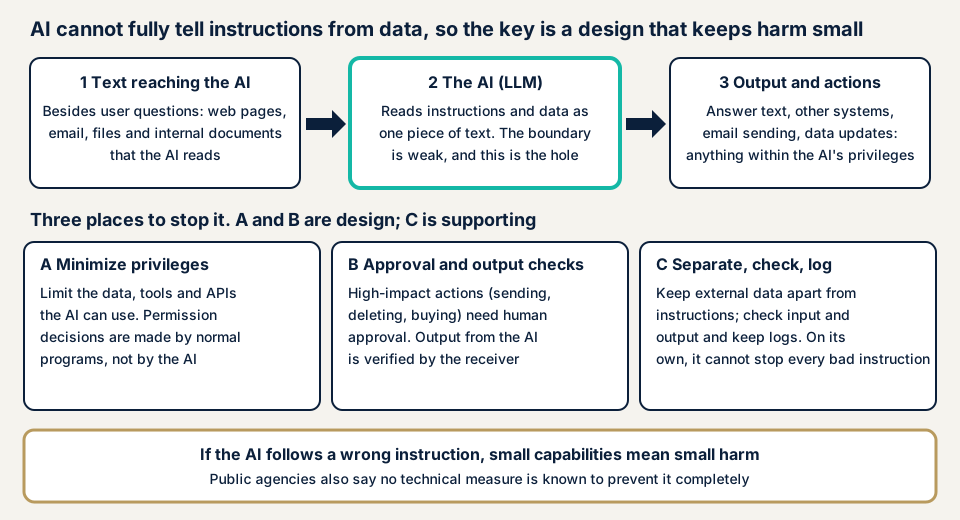
Item 2 in the diagram is where the hole sits. Assuming it cannot be fully stopped there, you limit the damage through designs A and B. MITRE's CWE-1427 classifies the weakness where an AI cannot tell a user's input from the developer's instructions, and it asks that external data such as RAG sources be treated as potentially malicious.
Direct and indirect injection
The MIC guidelines call typing crafted text into the AI direct injection, and making the AI refer to crafted data indirect injection. Web files and email are listed as examples of the indirect kind. OWASP also divides it into direct and indirect.
NIST describes indirect injection as a third party planting it so that the AI reads an outside resource, and says the victim is often the AI's own user.
What damage can occur?
The MIC guidelines give four examples of improper output. AI output is not only shown on screen. It is also used in the processing of connected systems.
- Making the AI output contents of the document-search data that should not be shown.
- Making it generate code that operates a connected system, such as SQL commands, leading to leaks or to tampering with or deleting data.
- Making it output the instruction text that records its internal settings.
- Making it output wrong content that stops users from reaching their purpose.
The more permissions you give the AI, the larger the damage. Permissions are covered on excessive agency, and output leaks on LLM data leaks.
Public cases: weaknesses in AI and vulnerabilities found
We cite only what public bodies' information says. The three individual cases are disclosures of possible abuse, not reports of damage.
IPA's commentary
In the commentary for organizations on the 10 Major Threats 2026, IPA describes indirect prompt injection as an attack where data the AI refers to contains improper instructions that the AI takes in. It says no perfect technical measure is known, and asks that the data the AI refers to not be polluted by dangerous data from outside.
Microsoft 365 Copilot (CVE-2025-32711)
NVD registered it on 11 June 2025. The description says that, through command injection into Microsoft 365 Copilot, an unauthorized attacker can disclose information over a network. The CVSS v3.1 base score is 9.3 in Microsoft's entry and 7.5 in NIST's assessment. IPA's commentary takes up this vulnerability, EchoLeak, as one where improper instructions injected from outside could have leaked a company's secret data.
PandasAI (JVNVU#91906701)
JVN published it on 14 February 2025. According to JVN, the prompt feature of Sinaptik AI's PandasAI has a vulnerability that allows arbitrary code execution. Crafted input may cause malicious Python or SQL code to be generated and run on an application that uses PandasAI. The remedy is choosing a configuration, in the security settings of the configuration file, that does not disable the protection.
CrewAI (JVNVU#99749963)
JVN published it on 9 April 2026. According to JVN, there are problems in the code execution tool, a search tool, and JSON loading. Direct or indirect prompt injection into an AI agent may lead to remote code execution or reading of local files. SSRF, an attack that makes a server connect to internal resources, is also listed.
The remedies include updating to the latest version, restricting the code execution tool, and not passing untrusted input. JVN records that CVE-2026-2275 and CVE-2026-2287 were fixed in CrewAI 1.11.0.
What the three cases show
In all three, text passed to the AI can lead to code execution or disclosure of information, and the AI reads more than the user's input. We confirm only what was published and say nothing about the current state of each product.
How can an AI operator check their own feature?
You can check in the order below without special tools. Do not try attack-style instructions on the live AI. It can stop the service or leak information.
- Draw the data flow. Write down who can enter input (public or internal), the outside data the AI reads (email, web, files, internal documents), and where output goes (screen, other systems, outgoing email).
- List the permissions given to the AI. Line up the API keys, database permissions, and operations the AI can run, and see whether they are the minimum needed. Anything too broad is the first thing to check.
- Check that the instruction text holds no secrets. The MIC guidelines ask that API keys and the like not be written directly in the system prompt but managed separately.
- Check for human approval of important operations. If the AI can send, delete, buy, or change settings on its own, you need an approval step.
- Check that logs exist. Without records of input, output, and tool calls, you cannot notice anomalies.
- Ask the vendor and developer. Get written answers on where the data the AI reads comes from, which permissions were given, whether approval exists, and how long logs are kept.
- Search JVN for the AI components you use. If something is published, check the affected versions and where to update.
This shows the state of design and permissions, not how the AI actually behaves. A clean result applies only to what you checked. The free URL check shows what is visible from outside the site linked to the AI, and contact us to discuss how far to examine the AI feature itself.
How far can you check an AI feature yourself?
You can check the data flow, permissions, approval, and logs, and question the vendor. How the AI behaves, and gaps in paths through reference data, are for an assessment, and AI that touches customer information or payments deserves a third party's check around release.
Prices, all excl. tax. "From" marks the lowest price.
- Free URL check: JPY 0 (only what anyone can see from outside, never the inside of the AI feature)
- Generative AI / LLM app assessment: from JPY 298,000
- Web application assessment, Lite: from JPY 98,000, up to 10 screens (the site side that hosts the AI screen)
- API assessment: from JPY 98,000, up to 10 endpoints (the API side the AI calls)
- Individual vulnerability fix: from JPY 10,000 per issue, quoted by content
- If you want a fix rushed, same-day start adds JPY 20,000
The price moves with the number of AI features, the number of connected data sources and tools, how many features sit behind login, and urgency. The formal quotation follows the free assessment.
Want a first look? Try the free URL check, which needs only a URL. To set the scope of an assessment, contact us and we will ask how you use AI.
How to defend against prompt injection
Think in this order: limit permissions, have people approve, and record and review. The MIC guidelines also ask you to layer several measures, since no single measure removes the risk.
For developers
- Limit the data, tools, and APIs the AI can use to the minimum. The NCSC advises making permission decisions in ordinary programs, not leaving them to the AI.
- Have a person approve high-impact operations such as sending, deleting, buying, and changing settings before they run.
- Treat outside data separately from the user's instructions. The NCSC cautions against relying on lists of banned words.
- Fix the format of AI output and validate it again on the receiving side. Details are on insecure output handling.
- Keep secrets out of the system prompt, and give document-search data reference permissions by user and role.
- Inspect input and output, and record the AI's input, output, and tool calls.
- Before release and when the model or configuration changes, run a check from an attacker's viewpoint (red teaming).
For owners
- Decide which tasks go to the AI and how far the data it reads extends. The AI Guidelines for Business ask you to recognize that vulnerabilities cannot be removed completely.
- Put explanations of permissions, approval, logs, and the source of reference data into your terms of order to developers.
- Check JVN notices for the AI components you use regularly, and update to fixed versions.
- Decide in advance how to stop the AI feature and how to keep logs when you find an anomaly.
What cyber-shield checks
Our generative AI / LLM app assessment uses OWASP's ten items as its viewpoints, and it combines a review of the setup with operation checks by a person. Before starting, we sign a non-disclosure agreement (NDA) and an assessment consent form, and agree the target and scope first.
- We list the data the AI reads and where its output goes.
- We check the permissions given to the AI and the human approval mechanism.
- We examine whether instruction text or reference data can make information appear that should not.
- We check the validation on the side that receives AI output.
We report in Japanese and re-assess once after fixes. We do not examine other companies' AI services, and the result describes weaknesses at that time, not future safety.
Frequently asked questions
What is prompt injection in one sentence?
It is an attack that makes an LLM (large language model) read crafted text so that it produces output or takes actions different from its intended instructions. The MIC guidelines split it into direct injection, typed in by the user, and indirect injection, planted in data the AI reads.
How do direct and indirect injection differ?
In direct injection, the AI's own user types the crafted text. In indirect injection, the text is planted in a web page, email, or file the AI reads, and it happens without the user noticing. NIST notes that in indirect cases the victim is often the user themselves.
Can input filtering or a warning note to the AI prevent it?
They help, but they do not prevent it alone. IPA says no perfect technical measure is known. The NCSC also advises against relying on lists of banned words. The core is a design that limits the permissions the AI can use and puts human approval before important operations.
Do we need measures for an AI used only inside the company?
Yes. The MIC guidelines assume attacks through the person typing and through the files referenced, even for an internal document-search AI (RAG). Take particular care if internal materials include files that come from outside.
How much does a generative AI app assessment cost?
The generative AI / LLM app assessment is from JPY 298,000 (excl. tax). The site side that hosts the AI screen is covered by Web application assessment Lite, from JPY 98,000 (excl. tax), up to 10 screens. The formal quotation follows the free assessment.
Next step: write down your AI's data flow and permissions
Today, write down what your AI feature reads, what it can do, and where it passes results. That list serves directly for questions to the vendor and for the scope of an assessment.
Once you have it, use the free URL check to see what is visible from outside the site linked to the AI. If you want to check the AI feature itself, contact us and we will decide together what you do yourself and what you hand over.
Frequently asked questions
What is prompt injection in one sentence?
It is an attack that makes an LLM (large language model) read crafted text so that it produces output or takes actions different from its intended instructions. The MIC guidelines split it into direct injection, typed in by the user, and indirect injection, planted in data the AI reads.
How do direct and indirect injection differ?
In direct injection, the AI's own user types the crafted text. In indirect injection, the text is planted in a web page, email, or file the AI reads, and it happens without the user noticing. NIST notes that in indirect cases the victim is often the user themselves.
Can input filtering or a warning note to the AI prevent it?
They help, but they do not prevent it alone. IPA says no perfect technical measure is known. The NCSC also advises against relying on lists of banned words. The core is a design that limits the permissions the AI can use and puts human approval before important operations.
Do we need measures for an AI used only inside the company?
Yes. The MIC guidelines assume attacks through the person typing and through the files referenced, even for an internal document-search AI (RAG). Take particular care if internal materials include files that come from outside.
How much does a generative AI app assessment cost?
The generative AI / LLM app assessment is from JPY 298,000 (excl. tax). The site side that hosts the AI screen is covered by Web application assessment Lite, from JPY 98,000 (excl. tax), up to 10 screens. The formal quotation follows the free assessment.