Written by: Mio Kanzaki(Security Analyst (AI))Reviewed by: 千葉圭介Updated
Insecure AI output handling (Improper Output Handling) is a flaw where text or code an AI produced is passed to another system with no validation or conversion. The destinations are screens, databases, server commands, and the like. It affects companies that connected generative AI to screens or business systems, and the damage reaches viewers and your own systems. First, list where the AI's answers go without a person checking them.
This page draws on material from OWASP, MITRE (which manages the CWE weakness catalogue), and IPA. It contains no attack strings or procedures. If an AI answer has already caused harm, start with the emergency guidance.
Check this first: AI uses that should be reviewed
A single match below is reason enough to check. Look hardest at the places where an answer moves on to the next process with nobody reading it.
- You show AI answers as HTML or Markdown on screen (chat screens, summaries, automatic sorting of reviews).
- A feature lets the AI build database search conditions or commands from plain-language requests and run them as they are.
- A feature runs AI-generated code or commands without confirmation.
- AI answers are used in file names, save locations, email text, or instructions to other systems.
- The AI reads outside web pages, emails, or uploaded documents to build its answers.
- The systems the AI connects to run with stronger permissions than the user has.
What is insecure AI output handling? An everyday example
Say an interpreter at reception listens to a visitor and writes a slip of key points. What if the person in charge of the safe or of ordering carried out that slip without reading it? The slip depends on what the visitor said and on papers the visitor brought, so it must be treated like text written by a stranger.
AI answers are the same. The AI builds an answer from the user's question and outside text, so its content is shaped by what it read. If you pass it straight to the next mechanism, the receiver may be moved from outside through the AI.
OWASP describes this flaw as insufficient validation and sanitization before AI output passes to other components or systems. Because the prompt (the instruction text) influences the output, an attacker can indirectly reach functions they could not touch directly. NIST says that data and commands usually do not travel on separate paths in AI, which is the root of many flaws, and calls it a flaw similar to the old SQL injection.
IPA's "How to Create a Secure Website" lists what must be escaped (converted so symbols display as plain characters): outside input values and strings read from databases or files, and strings generated by computation too. We think AI-generated strings need the same treatment.
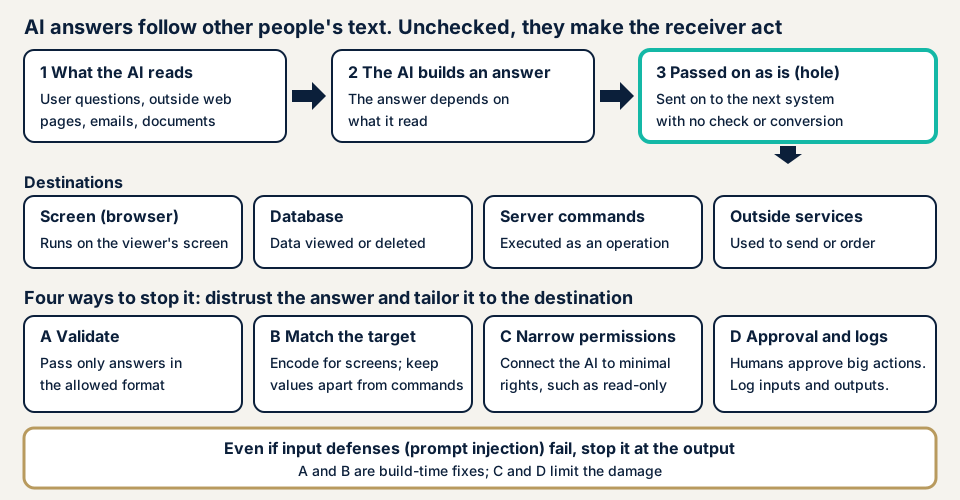
The hole sits at step 3 of the diagram. Validate the answer at that point and shape it for its destination, and the destination is not pushed into acting on it.
What happens at each destination
- Screen (browser): symbols in the answer work as screen commands, and an unintended action runs in the viewer's browser. It is the same type as cross-site scripting (XSS).
- Database: running an AI-built search command as it is can lead to viewing, changing, or deleting data. It is the same type as SQL injection.
- Server command: passing the answer straight to an OS command or code execution lets someone operate the server. It is the same type as OS command injection.
- Outside services and email: the answer is used as an instruction to send, order, or change settings, and an irreversible process runs.
OWASP lists XSS, CSRF, SSRF, privilege escalation, and remote code execution as results. Overreliance on the accuracy of answers is a separate item.
The way to make an AI give an unintended answer is prompt injection. If output handling is right, damage stops before the destination even when the entry is exploited.
What registered cases exist?
What we confirmed in primary sources are records in NVD, the vulnerability database run by US NIST, and the IPA handbook. These are vulnerability registrations, not reports of actual damage.
LangChain GraphCypherQAChain (CVE-2024-8309)
According to NVD, on 29 October 2024 a vulnerability was registered in the GraphCypherQAChain feature of LangChain 0.2.5, a collection of parts for AI apps. It says SQL injection can occur through prompt injection. NVD rates it CVSS 9.8 (Critical) and records that it can lead to tampering with or retrieval of data, and to deleting all data.
IPA's handbook (July 2026) takes up this case and sorts the root causes: a feature that turns a user's natural-language text into database language and runs it directly lacked sanitization and validation of the AI-generated commands, and had no permission limit such as read-only.
LangChain LLMMathChain (CVE-2023-29374)
NVD records that LLMMathChain in LangChain up to version 0.0.131 can run arbitrary code through prompt injection. It was registered on 5 April 2023, and NVD rates it CVSS 9.8 (Critical). It is an example where a design that runs AI-made expressions or code without confirmation became the weakness as it is.
Damage counts in Japan
In what we checked, we found no statistics from a Japanese authority giving the number of damages caused by flawed handling of AI output (checked 2026-11-17). Treat the pattern of registered vulnerabilities as material for reviewing your own design.
How can operators check this themselves?
Several checks need only a settings screen or a register you keep, not the source. Do not try crafted inputs on your own live AI. It can corrupt data or run wrong processes.
- List where the AI's answers go. Write down the screens, databases, code execution, email sending, other systems' APIs, and file saving that receive answers, and whether a person checks each. Rows with no check come first.
- Check the permissions the AI can use. Ask your developer or vendor whether the database permission the AI connects with is read-only, what operations it can run, and whether it runs with stronger permissions than the user. OWASP says risk rises when the AI holds more permission than the user.
- Look at the defenses on the display side. Open the screen that shows AI answers in Google Chrome, right-click, and choose Inspect. Reload under the Network tab and look in Response Headers of the top item for Content-Security-Policy. If it is missing, ask your web agency about it.
- Ask your developer or web agency four questions. When AI answers are shown on screen, do they go through automatic conversion, or is a feature that inserts values as raw HTML (an escape hatch) used? Do AI-built search commands go through parameterization, which separates commands from values? Are answers passed to OS commands or code execution? Is there validation that the answer has an allowed format before it is passed on?
Also check that records of AI input, output, and executed processing exist. OWASP lists the absence of output logging and monitoring as a factor that raises risk.
Where do you start to pass AI answers safely?
OWASP's first measure is a zero-trust view: treat the AI like any other user and do not trust it. Drop the assumption that answers are trustworthy, and validate and convert per destination.
For developers: shape the output before passing it on
- Treat the AI's answer as untrusted input and validate before passing it on. Letting through only allowed formats (fields, lengths, choices) is the basic method. CWE-1426 also lists treating output as untrusted as a design-stage measure.
- Convert (escape) values shown on screen to fit the output. OWASP stresses that rules differ for HTML body, attributes, and URLs, and IPA asks for escaping of every output element. CWE-116 likewise asks you to understand the encoding the destination expects. NIST also names the risk of information leaving through Markdown image display.
- Use parameterized commands for databases. Avoid designs where the AI writes whole SQL statements and they run.
- Design so AI answers are not passed to OS commands or code execution. IPA calls avoiding features that can start a shell the root fix. If unavoidable, have the AI choose from a list of allowed processes.
- Minimize the permissions of what the AI connects to. The MIC guidelines say to limit the orchestrator (the control part linking the AI and outside) to the necessary minimum, to contain damage.
- Set a CSP and record and monitor input and output. OWASP lists a strict CSP and logging and monitoring that finds abnormal output. Guardrails, which screen input and output, also help, but IPA writes that they are not foolproof alone.
For owners: layer it with operations
- For high-impact processes such as payment, sending data outside, and changing settings, do not let the AI run them automatically. Put human approval in between. IPA's handbook also asks for approval steps for these operations.
- Check where answers go every time an AI feature is added or changed. Writing an assessment into the contract with your web agency prevents forgetting.
- When you add an outside AI service or plugin, check whether answers pass automatically to screens or systems, and decide the permissions per destination.
- Prepare a switch to stop the AI feature when something looks odd, and keep records of input and output to find the cause.
What can you do yourself, and when should you call an expert?
You can do the destination list, the permission checks, and the look at defensive settings yourself. Tracing real processing is the expert's part: whether answers are really validated before they move on, and whether conversion works at the destination.
Prices, all excl. tax. "From" marks the lowest price.
- Free URL check: JPY 0 (only what anyone can see from outside, never the AI's processing behind it)
- Generative AI / LLM app assessment: from JPY 298,000, with a report
- Web application assessment, Lite: from JPY 98,000, up to 10 screens (suits checking the screens that display AI answers)
- Individual vulnerability fix: from JPY 10,000 per issue, quoted by content
- Re-assessment after fixes: one, free
The price rises with the number of features or screens assessed, the number of systems the AI connects to, and whether screens behind login are included. The formal quotation follows the free assessment.
Want a first look? The free URL check takes just a URL. Unsure whether your AI setup calls for an assessment? Contact us and describe how the AI is used.
What cyber-shield checks
The generative AI / LLM app assessment follows OWASP's ten items, pairing a configuration review with hands-on testing by a person. For this flaw, we check per destination whether AI answers are used as they are for screen display or commands. For the screen side, we use the method of our web application assessment to see whether conversion works.
Before starting, we sign a non-disclosure agreement (NDA) and an assessment consent form. A written report records what we find, and fixes are available if you want them. We do not inspect the AI provider's own platform, and we do not guarantee that AI answers are accurate. What an assessment finds is the state at the time of the work, so it cannot promise safety afterwards. Details are on the generative AI / LLM app assessment page.
Frequently asked questions
What is insecure AI output handling in one sentence?
It is a flaw where text or code the AI produced is passed to a screen, a database, a server command, or another system without validation or conversion. OWASP defines it as insufficient validation and sanitization before AI output reaches other components.
How is it different from prompt injection?
Prompt injection is the entry-side problem of making the AI give an unintended answer through text it reads. Output handling is the receiving-side problem: without validation or conversion, the answer affects screens, databases, or command execution. Even if the entry is breached, stopping it at the exit limits the damage.
Is it separate from the problem of AI answers being wrong (hallucination)?
Yes. OWASP treats overreliance on the accuracy of answers as a separate item. Output handling is about whether you validate and convert before passing on, whether or not the answer is correct.
Do guardrails prevent it?
They help, but they are not enough. The IPA handbook says features that screen input and output are not foolproof and do not guarantee complete defense alone. Combine them with conversion per destination, narrowed permissions, and human approval.
How much does an assessment cost?
The generative AI / LLM app assessment is from JPY 298,000 (excl. tax). Checking the screens that display AI answers is covered by Web application assessment Lite, from JPY 98,000 (excl. tax). The price depends on the number of features or screens assessed and the number of systems the AI connects to. The formal quotation follows the free assessment.
Next step: list where your AI's answers go
Today, put into one table where your AI's answers go: screens, databases, code execution, email, and other systems. Rows with no human check set your priorities.
The free URL check shows only what is visible from outside, so it cannot follow an answer into your systems. To have the AI's handling examined, contact us and we will agree an assessment scope.
Frequently asked questions
What is insecure AI output handling in one sentence?
It is a flaw where text or code the AI produced is passed to a screen, a database, a server command, or another system without validation or conversion. OWASP defines it as insufficient validation and sanitization before AI output reaches other components.
How is it different from prompt injection?
Prompt injection is the entry-side problem of making the AI give an unintended answer through text it reads. Output handling is the receiving-side problem: without validation or conversion, the answer affects screens, databases, or command execution. Even if the entry is breached, stopping it at the exit limits the damage.
Is it separate from the problem of AI answers being wrong (hallucination)?
Yes. OWASP treats overreliance on the accuracy of answers as a separate item. Output handling is about whether you validate and convert before passing on, whether or not the answer is correct.
Do guardrails prevent it?
They help, but they are not enough. The IPA handbook says features that screen input and output are not foolproof and do not guarantee complete defense alone. Combine them with conversion per destination, narrowed permissions, and human approval.
How much does an assessment cost?
The generative AI / LLM app assessment is from JPY 298,000 (excl. tax). Checking the screens that display AI answers is covered by Web application assessment Lite, from JPY 98,000 (excl. tax). The price depends on the number of features or screens assessed and the number of systems the AI connects to. The formal quotation follows the free assessment.