Written by: Mio Kanzaki(Security Analyst (AI))Reviewed by: 千葉圭介Updated
Excessive agency, OWASP's term, means that the tools, permissions, and automatic execution you hand to an AI exceed what the work needs. It concerns companies that let AI operate email, files, internal systems, or the cloud, and development teams that use coding AI agents. Start by listing the tools the AI may use, and check whether any tool meant only to read also holds write or delete permission.
An AI's judgment can swing because of an error, a vague request, or text arriving from outside. The preparation is to decide the AI's range in the design so that a swing does no harm. Below you will find the mechanism, published cases, ways to check your own setup, and the fixes.
Check this first: uses that should be reviewed
Recognize your setup in any line below, and it is time to review what the AI is allowed to do. Look too for a trial tool that is still wired into production.
- A tool you meant as "read only", such as document search or email summary, still has write, delete, or send functions.
- The tools the AI uses run under a shared administrator account that reaches everyone's data.
- Extensions you no longer use, or trial MCP servers, stay connected.
- The AI reads text from outside, such as email or web pages, and the same AI can also send or delete.
- It can send email, delete files, or pay without a person's confirmation.
- You gave an AI agent production database or cloud administrator permissions as they are.
- The AI's instructions say "do not do dangerous things", but the system has no restriction.
The AI Guidelines for Business (MIC and METI) define an AI agent as an AI system that senses its environment and acts autonomously. In the 2026 edition of IPA's "Information Security 10 Major Threats", AI-use risks appear in the organization ranking for the first time, at number three.
Why does a wide range given to the AI make the damage larger?
An agent calls a tool based on the AI's answer, returns the result as the next input, and keeps going. NIST explains that the tools include web browsing and code execution. It also writes that an attack can lead to arbitrary code execution or data being taken out of the environment.
OWASP calls the weakness where the AI takes harmful actions in response to unexpected, ambiguous, or manipulated output "Excessive Agency". The trigger may be the AI's misjudgment (hallucination), prompt injection, or a hijacked extension. The impact is set by the range the AI connects to.
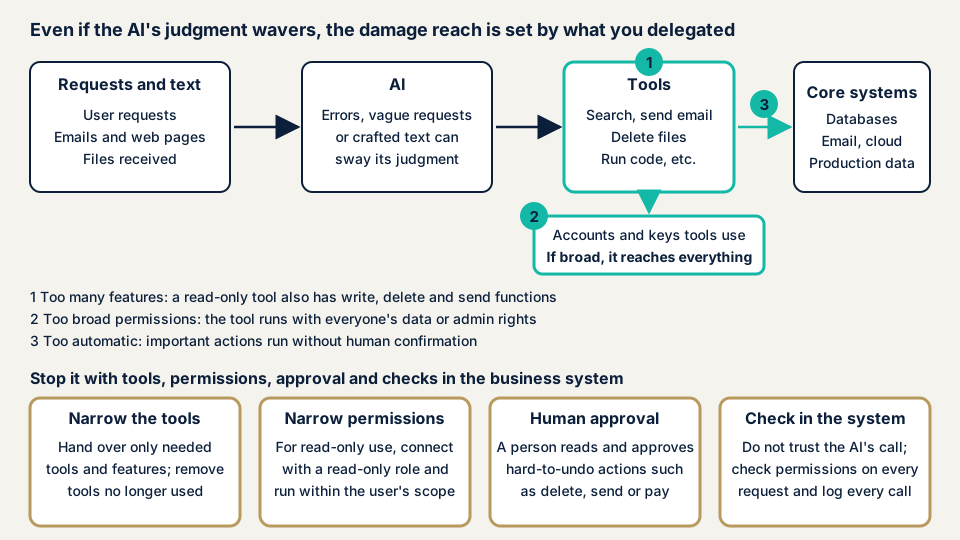
OWASP divides the causes into three, matching 1 to 3 in the diagram.
Too many functions
The tools handed to the AI have more functions than needed. OWASP gives an example of a document tool meant to be read-only that also has change and delete functions. Extensions left in place after they stopped being used, and tools that do not narrow the commands they run, are the same problem.
Permissions that are too wide
A tool holds more permission than needed in the system it connects to. OWASP's example is a read-only tool connected with an account that can also write and delete. Using a shared, highly privileged account that reaches everyone's data for per-user processing is the same.
This is the same thinking as IAM overprivilege. In MITRE's CWE, running with unnecessary privileges is CWE-250, and flawed handling of privileges is CWE-269.
Acting too automatically
High-impact operations can run without a person's confirmation or validation on the system side. OWASP gives the example of a tool that deletes files without asking for confirmation.
Why is asking in words not enough?
The UK NCSC points out that an LLM has no reliable boundary between instructions and data. Prompt injection may never be fully resolved. So it advises constraining operations with mechanisms that do not rely on the AI, and narrowing access to tools and APIs. When processing text from outside, the idea is to lower the AI's permissions to about those of the text's sender.
Threats and measures specific to AI agents are not yet settled, though. The MIC guidelines (March 2026) exclude AI agents from their scope because the technology is still developing rapidly. NIST also writes that research focused on agents is at an early stage.
What published cases exist?
We cover only what NVD, the US vulnerability database, and the standard's official pages confirm. We do not write causes or damage that the published text does not contain.
MCP Filesystem server vulnerabilities (CVE-2025-53109 and CVE-2025-53110)
On 2 July 2025, NVD registered vulnerabilities in "Filesystem", one of the MCP reference implementations. The text says older versions could reach unintended files through symbolic links inside an allowed directory, or through directories whose names began with the allowed name. It advises updating to the fixed version.
The "allowed range" of a tool the AI uses is protected by the tool's code, and a hole there breaks the range you set. The case shows why you need to update tools and check the allowed range.
What the official MCP specification asks
The MCP specification (2025-06-18 edition) says tools amount to arbitrary code execution and should be handled with care. A host is expected to obtain the user's explicit consent before calling a tool. The standard itself states that it cannot enforce these principles at the protocol layer, so the protection has to be built into the products and operations that use it.
How can you check what you have let the AI do?
You can grasp the current state in the steps below without specialist knowledge. Before any change, first just look and make a list.
List the tools the AI can use
- Count the tools that use AI. Include chatbots, coding assistants, business automation, email and calendar integration, MCP servers, and extensions.
- Read what each tool can do. Write down per tool whether it only reads, or can also write, delete, send, or run.
- Look at the accounts and keys a tool uses behind the scenes. Check whether they are administrator-level or reach everyone's data. The IAM overprivilege page shows how to see this on cloud screens.
- Separate operations that need a person's approval from those that run automatically. See which side deletion, sending, publishing, and payment fall on.
- Look for records of calls. Check that you can trace later which tool the AI called, when, and why.
Specific screens and settings
- In Claude Code,
/permissionsopens the list of permission rules and the settings file each rule comes from. According to the official documentation, rules are evaluated in the order deny, ask, allow, and the first match is the result. - For the MCP Filesystem server, check the list of allowed directories and the version in use.
- In the cloud, check the permissions on the service accounts and roles the AI uses on the IAM screen.
- List your MCP servers with their origin, what they connect to, and the range you allow. The official specification says not to trust tool descriptions unless they come from a trusted server.
Try it safely
Test in a test environment and account, not production. For example, ask an AI meant to be read-only to delete test data, and see whether the system's permissions refuse it. The point is not whether the AI declines, but whether the system stops it.
For an AI that reads text from outside, check in the test environment that it does not send or delete without confirmation right after reading. If you cannot interpret the results or decide what to fix first, contact us and describe your situation.
How to narrow what the AI is allowed to do
The work splits between those who build the AI mechanism (developers and system administrators) and those who bring AI into the business (executives and owners). OWASP notes that logging and rate limits reduce damage but do not prevent the weakness itself.
For developers and system administrators
- Hand over only the tools needed, and remove extensions you no longer use.
- Narrow the functions of tools too. OWASP prefers purpose-built tools over do-anything tools such as running a shell or fetching a URL.
- Narrow permissions on the side the tool connects to. If it only reads, connect with a read-only account. Where possible, run it with the permissions and range of the person using it.
- Have a person approve high-impact operations. The AI Guidelines for Business ask the approver to think through the reasons and grounds first.
- Check authorization in the business system on every request. Do not trust the AI's judgment as it is.
- If you use MCP, implement the user's consent before a tool call, and start with minimal scopes. Run local servers in an environment with minimal permissions.
For executives and owners
- Decide in a document which tasks go to the AI. Begin with read-only work.
- Do not give the AI administrator rights or production keys. Create an AI-only account and set how long permissions last.
- Require a person's final confirmation for operations that are hard to undo: remittance, deletion, publishing, and mass sending.
- Before rollout, confirm backups and the steps to restore.
- Check the origin and update status of the AI tools, extensions, and MCP servers you bring in, and set a review date.
What can you do yourself, and when should you call an expert?
You can list tools and permissions, remove tools you do not use, draw the line on which operations need approval, and run simple tests in a test environment. An expert is worth calling in these situations:
- The AI touches a production database, the cloud, or payments.
- You open the AI to customers or to all employees.
- The AI reads text from outside and can also send or delete.
- You connect several AIs and tools and run them automatically.
The free URL check (JPY 0) reads only what is visible from outside. The tools and permissions an AI can use are not visible from outside, so it cannot see them.
Prices, all excl. tax. The generative AI / LLM app assessment is from JPY 298,000 and comes with a report. The amount moves with how many features are assessed, how many systems the AI connects to, which data it refers to and how much, and how urgent the work is.
To fix what is found, an individual vulnerability fix is from JPY 10,000 per issue, and one re-assessment after fixes is free. If the AI's accounts sit in the cloud, the cloud configuration assessment (from JPY 98,000, per account) checks the permissions themselves. A formal quotation follows the free assessment. Not sure what to examine first? Contact us. The free URL check is also open to you, but it shows only the outside view.
What cyber-shield checks
In our generative AI / LLM app assessment, because AI answers differ each time, a person creates test situations and reads the results. For excessive agency we check:
- The list of tools the AI can use, and how wide each one's functions are.
- The permissions of the accounts and keys a tool uses behind the scenes, looking for write or delete where reading is enough.
- Whether high-impact operations are stopped by human approval or by validation on the system side.
- Whether an AI that reads text from outside also holds tools that carry information or operations outward.
The target is the apps and settings you manage. We do not test the AI provider's own platform. An assessment does not guarantee safety. It reduces the weaknesses found.
Frequently asked questions
How is an AI agent different from an ordinary chatbot?
The AI Guidelines for Business define an AI agent as an AI system that senses its environment and acts autonomously. NIST describes a mechanism that picks a function from the model's output, calls it, and returns the result to the model. If an AI only returns text, a reader's judgment stops its errors. An agent that can use tools turns an error directly into an operation.
Does writing "do not do dangerous things" in the AI's instructions prevent it?
No. The UK NCSC points out that prompt injection may never be fully resolved, and advises constraining operations with mechanisms that do not rely on the AI. Claude Code's official documentation also explains that the app, not the model, enforces permission rules, and that prompt instructions do not change permissions.
Is a human approval step before operations enough?
Not always. OWASP lists human approval for high-impact operations. The AI Guidelines for Business ask that a person approving an AI decision first think through the reasons and grounds themselves. An approval screen alone is not enough. The approver has to read the content.
Is using MCP dangerous?
MCP is a public standard for AI apps to connect to outside data and tools. The official specification says tools amount to arbitrary code execution and asks hosts to obtain the user's consent before calling a tool. It also states that the standard alone cannot enforce these principles. Check the origin of the servers you connect, the scope you allow, and updates.
How much does checking what we let the AI do cost?
The free URL check (JPY 0) sees only what is visible from outside, so it cannot see the tools and permissions the AI can use. The generative AI / LLM app assessment is from JPY 298,000 (excl. tax), and the price depends on the number of features assessed, the number of systems the AI connects to, and the type and volume of data it refers to. One re-assessment after fixes is free.
Next step: list the tools your AI can use
Today, list the tools your AI can use, and check whether irreversible operations such as deletion and sending run without a person's approval. These two steps shrink the room for a swung judgment to become damage. The free URL check shows only what is visible from outside, so it cannot see the tools and permissions behind your AI. To have a third party check what you have let the AI do, contact us and we will agree an assessment scope.
Frequently asked questions
How is an AI agent different from an ordinary chatbot?
The AI Guidelines for Business define an AI agent as an AI system that senses its environment and acts autonomously. NIST describes a mechanism that picks a function from the model's output, calls it, and returns the result to the model. If an AI only returns text, a reader's judgment stops its errors. An agent that can use tools turns an error directly into an operation.
Does writing "do not do dangerous things" in the AI's instructions prevent it?
No. The UK NCSC points out that prompt injection may never be fully resolved, and advises constraining operations with mechanisms that do not rely on the AI. Claude Code's official documentation also explains that the app, not the model, enforces permission rules, and that prompt instructions do not change permissions.
Is a human approval step before operations enough?
Not always. OWASP lists human approval for high-impact operations. The AI Guidelines for Business ask that a person approving an AI decision first think through the reasons and grounds themselves. An approval screen alone is not enough. The approver has to read the content.
Is using MCP dangerous?
MCP is a public standard for AI apps to connect to outside data and tools. The official specification says tools amount to arbitrary code execution and asks hosts to obtain the user's consent before calling a tool. It also states that the standard alone cannot enforce these principles. Check the origin of the servers you connect, the scope you allow, and updates.
How much does checking what we let the AI do cost?
The free URL check (JPY 0) sees only what is visible from outside, so it cannot see the tools and permissions the AI can use. The generative AI / LLM app assessment is from JPY 298,000 (excl. tax), and the price depends on the number of features assessed, the number of systems the AI connects to, and the type and volume of data it refers to. One re-assessment after fixes is free.