Written by: Mio Kanzaki(Security Analyst (AI))Reviewed by: 千葉圭介Updated
A data leak through an LLM (large language model, the core of a generative AI that reads and writes text) means information entered into an AI, or information the AI can refer to, reaches someone you did not mean to show it to. It concerns companies whose staff use outside generative AI services for work, and companies that built a chatbot answering from internal documents. Start by listing the AI services used inside your company, and check whether each provider uses what you enter for training.
Check this first: companies that should review their AI use
If even one of these applies, an AI usage check is worthwhile. Also look for free services or staff's personal accounts.
- Staff may be pasting contracts, customer lists, quotations, or source code into an AI from personal accounts.
- The company has no list of which AI services whoever uses.
- Nobody has read the terms to learn whether input is used for training and for how many days it is kept.
- You built a chatbot that searches internal documents but did not reflect per-document viewing permissions in its answers.
- The AI's instruction text (the system prompt) contains API keys, passwords, or internal circumstances.
- The AI reads text from outside, such as email and web pages, and the same AI is also trusted to send email and so on.
In IPA's "Information Security 10 Major Threats 2026", "cyber risks around the use of AI" entered the organization list for the first time, at third place. The commentary names information leaks through AI used for work without permission (shadow AI) as a risk.
Why does information leak through AI?
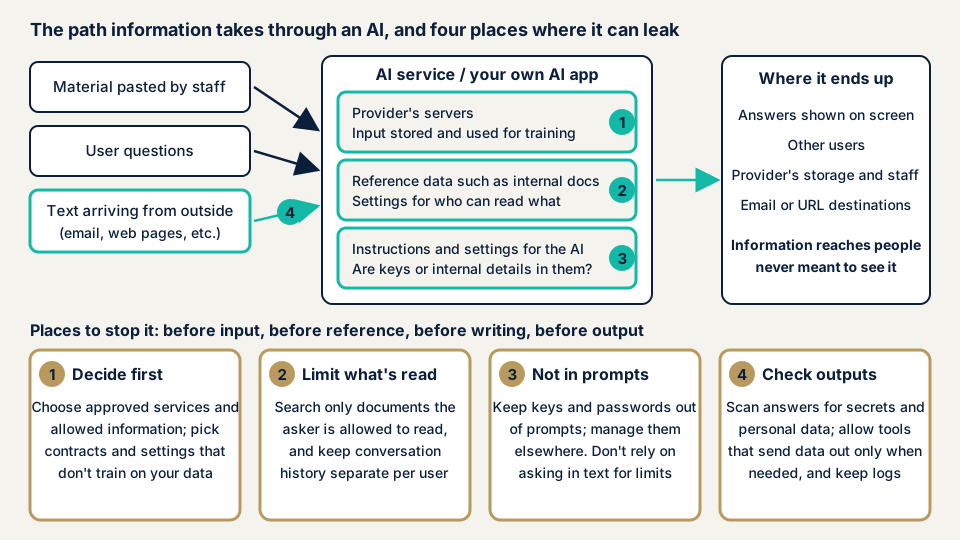
An AI service processes entered text on the provider's servers. Input may be stored and, under some conditions, used to improve the model, which adds a path for information to leave the company. When you build an AI app yourself, the range of documents and settings the AI can read is the range that can appear in its answers. As the diagram shows, it helps to sort the leak points into four.
Entered information stays with the provider
The UK NCSC (National Cyber Security Centre) explains that questions put to a public LLM are stored by the provider and are likely to be used to develop the service or model. Stored questions may leak or be made public by mistake. The NCSC advises not to put confidential information into public LLMs. How input is handled also differs by provider and contract plan.
Reference-data permissions are not reflected in answers
In RAG (retrieval-augmented generation, where the AI searches internal documents and uses them to answer), the AI answers from the documents it finds. If viewing permissions are not narrowed at the search stage, the content of a document can appear in the answer to someone who could not read it.
OWASP gives the example of one user receiving another user's personal data because data was not properly organized. The MIC guidelines ask you to set reference permissions on RAG data and data stores by user and role.
Secrets written in instruction text or settings
An AI has instruction text (the system prompt) that conveys its role and the conditions it must follow. If you write API keys or internal circumstances there, they may come out through answers.
OWASP explains that even if you write which kinds of information may be returned, it is not always obeyed. The MIC guidelines also ask that secret information not meant to be output be managed separately, where the AI can refer to it when needed, and not written directly in the instruction text.
The AI obeys text arriving from outside
If an instruction to the AI is planted in the text of an email or web page, the AI may take it as a command. This is called indirect prompt injection, and the mechanism and measures are on the prompt injection page.
The NCSC says an LLM has no reliable boundary between commands and data, so the problem may never be fully resolved. You need a design that narrows, first, what the AI can read and the means by which it can send things out.
What published cases and warnings exist?
Microsoft 365 Copilot vulnerability (CVE-2025-32711)
NVD, the US vulnerability database, registered CVE-2025-32711 on 11 June 2025 as a vulnerability in Microsoft 365 Copilot. The text says that, through command injection into the AI, an unauthorized attacker can disclose information over a network. The severity Microsoft assigned was CVSS 3.1 at 9.3.
IPA's commentary calls this vulnerability "EchoLeak". It explains that if the AI reads an invisible instruction contained in an email or similar, confidential information may be sent outside with no user operation.
Notice from the Personal Information Protection Commission (2 June 2023)
On 2 June 2023, the Personal Information Protection Commission published points of caution for businesses using generative AI services. It asks that, when you enter a prompt containing personal information, you check whether it is within what is necessary to achieve the purpose of use.
The Commission explains that entering a prompt with personal data without the person's consent, where it is handled for purposes other than outputting a response, may violate the Act on the Protection of Personal Information. It therefore asks you to confirm thoroughly that the provider does not use it for machine learning and the like. On the same day, it also issued a caution to OpenAI, the provider of ChatGPT, about acquiring special care-required personal information and related matters.
MIC's assumed case and NIST's point
In its March 2026 guidelines, the Ministry of Internal Affairs and Communications gives an assumed case of an internal chatbot using RAG. A user enters an improper prompt and tries to take data out of the reference data. It is an assumption for thinking about measures, not an actual incident. NIST's generative AI material (NIST AI 600-1) says there are examples where an attacked LLM showed sensitive information, derived from public information, that was in its training data.
How can you check your company's handling of AI?
The steps below show the current state, and no specialist knowledge is needed. Before changing settings, first list the situation.
Check how staff use AI services
- Find the services in use. Expense statements, browser extensions, internal communication logs (such as proxy records), and asking each department are leads. IPA also names communication logs as a way to find AI use you have not grasped.
- Check the contract type. Handling of input changes with whether it is a personal account or a corporate contract, and a free or paid tier.
- Read the provider's official page. Check whether input is used for training, how long it is kept, and whether people may read it. The table below shows examples of what official pages state.
- Look for a setting that stops training use. See whether the settings screen has an option that keeps input out of training, and whether administrators can set it for everyone. IPA also names thorough use of settings that exclude data from training.
| Provider and scope | What the official page says (checked 2026-11-18) |
|---|---|
| Anthropic (commercial products such as API, Team, Enterprise) | Input and output are not used for model training by default. If you send feedback, the whole conversation may be used for training |
| OpenAI (API) | Data sent to the API is not used for training or improvement by default. Logs for abuse monitoring are kept for up to 30 days by default |
| Google (Gemini API, free tier) | Content you send and the replies are used to improve products. Human reviewers may read them. It cautions against sending confidential or personal information |
| Google (Gemini API, paid tier) | Prompts and replies are not used to improve products. Logs are kept for a limited period to detect abuse and similar |
Handling changes with the plan, and consumer services are not in this table, so check which plan your staff use.
Check your own AI app
- With a test account that has no permission, ask about the content of a document it should not see. If the content does not appear in the answer, that passes for now. If it does, the search is not narrowed by per-document permissions.
- Create two test accounts and check that the content of one's conversation does not appear in the other's history or answers.
- Read the AI's instruction text and settings files and look for API keys, passwords, or internal circumstances.
- Open the log storage and check whether personal information remains in questions and answers, who can read it, and for how many days it stays.
- If the AI reads text from outside (email, web pages), check that the same AI does not also hold operations such as sending email.
How to read the result
If answers show documents outside the permission, the instruction text holds secrets, or logs keep personal information indefinitely, fix those first. An AI's answers differ each time, so one check cannot show that it is safe. If the result is hard to read, or you cannot rank the fixes, the free URL check gives the outside view, and you can contact us with details.
How to prevent information leaks
The work splits between those who build the AI app (developers and system administrators) and those who use AI (executives and owners). The AI Guidelines for Business ask you to recognize that AI vulnerabilities cannot be removed completely, so a design that shrinks the ceiling on damage is essential.
For developers and system administrators
- Narrow reference data to what the person asking can read. Check permissions at the search stage, not by the AI's judgment.
- Inspect input and output. Detect patterns of personal or secret information and mask them or refuse the response. The MIC guidelines name checking that output does not include unintended information.
- Do not write API keys or secrets in the instruction text. Manage needed values in a separate place the AI can refer to when needed.
- Choose, by contract and settings, conditions under which your company data is not used for training. OWASP names the option to opt out of training.
- Record input, output, and outside calls, and decide the retention period and who can read them.
For executives and owners
- Decide which AI services may be used and which kinds of information must never be entered. IPA names restricting work use of personal accounts and building rules.
- If personal data will be entered, check the Personal Information Protection Commission's points of caution: whether use stays within the purpose, and whether it is not used for machine learning.
- Check the terms of AI services. The AI Guidelines for Business caution that, even without a legal rule, a contract with a business partner may forbid use of its data.
- Teach staff not to enter secret information casually and to assume the AI can be wrong.
What can you do yourself, and when should you call an expert?
You can list services, read terms, set options that stop training use, write input rules, and run simple tests with an account that lacks permission. Bring in an expert when any of the following holds:
- You plan to open an AI that answers from internal documents to customers or all staff.
- You let the AI refer to data that includes personal information or partners' secrets.
- The AI reads text from outside and can also do things such as send email.
- A business partner asks you to confirm the safety of your AI.
The free URL check (JPY 0) reads only what is visible from outside. How an AI works inside is not visible from outside, so it cannot see it.
Prices, all excl. tax. The generative AI / LLM app assessment is from JPY 298,000 and comes with a report. Four things move the price: the features assessed, the systems the AI connects to, the type and volume of reference data, and urgency.
To fix what is found, an individual vulnerability fix is from JPY 10,000 per issue, and one re-assessment after fixes is free. The formal quotation follows the free assessment. To see where you stand, use the free URL check, or contact us if you are unsure.
What cyber-shield checks
In our generative AI / LLM app assessment, a person creates test situations and reads the AI's answers. For information leaks we check:
- Whether other users' information or internal documents mix into answers, and whether the permission boundary on reference data works.
- Whether keys or internal circumstances are written in the instruction text and settings.
- How far the AI trusts and acts on text arriving from outside.
- The tools the AI can use and how wide their permissions are.
We examine the apps and settings that you manage, and the AI provider's own platform is out of scope. Before starting, we sign a non-disclosure agreement (NDA) and agree the target and period in an assessment consent form. An assessment does not guarantee safety. It reduces the weaknesses found.
Frequently asked questions
If we enter company data into an AI, is it always used for training?
Not always. It depends on the provider and plan. Anthropic says input and output of commercial products such as the API, Team, and Enterprise are not used for model training by default. The OpenAI API also does not use it by default, and Google's Gemini API uses it to improve products on the free tier but not on the paid tier. For consumer services, check the provider's official page.
If it is not used for training, is it safe to enter?
Not necessarily. The UK NCSC notes that questions stored by the provider may leak or be made public by mistake. The OpenAI API also keeps logs for abuse monitoring for up to 30 days by default.
Could an AI that answers from internal documents show documents to people without permission?
Depending on how it is built, yes. The MIC guidelines ask you to set reference permissions on the data the AI refers to by user and role. You can check by asking a question from a test account without permission.
Is writing "do not reveal secrets" in the AI's instructions enough?
No. OWASP explains that limits written in the instructions are not always obeyed and can be bypassed, for example by prompt injection. Keep secrets such as API keys out of the instructions and manage them separately.
How much does checking AI safety cost?
The free URL check (JPY 0) sees only what is visible from outside, so it cannot see how the AI works inside. The generative AI / LLM app assessment is from JPY 298,000 (excl. tax), and the price depends on the number of features assessed, the number of systems the AI connects to, and the type and volume of data it refers to. One re-assessment after fixes is free.
Next step: list the AI services in use
Today, list the AI services used inside your company and decide which kinds of information must never be entered. These two steps greatly reduce input-side leaks. Use the free URL check to see what is visible from outside, then contact us to agree an assessment scope for your own AI app.
Frequently asked questions
If we enter company data into an AI, is it always used for training?
Not always. It depends on the provider and plan. Anthropic says input and output of commercial products such as the API, Team, and Enterprise are not used for model training by default. The OpenAI API also does not use it by default, and Google's Gemini API uses it to improve products on the free tier but not on the paid tier. For consumer services, check the provider's official page.
If it is not used for training, is it safe to enter?
Not necessarily. The UK NCSC notes that questions stored by the provider may leak or be made public by mistake. The OpenAI API also keeps logs for abuse monitoring for up to 30 days by default.
Could an AI that answers from internal documents show documents to people without permission?
Depending on how it is built, yes. The MIC guidelines ask you to set reference permissions on the data the AI refers to by user and role. You can check by asking a question from a test account without permission.
Is writing "do not reveal secrets" in the AI's instructions enough?
No. OWASP explains that limits written in the instructions are not always obeyed and can be bypassed, for example by prompt injection. Keep secrets such as API keys out of the instructions and manage them separately.
How much does checking AI safety cost?
The free URL check (JPY 0) sees only what is visible from outside, so it cannot see how the AI works inside. The generative AI / LLM app assessment is from JPY 298,000 (excl. tax), and the price depends on the number of features assessed, the number of systems the AI connects to, and the type and volume of data it refers to. One re-assessment after fixes is free.