Written by: Mio Kanzaki(Security Analyst (AI))Reviewed by: 千葉圭介Updated
Shadow IT means cloud services and devices that employees or departments use for work without the management department's permission or knowledge. Examples are a personal file-sharing contract, a service a department signed on its own, a generative AI on a personal account, and private PCs and smartphones. It happens even in a company of a few people. Start by writing out the services in use from the accounting payment statements and from the sign-up notices that reached company email.
If you have heard that company information was open for anyone to see, or that a personal account was taken over, read the emergency guidance first. Personal accounts and services are hard for the company to see, so save the screens before deleting or changing anything.
Check this first: organizations that should look for data outside management
Each line below that fits you points to data outside management. The more lines fit, the more data you may not have grasped.
- Some people exchange data with partners through file sharing or cloud storage the company does not contract.
- A department signed up for reservation, address-list, or chat services on its own, without telling IT staff.
- Some people use a generative AI on a personal account for work.
- Business data is stored on private PCs and smartphones.
- Nobody holds a list of the cloud services the company uses.
- No rule says which services may be personal contracts and which need a company contract.
- No steps exist for collecting data in personal accounts when someone leaves or transfers.
How does shadow IT lead to information leaks?
MIC uses the term shadow IT for information systems and services used in companies and organizations without the management department's permission. It means IT used in hiding. As an example, it gives the case of hiding a file-sharing service from the company to exchange information with outsiders.
In this state, the person using the service sets its security settings. MIC's guidebook says there is a risk of mistakes from individuals' lack of knowledge. It also records cases where an individual used a file-sharing service and a setting mistake caused a leak, and it points out that such use has grown with the spread of telework.
What the company has not grasped falls outside login management, checks of settings, updates, and recovery on leaving. MIC's Telework Security Guidelines explain that if unauthorized software or cloud services are used freely, administrators lose control and the risk of leaks rises. IPA's guidelines also say devices and software that are not managed tend to become security holes.
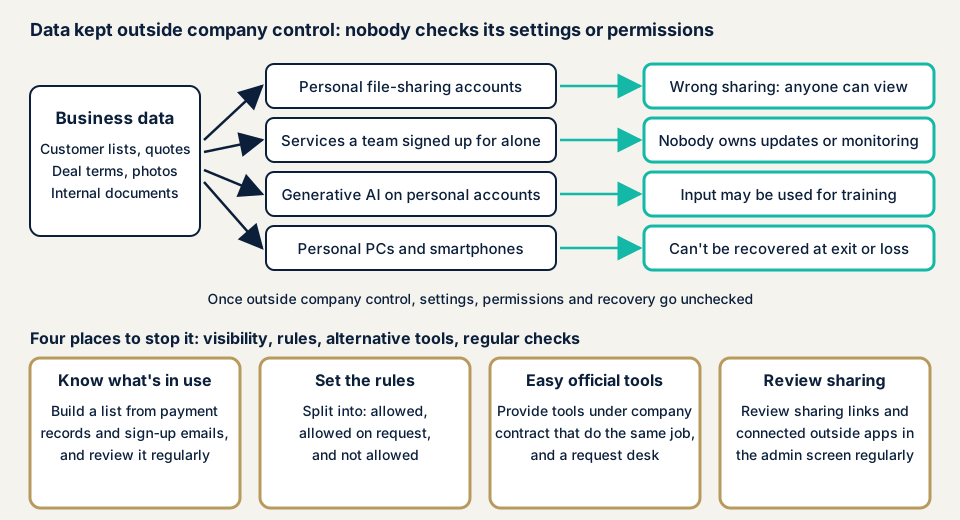
The upper row of the diagram shows where data that left management goes and what can happen. Below them sit the four places to stop it.
What damage can occur?
The damage depends on where the data sits. There are four main kinds.
- A mistaken public setting: data sits where anyone with the link can see it, unnoticed.
- Account takeover: for a personal account the company cannot confirm a strong password or multi-factor authentication, and cannot notice a takeover.
- Secondary use of input: a generative AI service may use what you enter for machine learning.
- What remains after leaving or loss: data on private devices or personal accounts is beyond the company's power to delete.
When a leak happens, you cannot define who was affected unless you know what data sits where. That is why knowing the locations is the first measure.
Cases and surveys published by public bodies
We take up only what material published by public bodies can confirm. The material does not name individual companies.
A case in MIC's guidelines (October 2022)
In the guidelines it published in October 2022, MIC included cases of leaks caused by cloud setting flaws. One is an employee who used a cloud service personally and stored confidential information for the company's work. That the files were set to public became known later through an outside report.
The same document lists, as factors in the cases, users' weak understanding of settings and flaws in structure, such as managing contractors and responding to shadow IT. It adds that cases made public are only a part, and that many cases, including unpublished ones, are thought to be occurring.
A case in a training collection from the Tochigi Prefectural Board of Education (March 2023)
The Tochigi Prefectural Board of Education included, in a training case collection for teaching staff, a teacher who received an SMS posing as a delivery company on a personal smartphone. After the teacher entered an ID and password and replied, the account of a privately contracted cloud storage was locked. That is when the teacher noticed the takeover.
The cloud held children's personal photos with names attached. The collection records that, because of this, the photos became viewable by a third party. It is training material and does not name the school or the municipality.
A notice from the Personal Information Protection Commission (June 2023)
On 2 June 2023, the Personal Information Protection Commission issued a notice on using generative AI services. It says that if a business handling personal information enters personal data without obtaining the person's consent in advance, and it is handled for purposes other than outputting a response, it may violate the Act on the Protection of Personal Information.
So it asks you to confirm thoroughly whether the provider does not use input for machine learning, among other points. It urges general users to check the terms of use and privacy policy before deciding, since entered personal information may be used for machine learning.
Measures that public bodies share
MIC's guidebook says that because cracking down on shadow IT is difficult, you begin by deciding rules and making them known. IPA's guidelines, version 4.0, put measures for using personally owned devices for work into their self-assessment items. Grasping the safety of outside services is an item in the same assessment.
How can you find shadow IT yourself?
You can check in the order below. The aim is not to find a culprit but to grasp data outside management.
- Start from payments. From card statements and invoices, list the monthly or yearly payments for cloud, business software, and AI services. Look at expenses an individual paid up front too.
- Search company email. Search for registration confirmations, login notices, and password reset emails to pick up the services registered with the company address.
- Ask each department. Without blaming, ask which services they use for work and whether each is a personal or company contract.
- Look at linked outside apps. In the admin screens of the email and groupware you use, check the list of linked outside apps.
- Look at sharing settings. In file sharing and cloud storage, look for files set so that anyone with the link can view them.
- Ask about devices and AI. Ask whether business data sits on private devices, whether generative AI is a corporate or personal contract, and whether a rule says what may be entered.
This shows only what you could confirm and does not promise you found everything. The free URL check shows what is visible from outside, and you can contact us about how to handle the services you find.
Will banning shadow IT make it disappear?
No. A ban alone hides who is using what, which makes it harder to grasp. MIC also says cracking down is difficult.
The reason people use it is often that the permitted tools are hard to use or were never provided. A list of what may be used, a window for requests, and official tools that are easy to use reduce the reasons to hide.
How to manage shadow IT
The work splits between those who manage services (IT staff and web agencies) and those who run the organization (owners). The first task for both is to make a list of the services in use.
For IT staff and web agencies
- Make a list (register) of permitted services. IPA advises starting with a list or management register and making regular review a habit.
- Look regularly at linked outside apps and logs in the admin screens. If there is a link nobody permitted, ask its owner.
- Set file sharing by default to inside the organization only, and make sharing outside a request process.
- In companies where departments can adopt services, have each department set usage rules. MIC's guidebook also lists this measure.
- Tell people to install permitted software only from the official source. This is the policy of MIC's Telework Security Guidelines.
- Permit generative AI only after confirming it is a corporate contract with input not used for learning.
- MIC says services that find shadow IT have also appeared. They are an option when the company has many people.
For owners
- Set the rules in three classes: what may be used as is, what may be used on request, and what must not be used.
- Create a window where people can declare services they use without being blamed. If people who declare are scolded, they hide next time.
- For private devices, either forbid storing business data or set the conditions for allowing it. IPA's guidelines ask you to decide which classes of files may be downloaded to personally owned devices.
- For work with personal information, decide how much may be entered into generative AI, in line with the Personal Information Protection Commission's notice.
- Put the steps for collecting accounts and data when someone leaves or transfers into a document.
- Review the register a few times a year and cancel services nobody uses. Accounts left uncancelled become entry points for takeover.
What if personal-account data was exposed or taken over?
Before stopping the sharing, save the screens and records. Then change the password of the account and disable the sharing links. If personal information is involved, a report under the law may be required.
To establish the scope of damage, contact us through the emergency guidance. If you delete without knowing what was inside, you can no longer tell who was affected.
What can you do yourself, and when should you call an expert?
You can list services from payments and company email, ask around, build the register, and write the rules down. That much needs no specialist knowledge.
Three situations call for an expert. The first is an organization where AWS, Google Cloud, and Azure accounts have multiplied under departments' or individuals' names. The second is one where data holding customers' personal information or deal terms may have been outside management. The third is one that made rules but cannot confirm they are followed.
The free URL check, which reads only what is visible from outside, is JPY 0. Contracts inside the company and employees' use are not visible from outside. Prices, all excl. tax: the cloud configuration assessment (AWS, Google Cloud, Azure) is from JPY 98,000 per account, and an individual vulnerability fix is from JPY 10,000 per issue.
The amount depends on the number of accounts assessed, the number of kinds of cloud, and urgency. Each assessment includes one re-assessment after fixes. If you want ongoing consultation on making rules and answering business partners' checklists, the security advisor is JPY 29,800 per month (excl. tax). The formal quotation follows the free assessment.
If you find many services, check them from the most important data down. First contact us, and we will decide together where to start.
What cyber-shield checks
Our cloud configuration assessment covers the AWS, Google Cloud, and Azure accounts that the operator has identified and authorized us to check. Tool scans and a person's checks are combined, and the range is fixed beforehand in an assessment consent form.
- Whether public settings on storage and similar have been overlooked.
- Whether permissions are wider than needed.
- Whether access keys are protected.
- Whether settings keep records of operations.
We deliver the findings as a report. SaaS such as file sharing and chat, generative AI services, and employees' personal accounts are outside this assessment. We also do not monitor employees' use. How to handle them is sorted out at the consultation stage.
Frequently asked questions
Is shadow IT used by employees with bad intent?
Mostly not. The examples in MIC's material are actions to get work done, such as hiding a file-sharing service from the company to exchange information with outsiders. Whether or not there is bad intent, data outside management cannot notice setting mistakes or takeover. Before blaming anyone, ask why the service is used.
May staff not enter work information into a generative AI on a personal account?
Input that includes personal information needs particular care. The Personal Information Protection Commission warns that if personal data is entered without the person's consent and the provider handles it for purposes beyond returning a response, this may violate the law. Check whether the provider uses input for machine learning, and decide which services the company uses and which information may be entered.
Does even a small company need a list of services?
Yes. IPA's guidelines explain that devices and software that are not managed tend to become holes. A spreadsheet list is a fine start. Write the service name, users, contract holder, data handled, and payment method, and review it regularly.
How much does checking or assessing shadow IT cost?
The free URL check, which sees only what is visible from outside, is JPY 0, but it cannot see use inside the company. The cloud configuration assessment, which checks the settings of the AWS, Google Cloud, and Azure accounts you have identified, is from JPY 98,000 (excl. tax) per account. The price depends on the number of accounts, the kinds of cloud, and urgency.
Next step: open your card statement
Today, open your credit card statement and write out the payments for cloud, business software, and AI services. Mark those the company has not grasped, and ask the people using them why, without blaming.
If you cannot decide how to handle what you find, contact us and we will set together how far the check goes. The free URL check shows only what is visible from outside, so it cannot see use inside the company.
Frequently asked questions
Is shadow IT used by employees with bad intent?
Mostly not. The examples in MIC's material are actions to get work done, such as hiding a file-sharing service from the company to exchange information with outsiders. Whether or not there is bad intent, data outside management cannot notice setting mistakes or takeover. Before blaming anyone, ask why the service is used.
May staff not enter work information into a generative AI on a personal account?
Input that includes personal information needs particular care. The Personal Information Protection Commission warns that if personal data is entered without the person's consent and the provider handles it for purposes beyond returning a response, this may violate the law. Check whether the provider uses input for machine learning, and decide which services the company uses and which information may be entered.
Does even a small company need a list of services?
Yes. IPA's guidelines explain that devices and software that are not managed tend to become holes. A spreadsheet list is a fine start. Write the service name, users, contract holder, data handled, and payment method, and review it regularly.
How much does checking or assessing shadow IT cost?
The free URL check, which sees only what is visible from outside, is JPY 0, but it cannot see use inside the company. The cloud configuration assessment, which checks the settings of the AWS, Google Cloud, and Azure accounts you have identified, is from JPY 98,000 (excl. tax) per account. The price depends on the number of accounts, the kinds of cloud, and urgency.