Written by: Mio Kanzaki(Security Analyst (AI))Reviewed by: 千葉圭介Updated
API excessive data exposure is a weakness where the API, the window an app or site uses to fetch data, returns more fields than the screen needs. It affects sites that exchange member or order information with smartphone apps or outside services, and the members and customers who own the data are the ones harmed. First, ask your web agency for a list of the fields each API returns, and see whether any are mixed in that the screen never shows. "Not on screen" does not mean safe.
Check this first: sites that should be reviewed
If any of these applies, check what your API responses contain.
- You have APIs linked to a smartphone app or outside services.
- Lists and details of members, orders, or inquiries are fetched through an API and shown on screen.
- Narrowing the fields to show is left to processing in the app or browser.
- The API returns one database record as it is.
- Member IDs or order numbers run in sequence, such as 1, 2, 3.
- Nobody has reviewed the number of APIs and what each returns since they were built.
How does API excessive data exposure happen?
The easiest way to write an API is to return one database record as it is. The name, address, phone number, email address, an internal memo, and a management number all go into the response.
The screen shows only the fields it needs, but the response has already arrived before the screen narrows it. In its 2019 edition, OWASP, a non-profit that works to raise web security, called this state "Excessive Data Exposure" and noted that data is often narrowed on the client side.
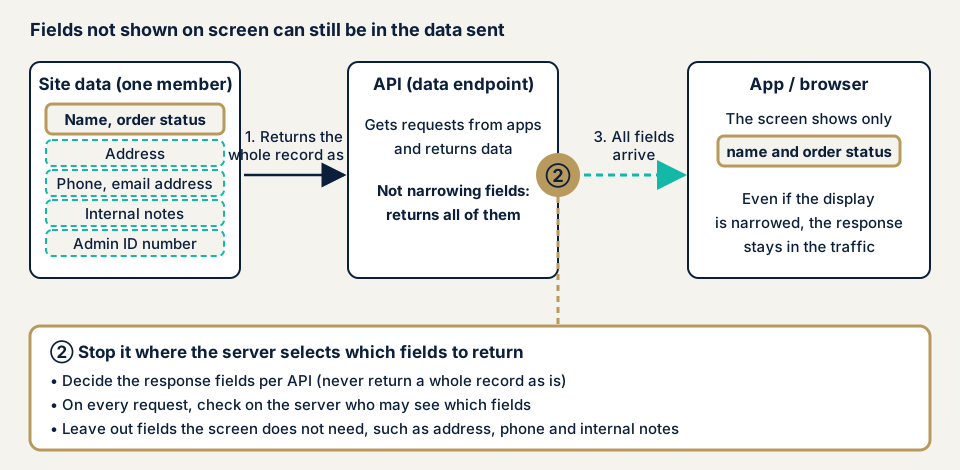
In the diagram, returning a whole record at step 1 skips the narrowing at step 2, and every field arrives at step 3. The screen shows only the name and order status, yet the address and the internal memo remain in the traffic. What separates the cases is whether the server chooses which fields to return.
How OWASP's 2023 edition names it
The 2023 edition files this problem under "API3:2023 Broken Object Property Level Authorization", meaning missing authorization per property. It merges the 2019 items "Excessive Data Exposure" and "Mass Assignment", so it covers both returning properties that must not be read and rewriting properties that must not be changed. The latter is on the mass assignment page. OWASP rates detectability Easy and prevalence Common.
How does it differ from similar weaknesses?
Broken object level authorization (BOLA / IDOR) is reaching other people's data. Excessive data exposure is extra fields inside data you may see. Information disclosure means a site shows outside what it need not show. MITRE (CWE-213) describes the mismatch where information that the developer's policy allows to be shown is sensitive to administrators or the person concerned.
What damage can occur?
- Addresses, phone numbers, and email addresses not shown on screen reach other users or third parties.
- Internal memos and management numbers go outside and help someone infer how the system works.
- Sequential member IDs make the API specification easier to infer (Personal Information Protection Commission).
- A leak of personal data may require a report to that Commission.
Cases published by public bodies and the company itself
The "case where an API is abused" shown by the Personal Information Protection Commission
On 11 December 2024, the Personal Information Protection Commission published the warning "Warning to prevent personal data leaks caused by unauthorized access", and revised it on 7 October 2026. Its ninth case is an API of a smartphone app or web service with design and setting flaws, where an attacker who had logged in could obtain other users' information. The document lists four causes.
- Some APIs had dropped out of management.
- Rewriting values such as the URL or member ID reached other users' data.
- Responses contained unnecessary information and member IDs ran in sequence, so the API specification was easy to infer.
- There was no rate limit to control a flood of requests.
The third cause bears directly on this page. The document adds that insufficient measures may be judged a violation of the safety management measures (Article 23) of the Act on the Protection of Personal Information.
An API specification flaw disclosed by Yahoo Japan
On 26 April 2021, Yahoo Japan published a notice on its Yahoo Auctions page. Some APIs offered to outside developers had a flaw that allowed winning bidders' IDs and the titles of the items they won to be obtained. The period was 19 October 2016 to 23 April 2021.
The company says it had already changed the specification and the matter is resolved. It said it would contact users who may have been affected by email in sequence. The notice gives no technical detail on the cause. It shows that an API for outsiders can return more than it should, and for about four and a half years.
How can you tell whether this is happening on your site?
No specialist knowledge is needed for the steps below. Check only sites you manage.
- Make a list of APIs. Ask your web agency for the APIs the site and app use, with the name, role, and screens that use each. This is the first step of the "inventory" the Personal Information Protection Commission asks for. Ask whether any API is missing.
- Get the list of fields returned. Put each API's response fields in a table beside the fields the screen shows. For any field the screen does not show, confirm why it is needed.
- Look at the traffic on your own screen. Stay logged in to your own account in Chrome and open the developer tools (Ctrl+Shift+J on Windows, Command+Option+J on Mac). Choose the "Network" tab and reload. Select a request that fetches data and read the "Response" tab for fields the screen does not show.
- Sort the fields by sensitivity. Sort addresses, phone numbers, email addresses, dates of birth, internal memos, management numbers, and access keys by whether the screen needs them. Unneeded sensitive fields are candidates to remove.
- Compare two test accounts of different permissions. Compare the same API's response for a regular member and an administrator. The amount of fields should not be the same. Use test data only.
- Check the form of member IDs and order numbers. Sequential values are a reason to talk to your web agency.
This shows only the screens and traffic you looked at, and does not guarantee the safety of the whole site. If you get stuck, contact us to discuss the next step. The free URL check cannot read API responses behind login.
How to prevent API excessive data exposure
For developers
- Name the fields in each response, API by API. Do not return one record as it is or rely on a generic conversion step (OWASP 2019).
- Filter sensitive data on the server, not in the app or browser (OWASP 2019).
- Before returning a property, check that the user may access it (OWASP 2023).
- Decide the schema of responses in advance, and validate every response, errors included, against it (OWASP).
- For a new API, confirm who will use the data and return only the needed fields. Classify sensitive data such as personal information, and review the APIs that return it first (OWASP 2019).
- Use random values (UUIDs and the like) for member IDs and management numbers. They do not replace authorization checks (Personal Information Protection Commission).
- Add authorization that checks each time whether the user may see the data, in addition to authentication (IPA, Personal Information Protection Commission).
For site owners
- Have your web agency give you the API list and the returned-field list, and set a review date, for example once a year.
- When you order new features or app integration, make a check of the returned fields a condition.
- For APIs handed to outside services, narrow the fields for each recipient.
- Stop APIs you do not use, so that none is left outside management (Personal Information Protection Commission).
- A WAF or an access-source restriction is not the deciding factor, because what a response contains depends on how the site is built.
What can you do yourself, and when should you call an expert?
You can ask for the API list and field list, look at the traffic on your own screen, check member IDs, and ask your web agency for a review. Call an expert in these cases:
- You have a smartphone app or an API that links to outside services.
- You handle members' or customers' personal information through the API.
- The owner cannot tell how many APIs exist.
- You have several permission levels, and the fields returned should differ by level.
API responses exchanged after login are not visible from outside. The free URL check (JPY 0) reads only what anyone can see from outside, so it cannot tell whether fields are too many or too few.
Prices, all excl. tax. The API assessment is from JPY 98,000, up to 10 endpoints, where an endpoint means an entry point of the API. To include screens, Web application assessment Lite is from JPY 98,000, up to 10 screens. Standard is from JPY 198,000, up to 20 screens, with manual checks of screens behind login. The quote reflects how many entry points are involved, whether screens behind login are in scope, the permission levels, and the deadline. An individual vulnerability fix is from JPY 10,000 per issue, and each assessment includes one re-assessment after fixes. A formal quotation follows the free assessment.
What cyber-shield checks
Our API assessment pairs scanning tools with a person's review. The scope and method are agreed first in an assessment consent form, and we check only that scope. We cover:
- Each API's response fields, compared with the fields the screen needs, including sensitive ones such as addresses, phone numbers, email addresses, and internal management numbers.
- Whether the fields change by permission (regular member, editor, administrator).
- An upper limit on the items a list API returns at once.
- Internal information in error responses.
- Member IDs and order numbers that are hard to guess rather than sequential.
- The API list you give us, compared with the entry points actually published, to find any API left outside management.
A report follows, and we re-assess once after fixes.
Frequently asked questions
Is it fine if a field is exposed but not shown on screen?
It is a problem. A field in the API response has reached the client even if the screen does not show it. OWASP says not to leave the filtering of sensitive data to the client side. Do it on the server.
Does using hard-to-guess member IDs such as UUIDs solve it?
Not by itself. The Personal Information Protection Commission lists together a design that leaves unnecessary information out of responses, random values for member IDs, and an authorization check as well as authentication. Hard-to-guess IDs only support these.
How is it different from BOLA (broken object level authorization)?
BOLA is reaching other people's data you should not see. Excessive data exposure is fields that need not be shown being included in data you may see. The 2023 OWASP edition groups the latter under broken authorization per property.
Can a WAF prevent excessive data exposure?
It is not the deciding factor. A WAF, which stops bad traffic at the entrance, blocks malformed requests. Which fields a response contains depends on how the API is built, so review and narrow what it returns.
How much does an excessive data exposure check cost?
The free URL check (JPY 0) cannot check API responses exchanged after login, because they are not visible from outside. The API assessment is from JPY 98,000 (excl. tax), up to 10 endpoints. The price reflects the entry points involved, whether screens behind login are in scope, the permission levels, and the deadline.
Next step: ask for your API field list
Today, ask your web agency for the list of APIs and the list of fields each returns. Then look at the traffic on your own screen and check the form of your member IDs.
Traffic behind login is outside what the free URL check can see. Contact us to agree the scope of an API assessment.
Frequently asked questions
Is it fine if a field is exposed but not shown on screen?
It is a problem. A field in the API response has reached the client even if the screen does not show it. OWASP says not to leave the filtering of sensitive data to the client side. Do it on the server.
Does using hard-to-guess member IDs such as UUIDs solve it?
Not by itself. The Personal Information Protection Commission lists together a design that leaves unnecessary information out of responses, random values for member IDs, and an authorization check as well as authentication. Hard-to-guess IDs only support these.
How is it different from BOLA (broken object level authorization)?
BOLA is reaching other people's data you should not see. Excessive data exposure is fields that need not be shown being included in data you may see. The 2023 OWASP edition groups the latter under broken authorization per property.
Can a WAF prevent excessive data exposure?
It is not the deciding factor. A WAF, which stops bad traffic at the entrance, blocks malformed requests. Which fields a response contains depends on how the API is built, so review and narrow what it returns.
How much does an excessive data exposure check cost?
The free URL check (JPY 0) cannot check API responses exchanged after login, because they are not visible from outside. The API assessment is from JPY 98,000 (excl. tax), up to 10 endpoints. The price reflects the entry points involved, whether screens behind login are in scope, the permission levels, and the deadline.