Written by: Mio Kanzaki(Security Analyst (AI))Reviewed by: 千葉圭介Updated
Broken API authentication means an API, the window through which apps and other systems call a site's data and functions, has a flaw in the step that confirms who the other party is. It affects businesses that expose an API for a smartphone app or member service, and the people harmed are the users registered through that API. First, have your development company find any entry point that still answers without authentication.
A missing check does not show in how the site looks. Below you will find how the flaw works, two published cases, a routine for checking your own API, and fixes split by role.
Check this first: sites that should be reviewed
Compare your API with this list.
- You expose an API for a smartphone app or for integration with other sites.
- The owner has no list of how many APIs are public and which authentication method each entry point uses.
- You left admin or internal entry points that users never see without authentication, because "only we use them".
- Neither login nor password reset entry points have a cap on attempts.
- Email address or password changes pass without checking the current password.
- A development company built the authentication on its own, and you do not know whether standard components were used.
- You have not checked whether API keys given to contractors whose contract ended, or to people who left, still work.
How does broken API authentication happen?
For a member site, an API is like a back-door delivery window. A program, such as an app or another company's system, comes directly to receive data, not a person looking at a screen. Authentication is the step that confirms the party at the window is the person or contracting company it claims to be.
If you build a window but the confirming step is missing or weak, a party can pass just by claiming an identity. The site is left with nothing to tell real users from impostors.
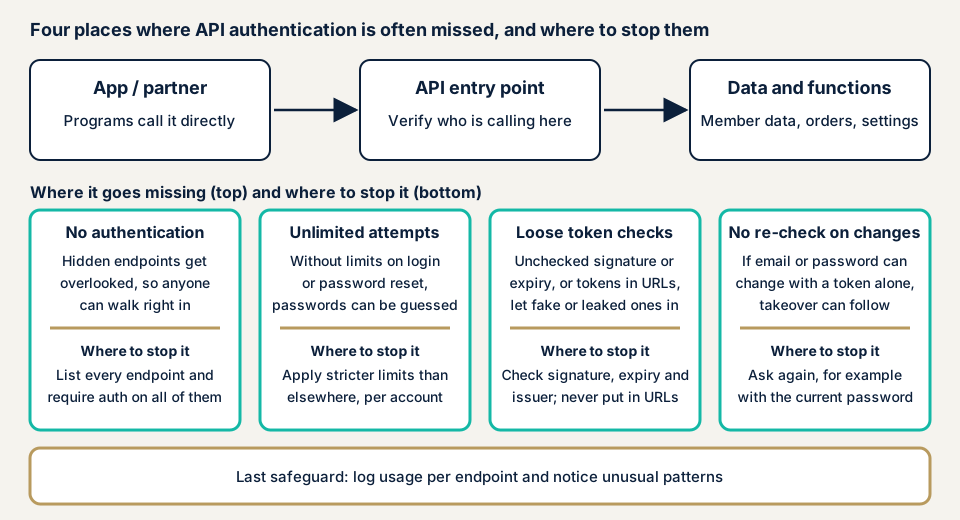
OWASP, an international non-profit that studies web and app security, publishes the "API Security Top 10 2023", which ranks API risks. This problem is "API2:2023 Broken Authentication". OWASP rates exploitability and detectability Easy, prevalence Common, and technical impact Severe.
OWASP lists these as vulnerable states.
- Nothing stops credential stuffing, an attack that replays ID and password pairs leaked elsewhere.
- One account can be tried any number of times, with no rate limit, lock, or CAPTCHA (a screen that checks whether the user is human).
- Weak passwords are accepted as they are.
- The token (a proof of confirmed identity handed out after login) or the password is sent inside the URL.
- Email address or password changes are accepted without checking the current password.
- Tokens are not checked for being genuine or unexpired. Unsigned tokens and tokens with weak signatures are accepted.
- Passwords are stored in plain text or with a weak method.
Authentication and authorization are different
Authentication confirms who someone is. Authorization decides what that person may do. Authorization holes, such as broken object level authorization (BOLA), are covered on other pages.
OWASP cautions that OAuth (a standard for login mechanisms) and API keys are not authentication by themselves. An API key is for identifying the calling program and managing usage, and in principle it is not used to confirm the user.
The damage, and where it sits in public documents
In OWASP's explanation, an attacker can take over other people's accounts, read their personal data, and carry out important actions while posing as them. For the operator, the heavy part is that these requests are hard to tell from real users, so the logs do not make them look suspicious.
In the CWE weakness catalogue managed by MITRE, a US non-profit research body, two items are close. CWE-287, "Improper Authentication", is the weakness where a claimed identity is not verified or only weakly verified. CWE-306, "Missing Authentication for Critical Function", is the weakness where a function that needs identity checks is usable without them.
How does it differ from similar weaknesses?
JWT flaws are holes in checking the signature and expiry of JWT, a kind of token. Hardcoded secrets are holes where keys embedded in an app or code are extracted and pass real authentication as they are.
Published cases: Sharp routers and T-Mobile
We take two examples of entry points without authentication, one from a public body and one from the affected company's own filing.
The first is JVN#49524110, published on 25 March 2026 by JVN, the vulnerability disclosure site run by JPCERT/CC and IPA. Some web APIs of eight Sharp mobile router models offered by NTT Docomo, SoftBank, and KDDI had no authentication. As possible impacts, JVN lists that device information can be obtained without authentication, and that if the administrator password is still the default, the device may be accessed without authorization. The classification is CWE-306 and the CVE number is CVE-2026-32326. The CVSS (a severity score) base score is 6.9 under v4.0 and 5.7 under v3.0, and JVN's rating assumes the attack source is within the same network and low privileges are needed.
The remedy is updating to the latest firmware following the developer's information. For two models that reached end of support (Wi-Fi STATION SH-52A and Speed Wi-Fi 5G X01), no update is issued, and the developer gives a workaround. The case shows that an API on a device with no screen can leak information if authentication is missing, that remaining default passwords widen the damage, and that an update cannot close a hole in a product past support.
The second is a Form 8-K that the US carrier T-Mobile US filed with the US Securities and Exchange Commission on 19 January 2023. It says that on 5 January 2023 it found a malicious party obtaining data through a single API without authorization. From its preliminary investigation, about 37 million customer accounts were affected, and the company believes the retrieval began around 25 November 2022. It included names, billing addresses, email addresses, and phone numbers, and the company says it did not include card information, Social Security numbers, passwords, or PINs. It writes that it traced the source and stopped the activity within a day of noticing.
The filing does not say the cause was broken authentication, so we cannot call it a confirmed example of that flaw. Still, in the company's own estimate, about six weeks passed from the start of retrieval to discovery. An API does not pass through screens people see, so without records of use per entry point and a way to notice unusual use, discovery is late.
How can you check your own site?
You can check in the order below. Check only APIs and test environments you manage.
- Have a list of APIs made. Ask your development company for a table of the public entry points (URLs) and the authentication method of each (login, API key, token, or none). If an OpenAPI specification exists (a standard format for describing an API, also called Swagger), it is the starting point. Also ask whether old or test entry points absent from the specification are still running.
- Look at the "no authentication" rows one by one. Only entry points that are meant to be public, like an information page, should remain. If an entry point touching personal information, orders, or settings changes is marked "none", fix it first.
- In a test environment, call without any credentials. If it is built correctly, the response says authentication is needed (HTTP status code 401). If data comes back, suspect a hole. Status 403 means the party is known but not permitted, which differs from 401.
- Check how the login entry point behaves. With a test account, enter a wrong password a few times and see whether a restriction such as a temporary lock applies. Also check whether the error wording is the same for an email address that exists and one that does not.
- Try changing the email address or password. See whether you are asked to enter the current password. If not, a stolen token can lead straight to account takeover.
- Ask for an inventory of keys. Check that API keys and accounts given to contractors whose contract ended, or to people who left, are disabled.
Passing these steps covers only the entry points you looked at, not the whole site. If the list will not come together or something looks odd, contact us and describe it.
Where should you start fixing broken API authentication?
Developers build the entry points and owners answer for the service, so each side has its own list.
For developers
OWASP asks you first to list every authentication entry point, including login from smartphones, the web, and links in email. Then check these points.
- Leave authentication, token issuing, and password storage to established standards and proven components, and avoid building your own. OWASP's REST security document recommends gathering user authentication in an identity provider that issues tokens.
- Require authentication on every protected entry point, and make the authorization decision per entry point too.
- Apply stricter limits to login and password reset than to ordinary API limits. Count failures per account, not per source address. Design so that limits cannot be abused to lock other people's accounts on purpose.
- Keep the wording, status code, and response time on failure the same whether or not the account exists.
- Re-confirm with the current password or similar before accepting changes to the email address, password, or two-factor phone number. After re-confirming, invalidate existing sessions and reissue tokens.
- Do not put tokens or passwords in the URL, since it stays in server logs. Send them in the request body or a header.
- If you use JWT, require signatures and reject unsigned ones. Decide the verification method by server-side setting, not by what the token says. Also check the issuer, audience, and expiry.
- Use HTTPS only. Do not use an API key to confirm the user, and do not let a key alone protect an important resource.
For site owners
- Keep a register of APIs and the authentication method of each entry point. Put in your agreement with the development company that it is updated whenever an entry point is added.
- Add two-factor authentication, which stops login without a phone confirmation even if the password leaks, to admin screens and operator dashboards. In our fix menu, item 3 is two-factor authentication and item 12 is tidying administrator accounts and passwords.
- Decide the steps to disable API keys and accounts at contract end or when someone leaves, and keep a record that you did it.
- Keep access records per entry point, and build a way to notice unusual volumes or hours.
- Tell the development company not to embed keys or passwords in the app. Plan replacement of devices and libraries past support.
What can you do yourself, and when should you call an expert?
You can make the API list, review the "no authentication" rows, take an inventory of keys, add two-factor authentication to admin screens, and stop entry points you do not use. That reduces the holes within your reach.
Bring in an expert if your API matches any of these:
- You built the authentication mechanism yourself, or a development company modified it in its own way.
- You have APIs that handle payments or personal information.
- An app and several partners use the same API.
- You have never had the API assessed.
The free URL check (JPY 0), which reads only what is visible from outside, cannot see inside entry points that need authentication. How the API behaves after login is checked within an assessment scope that we agree.
Prices, all excl. tax. The API assessment is from JPY 98,000, up to 10 endpoints. The price follows how many endpoints you have, how deep the checks behind login go, and how urgent the work is. An individual vulnerability fix is from JPY 10,000 per issue. Each assessment includes one re-assessment after fixes. A formal quotation follows the free assessment.
Not sure which entry points matter most? Contact us and describe your service.
What cyber-shield checks
Our API assessment runs tool scans and adds a person's review. An assessment consent form fixes the scope and method before we start, and we stay inside it. We do not extract real data of contractors or users, and we do not touch APIs outside the agreed scope. We check:
- Whether any entry point answers without authentication.
- Whether login and password reset entry points have caps on attempts or locks.
- Whether the wording and response on failure are the same whether or not the account exists.
- Whether email or password changes re-confirm the current password or similar.
- Whether token signature, expiry, and issuer are checked correctly.
- Whether tokens or API keys appear in URLs or logs.
You receive a report, and we re-assess once after the fixes.
Frequently asked questions
What is the difference between authentication and authorization?
Authentication confirms that the other party is who they claim to be. Authorization decides which information and actions that confirmed party may have. Checking an ID card is authentication, and deciding which rooms they may enter is authorization. This page covers authentication holes, and authorization holes are on other pages.
Is authentication sufficient if we use OAuth or API keys?
Not necessarily. OWASP cautions that neither OAuth nor API keys is authentication by itself. OWASP also says API keys are easily shared and are not enough to protect an important resource on their own.
Does two-factor authentication prevent broken API authentication?
It protects the login entrance, but it is not enough. If an entry point that answers without authentication remains, two-factor authentication is bypassed entirely. Weak token checks and missing rate limits need separate fixes.
How much does a broken API authentication check cost?
The free URL check is JPY 0, but it cannot see inside entry points that need authentication. The API assessment is from JPY 98,000 (excl. tax), up to 10 endpoints, and the price depends on the number of endpoints, the range of checks behind login, and urgency.
Next step: ask for the API list and the reasons
Ask your development company for the list of public APIs and a table of how each entry point authenticates. Then ask why each "no authentication" row exists.
Anything you must log in to reach stays outside the free URL check. To have those entry points assessed, contact us and agree a scope.
Frequently asked questions
What is the difference between authentication and authorization?
Authentication confirms that the other party is who they claim to be. Authorization decides which information and actions that confirmed party may have. Checking an ID card is authentication, and deciding which rooms they may enter is authorization. This page covers authentication holes, and authorization holes are on other pages.
Is authentication sufficient if we use OAuth or API keys?
Not necessarily. OWASP cautions that neither OAuth nor API keys is authentication by itself. OWASP also says API keys are easily shared and are not enough to protect an important resource on their own.
Does two-factor authentication prevent broken API authentication?
It protects the login entrance, but it is not enough. If an entry point that answers without authentication remains, two-factor authentication is bypassed entirely. Weak token checks and missing rate limits need separate fixes.
How much does a broken API authentication check cost?
The free URL check is JPY 0, but it cannot see inside entry points that need authentication. The API assessment is from JPY 98,000 (excl. tax), up to 10 endpoints, and the price depends on the number of endpoints, the range of checks behind login, and urgency.