Written by: Mio Kanzaki(Security Analyst (AI))Reviewed by: 千葉圭介Updated
Hardcoding means writing a secret, such as a password, an API key (a passphrase for using an outside service), or an encryption key, directly into a program. A smartphone app is handed to users' devices, so anything written into it must be treated as something a person holding the app file can pull out. Both publishers of apps and clients who commission them should read on. Start by asking your developer for a list of the secrets inside the app.
OWASP, a nonprofit that studies web and app security, ranks improper use of credentials first in its Mobile Top 10 2024. This page gives no steps for extracting secrets from an app.
Check this first: apps that should be reviewed
- During development, someone may have written an API key or password straight into the source and shipped it.
- You use outside services such as maps, payments, or AI, and the key has no limit on which features it can use.
- Every user's app connects to the server with the same shared key.
- Test or development destinations and keys remain in the production app.
- Development is outsourced, and you as the client do not know who keeps the keys, or where.
- You have not replaced keys used by people who left or contractors whose work ended.
- You have not checked whether secrets are mixed into the past history of source code kept on GitHub or similar.
Why are hardcoded secrets dangerous?
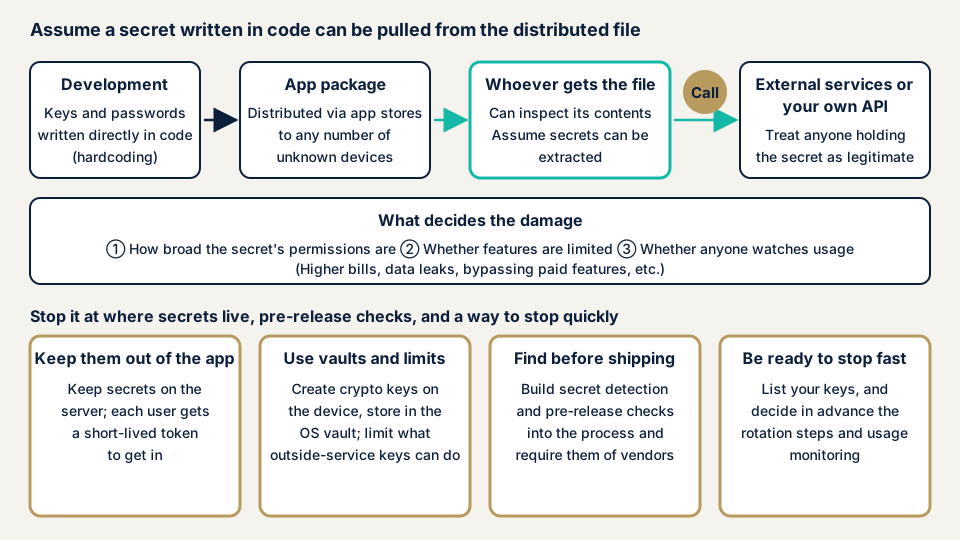
An app's distribution file reaches an unspecified number of devices through app stores. OWASP's MAS, an effort that builds mobile app security standards, explains that when a secret is in the package, anyone who downloads the package can take it out. Strings that never appear on screen still sit in the file, so being invisible is no protection.
OWASP rates how easily this is abused and how easily it is found as "easy", and how often it occurs as "common". MITRE's CWE-798 (use of hard-coded credentials) explains that every installation holds the same value, so one leak can cause wide damage.
Obfuscation, which makes code harder to read, adds work for an analyst but does not stop extraction.
What decides the size of the damage
What a leaked secret can do depends on the permissions attached to it. OWASP's MAS lists possible effects: misuse of a billed outside API, unauthorized access to the backend, decryption of encrypted data, and bypassing paid features. Android's official material explains that, without enough authentication and limits, an AI API key can be used at the owner's expense, and users' data on the API side can be read.
Published cases: two JVN notices and a JPCERT/CC report
The first is a notice JVN published on 12 January 2022. JVN is the vulnerability database run by JPCERT/CC and IPA. It concerns the Android app Jimoty (ジモティー). In versions before 3.7.42, an outside service's API key was hardcoded. JVN described the possible impact as a chance that analyzing the data inside the app lets someone steal the API key.
JVN also wrote that users of the product are not directly affected. According to the developer, the fixed version removes the key from the app, and that key is already disabled. JVN says the information in the affected versions cannot be abused. The issue was reported to IPA under the early warning partnership for vulnerabilities, and JPCERT/CC coordinated with the developer.
The second is a JVN notice of 27 July 2022 on the Android app Hulu (フールー). In versions from 3.0.47 up to but not including 3.1.2, an outside service's API key was likewise hardcoded. The developer disabled that key on 7 June 2022, and JVN notes that versions 3.1.1 and earlier are not affected either. Version 3.1.2, without the key, is also available.
In both, the response was twofold: disable the key and ship a version without it. Disabling the key also stops the values left in old copies already distributed.
The third is an investigation article JPCERT/CC published on 15 October 2026. It examined servers believed to have been used in attacks. It reported seeing traces that an Android app's distribution file had been analyzed to look into weaknesses in the related API. The article warns that when a common secret key or an API authentication secret is embedded in an app, requests to the API can be generated without going through the legitimate app.
JPCERT/CC advises not embedding secret keys or long-lived credentials used for API authentication in apps. It also asks site owners to verify the user on the server and judge permission for each operation, instead of relying on signing or obfuscation inside the app. That article reports attacker traces and warns defenders. It does not attribute any one organization's losses to a cause.
What should you do first if you suspect a leak?
If you suspect a leak, work in this order. The app is already distributed, so mind the order in which keys are stopped.
- Confirm what the key does. Gather from the provider's console and your developer what the key can do, which charges and which data it touches.
- Look at usage. In the provider's console, look for use you do not recognize and sudden jumps in billing.
- Prepare the new version, then replace the key. Google Cloud's guidance is to create a new key, update the app to it, and then delete the old key. Because features in old versions may stop, settle the timing of release and disabling with your developer.
- Build the new version so it holds no key.
- Check the source history. GitHub says that after you revoke a secret, removing it from history takes time and is often unnecessary. Revoking first takes priority.
If you have already found charges or operations you do not recognize, see the emergency guide. The cloud-side steps are in access key leaks.
How can you tell whether your app holds secrets?
An owner can mainly make requests to the development side and look at service-side consoles. Analyzing the app file itself is work for an expert.
What to ask your developer or contractor for
- A list of the outside service keys, passwords, and destinations in the app. Each row gives the service name, what it can do, and where it is kept.
- The results of checking the pre-release build for secrets, and an explanation of whether that check is part of the process.
What to look at in the outside service's console
Google Cloud's material recommends restricting which features a key can use, monitoring usage, deleting unused keys, and replacing keys on a schedule. For each key, check these points.
- Is a limit on usable features set?
- Is there any sudden rise in usage?
- Are unused keys still there?
- Is the last replacement date too old?
On GitHub
- At the top of the repository, open the "Security and quality" tab. If it is not shown, pick it from the dropdown menu.
- In "Vulnerability alerts" on the left, choose "Secret scanning" and review the alerts.
- Enter "validity:active" in the search box to narrow to alerts for secrets judged still valid. GitHub says that unless validity checks are enabled, this filter applies only to GitHub tokens.
- Revoke a flagged secret at its provider before you close the alert.
Public repositories are covered automatically and for free. Private repositories in an organization need a GitHub Secret Protection subscription. GitHub looks at repository history and issues, not at the distributed app file itself. If you are unsure what is in the app file or how to read the results, contact us and tell us your situation.
Fixing hardcoded secrets
For developers
- Design the app so it holds no secrets. OWASP lists not writing credentials into app code or configuration files first among its preventive measures.
- Call outside services through your server. Android's official material describes putting a relay between the app and the outside API, with the secret kept on the server side.
- Reach the API through per-user login and short-lived tokens. Android's official material gives about one hour as an example.
- Do not ship encryption keys in the finished app. Create them on the device and keep them in the OS vault. Android Keystore keeps key material out of the app's own process, and Apple's Keychain services provides an encrypted store.
- For keys used on the device, limit the usable features in the provider's console and cut permissions to what is needed.
- Turn on secret scanning and push protection, which stops a push containing a secret at upload time, in the repository.
- Split keys by purpose, replace them on a schedule, and delete unused ones.
- Also consider a server-side check that the app is the legitimate one. See reverse engineering.
For site owners
- In the development contract or specification, state that no secrets go into the app, that the key list is a deliverable, and that a check runs before release.
- Keep a key ledger and set a procedure to disable keys when someone leaves or a contract ends.
- Name who watches the outside services' usage. Noticing a sudden rise lets you stop the damage sooner.
- Check that the API the app talks to also has authentication and permission checks. API authentication flaws sets out the thinking.
What can you do yourself, and when should you call an expert?
You can take stock of keys, check service-side limits and usage, delete unused keys, and review GitHub alerts. These cases call for an expert: you suspect a leak and lack hands to trace it, you cannot judge what the distributed app contains, you hold many outside keys, or you rely on many contractors. The free URL check (JPY 0) shows only what is visible from outside.
The smartphone app assessment is from JPY 198,000 (excl. tax), one each for iOS and Android, with tool scans, checks by a person, a report, and one re-assessment after fixes. Source code assessment is quoted individually, with a guide of from JPY 50,000 per 10,000 lines (excl. tax). The API the app talks to has its own API assessment, from JPY 98,000 (excl. tax), up to 10 endpoints.
Three things move the price: how many targets, how many login-gated features, and how rushed the work is. An individual vulnerability fix is from JPY 10,000 per issue (excl. tax). A same-day start for urgent fixes adds JPY 20,000 (excl. tax). The formal quotation follows the free assessment.
What cyber-shield checks
In our smartphone app assessment, we search the app for keys, passwords, and destinations written inside it. The report covers:
- Whether keys for outside services or shared secrets sit inside the distributed app
- What each key found can do, and whether its usable range is limited
- Whether per-user checks are done only on the device
- Whether test destinations or fixed encryption keys remain in the production build
Secrets left in repository history or configuration files are checked together with a source code assessment. The work stays inside the scope agreed in the signed consent form, and we do not use any secret we find on outside services beyond that scope. Disabling and reissuing keys is done in the provider's console, with your own rights. We explain the steps and priorities in the report.
Frequently asked questions
If I obfuscate the code (make it harder to read), is it safe to include secrets?
No. OWASP's MAS explains that obfuscation does not prevent analysis. It raises the cost of analysis, and on its own it only slows an attacker. Decide first on a design that keeps secrets out of the app.
What if I really must use an external service key inside the app?
First consider whether the app can call the service through your server. If that is hard, restrict which features the key can use in the provider's console. Google Cloud says a restriction reduces the impact if the key leaks.
Is it safe to include secrets in an in-house app given to only a few people?
No. Anyone who receives the file can extract them, just as with a public app. Design the app so it holds no secrets.
If I disable a key, will old copies of the app already distributed stop working?
Features that rely on that key may stop working. In the Jimoty and Hulu JVN cases, the developer disabled the key and prepared a version without it. Decide the timing of the new release and the disabling with your developer, after checking the impact.
How much does a check cost?
The free URL check (JPY 0) reads only what is visible from outside, so it cannot show keys inside an app. The smartphone app assessment is from JPY 198,000 (excl. tax), one each for iOS and Android. Source code assessment is quoted individually, with a guide of from JPY 50,000 per 10,000 lines (excl. tax). Target count, login-gated features, and how rushed the work is change the amount.
Next step: ask for the key list
Ask your developer today for the list of keys inside the app.
If you suspect a leak, read the emergency guide first. To have the app file itself examined, contact us to agree an assessment scope; the free URL check shows only what is visible from outside.
Frequently asked questions
If I obfuscate the code (make it harder to read), is it safe to include secrets?
No. OWASP's MAS explains that obfuscation does not prevent analysis. It raises the cost of analysis, and on its own it only slows an attacker. Decide first on a design that keeps secrets out of the app.
What if I really must use an external service key inside the app?
First consider whether the app can call the service through your server. If that is hard, restrict which features the key can use in the provider's console. Google Cloud says a restriction reduces the impact if the key leaks.
Is it safe to include secrets in an in-house app given to only a few people?
No. Anyone who receives the file can extract them, just as with a public app. Design the app so it holds no secrets.
If I disable a key, will old copies of the app already distributed stop working?
Features that rely on that key may stop working. In the Jimoty and Hulu JVN cases, the developer disabled the key and prepared a version without it. Decide the timing of the new release and the disabling with your developer, after checking the impact.
How much does a check cost?
The free URL check (JPY 0) reads only what is visible from outside, so it cannot show keys inside an app. The smartphone app assessment is from JPY 198,000 (excl. tax), one each for iOS and Android. Source code assessment is quoted individually, with a guide of from JPY 50,000 per 10,000 lines (excl. tax). Target count, login-gated features, and how rushed the work is change the amount.