Written by: Mio Kanzaki(Security Analyst (AI))Reviewed by: 千葉圭介Updated
A JWT (JSON Web Token, a signed token showing a user is logged in) implementation flaw is a state in which the receiving side skips or loosens checks of the signature, expiry, issuer and so on. It affects sites that work with apps, sites that split the screen from the back end (the API), and companies with login links to other services, and the harm lands on their users and operators. Ask your developer whether signature checks are mandatory and the accepted methods are fixed on the server.
The trouble lies less in how tokens are made than in how loosely the receiving side checks them. We give no attack steps.
Check this first: sites that should be reviewed
Have your token checks reviewed if you recognise any of these.
- A smartphone app, or a site split into screens and API, handles login.
- You were told login uses JWT, but you do not know which component checks it.
- Token expiry is weeks long or absent.
- You have never tested whether an old token still works after logout or leaving.
- The signing key (a secret string) is short, written straight into source code, or reused.
- Tokens carry personal data such as email addresses or phone numbers.
- The login library has not been updated since it was added.
How do JWT implementation flaws arise?
The IETF (the body that sets technical standards) defined JWT in RFC 7519 in May 2015 as a string that carries a set of claims in JSON format. Compare it to an entry pass: it holds a name, an expiry and the issuing desk's name, stamped by the desk. A token has three parts: a header with the signing method, a body saying who, until when and for whom, and the signature that acts as the stamp.
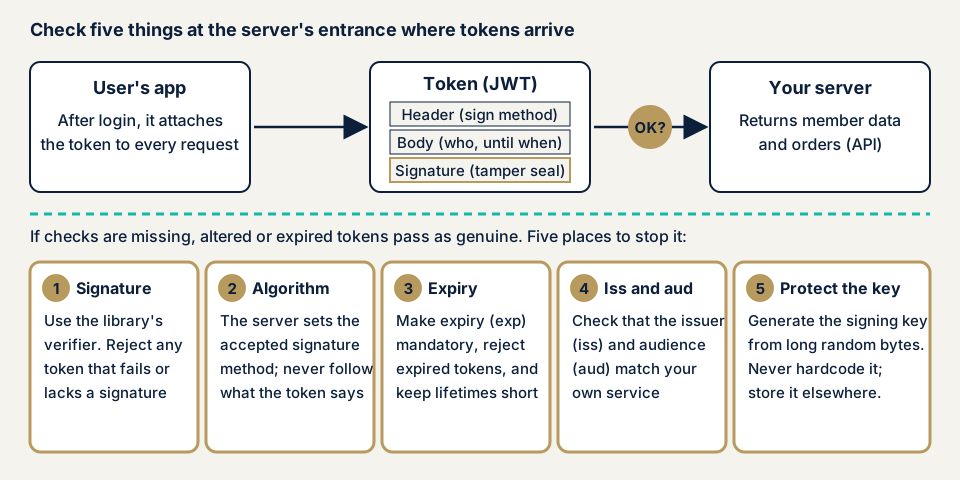
The signature exists to show the token was not altered on the way. If the receiving side does not check it, checks it loosely, or ignores expiry and audience, an altered token or one meant for another service passes as genuine. The server treats the holder as whoever the token says.
The token's content is not hidden
A signature detects changes. It does not hide the content. OWASP (a non-profit working on web safety) says a signed JWT is not secret, and its content can be seen from storage or logs. If you need to hide it, OWASP's guide describes JWE, a way to encrypt the token.
What damage can it cause?
The public sources point to these harms.
- An altered token is treated as properly signed, and logged-in functions are used as another user (the JVN cases).
- An expired or revoked token keeps working.
- A token issued for another service is accepted by yours, which is what OWASP's issuer and audience checks prevent.
- Personal data put in the token is read from logs or storage.
Where it sits in public references
In February 2020 the IETF published RFC 8725, the best current practices for JWT (BCP 225). The threats it lists include weak signatures and missing signature checks, weak shared keys and substitution of one token for another. The countermeasures include checking the signing method and verifying issuer and audience.
In MITRE's CWE it is CWE-347, improper verification of a cryptographic signature: a product does not verify a signature, or verifies it wrongly.
How it differs from session and API authentication flaws
Session management flaws mean the number the server remembers reaches a third party. A JWT shows a signed token instead of a number, and adds the risk of loose token checks. API authentication flaws cover the whole authentication entrance, of which JWT handling is one part. If a key is in the code, it is also a hardcoded secrets problem.
Public cases: signature checks in JWT components
JVN, the vulnerability notice site run by JPCERT/CC and IPA, lists signature verification flaws in components that handle JWT. We take three from 2015 and 2017. They are fixed in current versions, but they show why component versions matter.
JVN#06120222 (3 June 2015) found that JWT from F21, before version 2.0, did not properly verify the token's signature (CVE-2015-2951). JVN says data crafted by a third party could be treated as a validly signed token. The CVSS base score is 5.0, and the fix is the latest version.
JVN#25336719 (25 June 2015) affects namshi/jose 2.2.1 and earlier, 3.0.0 and earlier, 4.0.0 and earlier, and 5.0.0 and earlier. It is the same kind of flaw (CVE-2015-2964), with a base score of 5.0, and the fix is the latest version.
JVNVU#90916766 (25 September 2017) found that in jwt-scala, a Scala implementation, 1.2.2 and earlier let signature verification be bypassed (CVE-2017-10862). The CVSS v3.0 base score is 5.3. The fix is the latest source with the correction, and a workaround is to check that the signing method field in the header holds a suitable value.
In all three, your own code can be right while a component that skips a check leaves the hole. The scores look modest, but being treated as a signed token is serious, and we think it can be an entrance to acting as another user. The first fix was an update every time. IPA's 20 rules also ask for regular vulnerability measures for the software that makes up a web application.
How can you check your own site?
You can begin without specialist knowledge, but only on a site you manage.
- Get a list of components and versions. Ask your developer for the name, version and last update date of the component that handles JWT. With the name, you can search JVN iPedia (IPA's vulnerability countermeasure database) for published flaws.
- Ask how long a token lives. Find out the expiry in minutes and whether expiry is mandatory.
- Try two devices. Log in to one account on a second device and change the password on one. See whether the other stops at once or keeps working until expiry, and ask your developer for the longest delay.
- Look at the token's content. In the browser's developer tools Network view, find the token attached to calls after login and see whether it holds personal data you do not need. Treat a token like a password, and do not paste it into outside converter sites or chat.
- Ask your developer. Is signature checking mandatory? Are the accepted methods fixed on the server? Are issuer and audience checked? Is the key kept outside the source code?
These steps cover only what you checked. If you are unsure, contact us and we will decide the range with you.
How to prevent JWT implementation flaws
For developers
The top priority is not to write signature checks yourself but to leave them to a proven component, and then check the following.
- Reject the whole token if any signature or cryptographic operation fails (RFC 8725 section 3.3).
- Fix the accepted signing methods in server settings. Never trust the method named in the token header. RFC 8725 section 3.1 asks that the application can specify the allowed set and that each key be tied to one method.
- Unless other means protect them, do not let a component create or accept unsigned tokens (section 3.2). Choose from the HS256, ES256 and PS256 families OWASP recommends.
- Do not trust a key the token says to use. OWASP asks you not to use key information the header points to, unless it leads back to a configured trust anchor.
- A shared-key secret needs at least 160 bits of unpredictability and a length at least that of the hash output (256 bits for HS256), per OWASP. Generate it with a secure random source, and never hardcode it.
- Make expiry (exp) mandatory and short. Match the issuer (iss) exactly, choose keys only from verified issuers, and require the audience (aud) to include your service (RFC 8725 sections 3.8 and 3.9, and OWASP).
- Use separate validation rules for each token type (sections 3.11 and 3.12).
- If revocation is needed, use the Token Status List OWASP mentions, or a revocation list keyed by token ID (jti) and issuer. Do not key it by the token or its hash.
- Put the minimum in tokens, and update components by watching public information.
Also ask first whether to use JWT at all. OWASP's guide has a section on options other than JWT. For a members' site with the screen and back end on one server, we think standard server-side sessions leave revocation to the server more easily. See the defences under session management flaws too.
For site owners
- Ask your developer to run the checks above and answer in writing, attaching the list of endpoints that use JWT.
- Put component updates in your maintenance work, and decide who watches public information.
- Keep signing keys out of source control and shared chat, and settle a replacement procedure. Replacing a key makes every issued token unusable, so users log in again.
- If a key may have leaked, use our emergency contact.
- Reduce unused administrator accounts (item 12 of our fix menu).
- Two-step login does not cure loose token checks. It protects only the entrance before a token is issued.
What can you do yourself, and when should you call an expert?
You can do the checks above and question your developer. An expert is worth calling in any of these cases:
- You wrote your own JWT validation or changed a component's settings in detail.
- You offer payment, member data or admin functions through an API.
- You link login with outside services, and several services share an issuer.
- You have never had your post-login API assessed.
Communication after login cannot be seen from outside, so the free URL check (JPY 0) cannot show how tokens are handled.
All amounts exclude tax. The API assessment starts from JPY 98,000 for up to 10 endpoints. Web application assessment Lite starts from JPY 98,000 for up to 10 screens, and Standard from JPY 198,000 for up to 20 screens, with manual checks behind login. More endpoints or screens, a wider scope behind login, and urgency raise the amount. Fixing an individual vulnerability starts from JPY 10,000 per issue, quoted by content. We quote formally after the free assessment, and a single re-assessment after your fixes is included.
The free URL check shows only what is visible from outside. If you cannot say which APIs use tokens, contact us.
What cyber-shield checks
Our API assessment runs a tool scan and a person's review across the endpoints you agree in the consent form.
- Whether signature checks work in real traffic.
- Whether the accepted signing methods are fixed on the server.
- Whether expiry is mandatory and expired tokens are refused.
- Whether issuer and audience checks work per service.
- Whether tokens carry unneeded personal or internal data.
- Component versions against published vulnerabilities.
- Whether keys are written in the source code (within a source code assessment).
A written report lists what we found. Once you fix it, we test once more at no charge. Safety is not guaranteed, because testing shows only the state on the day.
Frequently asked questions
How is a JWT different from a session ID?
A session ID is a number the server remembers and asks you to show. A JWT carries the identity information and a signature in the token itself, and the server checks the signature and expiry. How revocation and expiry work is for the builder to decide and implement.
If a token is signed, is its content hidden?
No. A signature shows the content was not altered; it does not make it unreadable. OWASP also says a signed JWT is not secret. Keep personal data out of the token, and consider an encrypted form (JWE) if you must carry it.
How many minutes should a token last?
OWASP lists a short expiry as one way to limit token reuse but gives no specific length. Weigh how sensitive the data is against the effort of logging in again, and decide with your developer.
Does a JWT stop working as soon as the user logs out?
It depends on the build. If the server checks only expiry, the token may work until it expires even after logout. OWASP lists a Token Status List, or a revocation list keyed by token ID (jti) and issuer, as ways to revoke. Ask your developer how long it takes to stop.
How much does it cost to check for JWT flaws?
Communication after login cannot be seen from outside, so the free URL check (JPY 0) cannot check it. The API assessment starts from JPY 98,000 (excl. tax, up to 10 endpoints), and Web application assessment Standard from JPY 198,000 (excl. tax, up to 20 screens, with manual checks behind login).
Next step: three questions for your developer
Today, ask your developer for the version of the component that handles JWT, the token expiry, and how long a token keeps working after logout. To have the API behind login checked, contact us to agree an assessment scope. The free URL check shows what is visible from outside.
Frequently asked questions
How is a JWT different from a session ID?
A session ID is a number the server remembers and asks you to show. A JWT carries the identity information and a signature in the token itself, and the server checks the signature and expiry. How revocation and expiry work is for the builder to decide and implement.
If a token is signed, is its content hidden?
No. A signature shows the content was not altered; it does not make it unreadable. OWASP also says a signed JWT is not secret. Keep personal data out of the token, and consider an encrypted form (JWE) if you must carry it.
How many minutes should a token last?
OWASP lists a short expiry as one way to limit token reuse but gives no specific length. Weigh how sensitive the data is against the effort of logging in again, and decide with your developer.
Does a JWT stop working as soon as the user logs out?
It depends on the build. If the server checks only expiry, the token may work until it expires even after logout. OWASP lists a Token Status List, or a revocation list keyed by token ID (jti) and issuer, as ways to revoke. Ask your developer how long it takes to stop.
How much does it cost to check for JWT flaws?
Communication after login cannot be seen from outside, so the free URL check (JPY 0) cannot check it. The API assessment starts from JPY 98,000 (excl. tax, up to 10 endpoints), and Web application assessment Standard from JPY 198,000 (excl. tax, up to 20 screens, with manual checks behind login).