Written by: Mio Kanzaki(Security Analyst (AI))Reviewed by: 千葉圭介Updated
Broken object level authorization (BOLA) is a weakness where an API (the window through which applications exchange data) does not check, for each user, whether it may hand over the data for a given number. It affects businesses with APIs behind mobile apps, member sites, and booking or ordering systems. The operator is in trouble, and so are members whose information others can see. Make a list of the APIs that accept a number or ID, and ask your developers whether each one checks "is this the owner" on every request.
BOLA ranks first (API1:2023) in the 2023 OWASP API Security Top 10. The same kind of problem is also called IDOR (Insecure Direct Object Reference) or CWE-639. This page covers how it works, cases published by public bodies, how to check, and how to fix it.
Check this first: sites that should be reviewed
If any of these applies, check whether permissions are verified for each piece of data.
- You have APIs linked to mobile apps or outside services, with entry points that take an order, member, or booking number.
- Numbers or IDs run in sequence, such as 1, 2, 3.
- The filter that shows "only my data" is applied on the app or screen side.
- You have no list of published APIs and do not know who built which.
- Responses carry fields the screen never uses, such as other people's names or contact details.
- Nothing stops a flood of requests in a short time.
- You have never tested with another user's account during assessments or tests.
These overlap with the causes the Personal Information Protection Commission gave in a case, which a later section covers.
How does broken object level authorization happen?
Login confirms who you are (authentication). A separate mechanism, authorization, decides whether that person may receive this data. Within broken access control, BOLA is the state where authorization is missing for each single piece of data.
A typical case is an app that asks the API "show me the order with number X", and the API trusts that number and returns the data. From the site's view, this is a well-formed request from a logged-in user. If nothing checks whether the user owns the data, the API answers a request that points to another user's number in the same way.
OWASP says every endpoint (each entry point of an API) that takes a number or ID and handles data needs this check. It also notes that merely comparing the logged-in user's ID with the ID in the request is a sufficient fix only in some cases. A problem where someone reaches an entry point they have no right to is a different class, broken function level authorization (BFLA).
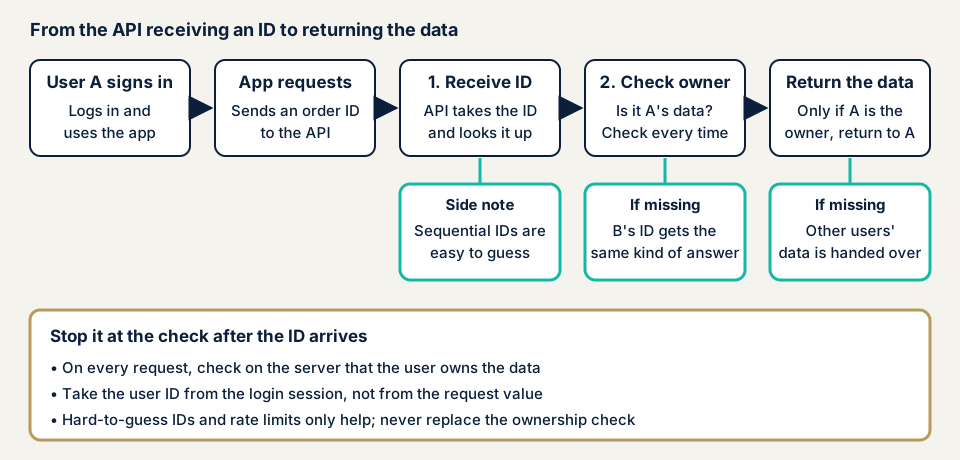
The place to stop it in the diagram is the fourth box. After the number is received, the check for the owner must be part of every request. That covers reading, updating, deleting, and exporting. OWASP rates exploitability Easy, prevalence Widespread, and detectability Easy.
What damage appears?
The main damage is that other users' information can be seen. Personal data such as order history, addresses, and contact details can be exposed. If updates and deletions pass, other people's data can be rewritten or erased. The more members you have, the wider the effect.
How does it differ from similar weaknesses?
IDOR is the name for reaching someone else's data through a direct reference such as a number, and it is almost the same kind of problem as BOLA. CWE-639 classifies the weakness where authorization can be bypassed through a value the user controls. API authentication flaws mean weak login itself, so the entry point differs from BOLA. Excessive data exposure means returning too many fields, and it often occurs together with BOLA.
Public cases: numbers rewritten to reach other people's information
An API case from the Personal Information Protection Commission
On 11 December 2024, the Personal Information Protection Commission published a warning that sorts reported leak cases into nine types, and revised it on 7 October 2026. Case 9, "cases where an API is abused", was caused by design and setting flaws in the API of a smartphone app or web service. After the attacker logged in, rewriting parameters let them obtain other users' information that they should not have been able to get.
Four causes are listed. First, some APIs had dropped out of management. Second, rewriting parameters such as the URL or the member ID allowed access to other users' data. Third, responses contained unnecessary information and member IDs ran in sequence, so the API specification was easy to infer. Fourth, there was no limit on the number of accesses (rate limiting).
The example measures are an inventory of APIs, a mechanism that performs authorization each time in addition to authentication, designs that do not return unnecessary information, random values such as UUIDs for member IDs, and rate limiting. The document also says that if measures are insufficient, it may be judged a violation of provisions such as Article 23 of the Act on the Protection of Personal Information, which sets safety management measures.
Authorization bypass in EC-CUBE and related products, published by JVN
On 22 January 2014, JVN, the vulnerability information site of JPCERT/CC and IPA, published JVN#51770585, "Authorization bypass vulnerability in EC-CUBE". It covers EC-CUBE 2.11.0 to 2.11.5 and 2.12.0 to 2.12.2, the type is CWE-639, and the CVE number is CVE-2014-0808. A logged-in user may obtain other users' registered information by sending a crafted HTTP request. The remedy is updating to the latest version or applying the fix files.
On 29 May 2024, JVN#15637138 reported the same problem in EC-Orange, a package based on EC-CUBE. It covers systems installed before 29 June 2015, and installations after that are noted as already protected. The CVSS v3.0 base score is 4.3. The report was accepted in July 2015, and coordination with the developer resumed in December 2023.
On 21 February 2025, JVN published a flaw in the API of My Security Account App by Rapid Response Monitoring. It is a permission check bypass by manipulating user identifiers (CWE-639, CVE-2025-0352). The developer says the patch has been applied and no action is needed from users.
In all three, a logged-in user is the entry point. Screens and APIs behind login are not visible from outside, so checking only public pages does not find them. The EC-Orange report shows that the same type of problem can remain in e-commerce sites built long ago. Check EC-CUBE vulnerabilities as well.
How can you check your own service?
You can check in the order below. Check only services you manage, and do not try other people's data or live production data.
- List the entry points that accept a number or ID. Ask your developers or web agency to write out the APIs and URLs that return data for orders, members, bookings, invoices, files, and so on by number. Ask whether any API has dropped out of management.
- Look at the form of the numbers. Are they sequential, or long strings that are hard to guess? Sequential numbers are not necessarily vulnerable, but the impact is larger if a check is missing.
- Look at the fields returned. Check that responses do not include fields the screen never shows, such as other users' names, contact details, or internal management numbers.
- Use two test accounts. In a development or test environment, prepare two test accounts and data owned by each. Ask your developers to confirm that, logged in as one, a request pointing to the other's data is refused. Include updating, deleting, and exporting as well as reading.
- Check the refusal records. See whether permission errors are recorded and whether repeated ones in a short time raise a notification.
- Check rate limits. Ask whether a limit detects and stops a flood of requests in a short time.
- Keep the result as a test. OWASP says to write tests for the authorization mechanism and not to release changes that make those tests fail.
If many answers were "I do not know", use the free URL check to see what is visible from outside, then contact us to discuss a scope that includes screens behind login and the API.
How to prevent broken object level authorization
For developers
- In every process that takes a number or ID to read, change, delete, or export data, check on the server, every time, whether the logged-in user has the right to it.
- Take the user's ID from the login information (the session), not from a value in the request. IPA gives this method.
- Narrow the search condition to what the logged-in user owns.
- Use random, hard-to-guess values such as UUIDs, not sequential numbers. This supports the checks and does not replace them.
- Do not put fields the screen never uses in the response.
- Record permission refusals and notify on repeats. Add rate limiting too.
- Write authorization tests, and do not release changes that fail them.
For site owners
- Keep a register of APIs and add newly built ones. The Personal Information Protection Commission lists inventory among its example measures.
- Include screens behind login and the API in the scope of assessments and tests, and check with several accounts of different permission levels.
- Put permission-check tests into your orders to and acceptance of work from web agencies.
- If you use a package such as EC-CUBE, check JVN notices and your update status.
- If you handle personal data, compare your state against the example measures in the Commission's warning.
Is it enough to make the numbers hard to guess?
No. The Personal Information Protection Commission and OWASP both recommend random values. OWASP's cheat sheet, however, places this as one layer of defense and says permission checks are still essential even with complex identifiers. If the number becomes known in some way and there is no check, the data can be viewed as it is.
What can you check yourself, and when should you call an expert?
You can list the entry points, check the form of the numbers and the fields returned, check refusal records and rate limits, and question your web agency.
Call an expert if you handle personal data or payments, if a mobile app connects through the API, if you have three or more permission levels, or if you wrote your own API. Screens behind login and the API are not visible from outside, so the free URL check (JPY 0), which reads only what is visible from outside, cannot tell whether permission checks are missing.
Prices, all excl. tax. The API assessment is from JPY 98,000, up to 10 endpoints. If you need manual checks including screens behind login, the Standard web application assessment is from JPY 198,000, up to 20 screens. The amount depends on the number of endpoints or screens, whether checks behind login are included, and urgency. An individual vulnerability fix is from JPY 10,000 per issue. Each assessment includes one re-assessment after fixes. A formal quotation follows the free assessment.
A first look at what is visible from outside is available through the free URL check. If the scope is unclear, contact us and describe how the API is used.
What cyber-shield checks
Our API assessment agrees the scope and method first in an assessment consent form and checks only that scope. For BOLA, within the range you ask for, we check:
- Whether, with assessment accounts, requests pointing to another user's data are refused.
- Whether updating, deleting, and exporting also check the owner, not only reading.
- Whether APIs that return lists return only the logged-in user's items.
- Whether numbers are sequential and responses carry unnecessary fields.
- Whether permission refusals are recorded and repeats are notified.
- Whether rate limiting stops a flood of requests in a short time.
We write the findings up in a report and re-assess once after your fixes.
Frequently asked questions
Does requiring login prevent BOLA?
No. Login confirms who the user is (authentication). Which data that user may see is decided by authorization. OWASP explains that in BOLA, a logged-in user reaching the entry point is by design, and the problem appears when the number is manipulated.
Is it safe if we make the numbers hard to guess?
That alone is not enough. Both the Personal Information Protection Commission and OWASP recommend random values such as UUIDs. OWASP's cheat sheet, however, treats this as a supporting measure and says permission checks are still required even with complex identifiers.
Are BOLA and IDOR the same thing?
They are names for the same kind of problem. The OWASP API Security Top 10 says BOLA, and OWASP's cheat sheet says IDOR. MITRE's CWE-639 is the weakness class where authorization can be bypassed through a value the user controls.
Is it fine if the screen shows only my own data?
No. Requests that reach the API directly, bypassing the screen or app, also need checking. IPA says to take the user ID from the logged-in session, not from a value in the request, and to confirm that items such as order numbers are ones that user is allowed to use.
How much does a BOLA check cost?
Screens behind login and the API are not visible from outside, so the free URL check (JPY 0) cannot check them. The API assessment is from JPY 98,000 (excl. tax), up to 10 endpoints, and the price depends on the number of endpoints, whether checks behind login are included, and urgency.
Next step: list your numbered entry points
Today, ask your developers or web agency to list the APIs that accept a number or ID. Then ask two questions. Does the server check the owner on every request? Has anyone ever tested with another user's account?
To check screens behind login and the API, use the free URL check to see what is visible from outside, then contact us to agree an assessment scope.
Frequently asked questions
Does requiring login prevent BOLA?
No. Login confirms who the user is (authentication). Which data that user may see is decided by authorization. OWASP explains that in BOLA, a logged-in user reaching the entry point is by design, and the problem appears when the number is manipulated.
Is it safe if we make the numbers hard to guess?
That alone is not enough. Both the Personal Information Protection Commission and OWASP recommend random values such as UUIDs. OWASP's cheat sheet, however, treats this as a supporting measure and says permission checks are still required even with complex identifiers.
Are BOLA and IDOR the same thing?
They are names for the same kind of problem. The OWASP API Security Top 10 says BOLA, and OWASP's cheat sheet says IDOR. MITRE's CWE-639 is the weakness class where authorization can be bypassed through a value the user controls.
Is it fine if the screen shows only my own data?
No. Requests that reach the API directly, bypassing the screen or app, also need checking. IPA says to take the user ID from the logged-in session, not from a value in the request, and to confirm that items such as order numbers are ones that user is allowed to use.
How much does a BOLA check cost?
Screens behind login and the API are not visible from outside, so the free URL check (JPY 0) cannot check them. The API assessment is from JPY 98,000 (excl. tax), up to 10 endpoints, and the price depends on the number of endpoints, whether checks behind login are included, and urgency.