Written by: Mio Kanzaki(Security Analyst (AI))Reviewed by: 千葉圭介Updated
An access key is a pair of an ID and a secret string that a program uses to tell a cloud such as AWS "this is me" and send commands. A leak means the key remains in source code, a configuration file, a public repository, or chat, and a third party can use it. It affects companies that develop and run systems in the cloud, and those that outsource development. If you suspect a leak, stop the key first.
AWS documentation says that whoever holds the key can reach AWS resources at the same level as its owner. If you have already found charges or operations you do not recognize, read the emergency guidance first. This page covers how keys leak, published cases, the first response, the screens to check yourself, and prevention.
Check this first: companies that should review their keys
Hold your own setup up against the list below. One match is enough reason to take a key inventory.
- Developers or contractors write keys directly in source code or configuration files.
- You manage code on GitHub or similar and have not checked whether private repositories also contain keys.
- The same key has been used by several systems for years.
- Keys used by people who left, or by contractors whose contract ended, are still active.
- Engineers pass keys to each other through chat, email, or shared documents.
- An access key exists for the AWS root user, the account owner itself. AWS recommends not creating one.
- Nobody knows how far the permissions attached to a key reach.
Why do keys leak, and what happens when they do?
A key is only a string. It can be copied, so anyone who sees it can use it. AWS documentation says not to write keys in application files and not to keep key files inside the project area. A typical leak starts with a key written in code, the code is uploaded to a repository, and the public or sharing setting is wrong. Pasting a key into chat has the same result.
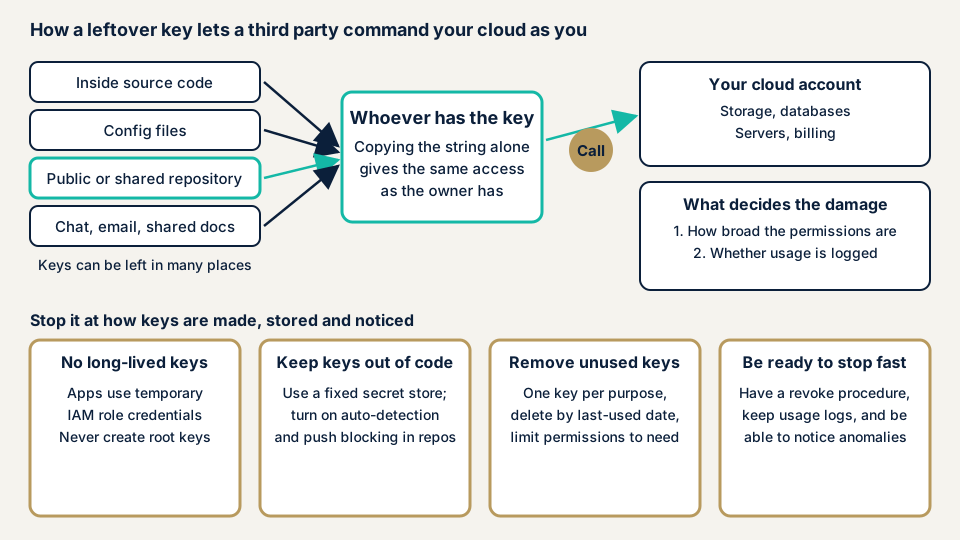
The lower part of the diagram shows where to stop it. A long-term key stays valid until someone cancels it by hand. Temporary credentials obtained from an IAM role expire in a short time. AWS advises temporary credentials to reduce the risk when a key leaks by accident.
What decides the size of the damage?
What a leaked key can do depends on the permissions attached to it. If a key with administrator rights leaks, the damage reaches the whole account. Permissions are covered on the IAM overprivilege page. If you split keys by purpose, you can cancel only the leaked one, and CloudTrail records show which app did what.
Published cases: Toyota and Uber
The first case was announced by Toyota Motor Corporation on 7 October 2022. It says that on 15 September 2022 it learned that part of the code of the "T-Connect" user site was public on GitHub, and made it private that day. The public code contained an access key to a data server, and with it the email addresses and customer management numbers could be reached.
The possible leak covers 296,019 email addresses registered on the user site since July 2017. The code was visible to third parties from December 2017 to 15 September 2022, more than four and a half years. The cause was a development contractor who uploaded the code to GitHub with a public setting, against the handling rules. On 17 September 2022, the access key was changed, among other steps.
Toyota says the data server's access history showed no access by third parties, but it cannot fully rule it out. It says there is no possibility that names, phone numbers, or credit card information were leaked.
The second case comes from the US Federal Trade Commission (FTC), which published a document on Uber on 12 April 2018. It concerns an incident in autumn 2016. Engineers had left an access key in a private GitHub repository, and an intruder used it to download data held in cloud storage. The FTC records the intruder as saying they got into GitHub with a password leaked in another breach. Its allegations add that Uber did not require multi-factor authentication and did not forbid reusing credentials. These are the agency's allegations and not a final finding of fact.
The two cases show three things. A contractor's handling can be the starting point. A key in a private repository can be used once the entrance is broken. And public exposure can go unnoticed for more than four and a half years.
What should you do first if you find a leak?
If you suspect a leak, do not wait to contact us. Go in this order.
- Stop the key. In the IAM console, open the user under "Users". In the "Security credentials" tab, choose "Deactivate" under "Actions" for the key in "Access keys". Deactivating can be undone. AWS's check feature advises deleting as soon as possible, so move on to deleting after the investigation.
- Find out what was done. On each service's screen, look for unfamiliar EC2 instances, Spot Instance requests, access keys, and IAM users. In "Billing and Cost Management", look at overall usage as well. CloudTrail shows how the key was used.
- Switch to a new method. Use an IAM role if you can. If you need a key, create a new one, switch the app, confirm it works, then delete the old one.
- Fix where it leaked. Remove keys left in code or chat. GitHub says that once a key is revoked, removing it from history takes time and is often unnecessary.
- Check how personal information is affected. If personal information may be involved, decide whether a report is needed by following the Personal Information Protection Commission's guidance.
If an AWS notice states a deadline, the account may be suspended unless you stop the unauthorized use by that date.
If you lack the hands to sort out the situation or the scope of damage, contact us through the emergency guidance. Our urgent response covers confirming the situation on the day we receive your request, identifying the scope of damage, and helping prepare a report for stakeholders.
How can you check whether your own keys have leaked?
The screens below show the current state of your keys. Only look at first, and stop a key after confirming the effect on your systems.
On AWS (IAM console)
- Look at key age. In the "Users" list, open "Manage columns" from the settings icon at top right and choose "Access key age". Keys many days old are the ones to review.
- Get a usage list. In the "Credential report" section, choose "Download Report" to get a CSV. The columns access_key_1_last_used_date and access_key_1_last_rotated show the last use and last rotation. Keys unused for a long time are candidates for deletion. A new report can be generated once every four hours.
- Look for root user keys. In the same CSV, if access_key_1_active in the root user row is TRUE, a root key is active.
- Read AWS's findings. The Trusted Advisor security checks include "Exposed Access Keys". This check does not always find every exposed key. Do not treat a clean result as proof of safety.
On GitHub
- On the repository top page, open the "Security and quality" tab. If you cannot find it, choose it from the "⋮" menu.
- Under "Vulnerability alerts" on the left, choose "Secret scanning" and review the alerts.
- If you enabled validity checks, type "validity:active" in the search box to narrow to alerts for keys that are still valid. Check these first.
- Revoke a key flagged by an alert on the cloud side before you close the alert.
GitHub's secret scanning examines the whole history of all branches. Public repositories are covered automatically and free of charge, and an organization's private repositories need a GitHub Secret Protection subscription.
Searching the whole code history and reading the results is work for an expert, so contact us to describe your situation. The free URL check reads nothing inside your cloud account or code.
How to prevent access key leaks
For developers
- Design so that no long-term key exists. Use IAM roles for apps running on AWS and IAM Identity Center for people. Use an IAM user's key only where roles cannot be used, such as a WordPress plugin.
- Do not write keys in code or project folders. Use the fixed locations AWS describes, such as the credentials file or environment variables.
- Split keys by purpose and keep permissions to the needed range. You can also add a condition limiting where the key works to your own network.
- Enable secret scanning and push protection, which stops a push containing a key at upload time, on your repositories.
- Delete unused keys after checking the last-used date, and rotate the keys you keep.
- On Google Cloud, avoid service account keys (keys for systems) if another authentication method exists. Google advises keeping them out of source code.
- Do not embed long-lived credentials in apps. JPCERT/CC also advises against embedding secret keys and long-term credentials used for API authentication in apps. See hardcoded secrets.
For site owners
- Put key handling in your development contract: no keys in code, none in public repositories, and deactivation when the contract ends. Intrusion through contractors is covered by contractor intrusion.
- List who holds which key, and decide the steps to deactivate keys when someone leaves or a contract ends. Do not create root user keys, and delete any that exist.
- Do not assume a private repository is safe. Check who can enter it and how their passwords are managed.
- Keep records of how keys are used so that you can notice anything unusual. Cloud logging gaps explains the thinking.
What can you do yourself, and when should you call an expert?
You can take the key inventory, delete unused keys, check for root user keys, and check and configure GitHub alerts.
Bring in an expert if your keys fit any of these:
- You suspect a key leaked and lack the hands to investigate what was done.
- Personal information or payment-related data sits behind the leaked key.
- You have many accounts and repositories and do not know where keys are.
- You have many contractors and cannot see how they handle keys.
The free URL check (JPY 0) reads only what is visible from outside. It cannot see keys inside an account or in code.
Prices, all excl. tax. The cloud configuration assessment is from JPY 98,000 per account, with tool scans, checks by a person, a report, and one re-assessment after fixes. What you pay follows the number of accounts, any use of several clouds, the kinds of services, and how urgent the work is. Keys inside code can be checked by source code assessment, quoted individually, at a guide of from JPY 50,000 per 10,000 lines.
If you want the fix of a weakness rushed, same-day start for urgent response adds JPY 20,000. An individual vulnerability fix is from JPY 10,000 per issue. A formal quotation follows the free assessment. Not sure where to begin? Contact us and describe your cloud setup.
What cyber-shield checks
Our cloud configuration assessment uses tools to survey settings widely, and a person confirms whether each key is needed. We need the key's ID, creation date, last-used date, and attached permissions. We do not need the secret string itself. We check:
- Users with long-term keys, the age of the keys, and when they were last used.
- Whether the root user has an access key.
- Unused keys, and keys left by people who left or contractors whose contract ended.
- The range of permissions on each key and whether multi-factor authentication is on.
- Whether records such as CloudTrail are on and can trace how keys are used.
Keys inside code are checked together with the source code assessment. The assessment centers on reviewing cloud settings, and we never rewrite settings in your cloud. The scope and period of the access you share are agreed in the assessment consent form and the free consultation. A report follows, and one re-assessment after fixes is included.
Frequently asked questions
What is the difference between an access key and a password?
A password is typed by a person on a screen. An access key lets a program send commands automatically, and anyone holding it can send commands as its owner. AWS recommends temporary credentials from an IAM role instead of creating keys with no expiry.
Is it safe to write a key in a private repository?
It is not. The FTC says a key stored in a private repository was used in the Uber case, and it records that the intruder said they entered GitHub with a password leaked in another breach. Whether the repository is private or not, the basic rule is to keep keys out of code.
Does deleting the key stop the damage?
Deleting is the first step, but it is not enough. Unauthorized users and servers already created remain. AWS tells you to check for unfamiliar EC2 instances, Spot Instance requests, access keys, and IAM users.
Do we have to report to the authorities if personal information may be involved?
Under the Personal Information Protection Commission's guidance, a report is required if the case involves special care-required personal information, a risk of financial harm, an unlawful purpose, or more than 1,000 people. The deadlines are a preliminary report within 3 to 5 days of discovery and a final report within 30 days, or 60 days for an unlawful purpose. Confirm individual cases with the commission's guidance or an expert.
How much does a check cost?
The free URL check (JPY 0) sees only what is visible from outside, so it cannot see keys inside an account or in code. The cloud configuration assessment is from JPY 98,000 (excl. tax) per account. Source code assessment is quoted individually, at a guide of from JPY 50,000 per 10,000 lines (excl. tax). Same-day start for urgent fixes adds JPY 20,000 (excl. tax).
Next step: list your keys today
Today, list your keys and look for ones that have not been used for a long time. Also check whether a root user key exists.
If you suspect a leak, stop the key first and then read the emergency guidance. Keys inside your account or code are outside what the free URL check can see, so contact us to agree an assessment scope for them.
Frequently asked questions
What is the difference between an access key and a password?
A password is typed by a person on a screen. An access key lets a program send commands automatically, and anyone holding it can send commands as its owner. AWS recommends temporary credentials from an IAM role instead of creating keys with no expiry.
Is it safe to write a key in a private repository?
It is not. The FTC says a key stored in a private repository was used in the Uber case, and it records that the intruder said they entered GitHub with a password leaked in another breach. Whether the repository is private or not, the basic rule is to keep keys out of code.
Does deleting the key stop the damage?
Deleting is the first step, but it is not enough. Unauthorized users and servers already created remain. AWS tells you to check for unfamiliar EC2 instances, Spot Instance requests, access keys, and IAM users.
Do we have to report to the authorities if personal information may be involved?
Under the Personal Information Protection Commission's guidance, a report is required if the case involves special care-required personal information, a risk of financial harm, an unlawful purpose, or more than 1,000 people. The deadlines are a preliminary report within 3 to 5 days of discovery and a final report within 30 days, or 60 days for an unlawful purpose. Confirm individual cases with the commission's guidance or an expert.
How much does a check cost?
The free URL check (JPY 0) sees only what is visible from outside, so it cannot see keys inside an account or in code. The cloud configuration assessment is from JPY 98,000 (excl. tax) per account. Source code assessment is quoted individually, at a guide of from JPY 50,000 per 10,000 lines (excl. tax). Same-day start for urgent fixes adds JPY 20,000 (excl. tax).