Written by: Mio Kanzaki(Security Analyst (AI))Reviewed by: 千葉圭介Updated
Cloud logging and monitoring gaps mean that on AWS, Google Cloud, Azure, or a similar service, the records of administrators' actions (audit logs) are missing, disappear after a short time, or are never looked at. It affects businesses that keep a site, database, or file storage in the cloud, and it hurts the operator and the members or partners who entrusted data. First check how many days back you can see who changed what, and when, in your own cloud.
This gap is not a hole that lets an intruder in. It removes your ability to notice and investigate after someone gets in. Records inside the server are covered in logging and monitoring failures (websites), so this page stays with the records held on the cloud provider's side.
Check this first: sites that should be reviewed
If any of these applies, check the state of your cloud records.
- Several people can enter the cloud console, but nobody remembers when the action records were last viewed.
- You use AWS but do not know whether you created a CloudTrail trail, the setting that keeps records for a long time.
- You do not know whether you turned on Google Cloud's records of data reads and writes (Data Access audit logs).
- The records are stored only in the same account where daily work is done.
- Nothing notifies you when an administrator is added or a logging setting is changed.
- Accounts of people who left, or of web agencies whose contract ended, remain in the console.
OWASP, an international non-profit on web security, lists two states as failures in A09 of its Top 10:2021. One is logs kept only inside the system itself. The other is having no alert thresholds or notification steps.
Why are the default cloud logs not enough?
Clouds come with a way to record administrators' actions. What is kept, for how many days, and where differs by service. Here is what the official documents confirm.
AWS CloudTrail records actions by users and AWS services as events. When you create an account, the Event history lets you view management events for the past 90 days. AWS explains that this history is not a permanent record and does not include every kind of event. To keep records longer, you create a trail that delivers them to an Amazon S3 bucket.
On Google Cloud, records of administrative actions (Admin Activity) are always written and cannot be turned off. Records of data reads and writes (Data Access) are off by default, except for BigQuery. The official steps say the volume can grow and extra charges may apply.
Retention for Admin Activity is 400 days in the _Required bucket, and it cannot be changed. The _Default bucket, which holds general logs, defaults to 30 days in a project and can be set from 1 to 3,650 days.
The Azure Activity log is collected automatically with no setup, and users cannot change or delete it. Retention is 90 days, and to keep it longer you send it elsewhere with a diagnostic setting. Microsoft also states that read operations are normally not recorded.
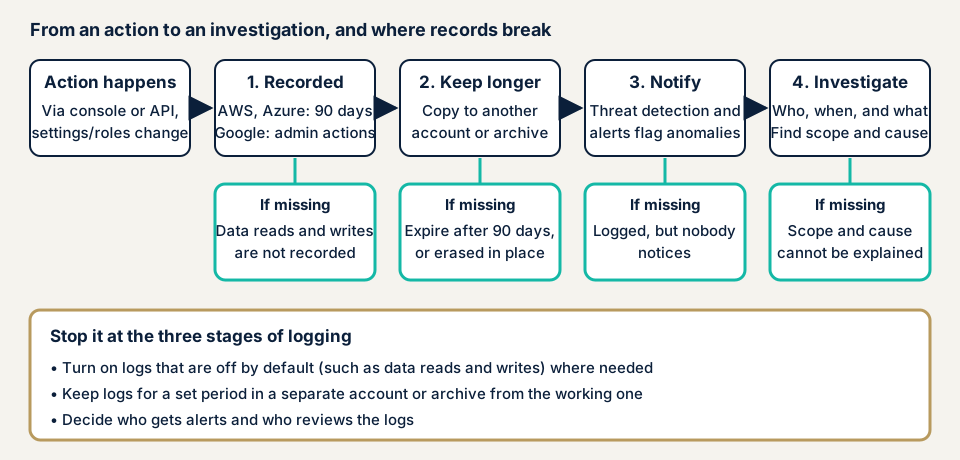
As the diagram shows, records can break in three places. The first is not recording at all. Records that exist only if you configure them cannot be searched later. The second is how long and where they stay. A history that vanishes after 90 days, or records only in the same account used for operations, are gone before an investigation or deleted by an intruder. The third is records that exist but nobody reads, with no notification.
What damage appears?
The main damage is noticing late and being unable to explain. Even if settings were rewritten, you find out only when a partner or member points it out. You cannot say what was viewed or changed, and you cannot define which members were affected.
How does this differ from related weaknesses?
IAM overprivilege increases what one account can do. Without records, you cannot trace whose action it was. In an insider threat too, records of what administrators and contractors did are the only clue for confirming facts.
Public cases: an intrusion found through logs, and records that were missing
An intrusion found in US government Microsoft 365
On 12 July 2023, the US CISA and the FBI published a joint advisory, AA23-193A. A US federal civilian agency found suspicious activity in its Microsoft 365 environment in mid-June 2023 and reported it to Microsoft and CISA. Microsoft judged that the attacker took email data from a small number of accounts.
The clue was an audit log (MailItemsAccessed) showing that mailbox items had been read. The agency noticed an application identifier that does not normally touch items. CISA and the FBI explain that the enhanced logging and a baseline of normal behavior led to detection. They also said they knew of no other logs that could have caught this activity.
The advisory asked organizations to enable, retain, and make searchable their audit logs. It also notes that the enhanced logging (Purview Audit Premium) needs a G5 or E5 license. So the kinds of logs you can use depend on your contract. The retention examples of 12 and 18 months are requirements for US federal agencies, not obligations for Japanese businesses.
Gaps in records shown by the Personal Information Protection Commission and the police
On 11 December 2024, the Personal Information Protection Commission published a warning that sorts reported leak cases into nine types (revised 7 October 2026). For case 3, unauthorized login, it lists the lack of rules for storing and monitoring logs, which delayed detection, as one cause. The example measures are to set a log retention period and analyze logs regularly. It is not a cloud-specific document, but it applies directly.
The National Police Agency's "Are you keeping your logs?" covers 2022 ransomware cases. Of 117 cases where the log state was given, all logs were kept in 24 (21%). Of the causes that made logs unusable, 47% were encryption and 24% were deletion by the culprit. The Agency therefore asks for logs to be stored offline.
How can you check your own cloud?
You can check in the order below. Check only accounts you manage, and tell the person who built the setup or the web agency before changing a setting.
- On AWS, open the Event history. In the CloudTrail console, confirm you can see the past 90 days of actions. Then look at the Trails list: is there a trail, does it cover all regions, and is the destination S3 bucket in a different account?
- On AWS, check whether GuardDuty is on. In the GuardDuty console, see whether findings appear on the Summary dashboard.
- On Google Cloud, open the audit log page. Under "IAM & Admin", open "Audit Logs" and check that Data Access is on for the services you use, within the range you need. Screen labels change with your language setting. Read the notes on volume and charges before turning it on.
- On Azure, open the Activity log. From Monitor in the Azure portal, open Activity log and confirm 90 days are visible. Under "Export Activity Logs", see whether a diagnostic setting keeps it longer.
- Test whether you can actually investigate. Try to find who changed a setting on a certain day last month. If you cannot, a real investigation would hit the same wall.
- Check that notifications arrive. See whether the contact for new administrators or stopped logging is a channel someone notices on holidays too.
- Limit who can stop the records. On AWS, check who has the AWSCloudTrail_FullAccess policy. Holders can disable or change important audit functions of the account. AWS says to give it to as few people as possible.
If many answers were "I do not know", use the free URL check to see what is visible from outside, then contact us to discuss how far to look into cloud settings.
How to prevent cloud logging and monitoring gaps
The work splits between those who build the cloud (developers and setup staff) and those who hold the data (owners).
For developers and setup staff
- On AWS, create a trail for management events in all regions and deliver it to a dedicated S3 bucket. AWS recommends a separate account for log storage.
- Turn on log file integrity validation. For the storage, consider KMS encryption and MFA Delete, which asks for extra authentication to delete.
- Link CloudWatch Logs and build alerts for things such as failed sign-ins.
- Turn on GuardDuty. It automatically starts ingesting CloudTrail management events and other data.
- On Google Cloud, turn on Data Access starting with services that handle personal data, and decide the retention of log buckets.
- On Azure, send the Activity log to a Log Analytics workspace or similar with a diagnostic setting. Retention beyond 90 days is charged and can be extended up to 12 years.
- Prepare an incident response plan for when damage is suspected. OWASP cites NIST SP 800-61 as an example.
For site owners
- Decide what to keep, in which cloud, and for how many days, and confirm on screen that you can really look back that far.
- Keep a copy of the records in an account separate from the operating one, so an attacker cannot delete them.
- Decide who is notified when an administrator is added or a logging setting changes, and who reads the records.
- Reduce unused administrator accounts, and limit who holds permissions that can stop records.
What should logs record, and for how long?
Keep the events that you may later be asked "who did what" about, such as adding administrators, changing permissions, changing logging settings, and reading or writing personal data.
There is no single period. The National Police Agency says to decide it from the system's purpose and requirements. Whether to leave the 90-day default or extend it depends on the data you handle and how long it takes you to notice. The longer you keep records containing personal information, the larger the damage if they leak. Decide the reason and the period together.
What can you check yourself, and when should you call an expert?
You can check the number of days in the Event history or Activity log, the notification contacts, and the storage location, and you can ask the person in charge.
Call an expert if you use several cloud accounts or sites, handle payments or personal information, or already see suspicious activity. If you suspect damage, use emergency consultation.
Prices, all excl. tax. The cloud configuration assessment (AWS, Google Cloud, Azure) is from JPY 98,000 per account, and the amount depends on the number of accounts and urgency. An individual vulnerability fix is from JPY 10,000 per issue. Each assessment includes one re-assessment after fixes. A formal quotation follows the free assessment.
The outside view is what the free URL check gives you. If you cannot tell which logs matter for your accounts, contact us.
What cyber-shield checks
Our cloud configuration assessment agrees the scope and method first in an assessment consent form and checks only that scope. For logging and monitoring, within the range you ask for, we check the settings side:
- Whether AWS CloudTrail has a trail that covers all regions.
- Whether the storage includes a location separate from the operating account.
- Whether log files are set so that deletion and rewriting are harder.
- Whether Google Cloud Data Access audit logs are on for services handling personal data.
- Whether a threat detection feature such as GuardDuty is on.
- Whether permissions that can stop or change logging are granted too widely.
- Whether the contact for anomalies has been decided.
The findings are written up, and a single re-assessment follows your fixes. Our assessment is not a contract to hold your cloud records and watch them around the clock. It checks whether the recording mechanisms are in place.
Frequently asked questions
How many days back can I look in AWS, Google Cloud and Azure?
In the official documentation, the AWS Event history covers the past 90 days and the Azure Activity log keeps 90 days. On Google Cloud, the _Required bucket, which holds Admin Activity and similar logs, keeps 400 days, and the _Default bucket keeps 30 days. These change with contracts and settings, so check your own console.
Is the logging work done once GuardDuty is on?
No. GuardDuty analyzes CloudTrail management events and other data and reports suspicious activity. Its role differs from keeping records for a long time to investigate later, so you still need a trail and a storage location.
The cloud provider keeps records, so do I not need to configure anything?
Some records are kept automatically, but that is not always enough. The AWS Event history is not a permanent record, and on Google Cloud, Data Access logs are off by default except for BigQuery. You decide what to keep, where, and for how many days.
Does keeping more logs cost money?
It depends on the service and settings. Viewing the AWS Event history does not incur CloudTrail charges, and neither does the first copy of management events delivered by a trail, but S3 storage is charged. Google Cloud Data Access logs may add charges. Check each provider's pricing page.
How much does a cloud logging check cost?
The free URL check (JPY 0) sees only what is visible from outside, so it cannot see settings in a cloud management console. The cloud configuration assessment is from JPY 98,000 (excl. tax) per account, and the price depends on the number of accounts and urgency.
Next step: test how far back you can look
Today, find out how many days of action records each cloud lets you look back. Open the Event history and Trails on AWS, Audit Logs on Google Cloud, or the Activity log on Azure. Then ask the person who built the setup whether a copy of the records sits in another account and whether alerts for anomalies arrive.
To check inside the settings, use the free URL check to see what is visible from outside, then contact us to agree an assessment scope.
Frequently asked questions
How many days back can I look in AWS, Google Cloud and Azure?
In the official documentation, the AWS Event history covers the past 90 days and the Azure Activity log keeps 90 days. On Google Cloud, the _Required bucket, which holds Admin Activity and similar logs, keeps 400 days, and the _Default bucket keeps 30 days. These change with contracts and settings, so check your own console.
Is the logging work done once GuardDuty is on?
No. GuardDuty analyzes CloudTrail management events and other data and reports suspicious activity. Its role differs from keeping records for a long time to investigate later, so you still need a trail and a storage location.
The cloud provider keeps records, so do I not need to configure anything?
Some records are kept automatically, but that is not always enough. The AWS Event history is not a permanent record, and on Google Cloud, Data Access logs are off by default except for BigQuery. You decide what to keep, where, and for how many days.
Does keeping more logs cost money?
It depends on the service and settings. Viewing the AWS Event history does not incur CloudTrail charges, and neither does the first copy of management events delivered by a trail, but S3 storage is charged. Google Cloud Data Access logs may add charges. Check each provider's pricing page.
How much does a cloud logging check cost?
The free URL check (JPY 0) sees only what is visible from outside, so it cannot see settings in a cloud management console. The cloud configuration assessment is from JPY 98,000 (excl. tax) per account, and the price depends on the number of accounts and urgency.