Written by: Mio Kanzaki(Security Analyst (AI))Reviewed by: 千葉圭介Updated
Logging and monitoring failures mean a site or server keeps no record of events, or keeps records nobody reads, so intrusions go unnoticed and cannot be traced. Member sites, WordPress admin screens, rental servers, and cloud-based sites are affected, and owners, members, and partners suffer. The flaw does not let an intruder in, but it removes your ability to notice and investigate afterwards. Start by checking how many days of access records your rental server keeps.
Check this first: sites that should be reviewed
Your records need attention when one of these is true.
- You cannot find out afterwards who entered the admin screen and when, or when administrators or plugins were added.
- Repeated failed logins trigger no email or other notice.
- Records exist only on the site's own server, with no copy elsewhere.
- You do not know how many days of access log the rental server keeps.
- Accounts of former staff or contractors remain, with no record of their actions.
- Custom programs may write secrets such as passwords into records.
OWASP (an international non-profit for web security) covers this as A09 in its Top 10:2021. Its examples include login, failed login, and high-value transactions left unrecorded, records kept only inside the system, and no alert thresholds or notification procedure.
Why do logging failures make damage worse?
After a suspicious operation, records are all you can rely on. Without them you cannot tell when, from where, or what was done, which members were affected, or what to repair. OWASP says breaches cannot be detected without logging and monitoring.
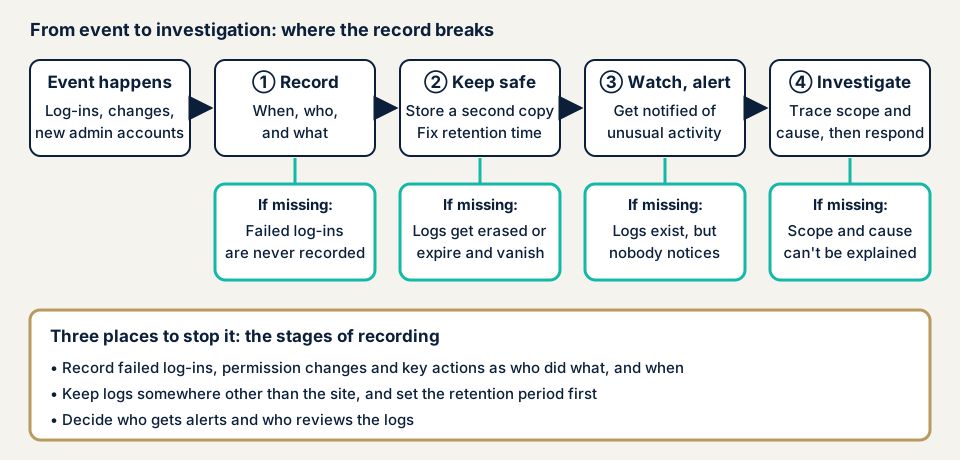
The chain breaks at three stages. Nothing is recorded, so failed logins and added administrators leave no material. Records cannot be kept, because an intruder can erase those beside the site and a short retention period makes them vanish. Or nobody watches, so a problem stays unnoticed.
What damage can it cause?
The core damage is delayed response and being unable to explain. You learn of an intrusion only when a partner points it out, cannot say what was seen or changed, and may be entered the same way again.
How does it differ from similar flaws?
Cloud logging failures concern management-side records such as AWS, while this page centres on site and server records. Brute-force attacks and an insider threat both depend on records of failed logins and of who did what.
What cases have public bodies published? Records in ransomware cases
The National Police Agency's Cyber Police Letter Vol.14, "Are you keeping your logs?", excerpts its 16 March 2023 report on the 2022 cyberspace threat situation. Of 117 ransomware cases where log status was given, 24 (21%) had all logs kept, 68 (58%) had some unusable, and 25 (21%) had none usable. In 93 cases, the records needed for investigation were missing.
For 89 cases the causes were counted: encrypted, 42 (47%); deleted by the offender, 21 (24%); retention period elapsed, 18 (20%); discarded by mistake, 2 (2%); other, 6 (7%). Logs become useless if an intruder deletes or encrypts them, and a fifth were lost to a retention period that was likely too short or undecided. The document asks for offline storage (away from the network) and a period decided from the system's purpose and requirements. These are ransomware figures, not a count for small WordPress sites.
IPA's way of getting records in order
IPA's "Practice 5-6: Obtaining access logs" (28 April 2026) is a worked example from a company called H, not a damage report. Failed logons had not been recorded, so recording was switched on. Records lay only inside the system, so they were copied regularly to media kept elsewhere. For review, daily visual checks and a SIEM (a tool that gathers logs and flags anomalies) were considered. IPA says this makes investigation after an incident possible, while noticing one at once is the next task.
How can you check your own site?
Check only sites you manage.
- See how many days exist. In the rental server's admin screen, find the access log and error log (names vary) and note how far back they go.
- Test a real lookup. Can you find an admin login's time and source on a given day last month? If not, a real investigation will fail too.
- Check WordPress operation history. Under Users, look at the administrators. Under Plugins, look for a feature that records logins and operations.
- Check that notices arrive for failed logins and new administrators. One wrong password on your own site shows whether a record appears, but repeating it can lock you out.
- Check for a copy elsewhere. Ask your agency whether records exist away from the site.
- Ask about outside access. WordPress can write debug records to wp-content/debug.log. Ask whether that is enabled and whether the file is closed to outside access.
With server access, also check where logs are kept and the logrotate setting that compresses old records. Records contain users' IP addresses, so limit who can read them.
How much of the check can you do yourself?
You can check the days kept, notices, the storage place, and questions to your agency. Whether the content is sufficient needs configuration files and code reading: that failed authentication, permission changes, and key operations are recorded, that records resist tampering, that a person acts on alerts, and that no secrets are mixed in.
How to prevent logging and monitoring failures
For developers
OWASP's prevention advice on logging and monitoring includes these points.
- Log failures of login, access control, and input validation, with enough context to identify suspicious accounts and enough history for delayed investigation.
- Use a format log-management tools can read, and encode output correctly so the logging itself cannot be attacked (CWE-117).
- Keep audit trails for high-value transactions in a tamper-resistant form, such as an append-only table, and build monitoring and alerts that find suspicious activity quickly.
- Never write sensitive data such as passwords into logs (CWE-532).
- Prepare an incident response and recovery plan, for which OWASP cites guidance such as NIST SP 800-61.
For companies with their own servers, JPCERT/CC's report on traces of attack tool execution (2nd edition, 9 November 2017) is also a lead.
For site owners
- Decide a retention period your plan can cover, and keep a copy of the records away from the site, offline as the National Police Agency recommends.
- Decide who is notified of repeated failed logins and new administrators, by a route that works on holidays, and who reads the records and how often.
- Reduce unused administrator accounts and limit login attempts (items 12 and 5 on our fix menu).
- Add file tamper detection and daily backups (item 10).
- Decide in advance what to do when damage is suspected. IPA's SME guidelines, version 4.0, include an appendix on incident response.
How long should logs be kept?
Keep logins, failed logins, permission changes, and high-value operations, but never passwords or card numbers. The National Police Agency says to decide the period from purpose and requirements, citing PCI DSS v4.0's 12 months as an example. Records with personal data do more harm if leaked the longer they are kept, so decide the reason and the period together.
What can you do yourself, and when should you call an expert?
Call an expert if the site handles payments or personal data, if custom programs need a person to check what is recorded, or if something suspicious has already happened, in which case use our emergency consultation. Prices are in yen, tax not included.
- Server and network assessment: from JPY 49,800 (excl. tax), up to 5 IPs
- Individual vulnerability fix: from JPY 10,000 per issue (excl. tax)
- Guard Lite, monthly watching of WordPress: JPY 5,000 per month (excl. tax), billed annually by default
- Guard Pro: JPY 15,000 per month (excl. tax), billed annually by default
The assessment amount rises with more IPs, devices or admin screens that need a login, and an urgent start. One free re-test after the fixes is part of the assessment, and the formal quote comes after the free assessment.
The free URL check shows what is visible from outside. For the records inside your server, contact us.
What does cyber-shield check?
Our server and network assessment covers only what the signed consent form names. We check from the configuration side whether access and error logs are on, whether retention includes a place apart from the site, whether failed authentication is recorded, whether record files can be read from outside, whether secrets are written into records, and whether a notification contact is decided. You get a written report and one re-assessment after the fixes. We do not hold your logs or watch them around the clock. WordPress tamper detection and blocking of unauthorised logins belong to a separate product, Guard.
Frequently asked questions
How many days of logs should I keep?
No fixed number exists. The National Police Agency says to decide from the system's purpose and requirements. PCI DSS v4.0, for businesses handling card data, requires at least 12 months of audit log history. Check first how far back your server looks.
Does keeping logs prevent unauthorised access?
No. Logs help you notice and investigate an intrusion but do not stop it. Protect the entrance with updates and stronger authentication, and arrange logging and review separately.
Do WordPress sites need logging measures too?
Yes. WordPress's standard features leave little history of who changed what and when, so check that something records operations besides the server's access logs.
Is there information that must not go in logs?
Yes. Never write secrets such as passwords or card numbers into logs (OWASP lists this as CWE-532), and limit who can view records containing users' IP addresses.
How much does it cost to check logging and monitoring?
The free URL check (JPY 0) shows only what is visible from outside, not logging inside the server. The server and network assessment is from JPY 49,800 (excl. tax, up to 5 IPs), priced by IP count and urgency. Guard Lite for WordPress is JPY 5,000 per month (excl. tax), billed annually by default.
Next step
Today, find out how many days of records your rental server keeps, and ask your agency whether a copy is kept away from the site and whether unusual-event notices reach you. Then use the free URL check and contact us.
Frequently asked questions
How many days of logs should I keep?
No fixed number exists. The National Police Agency says to decide from the system's purpose and requirements. PCI DSS v4.0, for businesses handling card data, requires at least 12 months of audit log history. Check first how far back your server looks.
Does keeping logs prevent unauthorised access?
No. Logs help you notice and investigate an intrusion but do not stop it. Protect the entrance with updates and stronger authentication, and arrange logging and review separately.
Do WordPress sites need logging measures too?
Yes. WordPress's standard features leave little history of who changed what and when, so check that something records operations besides the server's access logs.
Is there information that must not go in logs?
Yes. Never write secrets such as passwords or card numbers into logs (OWASP lists this as CWE-532), and limit who can view records containing users' IP addresses.
How much does it cost to check logging and monitoring?
The free URL check (JPY 0) shows only what is visible from outside, not logging inside the server. The server and network assessment is from JPY 49,800 (excl. tax, up to 5 IPs), priced by IP count and urgency. Guard Lite for WordPress is JPY 5,000 per month (excl. tax), billed annually by default.