Written by: Mio Kanzaki(Security Analyst (AI))Reviewed by: 千葉圭介Updated
An EC-CUBE vulnerability is a weakness found in the core of EC-CUBE, a Japan-made online shop platform, or in the plugins that run on it. Businesses running a shop on EC-CUBE are affected. Rewriting of the payment screen can leak card information, and unauthorized login to the admin screen can follow. Start by checking which version you run and comparing it with the official EC-CUBE vulnerability list.
For each hole, the official site publishes the affected versions and the fix. If you know your version and plugins, you can respond. If the payment screen or admin screen already shows a change you cannot account for, read urgent consultation first.
Check this first: sites that should be reviewed
If any of these applies, check the core and the plugins.
- You do not know your EC-CUBE version yourself and leave it all to the agency.
- You do not track the patch number at the end, as in "4.2.3-p1".
- You run payment plugins or paid plugins and cannot tell their update history.
- The admin screen URL and entrance are at their defaults, access is not restricted by source, and there are several administrators.
- You are still on an old series such as 2.x or 3.x.
- The server's mode setting is still in its development state.
IPA's security guidelines for e-commerce sites ask for restricted access to the admin screen (requirement 4) and software kept up to date (requirement 2).
How do EC-CUBE vulnerabilities arise?
EC-CUBE is open-source software widely used in Japan. Because so many shops use it, a published hole is searched for across every shop running the same software. Holes turn up in three places: the core, the admin screen, and plugins such as payment. The official site publishes a list of affected versions and severity.
Holes stay open because updates lag. In 2019, IPA called on shop owners to check how they use EC-CUBE and which version they run, and to update quickly if it is not current. EC-CUBE names a core with stacked fixes like "4.3.1-p1". Shops that do not follow that number leave published holes open.
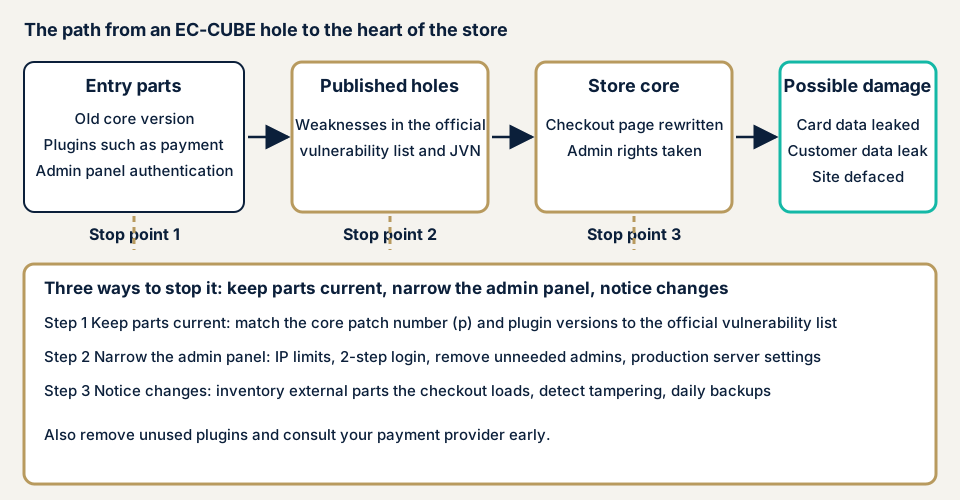
The diagram gives three places to stop it. Keep the parts at the entrance current, narrow down the admin screen, and notice changes around payment.
What damage can happen?
If the payment screen is rewritten, card numbers that customers type in are stolen. If someone gets into the admin screen, they can rewrite products and prices and view customer information. For the owner, tampering and a leak of customer information can happen together by this route.
Stealing by rewriting the payment screen is also called formjacking. The card skimming page covers it in detail.
How this relates to other vulnerabilities
XSS, where a crafted string runs in an administrator's browser, has also been published for EC-CUBE. A shop run on WordPress should check its WordPress plugin vulnerabilities in the same way.
Cases published by public bodies
We cover four cases you can verify on pages of IPA, JVN, and the official EC-CUBE site.
Payment screen rewriting (IPA, December 2019)
On 25 December 2019, IPA warned of rising information leaks from sites using EC-CUBE. It said many cases had been confirmed where the payment screen was rewritten and credit card numbers and other data were stolen. It cited about 140,000 leaked records, quoting the Ministry of Economy, Trade and Industry.
IPA asked for three actions: check how EC-CUBE is used and which version, update quickly if it is not current, and follow the developer's guidance.
Admin screen XSS (JVN, May 2021)
On 10 May 2021, JVN published XSS in EC-CUBE 4.0.0 through 4.0.5 (JVN#97554111). When a specific action was performed in the admin screen, a crafted entry planted in an input field could run in the administrator's browser. The CVSS v3 base score is 7.1. JVN rated it "urgent" and noted that attacks using it had been confirmed at publication.
The remedy is updating to 4.0.5-p1 or applying the developer's fix patch.
Two-factor authentication bypass (EC-CUBE official, February 2026)
On 10 February 2026, the official EC-CUBE site announced a vulnerability in 4.1.0 through 4.3.1 that lets a person get around two-factor authentication. If an administrator's ID and password leak, someone could log in to the admin screen without permission. The official site rated it "medium" and reported no damage at the time of posting.
JVN published it on 5 March (JVN#63765888, CVE-2026-30777). The fixed versions are 4.1.2-p5, 4.2.3-p2, and 4.3.1-p1. The official site points to applying the fix file, or checking and merging the differences, and asks you to test first on a development copy.
Official Amazon Pay plugin (JVN, October 2026)
On 14 October 2026, JVN published a vulnerability in the official "AmazonPay plugin" for EC-CUBE 4 (JVN#43511918, CVE-2026-103671). During checkout, a user could be redirected to any site and have account information stolen. The CVSS v3 base score is 4.7.
JVN notes that the developer has already confirmed attacks that use it. The remedy is applying the patch based on the developer's information. The affected plugin and versions span the CV1 and CV2 editions, so confirm them on the JVN page.
The four cases share two points. The shop's core, payment and the admin screen, is what gets targeted. And the way to start fixing it is updating the version.
How can you check your own site?
No specialist knowledge is needed for these steps. Run them only on a site you manage.
- Confirm the version. The admin screen that shows system information gives the EC-CUBE version. The screen name may differ by version. If you cannot log in, ask your agency.
- Compare with the official vulnerability list. On the official EC-CUBE site, find entries whose affected versions include yours. Compare down to the number with a p.
- List the plugins. From the plugin management screen, write down names and versions. Delete the ones you do not use, not just deactivate them. For payment plugins, search the name and version in JVN iPedia (the vulnerability countermeasure database).
- Count the administrators. On the member list screen, look at the administrators. Note any name you do not recognize or anyone who no longer uses the account. Check here whether two-factor authentication is on.
- Walk through a purchase once. Put an item in the cart and go as far as just before payment. Watch for unfamiliar input fields or screen changes with no warning.
- Ask your agency. When was each patch (p) applied? Is the server's mode setting the production one? Is access to the admin screen limited by source?
If you are technical, look in the server's environment settings file to see whether the mode is set for production. The official EC-CUBE documentation says a development setting exposes internal information, so a public site should use the production one.
These checks show only what you looked at. They do not guarantee the whole site is safe. Use the free URL check for what is visible from outside, and contact us if the results leave you unsure.
How much of an EC-CUBE check can you do yourself?
You can confirm the version, compare it with the official list, list the plugins, count the administrators, walk through a purchase, and question your agency.
Whether a fix is really in place, whether customized parts hide holes, and whether the outside scripts loaded on the payment screen are safe cannot be told from the screens. A shop that takes card payments, or one that was built custom, is surer in the hands of an expert.
Fixing EC-CUBE vulnerabilities
The work differs for the people who build a shop and the people who run it.
For agencies and developers
- Check the official vulnerability list on a schedule. When a notice appears, try the official fix file or the differences on a development copy first, then apply it to production. For customized parts, read the differences and merge them.
- Check plugin updates as often as the core, and delete the ones you do not use. For payment plugins, compare published versions right away.
- Set the server's mode to production on a public site.
- Limit admin screen access to fixed locations by firewall or settings, and turn on two-factor authentication for administrators. As the 2026 notice shows, fixes come even for the two-factor mechanism itself, so keep the version current.
- Take an inventory of the outside scripts the payment screen loads, keep only the ones needed, and set up a way to detect changes.
- For old 2.x and 3.x series, check how far fixes still appear on the official list, and plan a migration.
For site owners
- Get the version, patch numbers, and plugin list from your agency in writing. Ask for the dates they were updated.
- Tidy administrator accounts and passwords. Delete accounts nobody uses and remove weak or reused passwords (the same idea as item 12 of our fix menu).
- Set up two-factor authentication and a source restriction on the admin screen (items 3 and 4).
- Add file tampering detection and daily backups (item 10), so you can notice a rewritten payment screen and go back.
- Name who watches the official vulnerability list and new JVN entries, and have them look at least once a month.
What should you do first if you suspect damage?
An unfamiliar input field appears on the payment screen, administrators multiply, or card companies send more reports of fraudulent use. If you see any of this, save the logs and the actual state before deleting or changing settings. Deleting erases the route the attacker used.
Next, consult your card company and payment service provider. According to the Personal Information Protection Commission, a leak of credit card numbers from an e-commerce site must be reported. A leak caused by unauthorized access also qualifies, whatever the number of people. A preliminary report is due within 3 to 5 days of discovery, and the final report within 30 days (60 days if the cause was malicious).
Then contact urgent consultation. Recovery from tampering or malware is from JPY 29,800 (excl. tax) and covers investigating the cause, removing malicious code, and setting up against recurrence. Starting the same day adds JPY 20,000 (excl. tax).
When should you call an expert?
We suggest three triggers. The first is a shop that takes card payments or runs a payment plugin. The second is a shop with customizations or several paid plugins. The third is a shop where nobody can explain the version and patch numbers.
The free URL check (JPY 0), which reads only what is visible from outside, cannot show admin screen settings or screens behind login. Prices are excl. tax. The assessment for CMS-type shops such as EC-CUBE is from JPY 49,800, up to 30 pages. For a custom-built shop, Web application assessment Lite is from JPY 98,000, up to 10 screens. Standard is from JPY 198,000, up to 20 screens, with manual checks behind login.
An individual vulnerability fix is from JPY 10,000 per issue, quoted by content. The amount depends on the number of pages or screens, how much sits behind login, the number of plugins, and urgency. One re-assessment after fixes is included. A formal quotation follows the free assessment.
To see where you stand first, use the free URL check. If you are unsure, contact us and tell us the version you run.
What cyber-shield checks
Our e-commerce site assessment combines tool scans with checks by a person. Scope and method are agreed first in a signed consent form, and we examine only that scope. We run no checks that amount to an attack. We look at:
- The EC-CUBE core version and patch number, matched against the official vulnerability list
- The list and versions of installed plugins, matched against published vulnerabilities
- The admin screen entrance, source restrictions, two-factor authentication, and the number and permissions of administrators
- Along the path to payment, whether amounts or destinations change midway, and whether the loaded outside parts are appropriate
- Server settings (the mode, and where important files sit and their permissions)
- Administrators or plugins already added that you do not recognize
We write up the results in a report.
Frequently asked questions
How can I tell whether my EC-CUBE is affected?
The official EC-CUBE site's vulnerability list shows the affected versions, severity, and JVN number. You can see the version you run on the admin screen that shows system information. A version ending in p, such as 4.2.3-p1, is a version with patches stacked on it. When you compare with the list, compare including the p.
Are official plugins safe?
Even official ones can have holes. On 14 October 2026, JVN published a vulnerability in the official Amazon Pay plugin for EC-CUBE 4. The developer has already confirmed attacks that use it. Know which plugins and versions you have, and be ready to update when a fix appears.
Is my admin screen safe if I have two-factor authentication?
Not entirely. A vulnerability found in EC-CUBE 4.1.0 through 4.3.1 could let someone get around two-factor authentication if an administrator's ID and password leak. In February 2026 the official site published fixes. Keep two-factor authentication on, apply the fix, and do not reuse passwords.
Does this not apply if I do not hold card numbers myself?
It still applies. The Personal Information Protection Commission lists a leak of credit card numbers from an e-commerce site as a case that must be reported. Even if you store no card numbers, rewriting of the payment screen and leaks of customer information remain routes. An assessment can confirm what you hold.
How much does an EC-CUBE check cost?
The free URL check, which reads only what is visible from outside, is JPY 0, but it cannot see admin screen settings. The assessment for CMS-type shops such as EC-CUBE is from JPY 49,800 (excl. tax), up to 30 pages. For a custom-built shop, Web application assessment Lite is from JPY 98,000 (excl. tax), up to 10 screens. Page count, screens behind login, plugin count, and urgency change the amount.
Next step: two checks you can do today
Confirm your EC-CUBE version and patch number, and compare them with the official vulnerability list. Write down the installed plugins too.
To check around payment and admin screen settings as well, use the free URL check for what is visible from outside. Then contact us to settle the scope of an assessment.
Frequently asked questions
How can I tell whether my EC-CUBE is affected?
The official EC-CUBE site's vulnerability list shows the affected versions, severity, and JVN number. You can see the version you run on the admin screen that shows system information. A version ending in p, such as 4.2.3-p1, is a version with patches stacked on it. When you compare with the list, compare including the p.
Are official plugins safe?
Even official ones can have holes. On 14 October 2026, JVN published a vulnerability in the official Amazon Pay plugin for EC-CUBE 4. The developer has already confirmed attacks that use it. Know which plugins and versions you have, and be ready to update when a fix appears.
Is my admin screen safe if I have two-factor authentication?
Not entirely. A vulnerability found in EC-CUBE 4.1.0 through 4.3.1 could let someone get around two-factor authentication if an administrator's ID and password leak. In February 2026 the official site published fixes. Keep two-factor authentication on, apply the fix, and do not reuse passwords.
Does this not apply if I do not hold card numbers myself?
It still applies. The Personal Information Protection Commission lists a leak of credit card numbers from an e-commerce site as a case that must be reported. Even if you store no card numbers, rewriting of the payment screen and leaks of customer information remain routes. An assessment can confirm what you hold.
How much does an EC-CUBE check cost?
The free URL check, which reads only what is visible from outside, is JPY 0, but it cannot see admin screen settings. The assessment for CMS-type shops such as EC-CUBE is from JPY 49,800 (excl. tax), up to 30 pages. For a custom-built shop, Web application assessment Lite is from JPY 98,000 (excl. tax), up to 10 screens. Page count, screens behind login, plugin count, and urgency change the amount.