Written by: Mio Kanzaki(Security Analyst (AI))Reviewed by: 千葉圭介Updated
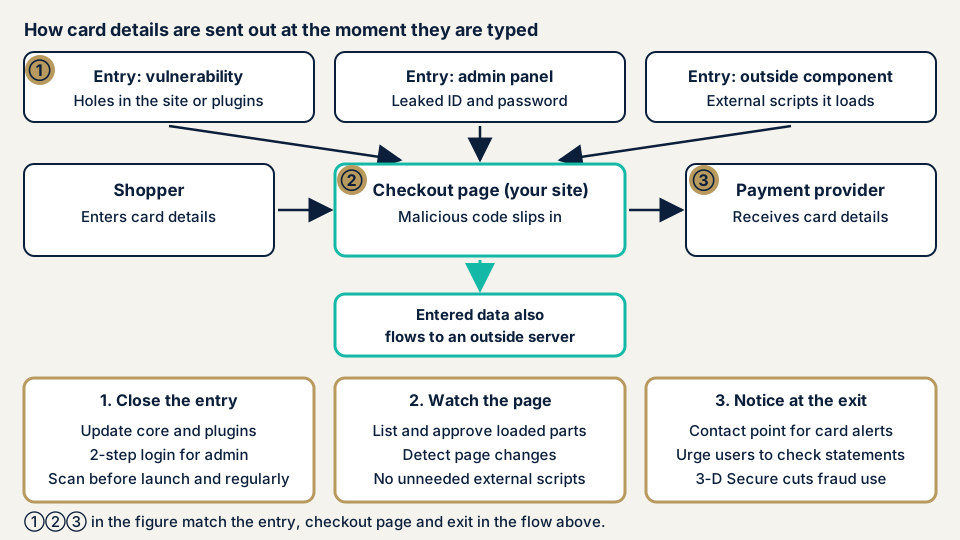
Card skimming (web skimming) is damage in which a malicious program planted on a site grabs the card number and other data a shopper types into the payment screen, at the moment of entry, and sends it outside. It can happen even to a shop that stores no card data itself, if the payment screen or the parts it loads are rewritten. Start by listing the outside parts your payment screen loads and see whether any cannot be explained.
If several customers have reported fraudulent use, or a card company has contacted you, read urgent consultation first.
Signs your payment screen needs a look
Look closely at the area around payment if any of these fits your shop.
- The card number field sits inside your own site.
- The payment or order confirmation screen loads outside scripts for advertising, analytics, or chat.
- Updates to the shop core (EC-CUBE, WooCommerce, and so on) or to payment plugins are late.
- Admin login needs only an ID and password, and access is not restricted by source.
- You leave payment customizations and upkeep to the agency and have never seen the change records.
- Nothing would tell you that the payment screen was rewritten (no tampering detection).
- A card company or customer has told you that fraudulent use appeared on cards used at your shop.
How does web skimming work?
When a malicious program slips into the page where shoppers enter card data, what they type is also sent somewhere other than the real destination. The method intercepts form contents, so it is also called formjacking. The Personal Information Protection Commission says that when a fake payment screen is built, it is extremely rare for customers to notice.
How the malicious program gets in
From published cases and documents, we group the routes into four.
- Flaws in the site or plugins. An attacker gets in through a hole in a part that was not updated, and the payment screen is rewritten.
- Admin screen ID and password. The Commission's notice includes a case where a stolen ID was used to log in to the management server and tamper with the site.
- Outside scripts the page loads. PCI SSC says scripts running in the shopper's browser are targeted, and that as e-commerce grew more complex and leaned on outside scripts, these attacks increased. See third-party script tampering.
- The payment mechanism itself. In the case below, the cause was tampering with the payment application.
How does the payment method change what you look at?
Not holding card data on your own server is called non-retention. The guidelines compiled by the Council for Credit Transaction Security Measures and published by METI list it as a merchant measure. It reduces leaks from stored data but does not protect the moment of entry. The Commission's notice says that even with a redirect-type setup, a flaw in the shop site can lead shoppers to a fake payment screen and get card data stolen.
How have web skimming losses been announced?
We cover three items, from the victim itself and from authorities. We leave out the details of the method.
Saga Hirakawaya online shop (announcement of 15 June 2026)
Saga Hirakawaya Co., Ltd. announced on 15 June 2026 unauthorized access to its online shop. On 9 March 2026, some card companies told it of leak concerns. The same day it stopped card payments and began an investigation by a third-party body. The investigation ended on 27 March. It found that the card data of 5,783 customers who paid by card from 21 March 2025 to 10 March 2026 may have leaked.
The cause was that a flaw in part of the system was used to tamper with the payment application. The data that may have leaked is the cardholder name, card number, expiry date, and security code. Personal information such as names and addresses covers 30,170 people. The announcement's opening also lists differently counted figures: 6,303 card records and 73,213 personal information records. The company reported to the Personal Information Protection Commission on 12 March and to the police on 9 March. No restart date had been set at announcement.
Personal Information Protection Commission survey (published 16 March 2022)
This is a survey of 71 e-commerce businesses that had reported leaks. As the direct cause of unauthorized access, 37% (26 businesses) cited a vulnerability that allows payment screen tampering, 31% (22) cited SQL injection, and 15% cited inadequate access restriction on the admin screen. Card data leaked at 93% of businesses (66), and fraudulent use occurred at 77% (55).
About 80% of the businesses took their shop offline once. More than 40% lost JPY 10 million or more from the shutdown. The base is the 71 businesses that reported, not all e-commerce businesses.
EC-CUBE payment screen tampering (IPA, December 2019)
On 25 December 2019, IPA warned that the payment screens of many sites using EC-CUBE had been rewritten and card numbers stolen. It says about 140,000 records leaked. See EC-CUBE vulnerabilities for more.
How can you check your own payment screen?
These steps call for no specialist knowledge. Apply them to your own site only.
- Confirm the payment method. Check your contract or the payment provider's admin screen. Is the entry screen the provider's, inside your site, or a method where card data never passes through your server (pass-through-free)? If you do not know, ask the provider.
- List what the payment screen loads. Open the checkout and order confirmation screens with the Network tab of the browser's developer tools, and write down the domains loaded. See whether you can explain the purpose of each and who added it.
- Take stock of administrators. On the admin user list, look for unused administrators or ones you do not recognize. If login records exist, look for logins at night or from overseas.
- Compare update status. List the versions of the shop core, payment plugins, and themes. Look in JVN iPedia (the vulnerability countermeasure database) and IPA notices for published vulnerabilities.
- Decide who will notice. Settle the contact points of your card company and payment provider, and who receives customers' fraud inquiries.
- Ask your agency. Is there a list of the parts loaded on the payment screen? Who holds the change records for payment work? Who can enter the admin screen?
If you are technical, also look at the modification dates of the payment page files, how long logs are kept, and whether a Content-Security-Policy is set. That setting tells the browser which destinations may be loaded.
What you see this way cannot show that nothing has been rewritten. The free URL check looks at the outside only. To look at the payment screen's contents and the rest, contact us and describe your shop.
Preventing card skimming
Builders of a shop and the people who run it have different jobs.
For developers
- Prefer non-retention and a pass-through-free method, where card data does not go through your own server.
- Apply vulnerability countermeasures. The Japan Consumer Credit Association's "List of security measures for e-commerce merchants" (version 1.1, March 2026) lists IP restriction on the admin screen, two-factor authentication, and limits on login attempts. Hiding particular directories, vulnerability assessments, and using current plugins also appear.
- Manage the scripts on the payment page. PCI DSS v4.0.1 requirement 6.4.3 asks for authorization of each script, confirmation that it has not been tampered with, and monitoring for tampering. Requirement 11.6.1 asks for a mechanism that detects and alerts on unauthorized changes to payment page content and communication headers. Both have been mandatory since 31 March 2025.
- On the SAQ A self-assessment form, these two requirements were removed, and a condition was added that the merchant be unaffected by scripts. PCI SSC says the requirements themselves are not weakened. Confirm which one applies to you with your card company or payment provider.
- Keep the number of outside scripts on the payment page to a minimum. Keep change records and logs, and take daily backups.
For shop owners
- METI's guidelines are treated as the practical reference for the security duties under the Installment Sales Act. Version 6.0, published on 5 March 2025, asks e-commerce merchants for system and website vulnerability countermeasures, EMV 3-D Secure, and countermeasures against unauthorized login. The Japan Consumer Credit Association's materials carry later versions, so check the latest.
- EMV 3-D Secure reduces fraudulent use of stolen cards. It does not stop skimming, so add it separately from vulnerability countermeasures.
- Settle the division of responsibility with the agency and payment provider in writing. In the Commission's survey, 38% of businesses did not understand the division of responsibility and had not agreed it with the contractor at the development and build stage.
- In our fix menu, item 1 (updates), item 3 (two-factor authentication), item 4 (source restriction on the admin screen), and item 10 (tampering detection and daily backups) follow the same thinking.
- A WAF, a filter that stops suspicious traffic at the entrance, is a supplement. Managing the parts the payment screen loads is a separate job.
What should you do if there are signs of damage?
Signs include reports of fraudulent use from a card company or customers, a change in how the payment screen looks or behaves, and administrators you do not recognize. If you see any, first consider stopping card payments for the time being. Saga Hirakawaya also stopped card payments the same day it was contacted.
Next, contact your payment provider and the card company you have a merchant contract with. Save the screens and logs, change the administrator passwords, and contact urgent consultation. Recovery from tampering or malware is from JPY 29,800 (excl. tax) and covers investigating the cause, removing malicious code, and setting up against recurrence. Starting the same day adds JPY 20,000 (excl. tax).
A report to the Personal Information Protection Commission may also be needed. Under the Commission's rules the preliminary report falls due 3 to 5 days after discovery, and the final report after 30 days, or 60 days if a malicious purpose is suspected.
What can you do yourself, and when should you call an expert?
You can confirm the payment method, list what the page loads, take stock of administrators, and compare update status.
An expert is the better choice in three situations. The card number field may sit inside your own site. The payment screen may load outside parts nobody can explain. Or the site may already show signs of damage.
Amounts in this section exclude tax. CMS-type shops such as EC-CUBE and WooCommerce are from JPY 49,800, up to 30 pages. For a custom-built shop, Web application assessment Lite is from JPY 98,000, up to 10 screens, and Standard is from JPY 198,000, up to 20 screens, with manual checks behind login. Pages or screens, screens behind login, paid plugins, and urgency move the final figure.
An individual vulnerability fix is from JPY 10,000 per issue, and one re-assessment after fixes is included. Our formal quote is sent once the free assessment is done.
What cyber-shield checks
Our e-commerce site assessment runs tool scans together with review by a person, inside a scope and method that a signed consent form fixes beforehand. We look at:
- The payment method and where card data passes
- The list of outside parts loaded by the payment and order confirmation screens, and any whose origin is unknown
- Versions of the shop core and payment plugins, and any published vulnerabilities
- Admin screen protection (source restriction, two-factor authentication, an inventory of administrators)
- Whether changes to the screen can be detected, and whether logs are kept
- Files or scripts already planted that you do not recognize
The results are written up as a report.
Frequently asked questions
If I do not store card data myself, do I need to worry about web skimming?
You still do. The Personal Information Protection Commission says that even with a redirect-type setup that sends shoppers to the payment provider's screen, a flaw in the shop site can be used to lead them to a fake payment screen and steal card data. Not storing data is a valid measure, but it does not replace protecting the site.
Does 3-D Secure stop card data from being stolen?
No. EMV 3-D Secure authenticates the cardholder at payment and reduces fraudulent use. It does not stop the typed data from being skimmed. METI's guidelines ask merchants to treat vulnerability countermeasures and 3-D Secure as separate efforts.
What is the fastest way to notice an attack?
A mechanism that detects changes to the payment screen is one way for the shop to notice early. PCI SSC lists, as requirement 11.6.1, a mechanism that detects and alerts on unauthorized changes to payment page content. Without one, you find out through card companies or customers, as Saga Hirakawaya did.
If I suspect damage, do I have to report to the Personal Information Protection Commission?
You may have to. The Commission's page gives as examples reportable cases a leak of personal data including credit card numbers from an e-commerce site, and typed data sent to a third party from a tampered site. A preliminary report is due within 3 to 5 days of discovery and a final report within 30 days. Ask the Commission or an expert about your own case.
How much does a card skimming check cost?
The free URL check, which reads only what is visible from outside, is JPY 0, but it cannot see the contents of the parts the payment screen loads. CMS-type shops such as EC-CUBE and WooCommerce are from JPY 49,800 (excl. tax), up to 30 pages. For a custom-built shop, Web application assessment Lite is from JPY 98,000 (excl. tax), up to 10 screens. The final figure depends on page count, screens behind login, paid plugins, and urgency.
Next step: list your payment parts today
Write down the parts your payment screen loads, and take stock of your administrators. Remove the parts and administrators you do not use.
The free URL check sees only what is visible from outside, so what the payment screen loads is beyond its reach, as the cost answer above notes. An assessment can look inside, and contacting us is the first step toward agreeing its scope.
Frequently asked questions
If I do not store card data myself, do I need to worry about web skimming?
You still do. The Personal Information Protection Commission says that even with a redirect-type setup that sends shoppers to the payment provider's screen, a flaw in the shop site can be used to lead them to a fake payment screen and steal card data. Not storing data is a valid measure, but it does not replace protecting the site.
Does 3-D Secure stop card data from being stolen?
No. EMV 3-D Secure authenticates the cardholder at payment and reduces fraudulent use. It does not stop the typed data from being skimmed. METI's guidelines ask merchants to treat vulnerability countermeasures and 3-D Secure as separate efforts.
What is the fastest way to notice an attack?
A mechanism that detects changes to the payment screen is one way for the shop to notice early. PCI SSC lists, as requirement 11.6.1, a mechanism that detects and alerts on unauthorized changes to payment page content. Without one, you find out through card companies or customers, as Saga Hirakawaya did.
If I suspect damage, do I have to report to the Personal Information Protection Commission?
You may have to. The Commission's page gives as examples reportable cases a leak of personal data including credit card numbers from an e-commerce site, and typed data sent to a third party from a tampered site. A preliminary report is due within 3 to 5 days of discovery and a final report within 30 days. Ask the Commission or an expert about your own case.
How much does a card skimming check cost?
The free URL check, which reads only what is visible from outside, is JPY 0, but it cannot see the contents of the parts the payment screen loads. CMS-type shops such as EC-CUBE and WooCommerce are from JPY 49,800 (excl. tax), up to 30 pages. For a custom-built shop, Web application assessment Lite is from JPY 98,000 (excl. tax), up to 10 screens. The final figure depends on page count, screens behind login, paid plugins, and urgency.