Written by: Mio Kanzaki(Security Analyst (AI))Reviewed by: 千葉圭介Updated
A WordPress plugin vulnerability is a flaw in the building blocks that add features to a site. Abused, it leads to page tampering, account takeover, or leaked information. Any site that adds forms, bookings, shop features, or membership through plugins can be affected. Start by listing the installed plugins, deleting those you do not use, and updating the rest.
If something unfamiliar has already happened on your site, read urgent consultation first.
Signs your plugins need a review
Take stock of your plugins if any of these fits your site.
- The Updates screen shows several plugins waiting for an update.
- Some plugins sit deactivated and unused.
- You run plugins that handle user data or files: contact forms, bookings, membership, shops, file managers.
- You use paid plugins and nobody checks whether the licenses have expired.
- A previous agency installed a plugin and you cannot explain why.
- A plugin whose last update was years ago is still installed.
- You have not updated plugins for over a year because you fear breaking the site.
IPA's "20 items" guide asks site operators to know the software their site is built on and deal with its vulnerabilities. It also asks them to remove applications that are no longer needed.
How do WordPress plugin vulnerabilities arise?
A plugin is a PHP program written by someone other than the WordPress team, and it runs on your server with the same permissions as core. So a flaw in a plugin is an entry point even when core is fully updated.
Patchstack found 11,334 new vulnerabilities in the WordPress ecosystem in 2025, up 42% on the year before, and 91% came from plugins (State of WordPress Security 2026, updated 25 February 2026). A hole in one of your many parts is easy to miss.
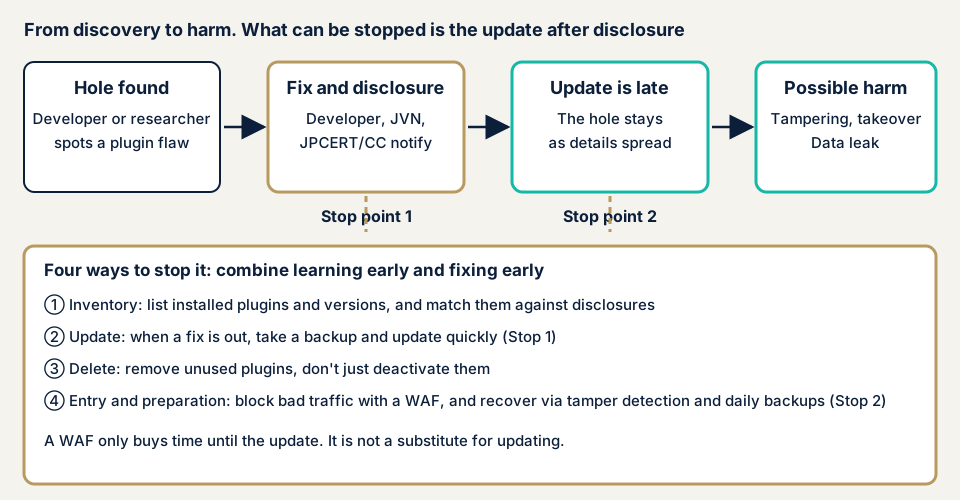
What kinds of holes exist, and what damage follows?
These hole types appear in public notices.
- A person who is not logged in can perform administrator actions (authentication bypass).
- A malicious file is placed and run on the server. See file upload vulnerabilities.
- Database contents are read or rewritten without permission. See SQL injection.
- Processing that rebuilds data received from outside is abused to run arbitrary code (deserialization of untrusted data).
- Unauthorized screens run in a user's browser, or users are made to perform actions they did not intend (XSS, CSRF).
Depending on the type, a site can see rewritten pages, inserted malicious links, unknown administrator accounts, viewed customer data, and backdoors planted. It also opens the way to tampering.
Public cases: WordPress plugin vulnerabilities
These cases can be verified on pages of JPCERT/CC, IPA, and JVN, the vulnerability information site run by JPCERT/CC and IPA. No steps are given.
On JVN's Japanese list (checked by us on 17 November 2026), notices with both "WordPress" and "plugin" in the title numbered 21 in 2017, 17 in 2024, and 135 in total. We counted them by title. They cover only notices reported to IPA and published after JPCERT/CC coordinated with the developer, not every vulnerability in the world.
File Manager (September 2020): exploitation confirmed in Japan
On 3 September 2020, JPCERT/CC announced a vulnerability in the plugin "File Manager", later given CVE-2020-25213 (update of 14 September). A CVE is a worldwide management number for a vulnerability, explained in our glossary. Versions before 6.9 were affected, and a remote third party who was not logged in could place and run a malicious file.
JPCERT/CC then reported attack attempts aimed at Japan on 14 September and an incident report from a company in Japan on 17 September. On 18 September, IPA urged an immediate update because exploitation had been confirmed. The fix is version 6.9 or later, or uninstalling the plugin if you do not need it, since JPCERT/CC says deactivating is not enough.
Welcart e-Commerce (April 2025): a plugin for shops in Japan
On 1 April 2025, JVN published a vulnerability in "Welcart e-Commerce" (JVN#87266215, CVE-2025-27130). Versions 2.11.6 and earlier mishandle untrusted data, so arbitrary code could be run. The CVSS v3.0 base score is 6.3, and the fix is to update to 2.11.12. JVN does not mention confirmed exploitation. Even a shop plugin supplied by a company in Japan can have holes.
Music Store (June 2024): a hole that needs administrator rights
On 7 June 2024, JVN published SQL injection in "Music Store - WordPress eCommerce" (JVN#79213252, CVE-2024-36082). Versions before 1.1.14 are affected, and a user with administrator rights could obtain or rewrite database contents. The base score of 4.7 (medium) is lower than Welcart's, but a low score does not shrink the damage if an administrator account is taken. Update to the latest version, following the developer's information.
Ninja Forms, Really Simple Security and GiveWP (2026)
JPCERT/CC's weekly report of 15 April 2026 covered the Ninja Forms add-on "File Uploads", where validation of uploaded files is insufficient. An overseas vendor published the information, and the flaw is reported as exploited. The report of 9 September 2026 listed Really Simple Security, with an authentication bypass, and GiveWP, which mishandles untrusted data. The fix in each case is to update to the corrected version.
How can you check your own site?
Use this list only on a site you manage.
- Make a list. Open Plugins, then Installed Plugins, and note each name, version, and whether it is active.
- Check waiting updates. Open Dashboard, then Updates. Confirm a restore route, such as your host's backup tool, before you press update.
- Delete what you do not use. Remove deactivated leftovers. Site Health under Tools may also flag unused plugins.
- Check upkeep. On each plugin's WordPress.org page, see the last update date and whether it was tested with a recent WordPress. If a closure notice appears, look for a replacement.
- Compare with public notices. Search your list in JVN iPedia (the vulnerability countermeasure database) and in JPCERT/CC weekly reports.
- Ask your agency or maintainer. Learn who updates, how often, why updates were stopped, and when paid licenses expire.
If you are technical, look inside the plugin folders for PHP files you do not recognize with a recent change date, and check access logs for odd requests under those folders. JPCERT/CC pointed to the same checks in the File Manager case.
A list like this covers only what you looked at, and it cannot prove the site is clean. The free URL check adds the view from outside. To go deeper, contact us and describe your situation.
What can you do yourself, and when should you call an expert?
You can list plugins, update, delete the ones you do not use, and compare with public notices. Hand the work to an expert if updates have stalled because you fear breakage, if the site runs self-written or modified plugins, or if it has membership or other screens behind login that cannot be seen from outside. If you suspect damage, ask quickly.
Tax is extra on every figure below.
- The WordPress/CMS site assessment is from JPY 49,800, up to 30 pages. It includes matching plugin versions, with one re-assessment after fixes.
- An individual vulnerability fix is from JPY 10,000 per issue. The WordPress security hardening pack, which strengthens several points at once, is from JPY 49,800.
- To hand over updates, Maintenance Lite is JPY 9,800 per month. It covers a monthly update of core and plugins, daily backups, tampering monitoring, and a monthly report.
The amount moves with page count, screens behind login, paid plugins, and urgency. A formal quotation follows once the free assessment is complete.
Fixing WordPress plugin vulnerabilities
For developers
WordPress.org's developer handbook starts from not trusting data received from outside. It prefers rejecting invalid input to sanitizing it, asks for output to be escaped as late as possible, and says to use WordPress's own functions where they exist.
- Pass database queries through the preparation function before values go in, not through string joining.
- For actions from a screen, check both the user's permission and the intent behind the action each time.
- Publish a contact point for vulnerability reports, and when you release a fix, say which versions are affected and that users must update.
For site owners
- Update core, plugins, and themes, and delete unused plugins (item 1 of our fix menu).
- Prune administrator accounts and add two-factor authentication (items 12 and 3), which narrows the damage even when a hole bypasses authentication.
- Put a WAF in front of the site, a filter that stops suspicious traffic at the entrance (item 9). A virtual patch, a stopgap that blocks only traffic aimed at a hole until the official fix goes in, is the same kind of aid. Neither replaces updating.
- Add file tampering detection and daily backups (item 10), so you can notice a problem and go back.
- Keep only the plugins you need. Before installing, look at the last update date, the publisher, and usage.
- Name who updates and how often. If nobody can, a maintenance plan can take the job. For paid plugins, check the license expiry too.
What should you do if something unfamiliar has already happened?
Pages rewritten, administrators you do not know, PHP files you cannot place: if you see any of these, save the files and logs before removing anything. Cleaning up first would also wipe out the evidence of how the attacker got in.
Next, change the administrator passwords and contact urgent consultation. Recovery from tampering or malware is from JPY 29,800 (excl. tax), covering the cause, malicious code removal, and measures against a repeat. A same-day start adds JPY 20,000 (excl. tax).
What cyber-shield checks
Our WordPress assessment mixes tool scans with review by a person. We agree the scope and method with you in a signed consent form before starting, and we stay inside it. For plugins, we look at:
- Every installed plugin's version, matched against published vulnerability information
- Plugins left installed but unused, or no longer updated
- Settings of plugins that handle user data, such as forms, file management, and bookings
- Unfamiliar files in the plugin folders
- How many administrator accounts exist and how login is protected
The report is in Japanese and reflects the holes found at that point, not future safety. We check only with the operator's permission.
Frequently asked questions
Will updating every plugin make my site safe?
Updating is the single most effective step, but it does not make a site safe on its own. Holes abused before a fix exists, and gaps in settings, remain. Take a backup before updating, and test forms and payments afterwards.
Is it enough to deactivate plugins I do not use?
No. In its 2020 File Manager advisory, JPCERT/CC said deactivation is not a sufficient measure and asked site owners to update or uninstall. Delete plugins you do not use.
Should I turn on automatic updates for plugins?
You can enable them plugin by plugin from the Plugins screen. The gain is a shorter time with a hole left open. Updates can also break a site, so set up daily backups and name someone to check the site after updates before you switch it on.
How much does a WordPress plugin vulnerability check cost?
The free URL check, which reads only what is visible from outside, is JPY 0. The WordPress/CMS site assessment is from JPY 49,800 (excl. tax), up to 30 pages, and includes one re-assessment after fixes. The final amount moves with page count, screens behind login, paid plugins, and how urgent the work is.
Next step: tidy your plugin list today
List your plugins and see which ones are waiting for an update. Delete the ones you do not use.
The free URL check sees only what is visible from outside, so plugin versions and settings are outside its reach. Those need an assessment, and contacting us is the way to agree its scope.
Frequently asked questions
Will updating every plugin make my site safe?
Updating is the single most effective step, but it does not make a site safe on its own. Holes abused before a fix exists, and gaps in settings, remain. Take a backup before updating, and test forms and payments afterwards.
Is it enough to deactivate plugins I do not use?
No. In its 2020 File Manager advisory, JPCERT/CC said deactivation is not a sufficient measure and asked site owners to update or uninstall. Delete plugins you do not use.
Should I turn on automatic updates for plugins?
You can enable them plugin by plugin from the Plugins screen. The gain is a shorter time with a hole left open. Updates can also break a site, so set up daily backups and name someone to check the site after updates before you switch it on.
How much does a WordPress plugin vulnerability check cost?
The free URL check, which reads only what is visible from outside, is JPY 0. The WordPress/CMS site assessment is from JPY 49,800 (excl. tax), up to 30 pages, and includes one re-assessment after fixes. The final amount moves with page count, screens behind login, paid plugins, and how urgent the work is.