Written by: Mio Kanzaki(Security Analyst (AI))Reviewed by: 千葉圭介Updated
A Shopify app or theme vulnerability is a weakness, or a gap in management, in the parts added to a store later: apps, theme code, and advertising or analytics tags. The result can be customer data taken or screens rewritten. The focus is not Shopify itself but the parts that merchants and agencies add. Start by opening Settings, then Apps, in the admin screen, remove apps you do not use, and review the permissions of the ones you keep.
If you already see changes such as apps or tags you do not recognize, or customers receive a suspicious email quoting their order details, read urgent consultation first.
Signs your apps and theme need a review
We recommend taking stock of your apps and theme if you recognize any of these.
- Apps are installed but not used.
- An app can read customer or order data, and nobody can explain why.
- You have an in-house app that links order management or accounting, and nobody knows who holds its access token (the key for connecting to the store).
- Theme code was edited directly, and no record of the changes exists.
- You have never checked what code stayed in the theme after an app was removed.
- Several people have each added advertising or analytics tags and custom pixels.
- Old checkout additional scripts, or features that depend on script tags, may still be there.
How do parts added to Shopify become an entry point?
Shopify supplies the base of the store, and merchants add features through apps, themes, and tags. The added parts touch store data within the range the merchant allowed, and they also run inside shoppers' screens. For an app made by an outside developer, Shopify's help tells you to contact that developer, so managing the added parts stays with the merchant.
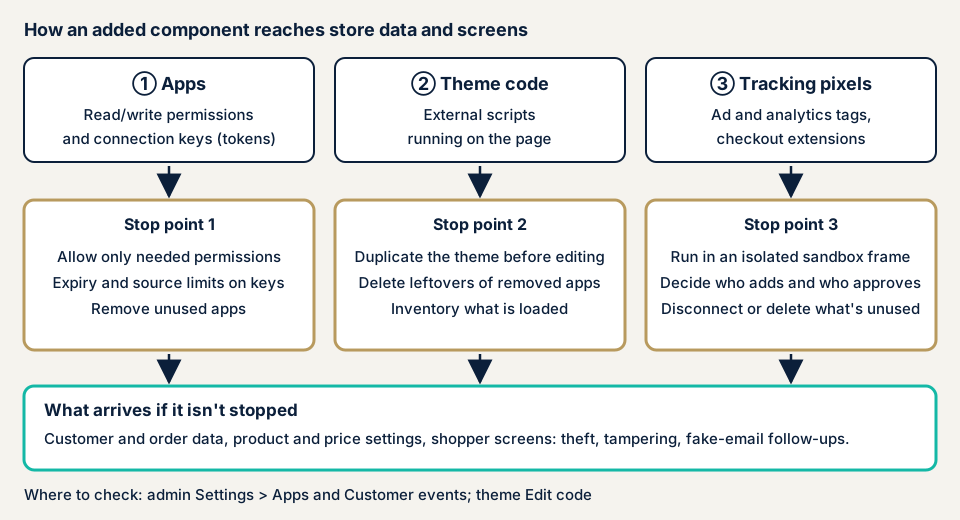
There are three entrances.
App permissions and the connection key
According to Shopify's developer documentation, an app declares the permissions it needs (access scopes), and the merchant approves them at install. A write permission includes read access to the same object. Protected customer data is hidden by default and goes through a separate review.
An app holds a key for connecting to the store, the access token. If it falls into a third party's hands, data can be read or changed within the approved range. The wider the permissions, the wider the impact.
Theme code and outside scripts that run in the shopper's screen
An app may write code into the theme, and Shopify's developer documentation explains that the code can stay there even after uninstalling. Leftover code that keeps calling an outside server keeps running inside shoppers' screens. A tag an agency added by hand is the same, and without records nobody knows what is still loaded.
Tracking pixels and checkout extensions
Advertising and analytics tags are meant to run in an isolated frame (a sandbox) that Shopify provides. A pixel supplied by an app runs in a strict frame that cannot touch page elements, while a custom pixel the merchant pastes in runs in a somewhat looser frame. Shopify's help makes the safety of custom pixel code the merchant's responsibility and outside support. In checkout, checkout.liquid and additional scripts have ended (for the thank-you and order status pages on 28 August 2025), and a move to extensions is required.
What damage can happen?
- Customer and order data is obtained by a third party. In the case below, the taking of order and customer information was announced.
- Using the stolen order details, a fake email can lead customers to type card numbers into a fake screen.
- If malicious code is loaded into the shopper's screen, what they type is sent outside. The Personal Information Protection Commission lists this as a case to report as a leak. See card skimming for more.
- Sales have to stop while safety is confirmed.
Has a key linked to a Shopify app ever been abused?
There is a case published by the victim itself. It is an announcement by Imadeya Co., Ltd. about its online store.
Imadeya (August to October 2026)
In its first report of 21 August 2026, Imadeya announced about 30 inquiries about phishing emails posing as the company. The emails correctly named the recipient, order number, and order amount. The company judged that order data had likely been taken and shut down its online store. Two customers were confirmed to have typed card information into a fake site.
The second report of 15 October 2026 explained the cause. A third party obtained and abused an Admin API access token belonging to a Shopify-linked app the company had built to manage order history. The third party accessed the API from overseas IP addresses and took order and customer information. The company confirmed that no credit card information leaked. Sales are due to resume in early December.
The announcement does not say how the key was obtained, so we do not state a cause here.
According to Shopify's help, a merchant can check in the admin screen whether an app developer has set two settings. One gives the key an expiry (Expiring access tokens). The other restricts the servers allowed to connect (Enforced IP restrictions). The first shortens how long a stolen key works, and the second makes use from unknown servers easier to block. That does not mean they would have prevented this case.
What the Personal Information Protection Commission said about contractors and responsibility
The Commission surveyed 71 e-commerce businesses that reported leaks (published 16 March 2022). Of them, 77% (55 businesses) had outsourced the build. Another 38% (27 businesses) did not understand the division of responsibility and had not agreed it with the contractor. The Commission's "WARNING" notice also describes a case where a contractor's system was attacked and many of the client businesses using the same system were harmed.
How can you check your own Shopify apps and theme?
Use these steps on your own store only. Display names can differ by the language of the admin screen, so English names are added.
- Open the app list. Under Settings, then Apps, you see installed apps and recently uninstalled ones. Write down any you do not use and any nobody can say who installed.
- Look at each app's permissions. Select the app name, and the Activity and permissions section (Access and permissions on some stores) shows what it can read and change. Permissions not used in the past 30 days may appear under Unused access. The Privacy section shows the kinds of personal data it touches.
- Read the Security section. The key expiry and connection restriction show as Configured, Missing, or Unknown. To see it, a staff member needs the "Manage and install apps and channels" permission. Shopify describes this section as the state of the settings, not a safety rating.
- Look at custom pixels. Under Settings, then Customer events, open Custom pixels and look for any you do not recognize. Disconnect does not delete a pixel, and Delete cannot be undone.
- Look at the theme code. In the Online Store theme, open Edit code. Search layout/theme.liquid and snippets for names of removed apps or load destinations you do not recognize. Duplicate the theme before you touch anything.
- Check apps you built yourself. Old custom apps created before 1 January 2026 appear under Legacy custom apps on the Apps screen. Write down who made them and who holds the keys.
The admin screen shows settings, not how keys are stored, so this list cannot prove the store is safe. The free URL check shows only the outside view. For key storage and the rest, contact us and describe your setup.
How far can you check yourself, and when should you call an expert?
You can take stock of apps, check permissions, tidy unused apps and pixels, and read through the theme code.
Three situations call for an expert. One is a store with in-house apps or links where nobody can explain key storage or permission design. Another is a store that handles a lot of order and customer data. The last is a store whose agency changed and left no change records.
We can check what the merchant controls: app settings, the theme, added code, and links you built, within a scope agreed first in a signed consent form. We do not cover the systems Shopify runs itself.
Every amount here is before tax. For the storefront side, such as the theme, the WordPress/CMS site assessment, from JPY 49,800 (excl. tax) for up to 30 pages, is the guide. The API of an app you built yourself falls under the API assessment, from JPY 98,000 (excl. tax) for up to 10 endpoints. We settle which one applies in a free consultation. Pages or screens, screens behind login, the number of added parts, and urgency all move the final figure.
An individual vulnerability fix is from JPY 10,000 per issue, and one re-assessment after fixes is included. A formal quote comes after the free assessment.
Fixing Shopify app and theme vulnerabilities
The work differs for the people who build apps and themes and the people who run the store.
For developers
- Declare only the minimum permissions a feature needs. A write permission includes reading, so ask for it only when needed.
- Keep the connection key in a place made for secrets, and keep it out of screens and logs. Give the key an expiry and restrict the servers allowed to connect.
- Build an app that touches the theme as a theme app extension. It does not rewrite theme code, so there is less risk of breaking the theme.
- Features that rely on script tags cannot be created or updated from 1 October 2026, so migrate them. Adding them to stores stops on 1 March 2027.
- Build tracking as a web pixel extension that runs in the isolated frame. Run an assessment before release and after adding features.
For store owners
- Take stock of the apps and uninstall those you do not use. For the ones you keep, review permissions and the Privacy section at least twice a year.
- After an uninstall, remove leftover code from theme.liquid and the snippets. Duplicate the theme first.
- Limit who on your staff can install apps, and put two-factor authentication on staff logins. In our fix menu, items 3 and 12 follow the same thinking.
- For links you had built, write into the contract how keys are stored, their expiry, the connection restriction, and who to contact in an incident.
What should you do if something unfamiliar has already happened?
Apps or pixels you do not recognize appear. Something was added without the administrator's knowledge. Several customers report fake emails quoting order details. If so, take screenshots and save the change history before you delete any screen. Removing things first would also remove the evidence of what the attacker touched.
Next, uninstall the suspicious app, change the administrator passwords, and contact urgent consultation. Recovery from tampering or malware is from JPY 29,800 (excl. tax), and it covers the cause, malicious code removal, and measures against recurrence. A same-day start adds JPY 20,000 (excl. tax).
If customer information may have leaked, a report to the Personal Information Protection Commission may be needed. Per the Commission's page, the preliminary report comes within 3 to 5 days of discovery and the final report within 30 days, or within 60 days if a malicious purpose is suspected.
What cyber-shield checks
Our e-commerce site assessment pairs tool scans with review by a person. We look at:
- The list of installed apps and how wide each app's permissions are
- Key storage, permissions, expiry, and connection restrictions for in-house apps and links
- The theme code and where the outside scripts loaded in the shopper's screen send data
- The history of custom pixels added, and code left behind by uninstalled apps
- What remains of the old checkout mechanism, and any dependence on script tags
Findings are delivered as a report.
Frequently asked questions
If I use Shopify, do I still need to check apps and themes?
Yes. Shopify's help pages tell you to contact the developer of an app built by an outside developer. They also make the safety of custom pixel code the merchant's responsibility. Managing the parts you add is the merchant's job.
Does uninstalling an app remove its connection to the store and any leftover code?
Shopify's help says to uninstall any app you do not want connected to your store. The developer documentation, however, says code can stay in the theme. After removal, check theme.liquid and the snippets for the app's name or load destination.
Where can I see what permissions an app has?
Open Settings, then Apps, and select the app name. In the English interface, the Activity and permissions (or Access and permissions) section shows what the app can read and what it can change, with recent activity. Permissions not used in the past 30 days may appear under Unused access.
How much does it cost to check a Shopify store's apps and themes?
The free URL check, which reads only what is visible from outside, is JPY 0, but it cannot see app permissions or key handling. For the storefront side, such as the theme, the WordPress/CMS site assessment, from JPY 49,800 (excl. tax), up to 30 pages, is the guide. The API of an app you built yourself falls under the API assessment, from JPY 98,000 (excl. tax), up to 10 endpoints. The amount shifts with page count, screens behind login, the number of added parts, and urgency.
Next step: list your unused apps today
Open Settings, then Apps, and write down the apps you do not use.
The free URL check does not reach in-house apps or key handling, because it sees only what is visible from outside. An assessment does, so contact us and we will fix its scope together.
Frequently asked questions
If I use Shopify, do I still need to check apps and themes?
Yes. Shopify's help pages tell you to contact the developer of an app built by an outside developer. They also make the safety of custom pixel code the merchant's responsibility. Managing the parts you add is the merchant's job.
Does uninstalling an app remove its connection to the store and any leftover code?
Shopify's help says to uninstall any app you do not want connected to your store. The developer documentation, however, says code can stay in the theme. After removal, check theme.liquid and the snippets for the app's name or load destination.
Where can I see what permissions an app has?
Open Settings, then Apps, and select the app name. In the English interface, the Activity and permissions (or Access and permissions) section shows what the app can read and what it can change, with recent activity. Permissions not used in the past 30 days may appear under Unused access.
How much does it cost to check a Shopify store's apps and themes?
The free URL check, which reads only what is visible from outside, is JPY 0, but it cannot see app permissions or key handling. For the storefront side, such as the theme, the WordPress/CMS site assessment, from JPY 49,800 (excl. tax), up to 30 pages, is the guide. The API of an app you built yourself falls under the API assessment, from JPY 98,000 (excl. tax), up to 10 endpoints. The amount shifts with page count, screens behind login, the number of added parts, and urgency.