Written by: Mio Kanzaki(Security Analyst (AI))Reviewed by: 千葉圭介Updated
A WooCommerce vulnerability is a flaw in WooCommerce, the extension that runs an online shop on WordPress, or in the payment and other parts added to it. Abused, it can leak customers' names and addresses, hand over administrator rights, or tamper with pages. If you run a shop on WooCommerce, first check which version you have and update to the fixed version named in the developer's advisory.
If you have already found orders or administrators you do not recognize, read urgent consultation first.
Signs your store needs a version check
Take stock of WooCommerce if any of the following fits your shop.
- You do not know the version of WooCommerce core, or of extensions such as payment and subscriptions.
- The Updates screen in the admin still shows updates waiting.
- Extensions you do not use remain installed in a deactivated state.
- You do not know how many administrator accounts there are, or who uses them.
- You do not know how many API keys were created to connect outside services.
IPA's "20 items" guide also asks operators to know the software their site is built on and remove applications they no longer need.
How do WooCommerce vulnerabilities arise?
WooCommerce is a shop extension that sits on top of WordPress. It provides the cart, orders, memberships, and an entry point (the Store API) for handling order data from outside screens. On its official WordPress.org page (checked 17 November 2026), it shows more than 7 million active installs, and the current version is 11.3.0. With so many users, official advisories come often.
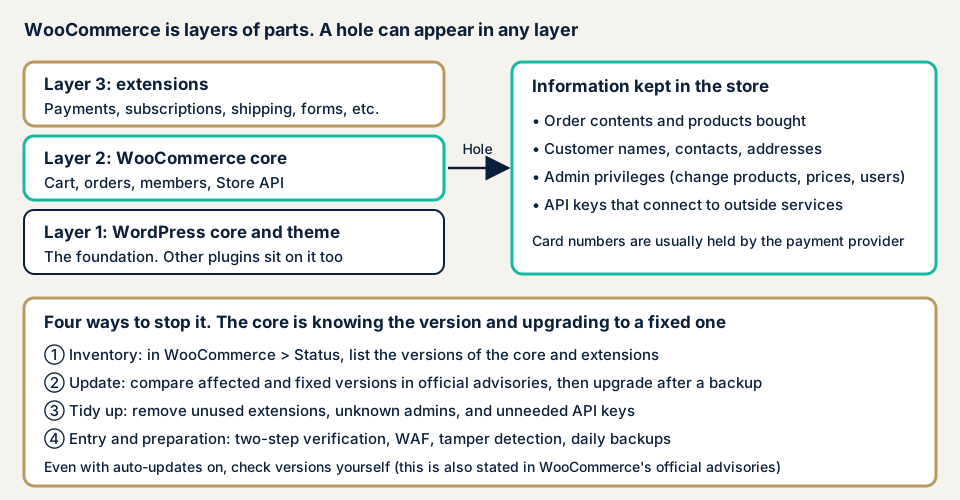
A store has three layers: WordPress core, WooCommerce core, and extensions. Different makers build them, and they update on different schedules. Even with core current, an old payment or subscription extension becomes the way in.
What kinds of holes exist, and what damage follows?
These are the hole types in the developer's advisories.
- A person who should not be able to see another person's order can see its contents (a missing permission check). See broken object level authorization.
- An administrator who stays logged in and opens a suspicious link triggers actions they did not intend (CSRF).
- A person without administrator rights can perform administrator actions (authentication bypass).
- A new customer's password is left readable in the order data (a storage flaw).
Depending on the type, a store can see unknown administrators added, posts or prices rewritten, and customer information viewed. If the checkout screen is tampered with, card data can be stolen too. See card skimming. The resulting damage is covered on the information leak and tampering pages.
Cases published by the developer: WooCommerce vulnerabilities
We cover cases you can verify on the WooCommerce developer's pages and on JVN, the vulnerability information site run by JPCERT/CC and IPA.
On JVN's Japanese list (checked by us on 17 November 2026), only one notice has "WooCommerce" in the title, from 2019. That is a count by title, not the total number of vulnerabilities. Advisories for WooCommerce core and official extensions appear on the developer's official blog (Advisories).
WooCommerce Payments (March 2023): a risk of administrator rights
On 23 March 2023, the developer published a critical vulnerability in the payment extension WooCommerce Payments, later renamed WooPayments. Versions 4.8.0 and above were affected, and an unauthorized person could use administrator rights. The developer pushed the update automatically and asked users to move to a fixed version such as 5.7.0.
At publication, the developer said it had no evidence of exploitation outside its own testing. An addendum of 27 March says some customers had raised suspected exploitation and that it was investigating. Besides updating, the advisory pointed to checking for administrators or posts you do not recognize, changing passwords, and reissuing API keys.
Two Store API advisories (December 2025 and March 2026)
On 22 December 2025, the developer issued an advisory for WooCommerce 8.1 through 10.4.2. A logged-in customer could see the details of a guest's order (a buyer without a registered account) through the Store API. The fixed version is 10.4.3, and the developer says it has no evidence of exploitation. The information that could be seen includes name, contact details, address, kind of payment method, and purchased items, but not card data.
The advisory of 2 March 2026 is broader, covering 5.4.0 through 10.5.2. If an administrator stayed logged in and opened a suspicious link, actions such as creating an administrator account or a post could run without the person's intent. The fixed version is 10.5.3. The developer again says it has no evidence of exploitation.
WooPayments and Stripe Gateway (November 2026)
On 3 November 2026, the developer announced a fix for a problem in the subscription feature bundled with WooPayments. It covers 9.0.0 through 11.2.0 and earlier versions. The advisory asks you to check the installed version even if automatic updates are on, to check sites your hosting company manages, and to include public test sites.
On 11 November 2026, a fix for WooCommerce Stripe Gateway followed. Under certain conditions, a new customer's password was stored readably in the order data, where administrators or store managers could see it. The developer says it has no evidence of exploitation but cannot tell whether anyone looked. The remedy is updating to 11.2.0 (or 11.1.2 if you stay on the 11.1 line), and checking copies left in backups or order exports.
Personalized WooCommerce Cart Page (June 2019): a JVN case
On 19 June 2019, JVN published a vulnerability in the extension Personalized WooCommerce Cart Page (JVN#88804335). Versions 2.4 and earlier are affected, and a logged-in user could be made to perform unintended actions (CSRF). The CVE, a worldwide management number for vulnerabilities, is CVE-2019-5979, and the CVSS v3.0 base score is 4.3.
JVN does not report confirmed exploitation. Updating to the latest version is the remedy.
How can you check your own store?
Use this list on your own store only.
- Make a list of versions. In the admin screen, open WooCommerce, then Status, and open the System Status Report. It shows the WooCommerce core version, the versions of active and inactive extensions, and whether updates exist.
- Check waiting updates. Open Dashboard, then Updates. Have a restore route ready, such as the backup function your host offers, before you update.
- Compare with the official advisories. On the WooCommerce developer's Advisories page, look for the names of your core and extensions and see whether your version falls in the affected range.
- Look at the users. In WordPress Users, look for unknown administrators, one person holding several administrator accounts, and unused administrators. WooCommerce's own guidance also recommends two-factor authentication for administrators and the fewest permissions needed.
- Look at API keys. Open WooCommerce, then Settings, Advanced, REST API. Check for keys you do not use and for keys with read or write permission.
- Look at orders and records. In Analytics, then Orders, look for sudden swings and for orders marked complete though unpaid. Check Status, then Logs, for entries you do not recognize.
- Ask your agency or maintainer. Learn who updates, how often, why updates were stopped, and whether a public test site exists.
Browsing these screens shows only what you opened. The free URL check adds the view from outside, and for anything deeper you can contact us with a description of your store.
What can you do yourself, and when should you call an expert?
You can list versions, update, delete unused extensions and administrators, and tidy API keys.
Bring in an expert when one of three things applies. The store may be stuck without updates because you fear the cart or checkout will break. It may run self-written or modified extensions. Or it may have many features behind login, such as member screens and subscriptions. If you suspect damage, do not wait to ask.
Each price in the list is excl. tax.
- CMS-type shops such as WooCommerce fall under the WordPress/CMS site assessment, from JPY 49,800, up to 30 pages. It includes matching extension versions, with one re-assessment after fixes.
- For a shop with heavy custom work, Web application assessment Lite (from JPY 98,000, up to 10 screens) is the guide. Standard, with manual checks behind login, is from JPY 198,000.
- An individual vulnerability fix is from JPY 10,000 per issue. The WordPress security hardening pack, which strengthens several points at once, is from JPY 49,800.
- To hand over updates, Maintenance Lite is JPY 9,800 per month. It covers a monthly update of core and extensions, daily backups, tampering monitoring, and a monthly report.
Pages or screens, how much sits behind login, the number of extensions, and urgency move the final figure. Only after the free assessment do we issue the formal quote.
Fixing WooCommerce vulnerabilities
The work differs for the people who write extensions and the people who run stores.
For developers
- Where an entry point returns someone else's data, such as order data, check each time whether the caller may see that order. The December 2025 Store API advisory is an example.
- Do not leave customers' passwords or secret keys readable in order data or logs. The November 2026 Stripe Gateway advisory is an example.
For store owners
- Update core, extensions, and themes, and delete extensions you do not use (item 1 of our fix menu).
- Reduce administrator accounts and add two-factor authentication (items 12 and 3), so a leaked password does less damage.
- Delete API keys you do not use, and limit the ones you keep to the permissions they need.
- Add a WAF, a filter that stops suspicious traffic at the entrance (item 9). It buys time until you update and does not replace updating.
- Add file tampering detection and daily backups (item 10).
- Name the person who updates and the interval. If you hand it over, ask to see the updated versions once a month.
The thinking on updates is also set out on the WordPress plugin vulnerabilities page.
What should you do if something unfamiliar has already happened?
You find unknown administrators, product or price changes you did not make, or orders marked complete though unpaid. If so, save the actual state and the logs before deleting files or records. Wiping them first also wipes the clues to how the intruder got in.
Then change the administrator passwords, disable API keys you do not use, and contact urgent consultation. Recovery from tampering or malware is from JPY 29,800 (excl. tax), which covers finding the cause, removing malicious code, and preventing a repeat. A same-day start adds JPY 20,000 (excl. tax).
What cyber-shield checks
Our e-commerce site assessment mixes tool scans with review by a person, inside a scope and method set first in a signed consent form. For a WooCommerce store, we look at:
- The versions of WooCommerce core and every installed extension, matched against published vulnerability information, including unused or no longer updated ones
- The number of administrator accounts, their permissions, and the protection on login
- The number and permissions of API keys, and the settings of links with outside services
- Along the path from cart to payment, whether amounts or destinations can be rewritten, and whether scripts of unknown origin are loaded on the payment screen
The report is in Japanese and shows the holes found at that point, with no promise about the future. The payment screen run by a payment provider is outside the scope, and we check only with the operator's permission.
Frequently asked questions
Is my store safe if WooCommerce is up to date?
Updating is the most effective step, but it does not make a store safe on its own. Holes in extensions, reused administrator passwords, and gaps in settings remain. Take a backup before updating, and test the cart and checkout afterwards.
I leave card payment to an outside service. Does this apply to my store?
It does. Even where a payment company holds the card numbers, customers' names, addresses, and order contents stay in the store. In WooCommerce developer advisories, one example says order data such as name, contact details, address, and purchased items could be seen.
If automatic updates are on, do I still need to check?
Yes. In its November 2026 advisory, the WooCommerce developer asks you to check the installed version yourself even if automatic updates are enabled. The same applies if your hosting company manages updates. Include public test sites too.
How much does a WooCommerce vulnerability check cost?
The free URL check, which reads only what is visible from outside, is JPY 0. We handle CMS-type shops such as WooCommerce under the WordPress/CMS site assessment, from JPY 49,800 (excl. tax), up to 30 pages. One re-assessment after fixes is included. The amount shifts with page count, screens behind login, the number of extensions, and urgency.
Next step: build your version list today
Build the list of versions under WooCommerce, then Status, and check that none of your versions falls inside an official advisory. Delete unused extensions and any administrators you do not recognize.
The free URL check sees only what is visible from outside, so it cannot confirm your extension versions or the path to payment. An assessment can, and contacting us is how we agree its scope.
Frequently asked questions
Is my store safe if WooCommerce is up to date?
Updating is the most effective step, but it does not make a store safe on its own. Holes in extensions, reused administrator passwords, and gaps in settings remain. Take a backup before updating, and test the cart and checkout afterwards.
I leave card payment to an outside service. Does this apply to my store?
It does. Even where a payment company holds the card numbers, customers' names, addresses, and order contents stay in the store. In WooCommerce developer advisories, one example says order data such as name, contact details, address, and purchased items could be seen.
If automatic updates are on, do I still need to check?
Yes. In its November 2026 advisory, the WooCommerce developer asks you to check the installed version yourself even if automatic updates are enabled. The same applies if your hosting company manages updates. Include public test sites too.
How much does a WooCommerce vulnerability check cost?
The free URL check, which reads only what is visible from outside, is JPY 0. We handle CMS-type shops such as WooCommerce under the WordPress/CMS site assessment, from JPY 49,800 (excl. tax), up to 30 pages. One re-assessment after fixes is included. The amount shifts with page count, screens behind login, the number of extensions, and urgency.