Written by: Mio Kanzaki(Security Analyst (AI))Reviewed by: 千葉圭介Updated
A WordPress core vulnerability is a flaw in WordPress's own program that can be abused until the official fix reaches your site. Every WordPress site is in scope, and the impact is largest where automatic updates were switched off or years have passed without an update. Start by opening Dashboard, then Updates, in the admin screen and see whether core is current.
Is your core out of date? Seven warning signs
Any one of these is a reason to look at your core update status.
- The Updates screen still shows a core update waiting.
- You do not remember switching off automatic updates, or do not know who did.
- The site runs the version your agency delivered years ago.
- You skip core updates for fear of conflicts with the theme or plugins.
- You have never confirmed that a pre-update backup exists and can be restored.
- The server's PHP (the language that runs the site) is too old for a newer WordPress.
- Several people hold administrator accounts, and nobody owns updates.
The WordPress.org handbook says the most important step is keeping core, every plugin, and every theme up to date. IPA's "Top 10 Information Security Threats 2026" ranks attacks that exploit system vulnerabilities fourth among threats to organizations.
Why does a late update turn a core vulnerability into damage?
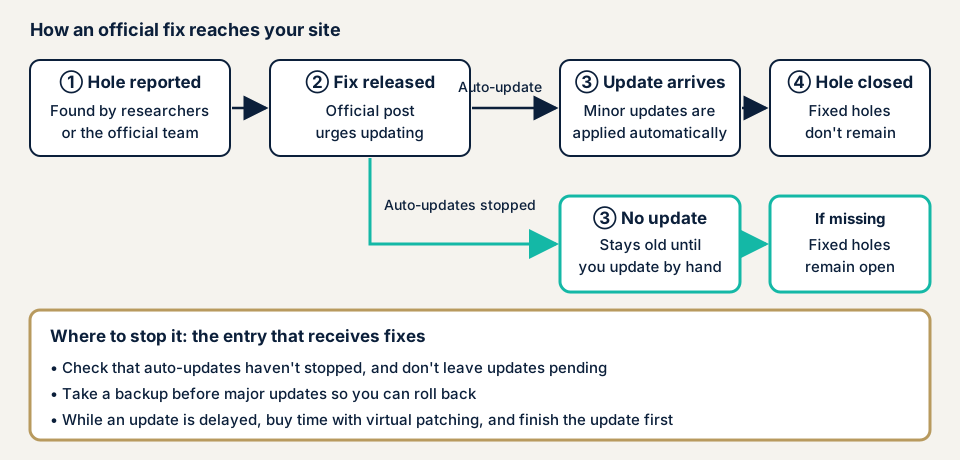
The WordPress program is public. When a researcher or the security team reports a flaw, the project releases a fixed version (a security release). The release post names the kind of problem fixed and gives no attack steps, but for a site that has not updated it also signals that a hole exists.
Damage that core flaws can cause
The 7.1.3 release of 6 October 2026 announced seven security fixes. They include stored XSS in the comment admin screen, SQL injection in the export feature, an issue that let an author-level user pin a post to the top, and an issue that let an unauthenticated visitor see comments on a private post.
The 7.1.4 release of 28 October 2026 fixed several more. One is a weakness during the upgrade process that could lead to remote execution of unauthorized programs. Possible damage is page tampering, administrator takeover, and viewing of unpublished information, depending on the site's settings.
How this differs from plugins and themes
Patchstack found 11,334 new WordPress vulnerabilities in 2025, up 42% on the year before, and 91% of them came from plugins. Core has fewer flaws, yet every site runs the same program. The more common ways in are covered on the WordPress plugin and WordPress theme pages. For neglected updates in general, see unpatched software.
Public cases: official security releases and JVN
WordPress.org published "7.1.3 Maintenance and Security Release" on 6 October 2026 and "7.1.4" on 28 October 2026. As of 17 November 2026, 7.1.4 is the latest security post on the official site. Both recommend updating right away. The 7.1.3 post lists four bug fixes beside seven security fixes. It says older branches (currently back to 4.7) receive fixes when needed, but only the latest release is actively supported.
JVN, the disclosure site run by JPCERT/CC and IPA, announced on 8 November 2022 (JVN#09409909) that WordPress before 6.0.3 had several vulnerabilities. Three problems concern the post-by-email feature. The CVE identifiers (worldwide IDs for vulnerabilities) are CVE-2022-43497 and CVE-2022-43500, stored XSS with a CVSS v3 base score of 6.1, and CVE-2022-43504, improper authentication, at 5.3.
JVN says a viewer's browser could run an unauthorized script, and a poster's email address could be obtained. The remedy is updating to the latest version, and the developer provided fixes for every version from 3.7 on. Updates are urged even for moderate scores, and fixes sometimes reach old versions, so check the official post for your version.
How can you check your own site?
Use these steps on your own site only.
- Core version and waiting updates. Open Dashboard, then Updates, and see whether core is current.
- Site Health. Open Tools, then Site Health, and read the findings under Status. It may flag the background update state or the PHP version.
- Official posts. In the security category of the WordPress.org news pages, note the dates of recent security releases and confirm your version has received the updates since.
- Auto-update setting. Ask your agency or host how
AUTOMATIC_UPDATER_DISABLEDandWP_AUTO_UPDATE_COREare set in wp-config.php. The second takes priority over the admin screen setting, and updates may have been switched off at delivery without anyone remembering. - Backup. Confirm a daily backup exists and that someone has tried the restore steps. Back up before every update.
- Public advisories. Search JVN iPedia (the vulnerability countermeasure database) for "WordPress" and see whether any entry covers your version.
Before pressing update, look for waiting theme and plugin updates too, since raising core first can stop an old plugin from working.
If many answers come back as "I don't know", the free URL check covers only what is visible from outside. Reviewing the admin screen takes an assessment, so contact us to discuss how far it should go.
What can you do yourself, and when should you call an expert?
You can check waiting updates, update after a backup, confirm the auto-update setting, and compare against the official posts.
An expert helps when a core update breaks the layout, when the theme is customized or core files were edited, or when old PHP cannot run a newer release. The same goes for sites that want to know whether they were tampered with while stuck on an old version. Many screens behind login or many paid plugins take more effort to check, and the free URL check (JPY 0), which reads only what is visible from outside, cannot settle those. If damage is suspected, use urgent consultation.
All amounts below exclude tax. The WordPress/CMS site assessment is from JPY 49,800 for up to 30 pages, and it rises with page count, screens behind login, paid plugins, and urgency. A fix for one vulnerability is from JPY 10,000 per issue. Recovery from tampering or malware is from JPY 29,800. The assessment includes one re-assessment after fixes.
To hand over monthly updates, Maintenance Lite is JPY 9,800 per month. It covers a monthly update of core and plugins, daily backups, tampering monitoring, and more. Guard for WordPress is JPY 5,000 per month for Lite and JPY 15,000 per month for Pro, which includes virtual patching (annual billing is the norm). A rebuild is from JPY 100,000 for up to 10 pages in about 7 to 10 days, and more paid plugins raise it. Formal quotes come after the free assessment.
Fixing WordPress core exposure
For developers and agencies
- Add features through themes and plugins, not by editing core files, because direct edits vanish at each update or block it.
- At delivery, tell the client in writing how automatic updates are set, and if you stop them, give the reason and the manual procedure that replaces them.
- Try themes and plugins against the latest core on a duplicate of the site first, and keep PHP within the range WordPress supports.
- Limit administrator permissions to what each person needs.
For site owners
- Leave minor core updates on automatic. If a site must stop them, name the person and the day for manual updates.
- Back up before updating, and arrange a daily backup and a check of the restore steps (item 10 of our fix menu).
- Update core, themes, and plugins together, and delete unused plugins (item 1).
- Reduce administrators and add two-factor authentication (items 12 and 3). These guard against login attacks and do not replace updates.
- To buy time while updates wait, a virtual patch blocks only traffic that targets a known hole, even before a fix exists. It does not replace updating.
- To cut the update workload, rebuild as a secure HTML/PHP site (item 14).
What cyber-shield checks
Our WordPress/CMS site assessment pairs tool scans with review by a person. A signed consent form fixes the scope and method first, and nothing outside it is examined. For core, we look at:
- The WordPress version, matched against publicly known vulnerabilities
- Whether the site is stuck on an old core that has stopped updating
- Themes or plugins left behind, whose distributors stopped updating, that block a core update
- Whether the auto-update setting has been stopped (confirmed with an interview of your agency)
Results go into a report, and we re-assess once after you fix them. An assessment alone never rewrites your site. Fixes begin after a quotation and your order, and before delivery a PDF shows what was fixed and how, so you can run your own operation checks.
Frequently asked questions
How far do WordPress automatic updates run by default?
According to WordPress.org documentation, minor core updates (maintenance and security releases) are automatic by default. Major updates are automatic by default on new installs from 5.6 onward, while existing sites keep their earlier setting. Plugins and themes are not updated automatically except in special cases.
How can I tell whether automatic updates have been switched off?
Open Tools, then Site Health, in the admin screen to see the status of background updates. Also ask your agency how wp-config.php is set. If AUTOMATIC_UPDATER_DISABLED is enabled, or WP_AUTO_UPDATE_CORE is false, core does not update itself.
Will updating core break my site?
It can. The display may break because of how a theme or plugin interacts with the new version. Take a backup first and make sure you can restore it. For a site you worry about, try the update first on a duplicate of the site.
Is it a problem to keep running an old version?
We advise against it. The WordPress.org article for 7.1.3 says only the latest release is actively supported. Older branches may also receive fixes when needed, but delivery is not guaranteed in time. Ask your agency why the site cannot move to the latest release.
How much does a WordPress core check cost?
The free URL check (JPY 0) reads only what anyone can see from outside, so it does not show update status inside the admin screen. The WordPress/CMS site assessment is from JPY 49,800 (excl. tax), up to 30 pages, and the amount depends on page count and paid plugins. If you want updates handled monthly, the Maintenance Lite plan is JPY 9,800 per month (excl. tax).
Next step: look at two things today
Open the Updates screen to see where core stands, and confirm that automatic updates are not switched off. That closes most of the gap a late update leaves.
The free URL check shows only what is visible from outside, so it cannot tell you whether core, themes, and plugins have holes. That takes an assessment. Contact us and we will work out its scope with you.
Frequently asked questions
How far do WordPress automatic updates run by default?
According to WordPress.org documentation, minor core updates (maintenance and security releases) are automatic by default. Major updates are automatic by default on new installs from 5.6 onward, while existing sites keep their earlier setting. Plugins and themes are not updated automatically except in special cases.
How can I tell whether automatic updates have been switched off?
Open Tools, then Site Health, in the admin screen to see the status of background updates. Also ask your agency how wp-config.php is set. If AUTOMATIC_UPDATER_DISABLED is enabled, or WP_AUTO_UPDATE_CORE is false, core does not update itself.
Will updating core break my site?
It can. The display may break because of how a theme or plugin interacts with the new version. Take a backup first and make sure you can restore it. For a site you worry about, try the update first on a duplicate of the site.
Is it a problem to keep running an old version?
We advise against it. The WordPress.org article for 7.1.3 says only the latest release is actively supported. Older branches may also receive fixes when needed, but delivery is not guaranteed in time. Ask your agency why the site cannot move to the latest release.
How much does a WordPress core check cost?
The free URL check (JPY 0) reads only what anyone can see from outside, so it does not show update status inside the admin screen. The WordPress/CMS site assessment is from JPY 49,800 (excl. tax), up to 30 pages, and the amount depends on page count and paid plugins. If you want updates handled monthly, the Maintenance Lite plan is JPY 9,800 per month (excl. tax).