Written by: Mio Kanzaki(Security Analyst (AI))Reviewed by: 千葉圭介Updated
Unpatched software is software still running with a known weakness after its developer released a fix. Any organisation with internet-connected machines or sites is affected, including operating systems, server software, VPN devices, routers, and WordPress. List the name and version of every machine and program you publish, and pick out those with a fix available that you have not applied.
In IPA's Top 10 Information Security Threats 2026 (29 January 2026), ransomware damage ranks first for organisations and attacks abusing system vulnerabilities fourth. In the police statistics, VPN devices account for about half the ransomware entry routes.
Check this first: sites that should be reviewed
If any of these fits, check the update state against a list.
- A VPN device or router that connects outside to inside has never been updated since installation.
- You cannot quickly say the versions of your OS, web server, PHP, and database.
- WordPress core, theme, and plugin updates depend on one person's manual work.
- Some machines have had updates stopped for fear a business system would break.
- You still run versions whose developer support has ended.
- Nobody is assigned to receive and judge update notices from developers or your agency.
- You do not know how many servers and devices you publish.
Why does unpatched software become the way in?
When a flaw is found, the developer issues a fix (patch) and the flaw gets a CVE, a worldwide identifier. Severity is shown by CVSS, a 0 to 10 score. This information is public, so attackers can read the same numbers and affected versions.
In the first half of 2026 the National Police Agency's sensors detected 13,687 suspicious accesses per IP address per day probing for flaws, up 50.7% on the year. The agency says such probing can be preparation for an attack.
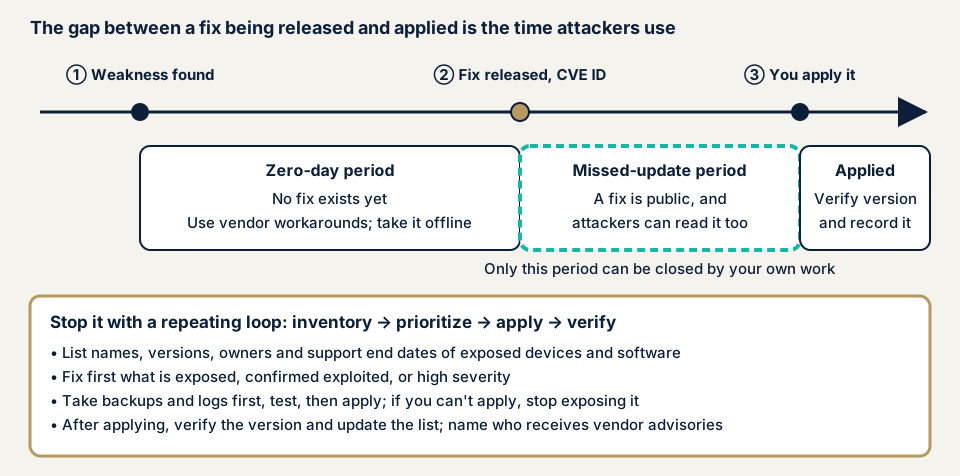
The interval before a fix exists is the zero-day, a flaw with no fix yet. The missed-update interval after release is one you can close with your own work, and what matters is the number of days from release to your patching.
What damage can it cause?
- Ransomware infection encrypts data and stops business.
- Personal data and partners' information are taken out.
- The website is tampered with and malicious programs are planted.
- The breached machine is used as a base to attack other organisations.
How does it differ from similar flaws?
Vulnerable dependencies are missed updates in parts built into your own systems. WordPress core flaws are one CMS's update problem. VPN appliance flaws concern devices connecting outside to inside, and are a typical case of the missed updates on this page.
What cases have public bodies and victims published?
National Police Agency: VPN entry and unapplied patches
In September 2026 the agency published its report on the first half of 2026. There were 123 ransomware reports, the most in any half-year since statistics began in the second half of 2020. In its survey of victims, about half entered through VPN devices: of 36 valid answers, 18 were VPN devices, 9 remote desktop, and 9 other. The agency says attackers abuse unpatched flaws and leaked credentials to enter.
On security patch status, 17 of 29 valid answers said unapplied patches existed. Over the four years from 2022 to 2025 it was 203 of 344. In the 2025 report this item concerns the patch state of the device named as the entry route. The agency's January 2026 leaflet says 48% of organisations had applied the latest patch to VPN devices and 52% had not.
Handa Hospital report: a neglected flaw in a VPN device
Handa Hospital in Tsurugi Town, Tokushima, was infected by ransomware in the early hours of 31 October 2021, and electronic records and other data were encrypted. Normal care resumed on 4 January 2022. The expert panel report of 7 June 2022 says a known flaw in a VPN device installed for maintenance (CVE-2018-13379) had been neglected.
The device had not been updated since installation. The developer repeatedly urged correction from 2019 to 2021, and in September 2021 IDs and passwords for about 87,000 devices worldwide collected through the flaw were published, including information on this hospital's device. The report judges that intrusion through the flaw is highly likely. But the device was later updated without thought to keeping logs, so logs could not be analysed and the route could not be proven.
The report gives the reasons updates stopped: vulnerability management was not carried out because electronic records and other systems might become unstable. There was no limit on VPN source addresses and no multi-factor authentication. It also names as a problem that the maintenance provider had not explained the flaw to the hospital.
JPCERT/CC: attacks probing for known flaws
In an advisory of 8 October 2026 (updated 23 October), JPCERT/CC reported a string of data leaks from unauthorised access at domestic organisations around September. Observed methods include testing each target for known flaws and stealing configuration files and backups. It asks organisations running affected versions to update to fixed ones.
For the flaw in Metabase, a data visualisation tool (CVE-2026-72898), the developer confirmed zero-day attacks, meaning attacks before a fix existed. The advisory of 14 August asked for workarounds where an immediate update is impossible, and for checking for signs of compromise even after updating.
How can you check your own site for missed updates?
Check only machines and sites you manage.
- List the machines and software you publish: websites, public servers, VPN devices, routers, mail servers, and remote-access devices, with name, version, owner, contractor, and support end date. IPA's first step is to gather information only on the software you use.
- Check versions. For WordPress, the Updates screen in the dashboard shows core, theme, and plugin updates (per the Japanese WordPress.org documentation). For VPN devices and routers, find the version display in the admin screen using the product's guide.
- Check the developer's support end date. Versions past support may get no fix even when flaws are found.
- Match versions against published flaw information, such as the developer's advisory and IPA's JVN iPedia database, by product name and version.
- Check whether a flaw is known to be exploited. CISA's Known Exploited Vulnerabilities Catalog lists flaws actually abused. If your product appears, treat it first.
- Ask why updates are stopped and who is responsible, and fix a deadline. Record who will do what by when.
This shows only the machines and software you checked. See what is visible from outside with the free URL check, and contact us if you are unsure what to do next.
How to prevent unpatched software
IPA advises against fixing everything blindly and prioritising by how easy an attack is and how large the damage would be.
For IT staff and agencies
- Review the list monthly, and name who receives developer advisories, JPCERT/CC alerts, and IPA's important security information.
- Prioritise by whether it can be abused from the internet, whether abuse is confirmed, and how high the CVSS score is. CISA's BOD 26-04 for federal agencies also lists external exposure, confirmed abuse, ease of automated abuse, and technical impact.
- Keep a backup and logs before applying. At Handa Hospital the update was made without keeping logs, so the intrusion route could not be proven.
- Test in a separate environment and plan the work before production (IPA).
- If you cannot update at once, apply the developer's workaround and narrow the entrance by stopping publication, limiting sources, or adding multi-factor authentication.
- After updating, check for signs of compromise, and preserve logs before the update.
For site owners
- For WordPress, our fix menu item 1 covers updating core, themes, and plugins and deleting unused plugins. WAF configuration (item 9) and file tamper detection with daily backups (item 10) also help.
- Decide by contract who does the updating. Maintenance Lite is JPY 9,800 per month (excl. tax) and includes a monthly update of core and plugins, daily backups, tamper monitoring, a monthly report, and first-line response to faults. Maintenance Standard is JPY 19,800 per month (excl. tax) and adds updates as needed, one hour of work a month, and priority response in an emergency.
- Ask your maintenance provider whether it must explain flaws to you. The Handa Hospital report names the lack of such explanation as a problem.
- List devices outside automatic updates with the person responsible.
What can you do yourself, and when should you call an expert?
You can list, check versions and support dates, and fix an owner and deadline for updates. Versions on devices inside your network and configuration weaknesses need an assessment.
Call an expert if you hold a VPN device or public server and cannot check its version yourself, if a business system would stop on update and you have no test environment, if a fix has been out for weeks with no date to apply it, or if you have ever logged traffic or failed logins you cannot explain. The free URL check (JPY 0) shows only what is visible from outside, so it cannot see versions of devices inside. Prices below exclude tax.
- Server and network assessment: from JPY 49,800 (excl. tax), up to 5 IPs
- WordPress/CMS site assessment: from JPY 49,800 (excl. tax), up to 30 pages
- WordPress security hardening pack: from JPY 49,800 (excl. tax), closing the holes found
- Individual vulnerability fix: from JPY 10,000 per issue (excl. tax)
- Recovery from tampering or malware: from JPY 29,800 (excl. tax)
If you need the fix of a found hole started on the same day, an urgent same-day start adds JPY 20,000 (excl. tax). IP count, page count, screens behind login, and urgency change the other amounts. The first re-check after your fixes costs nothing, and the free assessment comes before any formal quote.
If you suspect damage already, see our emergency guide. To see the outside view first, use the free URL check or contact us.
What does cyber-shield check?
Our server and network assessment combines tool scans with a person's checks, and we examine only the IP addresses in the scope agreed beforehand in the consent form. We map the entrances reachable from outside and the services behind them, and match versions of the OS, web server, and mail server against published flaws (CVE numbers). We check the version and configuration of VPN devices, routers, and firewalls for fixes not applied, and look for default settings or missing multi-factor authentication on admin screens and remote login. The report gives the CVSS severity and an order for fixing: now, at the next update, or when there is time.
Checks that could affect service run only in agreed time windows, and we do not touch other companies' servers. The update work itself is taken separately as an individual fix or maintenance contract. A WordPress site is covered by the separate WordPress/CMS site assessment.
Frequently asked questions
Updating might break our business system, so we cannot update. What should we do?
Keep a backup and logs, test in a separate environment, then apply. For a device that still cannot be updated, stop exposing it to the internet or narrow the entrance with source limits and multi-factor authentication. The Handa Hospital report names stopping updates for fear of malfunction as a problem.
If automatic updates are on, can I stop worrying about missed updates?
No. Each product decides what updates automatically. VPN devices, server operating systems, and software you built yourself are often left out and need manual work. Check regularly that updates succeeded and that no device is missing from your list.
Can nothing be done about a zero-day, a flaw with no fix yet?
Yes. Apply the workarounds the developer gives, block access to the affected entrance, or take it offline for now, and apply the fix once it appears. JPCERT/CC asks you to look for signs of intrusion rather than stop at updating.
Do the police statistics represent all damage?
No. The ransomware entry routes and patch status come from the agency's survey of victim organisations and count only valid answers. The patch question had 29 answers for the first half of 2026. Read it as a trend, not an overall ratio.
How much does it cost to check for missed updates?
The free URL check (JPY 0) shows only what is visible from outside. Checking the versions of public servers and VPN devices is part of the server and network assessment, from JPY 49,800 (excl. tax, up to 5 IPs). The number of IPs and urgency change the amount.
Next step
Today, list the machines and software you publish, compare your VPN device's version with the developer's advisory, and fix an owner and deadline for updates. That order shows the gap between release and your patching. The free URL check shows only what is visible from outside, so contact us to agree an assessment scope.
Frequently asked questions
Updating might break our business system, so we cannot update. What should we do?
Keep a backup and logs, test in a separate environment, then apply. For a device that still cannot be updated, stop exposing it to the internet or narrow the entrance with source limits and multi-factor authentication. The Handa Hospital report names stopping updates for fear of malfunction as a problem.
If automatic updates are on, can I stop worrying about missed updates?
No. Each product decides what updates automatically. VPN devices, server operating systems, and software you built yourself are often left out and need manual work. Check regularly that updates succeeded and that no device is missing from your list.
Can nothing be done about a zero-day, a flaw with no fix yet?
Yes. Apply the workarounds the developer gives, block access to the affected entrance, or take it offline for now, and apply the fix once it appears. JPCERT/CC asks you to look for signs of intrusion rather than stop at updating.
Do the police statistics represent all damage?
No. The ransomware entry routes and patch status come from the agency's survey of victim organisations and count only valid answers. The patch question had 29 answers for the first half of 2026. Read it as a trend, not an overall ratio.
How much does it cost to check for missed updates?
The free URL check (JPY 0) shows only what is visible from outside. Checking the versions of public servers and VPN devices is part of the server and network assessment, from JPY 49,800 (excl. tax, up to 5 IPs). The number of IPs and urgency change the amount.