Written by: Mio Kanzaki(Security Analyst (AI))Reviewed by: 千葉圭介Updated
A WordPress theme vulnerability is a flaw in the part that sets how your site looks. A theme holds more than design. It contains programs that run on the server, so abuse can rewrite what the site displays or harm the people viewing it. Any WordPress site can be affected. Start by listing the themes in the admin screen, deleting the ones you do not use, and checking the update status of the active theme.
Signs your themes need a review
Look at your themes if any of the following describes your site.
- Under Appearance, then Themes, several unused themes are left installed.
- A theme still shows "update available" and has been left that way.
- A theme whose distributor stopped updating it, or whose source is unknown, is installed.
- Nobody knows how a paid theme is updated or when its license expires.
- An agency edited files directly, and nobody can explain the contents.
- A child theme overrides files of the parent theme.
- Parts such as sliders or forms ship bundled inside the theme.
IPA's "20 items" guide asks operators to deal with vulnerabilities in the software they use and to remove applications that are no longer needed. Themes fall under both.
How do WordPress theme vulnerabilities arise?
A theme includes PHP files that lay out each screen and files that add features. Because it runs as a program on the server, a flaw can become an entry point just as in a plugin.
The WordPress.org developer resources ask theme authors to watch for abuse routes even in code meant for their own site. The Theme Handbook names three typical holes. XSS comes from how output to the screen is handled. SQL injection comes from how database queries are handled. CSRF comes from not checking the intent behind an action.
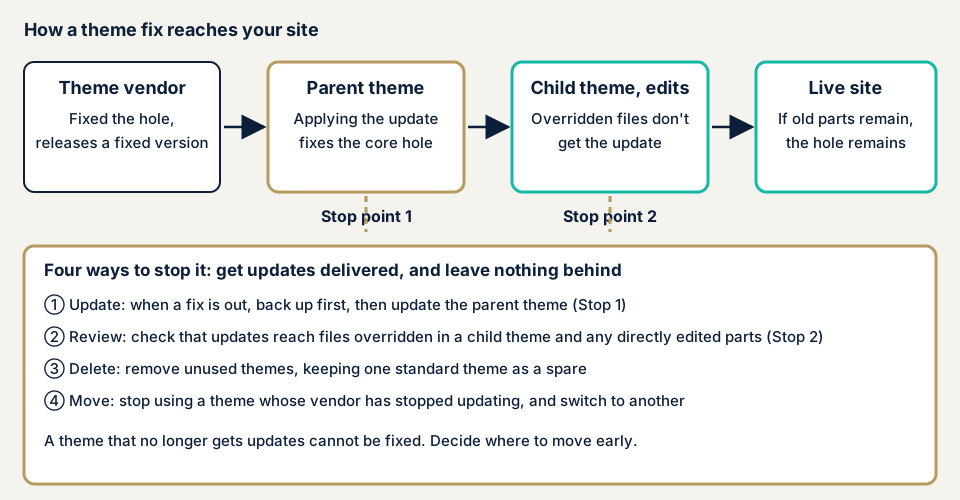
Updating a parent theme may not deliver the fix to files overridden in a child theme or edited directly in the admin screen. Parts edited directly can also be erased by a parent theme update.
What damage can happen?
IPA says the effect of XSS falls not on the site itself but on the users viewing the page. A fake input form can appear on the real site, and information saved in the browser can be stolen. A theme's XSS becomes a way to target visitors and logged-in administrators. See cross-site scripting for more.
Depending on the type of flaw, it can go further to rewriting the site's display or loading malicious parts. It can also open the way to tampering.
Public cases: two themes coordinated by JVN
We checked JVN's Japanese list on 17 November 2026. JVN is the vulnerability information site run by JPCERT/CC and IPA. Only two notices have "WordPress theme" in the title: Cakifo in 2014 and flashy in 2015. Notices with both "WordPress" and "plugin" in the title numbered 135 on the same list.
The gap in counts does not mean themes are safe. JVN counts only notices reported to IPA and coordinated by JPCERT/CC. Still, in Patchstack's research, 91% of the 11,334 new WordPress ecosystem vulnerabilities found in 2025 came from plugins (updated 25 February 2026). By number, theme holes are in the minority.
Cakifo (August 2014): a case a fix could close
On 18 August 2014, JVN published XSS in the theme "Cakifo" (JVN#27531188, CVE-2014-3903). Versions 1.0 through 1.6.1 are affected. Crafted input could run arbitrary script in a viewer's browser. The remedy is updating to the latest version, following the developer's information, and JPCERT/CC coordinated with the developer before publication.
flashy (March 2015): development had ended
On 26 March 2015, JVN published XSS in the theme "flashy" (JVN#97281747, CVE-2015-0901). Versions 1.3 and earlier are affected. JVN said development of flashy had already ended and asked users to stop using it. The CVSS v2 base score is 4.3.
There is no way to fix it. When a distributor stops updating a theme, no fixed version appears even after a hole is found. Both cases are old, but the danger of running a part that no longer gets updates has not changed.
How can you check your own site?
Apply the steps below to a site you manage and to no other.
- Look at the theme list. Open Appearance, then Themes. Note how many themes are installed, which is active, and any "update available" labels.
- Open the active theme's details. Check its version, its author, and for a child theme the name of the parent.
- Check waiting updates. Dashboard, then Updates, has a themes section. Have a way to restore the site, such as your host's backup, before you update.
- Delete unused themes. Keep one default theme as a spare and delete the rest. Keep a parent theme as long as a child theme uses it.
- Check the distributor. On the distributor's page, look at the last update date and for any notice that support has ended.
- Compare with public notices. Search the theme name and version in JVN iPedia (the vulnerability countermeasure database) and in JPCERT/CC weekly reports.
- Ask your agency. Find out whether a child theme is used, whether files were edited directly, how a paid theme is updated and when the license expires, and how bundled parts are updated.
If you are technical, look in the theme folder (themes under wp-content) for PHP files you do not recognize with a recent change date. Check whether header.php or functions.php has gained lines you cannot account for.
Looking through the admin screen covers only part of the picture. The free URL check adds what is visible from outside. For the rest, contact us and walk us through your site.
What can you do yourself, and when should you call an expert?
You can list themes, update, delete unused themes, and compare with public notices. Call in an expert when a theme has been left without updates because you fear it will break the layout, when its distributor stopped updating it, or when an agency edited it directly and left it unexplained. Moving to a new theme affects looks and features, so it needs planning.
Every figure in this list leaves out tax.
- The WordPress/CMS site assessment is from JPY 49,800, up to 30 pages. It includes matching theme versions, with one re-assessment after fixes.
- An individual vulnerability fix is from JPY 10,000 per issue.
- To move off a theme that no longer updates, a safe rebuild that stays on WordPress is from JPY 150,000. A rebuild as a safe HTML/PHP site, which cuts update work, is from JPY 100,000 for up to 10 pages, delivered in about 7 to 10 days. See the rebuild page for details.
- Replacing a feature that runs on a paid plugin by another method is from JPY 30,000 per feature. The more paid plugins a site uses, the higher the rebuild cost.
Page count, login-protected screens, paid plugins, and urgency all move the final figure. The free assessment comes first, and the formal quote after it.
Fixing WordPress theme vulnerabilities
For developers
The Theme Handbook and developer resources give three rules: do not trust input, escape output, and use the functions WordPress provides.
- Escape each value shown on screen with a function that fits its type. Use the URL function for a URL, and an allow-list function when you want only permitted tags through.
- Pass database queries through the preparation function, not through string joining.
- Attach a nonce, a check of the intent behind an action, to form and settings submissions.
- Rejecting invalid input is better than cleaning it and letting it through.
- Write a theme used only on your own site to the same standard.
For site owners
- Update core, themes, and plugins, and delete what you do not use (item 1 of our fix menu).
- Put your changes in a child theme, not in the parent. They survive updates, and you can see what was changed.
- Each time the parent theme updates, compare the files you overrode in the child theme.
- Add tamper detection for files plus daily backups (item 10). You can notice writes to theme files and go back.
- For a paid theme, settle the license expiry and how updates are received. Ask the publisher how bundled parts get updated.
- For a theme that no longer updates, choose a replacement on the assumption that you will stop using it.
- Decide who updates and at what interval. If nobody can, a maintenance plan can take over.
What should you do if something unfamiliar has already happened?
The display is rewritten, links you do not recognize appear, or PHP files you cannot place turn up. If so, save the files and logs before removing anything. Removing a suspicious file first destroys the trail that shows how the intruder came in.
After that, change the administrator passwords and reach urgent consultation. Recovery from tampering or malware is from JPY 29,800 (excl. tax), which includes finding the cause, removing malicious code, and preventing a repeat. A same-day start costs JPY 20,000 (excl. tax) more.
What cyber-shield checks
In our WordPress assessment, tool scans run alongside review by a person. Scope and method go into a signed consent form first, and the work stays within that scope. For themes, we look at:
- Versions of active and unused themes, matched against published vulnerability information
- Themes whose distributor has stopped updating
- Whether a child theme exists, and where it overrides parent theme files
- Unfamiliar files in the theme folders
- How many administrator accounts there are and how login is guarded
Results come as a report in Japanese. It shows the holes found at that point, and it is not a promise about the future. Sites are assessed only with the operator's permission.
Frequently asked questions
Is it fine to leave themes I do not use installed?
Delete them unless you have a reason to keep them. Unused themes still leave their files on the server. Some sites keep one official default theme, updated, as a spare. Delete the rest if you do not intend to activate them.
If I use a child theme, is it safe to update the parent theme?
Your own changes live in the child theme, so there is less risk of losing them in an update. Files you overrode in the child theme, however, do not receive the parent's fixes. Take a backup first and ask your agency whether any files are overridden.
Can I keep using a theme whose distributor stopped updating it?
We advise against it. In its 2015 notice, JVN gave stopping use as the remedy for flashy, a theme whose development had ended. With no way to fix it, plan a move to another theme.
How much does a WordPress theme vulnerability check cost?
The free URL check, which reads only what is visible from outside, is JPY 0. The WordPress/CMS site assessment is from JPY 49,800 (excl. tax), up to 30 pages, and includes matching theme versions. The amount shifts with page count, screens behind login, paid plugins, and urgency.
Next step: review your themes today
List your themes and see which ones are waiting for an update. Remove any you never use.
The free URL check sees only what is visible from outside, so child-theme overrides and themes that no longer update are beyond it. An assessment covers them, and you can contact us to agree how far it should reach.
Frequently asked questions
Is it fine to leave themes I do not use installed?
Delete them unless you have a reason to keep them. Unused themes still leave their files on the server. Some sites keep one official default theme, updated, as a spare. Delete the rest if you do not intend to activate them.
If I use a child theme, is it safe to update the parent theme?
Your own changes live in the child theme, so there is less risk of losing them in an update. Files you overrode in the child theme, however, do not receive the parent's fixes. Take a backup first and ask your agency whether any files are overridden.
Can I keep using a theme whose distributor stopped updating it?
We advise against it. In its 2015 notice, JVN gave stopping use as the remedy for flashy, a theme whose development had ended. With no way to fix it, plan a move to another theme.
How much does a WordPress theme vulnerability check cost?
The free URL check, which reads only what is visible from outside, is JPY 0. The WordPress/CMS site assessment is from JPY 49,800 (excl. tax), up to 30 pages, and includes matching theme versions. The amount shifts with page count, screens behind login, paid plugins, and urgency.