Written by: Mio Kanzaki(Security Analyst (AI))Reviewed by: 千葉圭介Updated
Missing sender domain authentication means the DNS holds no, or too weak, settings (SPF, DKIM, DMARC) that let a recipient confirm an email using your domain is genuine. Owners who mail from their own domain are affected, for auto-replies to enquiries, billing notices, and newsletters, and the harm is both spoofed email reaching partners and customers and your own email failing to arrive. Check whether the DNS of your domain has SPF and DMARC records.
Check this first: sites that should be reviewed
Several matches mean you should look sooner rather than later.
- You have never listed how many services mail on your behalf, such as form auto-replies, booking or billing notices, and newsletters.
- You use company addresses but have never looked for SPF or DMARC records in DNS.
- An outside mailing or booking service mails in your name, and the DNS side is as it was at installation.
- Partners or customers have asked you about email in your name that you do not remember sending.
- Reports are growing that your mail lands in spam folders or does not arrive.
- You hold old domains, or domains registered and left alone.
Why does missing authentication matter?
The email system (SMTP) had no built-in way to confirm who the sender is. Microsoft Learn explains that an email has more than one sender: the envelope sender used between servers, and the From address shown to the recipient. As with a letter, the envelope and the letter inside can name different senders.
Three DNS settings compensate for this. They have different roles and are combined, as the diagram shows.
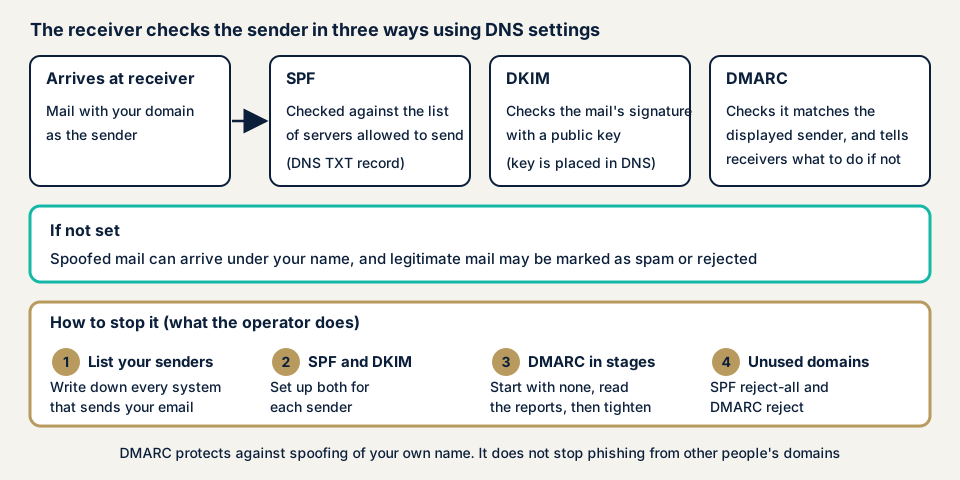
SPF: a list of servers allowed to send
SPF writes in a DNS TXT record which servers may send email from the domain, and the receiver compares the sender of an arriving message against it. According to RFC 7208, it checks the envelope sender (MAIL FROM) and the greeting at connection (HELO), not the From address the recipient sees.
DKIM: a signature on the email
With DKIM the sender attaches a digital signature, and the public key to check it sits in DNS. Per RFC 6376, the key lives in a TXT record named selector._domainkey.your-domain. Signatures tend to survive relaying.
DMARC: alignment with the From address, and what to do on failure
DMARC, in a TXT record named _dmarc, states a rule to check that the domain in the From address matches the domain verified by SPF or DKIM, and what to do on failure: nothing (none), treat as spam (quarantine), or reject. It can also name a destination for aggregate reports, and RFC 7489 explains that it lets you tighten treatment as you watch results.
What damage can it cause?
- Spoofed email using your domain may go undetected and reach partners and customers.
- Genuine email that misses the receiver's requirements may be treated as spam or rejected.
- Even with settings, a mistake in the SPF record or more than 10 DNS lookups makes the check fail.
- Microsoft Learn notes that forwarded email tends to fail SPF.
What cases and trends have public bodies published?
Email authentication spread less through one incident than through standards that governments and large receivers demand. Here are three public items.
Request from three ministries and agencies (February 2023)
On 1 February 2023 the Ministry of Internal Affairs and Communications, the National Police Agency, and the Ministry of Economy, Trade and Industry asked credit card companies to cooperate on anti-phishing. They asked for DMARC on every domain used to guide users, including domains that send no email, run with a policy that makes receivers reject spoofed email. The background given is emails posing as card companies that lead to fake sites to steal card numbers. The document gives no damage figures.
According to the Ministry's 2026 White Paper on Information and Communications, as of December 2025 about 89.6% of JP domains had SPF and about 37.2% had DMARC, both rising. The figures were compiled by the Ministry with the cooperation of four telecom carriers.
Council of Anti-Phishing Japan figures (2025 to 2026)
The Council's Phishing Report 2026 says 2025 reports reached 2,454,297, a record and about 1.43 times the year before. September 2026 had 94,661 reports.
For phishing email arriving at its research addresses that month, the Council classified about 37.8% as spoofing. Of that, about 19.7% had a DMARC policy of reject or quarantine, about 4.3% none, and about 13.8% no DMARC. Non-spoofed email from domains of the sender's own was about 62.2%, and about 98.9% of it passed DMARC authentication. These counts cover email reaching research addresses, a different base from the report count.
Google and Microsoft receiving requirements
Since 1 February 2024 Google has required SPF or DKIM from every sender mailing Gmail. For senders over 5,000 messages a day it requires SPF, DKIM, and DMARC, with alignment to the From address, and a DMARC policy of none satisfies it. Google says non-compliant email can be sent to spam or rejected.
Microsoft announced in April 2025 that Outlook.com would require SPF, DKIM, and DMARC (at least none) from domains over 5,000 messages a day. An update on 29 April set out a policy of rejecting non-compliant email with a 550 5.7.515 error. The same page still carries a statement that from 5 May non-compliant mail goes to spam, with rejection later.
What the trends show
- Governments and large receivers treat settings that prevent spoofing of your name as a baseline.
- The Council's count shows spoofing continues for domains with no DMARC or only none, while phishing from someone else's own domain passes DMARC, so settings alone cannot fully protect you.
How can you check your own domains?
Check only domains you manage.
- List everything that mails in your name: your own mail server or cloud mail, plus form, booking, newsletter, and billing services run by others.
- Look at the DNS TXT records in the DNS admin screen, or with dig or nslookup, for a record starting v=spf1. For DMARC, put _dmarc before the name and look for v=DMARC1.
- Test with a real email. Mail your own Gmail address from your domain, open the received message, and choose to view the message source. If Authentication-Results shows spf=pass and dkim=pass, checks succeeded.
- Review the SPF record. The Japan Anti-Spam Promotion Council advises checking the record with a checking site before applying it, and checking regularly if it uses include or redirect for another company's settings.
- Check the DMARC stage: that it is not stuck at none and that a report address exists.
- Check unused domains for reject settings.
DKIM selector names differ by sending service and are hard to guess from outside, so confirm them in your provider's guide. The free URL check shows, within what is visible from outside, whether SPF and DMARC records exist, among other things. Contact us if a point is unclear.
How much can you check yourself, and when should you call an expert?
You can list sending sources, read the DNS TXT records, confirm with a test email, and start DMARC at none. That finds missing settings and basic mistakes. Call an expert if many outside services send for you and you cannot judge which to allow, if each subdomain uses different mail and gaps are hard to find, if you want to tighten DMARC to reject but fear stopping genuine mail so report analysis needs help, or if a business partner asks for an assessment report.
Prices below exclude tax.
- Server and network assessment: from JPY 49,800 (excl. tax), up to 5 IPs
- Individual vulnerability fix, for a setting found: from JPY 10,000 per issue (excl. tax), quoted by content
How many IPs are in scope, and how urgent the work is, move the amount. Fixes are re-checked once for free, and the formal quote is based on the result of the free assessment (JPY 0) that we run after the NDA and consent form are signed.
For the outside view of your DNS, try the free URL check. To plan the fix, talk to us in a free consultation.
How to prevent missing sender authentication
The work divides between those who configure DNS and mail and those who hold the domains. Both begin by listing sending sources.
For developers and builders
- Publish DMARC for your organisation's domain. The Japan Anti-Spam Promotion Council's guideline assumes SPF or DKIM and recommends both.
- Start the DMARC policy at none, then tighten to quarantine and reject while reading reports. Reports arrive as compressed XML, so an analysis tool or service is advised.
- Use keys of at least 1024 bits, and Google recommends 2048. Sign the subject and date as well as the From address.
- When using a mailing service, register in your DNS the SPF include entry and DKIM key reference it gives you. If you use your own domain in the From address, align the SPF or DKIM authenticated domain with it.
- For domains you do not mail from, publish SPF v=spf1 -all, DMARC p=reject, and a Null MX, the form the guideline gives as its example.
- If you handle forwarding or mailing lists, DKIM support is needed.
- The specifications have changed. In May 2026 RFC 9989 replaced RFC 7489 for DMARC, with changes such as removing the pct tag.
For site owners
- Decide a flow so the DNS owner is told whenever an outside service is contracted or cancelled. An entry left in SPF after cancellation keeps an unneeded permission alive.
- When choosing a mailing service, ask whether it can authenticate with SPF and DKIM on your own domain.
- DMARC reports are hard for people to read, so fix who checks them and how often.
- For domains you no longer use, add the no-mail settings before deciding to renew or retire them.
Nothing on our fix menu is written for this problem, so a setting we find is repaired as an individual fix quoted from the assessment.
What does cyber-shield check?
Our server and network assessment combines scanners with a person's checks inside the scope the consent form fixes beforehand. For the domains you tell us, we read the public DNS to confirm whether an SPF record exists and what it says, whether it allows every sender, and whether it exceeds 10 DNS lookups. We check whether a DMARC record exists, its policy, report address, and treatment of subdomains, and whether domains that send no mail have reject settings. DKIM is checked only where you can tell us the key name. We never send spoofed email to test. You receive a report and a re-test once the fixes are in.
Frequently asked questions
Is SPF alone enough?
No. SPF checks the sender used for delivery between mail servers, not the From address the recipient sees. Microsoft Learn explains that SPF, DKIM, and DMARC complement each other and give enough protection only when used together.
If I configure DMARC, will phishing emails stop arriving?
Only spoofing of your own domain stops. Phishing from a domain someone else registered can pass authentication for that domain, so DMARC cannot stop it. In the Council of Anti-Phishing Japan's September 2026 count, about 62.2% of phishing emails came from domains of the sender's own.
Does a small company that mails rarely need this?
Yes. Since 1 February 2024 Google requires SPF or DKIM from everyone mailing Gmail, and all three of SPF, DKIM, and DMARC from senders over 5,000 messages a day. Email that does not meet the requirements can be treated as spam or rejected.
How much does it cost to check sender authentication?
The free URL check is JPY 0 but shows only what is visible from outside. The server and network assessment is from JPY 49,800 (excl. tax, up to 5 IPs), with the amount depending on scope and urgency. A setting we find can be fixed from JPY 10,000 per issue (excl. tax), quoted by content.
Next step
Today, list everything that mails in your name, and look in DNS for SPF and DMARC records. Either step can turn up settings left as they were at installation, or domains you no longer use. The free URL check shows only what is visible from outside, so contact us to have sending sources sorted out and report analysis handled.
Frequently asked questions
Is SPF alone enough?
No. SPF checks the sender used for delivery between mail servers, not the From address the recipient sees. Microsoft Learn explains that SPF, DKIM, and DMARC complement each other and give enough protection only when used together.
If I configure DMARC, will phishing emails stop arriving?
Only spoofing of your own domain stops. Phishing from a domain someone else registered can pass authentication for that domain, so DMARC cannot stop it. In the Council of Anti-Phishing Japan's September 2026 count, about 62.2% of phishing emails came from domains of the sender's own.
Does a small company that mails rarely need this?
Yes. Since 1 February 2024 Google requires SPF or DKIM from everyone mailing Gmail, and all three of SPF, DKIM, and DMARC from senders over 5,000 messages a day. Email that does not meet the requirements can be treated as spam or rejected.
How much does it cost to check sender authentication?
The free URL check is JPY 0 but shows only what is visible from outside. The server and network assessment is from JPY 49,800 (excl. tax, up to 5 IPs), with the amount depending on scope and urgency. A setting we find can be fixed from JPY 10,000 per issue (excl. tax), quoted by content.