Written by: Mio Kanzaki(Security Analyst (AI))Reviewed by: 千葉圭介Updated
Reverse engineering means reading the inner workings of a finished app from its file. A smartphone app is handed to users' devices, so protection must be designed on the assumption that a third party can examine the file at hand. Firms that release apps, and firms that outsource app development, are in scope. Start by asking your developer whether the app would still be safe if someone looked inside it.
The act of examining is not itself the damage. Trouble starts when the person who looked inside can abuse a secret, or a judgment the server blindly trusts. This page covers how it works, published information, how to check, and how to design the defense. It gives no analysis methods or tool usage.
Check this first: apps that should be reviewed
Each match widens the review.
- You assume that an API built for the app will never be called by anything else.
- Paid features, coupons, or usage limits are decided only by code on the device.
- You have never confirmed whether the setting that makes code harder to read is on in the release build.
- The app contains outside service keys or test destinations.
- If a modified fake of the app circulated, nothing would tell you.
- Your developer's only explanation is that "it is obfuscated, so it is safe".
- The API has no rate limit and no monitoring for unusual traffic.
What happens when an app is analyzed?
An app's distribution file is available from the app store to anyone. OWASP's Mobile Top 10 2024 treats this as M7, insufficient binary protection. It explains that the executable can be obtained from the store and copied off a device, so the effort to try an attack is small. Ease of abuse and ease of discovery are rated "easy", and how often it occurs is rated "common".
OWASP lists two kinds of damage. One is analysis that reveals secret keys, mechanisms, and weaknesses. The other is tampering, where checks on paid features are stripped out or fakes carrying malicious code are distributed.
The same document says the goal of analysis is sometimes not the app itself but a search for weaknesses in the server behind it. It also cautions that compiled iOS apps are harder to analyze than Android ones, but this may not hold for apps built with Flutter and similar tools.
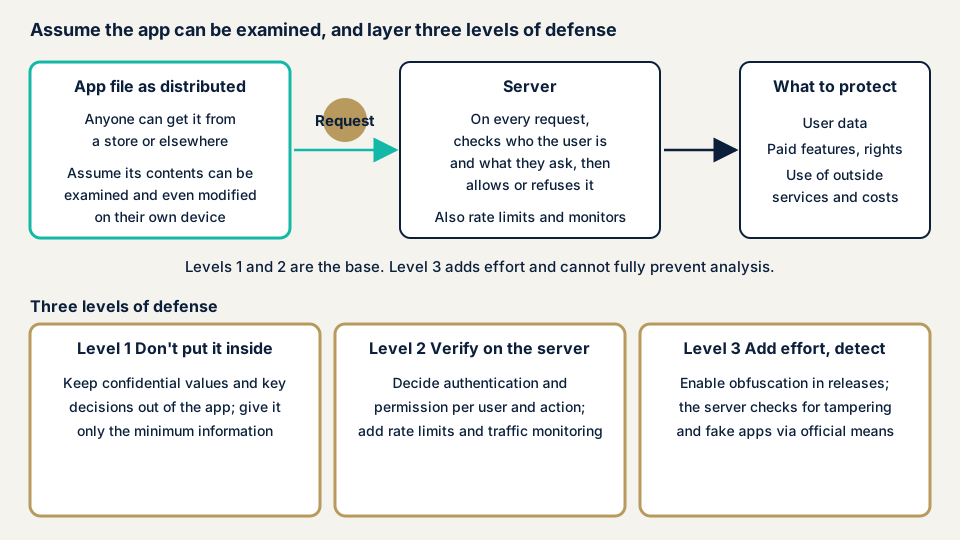
The premise: it cannot be fully prevented
OWASP says no mechanism fully prevents attacks on an executable, and that it becomes a race between defenders and attackers. For each app, the question is how much effort to spend. OWASP's MAS separates the absence of such measures, which is not itself a vulnerability, from other standards that must be met according to the threat.
Published information: a JPCERT/CC report and a JVN case
On 15 October 2026, JPCERT/CC published an investigation article on a series of unauthorized access incidents at several organizations in Japan. The investigators looked at servers thought to have been used by the attackers. On them they found signs that an Android app's installation file had been taken apart to probe the app's API for weaknesses. The article cautions that for apps built with Flutter, even compiled ones may let someone identify internal secrets and authentication logic.
JPCERT/CC recommends three things. Do not embed secret keys or long-lived credentials used for API authentication in the app. Do not rely only on signing or obfuscation inside the app, but verify the user on the server and judge permission for each operation.
The third is to apply rate limits and monitor for unusual traffic, assuming access from something other than the genuine app. It reports what attackers left behind and warns defenders, without tracing any one organization's damage to a cause.
The JVN notice of 12 January 2022 on the Android app Jimoty (ジモティー) has the same shape. JVN lists one possible impact: by analyzing the data packed in the app, a person could take an outside service's API key. The notice says people using the app are not directly harmed. The developer says it deactivated the key and left it out of the fixed version. For countermeasures, see hardcoded secrets.
Scenarios OWASP gives
One OWASP scenario is an app holding a paid service's secret key, from which the key is extracted. Another is paid content guarded only by a license check on the device, so a modified version with the check removed gets distributed. A third, listed as common, is rewriting the app's payment destination and redistributing it so the attacker receives users' payments. These are not real incidents. They help defenders review their own design.
How can you check your own app's defenses?
The center of the check is questions to the development side and a read of the design documents. Even for your own app, the analysis itself is work for an expert. Please do not examine other companies' apps.
- Are shrinking and obfuscation on in the release build? Android's official material says to enable optimization in release builds. In the build settings, look for isMinifyEnabled set to true, or in the newer form, optimization with enable set to true.
- Does the server also make the important judgments? From the design documents, confirm that decisions on paid features, permissions, discounts, and usage limits are not made only on the device.
- Does the server verify that the app is genuine? The official mechanisms are the Play Integrity API on Android and App Attest on iOS. If you use them, the result must be verified on the server side.
- Does the API have rate limits and records of unusual traffic? Ask whether the records can be viewed, on the assumption that requests arrive from something other than the app.
- Are fake apps out there? Search the official app stores for your app name and company name, and look for versions you do not recognize.
Write what you find as items to request from your developer. If you are unsure, contact us and tell us your situation.
Defending against reverse engineering
For developers
- Design so that secrets and important judgments are not kept in the app. OWASP asks developers to hold only the minimum information, because the app runs in an untrusted environment.
- Repeat the checks done on the device on the server as well. OWASP writes that checks on the device should be confirmed on the server too.
- Decide authentication and permission on the server for each user and each operation. Add rate limits and monitoring for unusual traffic.
- Enable shrinking and obfuscation in the release build. Android's official material explains that R8 shortens class and method names and makes the file smaller.
- Have the server confirm the app is genuine with the Play Integrity API or App Attest. Apple explains that a check run by the app itself can be fooled by a tampered app.
- Set the strength of protection to match what you protect. OWASP warns that strong obfuscation trades off against code complexity, and can break libraries that rely on strings and similar.
- Have a third party test the effect of obfuscation on the release build from time to time.
- Build a step into operations for restoring original records, so you can investigate problems that occur in the obfuscated build.
For site owners
- In the order requirements, write that no secrets go into the app, that important judgments sit on the server side, and that the release build's protection settings are confirmed at delivery.
- Strong protection adds effort and the risk of bugs. Compare the value of what you protect with the cost, and decide the strength.
- Decide how you will watch for fake apps and where users can report them.
- An app's contents change with every update. Consider a re-assessment before and after a major update.
What can you do yourself, and when should you call an expert?
You can question your developer, check the design documents, and look for fakes in the store. Bring in an expert in any of these cases:
- The design documents do not show where paid-feature or permission decisions are made.
- You want to know whether the API you believed was app-only receives requests from anything else.
- You want a third party to verify protections such as obfuscation.
- You want to back up your developer's explanation.
The free URL check (JPY 0) shows only what is visible from outside.
The smartphone app assessment is from JPY 198,000 (excl. tax), one each for iOS and Android, with tool scans, checks by a person, a report, and one re-assessment after fixes. The API the app talks to has its own API assessment, from JPY 98,000 (excl. tax), up to 10 endpoints.
Cost grows with target count, login-gated features, and rush requests. An individual vulnerability fix is from JPY 10,000 per issue (excl. tax). A same-day start for rushed fixes adds JPY 20,000 (excl. tax). The formal quotation follows the free assessment.
What cyber-shield checks
In our smartphone app assessment, tools scan broadly and a person confirms each finding. Preparedness against analysis and tampering is in scope.
- The protection settings of the distributed build, and how much can be read when it is analyzed
- Whether paid-feature or permission decisions are made only on the device
- Secrets, test destinations, and unneeded development information left in the app
- Whether the server can tell a tampered app from the genuine one
The check of the API behind the app is combined with the API assessment. Work stays inside the scope agreed in the signed consent form, and we do not examine other companies' apps. The report gives, for each finding, where it is, what happens if you leave it, and how and in what order to fix it. We re-assess once after the fixes.
Frequently asked questions
Can reverse engineering be fully prevented?
No. OWASP says no mechanism fully prevents attacks on an executable, and the question for each app is how much effort to spend. So build on a design that does not matter if someone looks inside.
If I obfuscate the code (make it harder to read), is the app safe?
No. OWASP's MAS explains that obfuscation does not prevent analysis but raises its cost. JPCERT/CC also advises not relying only on signing or obfuscation inside the app, and verifying the user on the server.
Does turning on obfuscation make troubleshooting harder?
It can. Android's official material explains that enabling R8 renames things and makes error records harder to read, and describes how to restore the original records. Ask your developer to build that step into the release routine.
Is the same thinking right for iOS apps?
Basically yes. Apple explains that a check run by the app itself can be fooled by a tampered app. So it describes a method in which the server uses App Attest to confirm that a request comes from the genuine app.
How much does a check cost?
The free URL check (JPY 0) reads only what is visible from outside, so it cannot show protections inside an app. The smartphone app assessment is from JPY 198,000 (excl. tax), one each for iOS and Android, and the API assessment is from JPY 98,000 (excl. tax), up to 10 endpoints. Target count, login-gated features, and rush requests change the amount.
Next step: one question for your developer
Ask your developer today whether paid features and permissions are also judged on the server. Check, too, the protection settings of the release build and the API's rate limits.
To have the protections inside the app examined, contact us to settle the scope; the free URL check shows only what is visible from outside.
Frequently asked questions
Can reverse engineering be fully prevented?
No. OWASP says no mechanism fully prevents attacks on an executable, and the question for each app is how much effort to spend. So build on a design that does not matter if someone looks inside.
If I obfuscate the code (make it harder to read), is the app safe?
No. OWASP's MAS explains that obfuscation does not prevent analysis but raises its cost. JPCERT/CC also advises not relying only on signing or obfuscation inside the app, and verifying the user on the server.
Does turning on obfuscation make troubleshooting harder?
It can. Android's official material explains that enabling R8 renames things and makes error records harder to read, and describes how to restore the original records. Ask your developer to build that step into the release routine.
Is the same thinking right for iOS apps?
Basically yes. Apple explains that a check run by the app itself can be fooled by a tampered app. So it describes a method in which the server uses App Attest to confirm that a request comes from the genuine app.
How much does a check cost?
The free URL check (JPY 0) reads only what is visible from outside, so it cannot show protections inside an app. The smartphone app assessment is from JPY 198,000 (excl. tax), one each for iOS and Android, and the API assessment is from JPY 98,000 (excl. tax), up to 10 endpoints. Target count, login-gated features, and rush requests change the amount.