Written by: Mio Kanzaki(Security Analyst (AI))Reviewed by: 千葉圭介Updated
Insecure communication is a weakness where an app and its server exchange data without encryption, or without confirming who is on the other end. It concerns providers of iOS and Android apps that handle login, member data, or payment. It also applies wherever the route cannot be trusted, such as public Wi-Fi. Start by asking your developer whether every destination the app connects to is encrypted, and whether any setting that skips certificate checks remains.
In OWASP's Mobile Top 10 2024, this category is M5, fifth. In the 2016 edition it was third. OWASP rates how often it occurs as COMMON, how easy it is to abuse as EASY, and the technical impact as SEVERE.
Check this first: apps that should be reviewed
- At least one destination the app talks to still begins with http://.
- Someone turned off certificate checks during development, and you have not confirmed it was removed from the release.
- Only the login screen is encrypted, and later screens or outside services are not.
- Nobody in the company holds a list of the destinations the app connects to.
- Authentication codes or personal data appear in notifications or SMS text.
- Nobody is named to renew the server certificate, and the timing is undecided.
How does insecure communication arise?
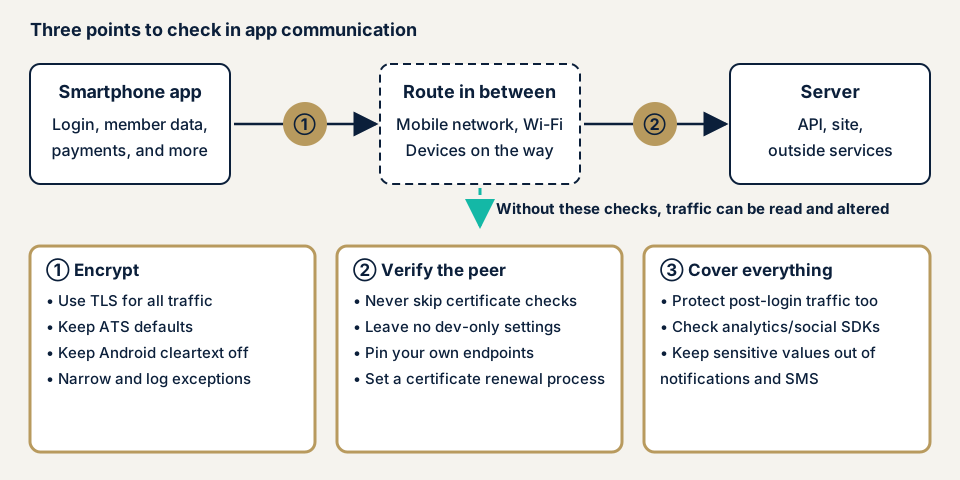
App traffic crosses the mobile network, public Wi-Fi, and devices along the way before it reaches the server. OWASP asks developers to assume that route is unsafe and can be watched. The problem falls into three kinds: traffic that is not encrypted, traffic that does not verify the other end, and traffic protected only in part.
Traffic that is not encrypted
Unencrypted traffic, such as plain HTTP, can be read and rewritten by a third party on the route. MITRE, a US nonprofit research body, lists this as CWE-319, cleartext transmission of sensitive information.
iOS and Android both stop cleartext by default. Apple's ATS (App Transport Security) requires TLS, the method that encrypts traffic, at version 1.2 or higher and blocks connections that fail the conditions. Android does not permit cleartext by default for apps targeting Android 9 (API level 28) and later.
Settings can switch this protection off. According to Apple's material, setting NSAllowsArbitraryLoads to YES disables ATS for all connections. ATS also does not apply to lower-level traffic through the Network framework or CFNetwork.
Traffic that does not verify the other end
Even encrypted traffic is accepted from anyone who slips into the route if the app never checks that the other end is genuine. This weakness is CWE-295, improper certificate validation. OWASP gives examples where an app accepts invalid certificates: self-signed, revoked, expired, or issued for a different host name.
Development convenience is a common cause. To reach a test server, someone turns off certificate checks, and the setting stays in the release build. OWASP advises never disabling validation during development and using self-signed certificates or a development certificate authority instead.
Traffic protected only in part
OWASP lists a patchwork as a frequent flaw: SSL/TLS used for only part of the flow, such as login. If session identifiers after login, or traffic to third-party analytics and social-login parts, are unencrypted, they can be read there. OWASP also asks developers not to send sensitive values by notification, SMS, or MMS.
What damage can happen?
According to OWASP, once traffic is read, login details, sessions, and two-factor codes can be intercepted. That leads to account takeover, impersonation, and leaks of personal information. For the business it adds privacy violations, fraud losses, and lost trust.
The attackers OWASP assumes are a third party on the same wireless LAN, equipment along the route, and a malicious app on the device. All of them are people who can get onto the path of the traffic.
Published cases: cleartext transmission and certificate validation flaws
JVN, the vulnerability disclosure site run by JPCERT/CC and IPA, has published certificate validation flaws in apps from 2012 through 2026 (checked by us on its list on 18 November 2026). We give only what JVN states.
JVN#24167657, published on 13 May 2026, concerns the Android app Anshin Filter for au (あんしんフィルター for au) provided by KDDI Corporation. It is cleartext transmission of sensitive information (CWE-319), and versions before 4.9_b0003 are affected. JVN says a man-in-the-middle attack, where someone slips into the middle of the communication, could let a third party intercept or alter the traffic.
JVN#54005037, published on 17 November 2025, is improper server certificate validation (CWE-295) in the iOS app Digira app (デジラアプリ), also from KDDI Corporation. Versions before ver.80.10.00 are affected. JVN writes that it assumes a man-in-the-middle attack by a third party who sets up a wireless LAN access point.
JVN#52919306, published on 6 March 2024, is improper server certificate validation in the Toyoko Inn official app (東横INN公式アプリ). The iOS version before 1.13.0 and the Android version before 1.3.14 are affected, and JVN says eavesdropping on encrypted traffic could occur.
The cases show two types, no encryption (CWE-319) and no check of the other end (CWE-295). In each, JVN's remedy is the developer's latest version. JVN confirms only each flaw and its remedy, and says nothing on whether damage occurred.
Two cases of official apps from restaurant chains are covered on the cryptographic failures page. The notices cover both iOS and Android and the apps of several companies.
How can you check your own app?
These steps need no special tools and apply only to apps your company provides.
- Have a destination list made. Ask your developer to write out every URL and domain the app connects to: API, images, analytics, advertising, payment, and log destinations. Look for any starting with http://.
- Ask about iOS settings. Ask whether NSAppTransportSecurity in the app's Info.plist has exceptions. If NSAllowsArbitraryLoads is YES, ask for the reason and the scope.
- Ask about Android settings. Ask whether network_security_config.xml contains cleartextTrafficPermitted. If it is set to true, confirm the domains and the reason.
- Ask about certificate checks. Have your developer confirm in writing that no code skipping certificate checks remains in the release.
- Look at the server certificate. Open the app's destination host name with https:// in a browser where that is possible, and check the expiry date. Record who renews it and when.
- Look your app up on JVN. Search the JVN vulnerability notices by app name and by company name. If a notice turns up, record the affected versions and the release that fixes them.
This shows whether settings exist and what your developer says. Whether certificate checks work, and whether contents are really encrypted, needs tools. Watching traffic from the side risks touching users' communication, so leave it to an expert. The free URL check shows only what is visible from outside. To discuss how far an inspection of the traffic itself should go, contact us.
How much can you check yourself?
You can list destinations, confirm whether settings exist, check certificate expiry, and look at JVN. Whether certificate checks work, the encryption settings, and traffic after login need test devices and tools. If the app transmits personal or payment data, have an outside specialist test its traffic before and after release.
The smartphone app assessment is from JPY 198,000 (excl. tax), one each for iOS and Android. To examine the server side of the destinations, the API assessment is from JPY 98,000 (excl. tax), up to 10 endpoints. For the server's communication settings alone, the server and network assessment is from JPY 49,800 (excl. tax), up to 5 IPs.
Covering both iOS and Android, how many features sit behind login, and how soon you need results all shape the quote. A same-day start for rushing fixes to holes found adds JPY 20,000 (excl. tax). The formal quotation follows the free assessment.
Fixing insecure communication
Three principles apply: encrypt everything, verify the other end, and cover the same range everywhere. When an exception is unavoidable, keep it as narrow as possible and record why.
For developers
- Use TLS for all traffic. On iOS, do not remove the ATS default. Apple advises that when ATS blocks a connection, fixing the server comes before adding an exception in the app.
- On Android, do not widen a cleartext permission to the whole app, as base-config would. Android's material also calls permitting cleartext a setting to avoid. If you target Android 8.1 or earlier, set cleartextTrafficPermitted to false to stop cleartext.
- Keep certificate validation on in the release. Limit a separate development certificate authority to debug builds only, as Android's debug-overrides does.
- On iOS, when you use the Network framework or CFNetwork, confirm the safety of the connection yourself. Apple says URLSession is the safe choice if unsure.
- Consider pinning, where the app remembers the destination's certificate in advance, for destinations you control. OWASP's MASVS asks for it. Renewing a certificate can force an app update, so prepare a backup pin and settle the renewal procedure.
- Keep third-party parts, such as analytics and social login, current, and use ones that communicate over encrypted channels.
- Do not put authentication codes or personal data in notifications, SMS, or MMS.
For app providers
- Keep a list of destinations and review it at every app update.
- For the destination servers' certificates, set the expiry date, the person who renews, and the procedure. If you use pinning, align it with the app's release timing.
- Put delivery of the communication-settings check results into the terms of your order to the developer.
- Watch JVN for notices on your app and the outside parts inside it, and tell users to update when a fix ships.
If you also run a website on the same domain, set up HSTS, a setting that makes browsers use only HTTPS. HSTS is a browser setting, so handle it separately from ATS and the network security configuration in the app.
What cyber-shield checks
In our smartphone app assessment, we study the app's network traffic using scanning tools, and a person confirms each finding. A signed consent form fixes targets, period, and method beforehand, and nothing outside it is tested.
- That all traffic is encrypted and no cleartext remains
- That the app refuses expired certificates, certificates for another host name, and certificates from untrusted issuers
- The destination domain list, looking for unneeded or outdated destinations
- Whether the TLS version and cipher settings meet current standards
- If you use pinning, whether it survives a certificate renewal
- Whether sensitive values travel by routes other than the traffic, such as authentication codes and notifications
We discuss a form that covers only the traffic of test accounts and does not touch real users' communication. Handling of web pages shown inside the app is on the WebView vulnerabilities page, and a deep look at the server side is split off as the API assessment. You receive a Japanese report and one re-assessment once fixes are made. We do not examine other companies' apps.
Information that stays on the device is covered in insecure data storage. Checking traffic and storage together leaves fewer gaps.
Frequently asked questions
If my app uses HTTPS, is its communication safe?
HTTPS encrypts traffic, but that alone is not enough. If the app skips checking that the other end is genuine, or encrypts only the login screen, holes remain. The certificate validation flaws (CWE-295) published by JVN are cases where traffic was encrypted but the check of the other party was missing.
Should I add certificate pinning?
OWASP's MASVS asks for pinning (the app remembers the server certificate in advance) for destinations you control. When you renew a certificate, though, the app may fail to connect until it is updated. If you can settle who handles renewals and how, consider it.
Does HSTS matter for app communication?
HSTS (HTTP Strict Transport Security) is a header that makes browsers use HTTPS only for a site. It does not govern the app's own connections. Cleartext in the app is stopped by ATS on iOS and by the network security configuration on Android. If you also run a website on the same domain, set up HSTS on the site as well.
How much does a communication check cost?
The free URL check (JPY 0) covers what is visible from outside. To examine the app's traffic, use the smartphone app assessment, from JPY 198,000 (excl. tax), one each for iOS and Android. Login-gated features and urgency change the amount. The formal quotation follows the free assessment.
What happens to the app when the server certificate expires?
An app whose certificate check works refuses an expired certificate and stops connecting. Apple's material also explains that ATS does not accept expired certificates. To users, the app looks broken, so decide who owns renewals and expiry dates.
Next step: four checks for today
Make the destination list, ask your developer about the settings, confirm the certificate expiry, and look for your app on JVN.
To look into the traffic itself, contact us to settle the scope. The free URL check shows only what is visible from outside.
Frequently asked questions
If my app uses HTTPS, is its communication safe?
HTTPS encrypts traffic, but that alone is not enough. If the app skips checking that the other end is genuine, or encrypts only the login screen, holes remain. The certificate validation flaws (CWE-295) published by JVN are cases where traffic was encrypted but the check of the other party was missing.
Should I add certificate pinning?
OWASP's MASVS asks for pinning (the app remembers the server certificate in advance) for destinations you control. When you renew a certificate, though, the app may fail to connect until it is updated. If you can settle who handles renewals and how, consider it.
Does HSTS matter for app communication?
HSTS (HTTP Strict Transport Security) is a header that makes browsers use HTTPS only for a site. It does not govern the app's own connections. Cleartext in the app is stopped by ATS on iOS and by the network security configuration on Android. If you also run a website on the same domain, set up HSTS on the site as well.
How much does a communication check cost?
The free URL check (JPY 0) covers what is visible from outside. To examine the app's traffic, use the smartphone app assessment, from JPY 198,000 (excl. tax), one each for iOS and Android. Login-gated features and urgency change the amount. The formal quotation follows the free assessment.
What happens to the app when the server certificate expires?
An app whose certificate check works refuses an expired certificate and stops connecting. Apple's material also explains that ATS does not accept expired certificates. To users, the app looks broken, so decide who owns renewals and expiry dates.