Written by: Mio Kanzaki(Security Analyst (AI))Reviewed by: 千葉圭介Updated
Cryptographic failures are weaknesses where data that needs protection is not encrypted, or is protected by weak encryption or misused keys, so its contents can be read. Every site and app that handles member data, enquiry content, or payment-related information is affected. Start by checking that every page opens over HTTPS and how passwords are stored.
In the OWASP Top 10:2021 (OWASP is an international non-profit that researches web application security), this category ranks second, up from third in 2017, and was renamed from "Sensitive Data Exposure" to point at the cause.
Check this first: sites that should be reviewed
Any of the following means your encryption deserves an inspection.
- The enquiry form, registration, login, or cart runs on a URL beginning http://.
- HTTPS pages load images or scripts over http://, or the address bar shows "Not secure" on some screen.
- You cannot explain how passwords are stored, or "forgot password" emails the original password.
- Nobody is assigned to renew the SSL certificate.
- Encryption keys, API keys, or database passwords are written directly in programs or configuration files.
How do cryptographic failures happen?
Data passes through the browser, the site, and storage, and failures cluster in three places.
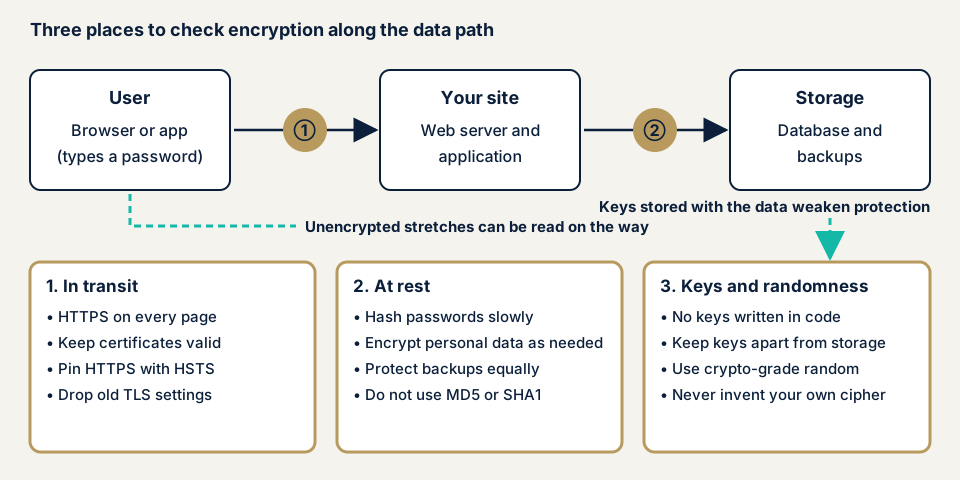
In transit: unencrypted stretches
HTTP traffic is not encrypted, so where a third party can sit on the path, as on public Wi-Fi, passwords and form content can be read. MITRE's CWE-319 (cleartext transmission of sensitive information) asks for the whole session, not only the login page, to be protected with SSL/TLS. Even with HTTPS, an expired certificate, old TLS settings, or parts loaded over HTTP leave holes, and an app must check its partner's certificate.
At rest: recoverable or weak storage
Plain-text passwords expose every user once the store leaks, and encrypted data leaves with its key if both sit together. Hashes (one-way conversions) built on old methods such as MD5 or SHA1 are weak too. CWE-327 classes broken or risky algorithms as a weakness, and MD5, SHA1, and DES were once thought strong before being broken.
Keys and randomness: weak handling of the tools
Keys written into source code, left at defaults, or reused across services cancel out the cipher's strength, and random values from a non-cryptographic function are predictable. Do not invent your own algorithm: CWE-327 advises proven algorithms and verified implementations.
What damage can it cause?
Data can be read or altered. Eavesdropping exposes login details, member data, and order contents, and plain or weakly encrypted values leaked from storage are used as they are. Encryption limits damage after an intrusion without stopping it, so pair it with session management and update control.
What cases have public bodies published? Certificate validation flaws
JVN, the portal run by JPCERT/CC and IPA, has repeatedly published "improper server certificate validation" in smartphone apps (CWE-295), where the app does not check that its partner is genuine.
JVN#38632731 (11 May 2026) concerns a restaurant chain's official app, Android and iOS versions 2.0.11 to 3.9.10. JVN says an attacker running a malicious Wi-Fi access point could eavesdrop on or alter communication about push notifications. The fixed version is 3.9.11, and the developer says it forced affected versions to update at launch (CVE-2026-41872).
JVN#11257333 (6 February 2023) concerned another restaurant chain's official app, iOS and Android versions before 3.1.0. JVN says an attacker on the communication path could eavesdrop on encrypted traffic. IPA received the report, and JPCERT/CC coordinated with the developer.
Encrypting traffic means little if the other party is not verified, and code that connects a site to external APIs or payment services can share the weakness. JVN's remedy is to update to the developer's latest version. These records describe the flaw, not whether harm occurred.
How can you check your own site?
Check only sites you manage.
- Open the site over HTTP. Type a URL beginning http:// and see whether it switches to https://, on the enquiry form, login, and cart too.
- Check the certificate's expiry. In Chrome, click the icon left of the address bar and open the certificate details. Record who renews it.
- Look for mixed parts. Press F12 and read the Console for mixed-content warnings about http:// images or scripts.
- Check for HSTS. In the Network tab, look for Strict-Transport-Security in the first request's response headers.
- Check the cookie mark. In the Application tab, see whether the login cookie has Secure.
- Check WordPress. Under Settings, General, both addresses should begin with https://.
- Ask your agency in writing. How are passwords stored? Where are keys and API keys kept outside the program? Are backups encrypted?
These steps show outside settings and your agency's answers, not storage contents or program internals. "No problem" holds only for the screens you checked.
How much of the check can you do yourself?
Transport settings show on screen. The password storage method, key location, certificate checking in apps, and traffic behind login need design documents, configuration files, or code review, so leave them to an expert if you handle personal or payment information.
How to prevent cryptographic failures
For developers
Start by classifying your data, and do not keep data you do not need, as OWASP lists first.
- Use TLS with forward secrecy (past traffic stays hard to decrypt) and enforce it with HSTS. IPA's TLS guideline covers protocol versions, certificates, and cipher suites, and recommends its "recommended security" type unless there is a special reason.
- Hash passwords with a salted, deliberately slow method. OWASP lists Argon2id first, then scrypt, bcrypt for older environments, and PBKDF2 where FIPS compliance is required.
- Choose algorithms from the CRYPTREC cryptography list, and avoid MD5, SHA1, and the old padding scheme PKCS#1 v1.5.
- Use authenticated encryption, which also detects tampering, and never reuse an initialization vector with the same key.
- Use cryptographic random generators, and read keys from a secrets-management service (see hardcoded secrets).
- Never disable certificate validation toward external parties, and check that no test-only switch reached production.
- Do not cache confidential responses or move secrets over unencrypted methods such as FTP, and have someone other than the configurer verify the result, as OWASP also asks.
For site owners
- Configure automatic HTTP-to-HTTPS redirection and certificate renewal (item 11 on our fix menu).
- Add HSTS with a short period first (86400 seconds in OWASP's example), and read the procedure before using the hard-to-undo preload.
- Update WordPress and delete unused plugins (item 1), and tidy administrator accounts with a password manager (item 12).
- Restrict access to backups and confirm they are encrypted (daily backups and tamper detection are item 10).
- Ask your agency to review cryptography in delivered code, with a list of screens that store personal data.
What can you do yourself, and when should you call an expert?
Call an expert for sites handling personal or payment information, or when storage or traffic behind login needs checking. Prices below are yen excluding tax, with "from" showing the minimum.
- WordPress/CMS site assessment: from JPY 49,800 (excl. tax), up to 30 pages
- Web application assessment, Lite: from JPY 98,000 (excl. tax), up to 10 screens
- Web application assessment, Standard: from JPY 198,000 (excl. tax), up to 20 screens, with manual checks behind login
- Server and network assessment, for server TLS settings alone: from JPY 49,800 (excl. tax), up to 5 IPs
Page or screen count and any screens behind login move the amount. Your fixes get one free re-test, and the free assessment comes before any formal quotation.
The free URL check shows what is visible from outside. If you hold personal or payment data, contact us to scope a deeper check.
What does cyber-shield check?
Our web application assessment is run by tools plus a reviewer and stays inside the scope in the consent form we sign first. We check settings and mechanisms, not collect your users' personal data. We check HTTPS and redirection, certificate expiry, TLS versions, security headers such as HSTS, cookie attributes (Secure, HttpOnly, SameSite), mixed content, unencrypted traffic behind login, and error messages that reveal keys. Interviews and design documents show how passwords are stored and where keys are kept. Source code assessment can be added by individual quotation. The report lists what we found, and we re-test once after you fix it.
Frequently asked questions
If my site uses HTTPS, are there no cryptographic failures?
HTTPS protects only the traffic between the browser and the site. Stored values, backups, key locations, and certificate expiry remain separate problems, so check transit, storage, and keys separately.
Should passwords be stored encrypted?
No. Encryption can be reversed with the key. Use a hash, a one-way conversion, with a salt (a random value added per user) and a slow method. OWASP lists Argon2id first, at minimum 19 MiB of memory, 2 iterations, and 1 degree of parallelism.
What is HSTS, and what should I watch for when adding it?
HSTS (HTTP Strict Transport Security) makes the browser connect to the site only over HTTPS. OWASP advises starting with a short period such as 86400 seconds (one day). Add includeSubDomains only once every subdomain works over HTTPS, and read the procedure before using preload.
Does the CRYPTREC cryptography list matter for private-sector sites?
Government information systems refer to the list, and it places no legal duty on private companies. National experts evaluated it, so it is still a sound yardstick. A revision was published on 30 March 2026.
How much does it cost to check for cryptographic failures?
The free URL check (JPY 0) shows only settings visible from outside. Storage and traffic behind login need an assessment: Lite web application assessment from JPY 98,000 (excl. tax, up to 10 screens), Standard from JPY 198,000 (excl. tax, up to 20 screens, with manual checks behind login), or the WordPress/CMS site assessment from JPY 49,800 (excl. tax, up to 30 pages).
Next step
Today, open your site over HTTP, check the certificate's expiry, and ask your agency the three questions above. Then use the free URL check for the outside view and contact us to agree an assessment scope.
Frequently asked questions
If my site uses HTTPS, are there no cryptographic failures?
HTTPS protects only the traffic between the browser and the site. Stored values, backups, key locations, and certificate expiry remain separate problems, so check transit, storage, and keys separately.
Should passwords be stored encrypted?
No. Encryption can be reversed with the key. Use a hash, a one-way conversion, with a salt (a random value added per user) and a slow method. OWASP lists Argon2id first, at minimum 19 MiB of memory, 2 iterations, and 1 degree of parallelism.
What is HSTS, and what should I watch for when adding it?
HSTS (HTTP Strict Transport Security) makes the browser connect to the site only over HTTPS. OWASP advises starting with a short period such as 86400 seconds (one day). Add includeSubDomains only once every subdomain works over HTTPS, and read the procedure before using preload.
Does the CRYPTREC cryptography list matter for private-sector sites?
Government information systems refer to the list, and it places no legal duty on private companies. National experts evaluated it, so it is still a sound yardstick. A revision was published on 30 March 2026.
How much does it cost to check for cryptographic failures?
The free URL check (JPY 0) shows only settings visible from outside. Storage and traffic behind login need an assessment: Lite web application assessment from JPY 98,000 (excl. tax, up to 10 screens), Standard from JPY 198,000 (excl. tax, up to 20 screens, with manual checks behind login), or the WordPress/CMS site assessment from JPY 49,800 (excl. tax, up to 30 pages).