Written by: Mio Kanzaki(Security Analyst (AI))Reviewed by: 千葉圭介Updated
Insecure data storage is a weakness where a smartphone app leaves passwords or personal information on the device in a form or place that others can read easily. Every business that provides an iOS or Android app with login, whether for membership cards, bookings, payments, or internal messaging, should check it. Start by writing out what your app keeps on the device and asking your developer where each item is stored.
In OWASP's Mobile Top 10 2024, this category is M9, ninth. In the 2016 edition it was second. OWASP, an international nonprofit studying web and app security, rates how often it occurs as COMMON, how easy it is to abuse as EASY, and the technical impact as SEVERE.
Check this first: apps that should be reviewed
- The app keeps a password or token (a string showing identity was confirmed) on the device to hold the login, and nobody can explain where or in what form.
- Member details or booking contents sit in a database or file on the device, and you have never confirmed whether it is encrypted.
- Log output added for testing may still be in the published app.
- Development is outsourced, and nobody has read how the delivered app handles storage.
- A business app is also installed on staff members' personal devices, with no decision on passcodes or who to contact if one is lost.
How does insecure data storage arise?
A smartphone app runs on the user's own device. Whatever it leaves there can be read from outside the server: by whoever holds the device, by another app on it, or from where backups go. The problem comes in two forms: putting data in the wrong place, and leaving data where you never meant to.
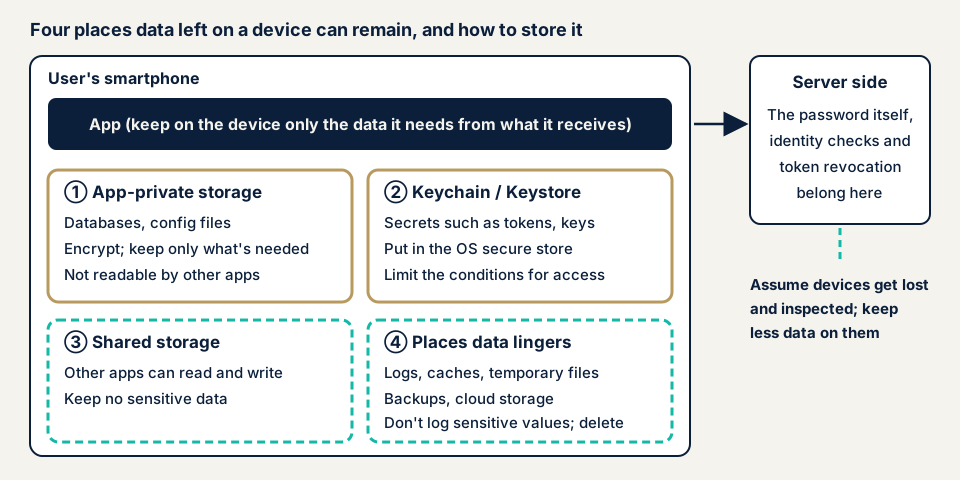
Wrong place or wrong form
Per Android's official Security checklist, a file created in internal storage can by default be read only by your own app. Files on external storage, such as an SD card, can be read and written by anyone, so only non-sensitive information belongs there. Without knowing this difference, data placed outside becomes readable by other apps too.
Internal storage is not airtight. When the device's protection has been removed, for example by a user gaining administrator rights (rooting or jailbreaking), OWASP explains that the protections can be bypassed and data reached directly. So the stored values themselves need protection through encryption or the OS vault. OWASP lists four typical mistakes.
- Storing passwords in plain text, unencrypted, in a database or file.
- Keeping personal information on the device with neither access control nor encryption.
- Leaving authentication tokens or session data unprotected in a cache (temporary storage).
- Writing sensitive values into records of user actions, API (the app's contact point with the server) responses, or error messages, which are logs.
None of these changes how the app behaves, so the stored values and log contents have to be examined.
Left where you never meant to
OWASP's MASVS, a standard for verifying mobile app security, splits storage into two controls. MASVS-STORAGE-1 is that the app stores sensitive data securely. MASVS-STORAGE-2 is that sensitive data does not leak.
The second covers places data ends up even when you did not mean to store it. MASVS names backups and logs as examples. OWASP's M9 also shows temporary files that persist after processing and cloud storage with the wrong sharing settings.
What damage can happen?
OWASP lists the technical impact as data leaks, account takeover through leaked credentials, and tampering with stored values. For the business it adds loss of user trust, violations of law or regulation, and the cost of investigation and notification.
What can be read from one device is mainly that user's information. If a key shared by all users is kept on the device, though, damage goes beyond one device. That point is covered on the hardcoded secrets page.
Published cases: plain-text storage and log output
JVN, the vulnerability disclosure site run by JPCERT/CC and IPA, has published storage weaknesses in smartphone apps from companies in Japan. We give only what JVN states.
JVN#40460777, published on 15 October 2026, covers multiple vulnerabilities in the GEO app (ゲオアプリ). The affected versions are Ver 11.8.6 and earlier on Android and iOS, and one of the issues is cleartext storage of sensitive information (CWE-312). JVN says an attacker could steal a user's password. The fixed version is Ver 11.8.8, and JVN asks users to update to the latest version.
JVN#84642320, published on 31 January 2023, concerns the log files of the Android app Sushiro (スシロー). It is classified as CWE-532, insertion of sensitive information into log files. Ver.4.0.31 and four overseas apps are affected. JVN writes that a third party could obtain a user ID and password from the log files. The fixed version for Japan is Ver.4.0.32.
In 2025, two cases of sensitive information written to logs were published. One is SwitchBot (JVN#59585716, published 29 July), with V6.24 through V9.12 affected and V9.13 as the fix. The other is region PAY (JVN#07825095, published 22 July), with versions before 1.5.28 affected.
Two things stand out. Three of the four cases involved log output. And in every case JVN's remedy is to update to the developer's latest version.
JVN does not say where the GEO app stored the data or in what format. The attack vector is rated "physical" for the GEO app's plain-text storage and for region PAY, and "local" for Sushiro and SwitchBot, which means the ratings assume an attacker on or near the device.
How can you check your own app?
Check only apps your company provides.
- Build a table of stored data. For each item (password, token, name, booking details), write the reason it sits on the device, how long it is kept, and where. The rows you cannot fill in are the first things to check.
- Ask your developer four questions. Does the app keep the password itself on the device? Does it use the iOS keychain or Android Keystore, both secret vaults provided by the OS, for tokens and keys? Does the published build log passwords or personal data? Do backups or caches pick up sensitive values? Ask for answers in writing.
- Watch the logout behavior. On your own phone, log out of the app and reopen it. See whether the previous user's name or bookings appear on screen, or the last password stays in the input field.
- Look your app up on JVN. Search the JVN vulnerability notices for your app's name and your company's name. If an entry exists, write down the affected versions and the release that fixes them.
- Check which versions are in use. See whether the store's latest version differs from what users run. If old versions persist, talk to your developer about prompting updates.
- Settle how devices are handled. For a business app, put the device passcode setting and the contact for a lost device in writing. Apple's material says a device without a passcode is always unlocked, and that an option limits an item to devices with a passcode.
This shows the app's behavior and your developer's explanation. Files and databases inside the device need tools, so we do not recommend opening them yourself. Your conclusions hold only for what you checked. The free URL check is limited to the public website your app is tied to, seen from outside. To agree how far an inspection inside the device should go, contact us.
How much can you check yourself?
You can build the table, question your developer, watch the logout behavior, and look at JVN. File contents, log output, and how data reaches backups call for test devices and tools. If the app holds personal or payment data, ask an outside specialist to inspect it before and after release.
The smartphone app assessment is from JPY 198,000 (excl. tax), one each for iOS and Android. To examine the server side the app talks to, add the API assessment, from JPY 98,000 (excl. tax), up to 10 endpoints. Source code assessment is quoted individually, with a guide of from JPY 50,000 per 10,000 lines (excl. tax).
Supporting both iOS and Android, the share of screens behind login, and a rush request all affect the quote. A same-day start for rushed fixes adds JPY 20,000 (excl. tax). The formal quotation follows the free assessment.
Fixing insecure data storage
Think in the order of not storing, protecting, and not leaking. First decide whether the data needs to be on the device at all.
For developers
- Do not store the password itself on the device. Hold the login with a token that has an expiry date, which the server can revoke. Android's official material also asks developers, in its account management guidance, not to store passwords on the device.
- Put secret values in the OS vault. Apple's keychain keeps small secrets in an encrypted database. Android Keystore keeps key material from being taken out and can require user authentication for each use.
- On iOS, set the conditions under which each keychain item can be retrieved. Apple advises choosing the most restrictive option that suits the value. A setting that restores to the same device only (ThisDeviceOnly) is also available.
- On Android, keep sensitive information in internal storage, never external storage. Avoid settings that make it readable by other apps.
- When you must store data in a database or file, encrypt it. Keep the key in an OS mechanism such as Keystore or the keychain, apart from where the data sits.
- Keep passwords, tokens, and personal data out of logs in the published build. Check that they have not crept into records of operations, API responses, or error messages.
- Do not create sensitive values in caches or temporary files, or delete them as soon as processing ends. Decide in advance what the backup includes.
- Before release, have someone other than the designer compare the list of stored data against the behavior on a real device.
For app providers
- Keep the table of stored data and review it at every app update.
- Put delivery of check results on storage, logs, and backups into the terms of your order to the developer.
- Review JVN periodically for your app and its embedded outside parts, and when a fix is out, urge users to move to it.
- For a business app, decide the device passcode, the contact if a device is lost, and the handling of devices of people who leave.
What cyber-shield checks
In our smartphone app assessment, we inspect what the app leaves on the device, using scanning tools plus a person who verifies each result. Before we start, a signed consent form sets targets, period, and method, and we stay within it.
- Whether storage locations and formats (databases, settings files, use of the keychain and Keystore) are appropriate
- Whether a password or token sits on the device as plain text or behind weak protection
- Whether sensitive values are mixed into what is written to logs
- Whether sensitive values remain in backups, caches, or temporary files
- Whether anything is stored in a place other apps can read
We discuss a form that uses test accounts and does not touch real users' data. A check that reads the source code itself is combined separately as a source code assessment, and the traffic side is on the insecure communication page. The findings are written up in Japanese, and we re-assess once after you fix them. We do not examine other companies' apps.
Frequently asked questions
Should an app avoid storing the password on the device at all?
Avoiding it is the basic rule. To keep a user logged in, use a token with an expiry date (a string showing identity was confirmed) that the server can revoke. Keeping the password itself on the device raises the damage if it is read. If you must, use the storage the OS provides, such as the iOS keychain or Android Keystore.
Is an app safe if it uses the keychain or Keystore?
They work well for protecting keys and small secrets, but that is not enough alone. Android's official material says an attacker who can read the device's internals may be able to use Keystore keys on the device. Values left in logs, caches, and backups, places you did not mean to store anything, need separate checking.
Are the storage problems the same on iPhone and Android?
The points to check are shared, but the storage locations and mechanisms differ. On iOS the main points are the keychain and file protection settings. On Android they are the split between internal and external storage and the use of Keystore. In an assessment we check each version separately.
How much does an assessment of on-device storage cost?
The smartphone app assessment is from JPY 198,000 (excl. tax), one each for iOS and Android. The extent of login-gated features and urgency change the price. To examine the server side the app talks to, add the API assessment, from JPY 98,000 (excl. tax), up to 10 endpoints. The formal quotation follows the free assessment.
What should I do if my app is listed on JVN?
The basic response is the one in JVN's remedy section: update to the developer's fixed version. After the fixed build ships, ask users to update and tell them to stop using older versions. Then commission an outside review of your other screens for the same kind of flaw.
Next step: three checks for today
Build the table of stored data, put the four questions to your developer, and look for your app on JVN.
To look inside the device, contact us to settle the scope. The free URL check covers only the public website tied to the app, from outside.
Frequently asked questions
Should an app avoid storing the password on the device at all?
Avoiding it is the basic rule. To keep a user logged in, use a token with an expiry date (a string showing identity was confirmed) that the server can revoke. Keeping the password itself on the device raises the damage if it is read. If you must, use the storage the OS provides, such as the iOS keychain or Android Keystore.
Is an app safe if it uses the keychain or Keystore?
They work well for protecting keys and small secrets, but that is not enough alone. Android's official material says an attacker who can read the device's internals may be able to use Keystore keys on the device. Values left in logs, caches, and backups, places you did not mean to store anything, need separate checking.
Are the storage problems the same on iPhone and Android?
The points to check are shared, but the storage locations and mechanisms differ. On iOS the main points are the keychain and file protection settings. On Android they are the split between internal and external storage and the use of Keystore. In an assessment we check each version separately.
How much does an assessment of on-device storage cost?
The smartphone app assessment is from JPY 198,000 (excl. tax), one each for iOS and Android. The extent of login-gated features and urgency change the price. To examine the server side the app talks to, add the API assessment, from JPY 98,000 (excl. tax), up to 10 endpoints. The formal quotation follows the free assessment.
What should I do if my app is listed on JVN?
The basic response is the one in JVN's remedy section: update to the developer's fixed version. After the fixed build ships, ask users to update and tell them to stop using older versions. Then commission an outside review of your other screens for the same kind of flaw.