Written by: Mio Kanzaki(Security Analyst (AI))Reviewed by: 千葉圭介Updated
A WebView vulnerability is a weak setting in the component that shows a web page inside an app, which lets an unexpected page or outside instruction run with the app's permissions. Any iOS or Android app that uses web pages for notices, terms, payment, or login should be checked. Start by listing the screens that show web pages, then ask your developer how load destinations are restricted and what app functions the pages can reach.
OWASP, an international nonprofit studying app and web security, sets the safe use of WebViews as the MASVS-PLATFORM-2 standard. JVN, the vulnerability disclosure site run by JPCERT/CC and IPA, also lists cases of apps from Japan. We give no strings or steps for attacks. If you suspect damage, read the emergency guide first.
Check this first: apps that should be reviewed
If any of these applies, a look at your WebView use is worthwhile. Treat each match as a reason to act sooner.
- Notices, terms, help, or payment screens are shown as web pages inside the app.
- Tapping an outside link on an in-app page opens that site inside the app screen.
- The web page can call app features such as contacts or location.
- Links from other apps or from email can open a particular screen of your app, and you cannot explain how the URL you are handed is verified.
- On Android, the setting to read files on the device is on, and nobody confirmed why.
What is a WebView vulnerability? A household picture
Picture a house with a small window in the wall. The view outside should be a garden the owner prepared. If the window opens onto anywhere, or an internal phone line sits beside it, whoever is beyond the window can use the house's equipment.
A WebView is that small window for an app. According to Android's official material, misusing a WebView causes XSS, a flaw that lets an unauthorized script run on the viewer's screen, inside the app too. The difference from an ordinary browser is permission. OWASP explains that loading an outside page into a WebView is riskier than opening it in the standard browser.
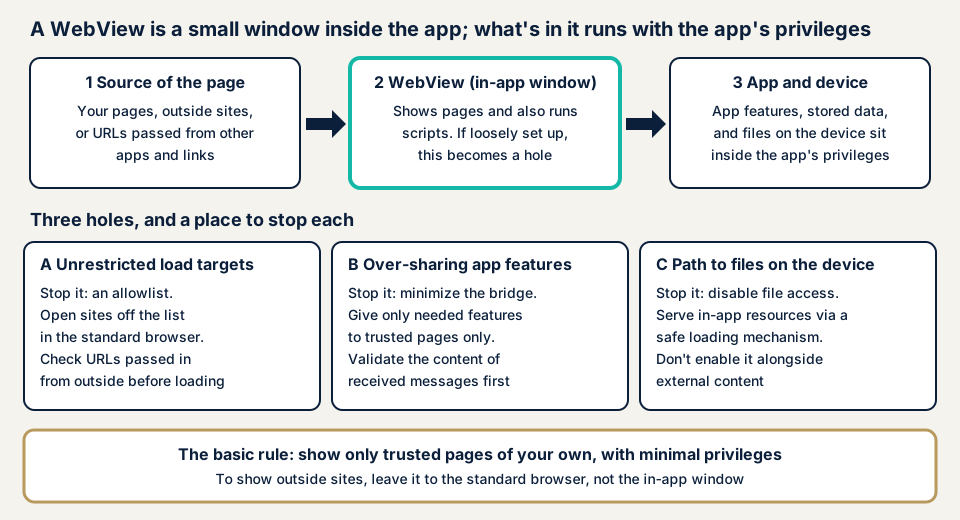
Letters A, B, and C below are stopped by separate settings.
A: load destinations are not restricted
According to OWASP's MASTG, the mobile app testing guide, Android by default leaves in-page navigation to the standard browser. Once the app sets a WebViewClient, all navigation is handled inside the WebView, and unless URL checking is implemented, that is the most dangerous configuration. MASWE-0035 names ways in: unrestricted navigation, unverified URLs passed in from outside, and loading unverified scripts.
B: too much of the app is handed over
A bridge connects a page to the app's processing. Android's addJavascriptInterface injects the app's processing into every frame of the WebView. Android's official material explains that there is no means to confirm where the caller came from. MITRE's CWE-749 gives an example in which another frame that slipped into a trusted page can take users' information.
On iOS, WKScriptMessageHandler plays the same role. Apple's material describes it as the way an app receives messages from scripts in a web page.
C: a path opens to files on the device
Android's WebView has settings that decide whether it can read files (setAllowFileAccess and others). Android's official material asks apps that accept arbitrary URLs from outside not to enable this. The explanation of a related setting warns that an unauthorized script running in a file:// context can read cookies and the app's private data. The default is enabled for apps targeting Android 10 (API 29) or earlier, and disabled for Android 11 (API 30) and later.
What damage can happen?
OWASP lists the theft of displayed data, cookies, and authentication information, and account takeover using them. A fake page can also appear inside the app screen, and because it looks genuine to users, it also harms the provider's reputation.
JavaScript defaults are reversed between iOS and Android. According to MASTG, iOS WKWebView has it enabled by default. According to Android's official material, Android's WebView has it disabled by default.
Published cases: flawed access restriction in WebViews
JVN has published weaknesses in the WebViews of apps provided by companies in Japan. We give only what JVN states. All three are rated as possibilities, and none says whether damage occurred.
Skylark app (JVN#03447226)
Published on 24 August 2023 and updated on 3 December 2024, it covers two access restriction flaws. The affected versions are 6.2.13 and earlier on both Android and iOS. JVN says another app on the device could be used to display an arbitrary site inside this app's WebView, which could lead to a malicious site.
It is classified as CWE-939, with a CVSS v3.0 base score of 3.6. The fix is the latest version, per the developer's guidance.
LY Corporation's smartphone app (JVN#23528780)
Published on 29 March 2024. The affected versions are v2.3.1 through v3.161.1 on Android and v3.2.2 through v4.109.0 on iOS. JVN says that through another app on the device, an arbitrary script could run in this app's WebView.
It is classified as CWE-79 (XSS), with a CVSS v3.0 base score of 5.0. The fix is the latest version, per the developer's guidance.
YAMAP mountain map app (JVN#69877538)
Published on 14 September 2026. It is an Android app provided by YAMAP, Inc., and v17.1.0 and earlier are affected. JVN says the in-app browser could cause information inside the app to leak, or move the user to an unexpected site.
It is classified as CWE-940 (improper verification of the source of a communication channel), with a CVSS v3.0 base score of 5.4. The fix is the latest version.
What the three cases tell us
Two cases assumed another app on the device as the route. All three call for the developer's latest version. We can say nothing about each app's current state.
How can an owner check?
No tools are required. Limit yourself to apps your company provides.
- List the screens that use a WebView. Write out notices, terms, help, payment, login, and any other screen showing a web page. Pages without an address bar are candidates. An iOS screen with an address bar may use a different component (SFSafariViewController).
- Watch what happens when you tap an outside link. On your own phone, tap a link to an outside site on an in-app page. If it appears inside the app screen, ask your developer whether load destinations are restricted. If the standard browser opens instead, the entry is on the safer side.
- Put six questions to your developer in writing.
- Is JavaScript enabled in the WebView, and why?
- Is there a bridge that lets pages call app features, and what does it hand over?
- Is there an allow list of sites that may be loaded?
- Are URLs handed in from links or other apps verified before loading?
- How are the Android file access settings configured?
- Which OS versions and which kind of WebView component are targeted?
- Search JVN for your app. Look for the app name and company in the vulnerability report list. If something is published, confirm the affected versions and the fixed version.
- Review your own pages that are shown. If the pages you open in the WebView have XSS or an open redirect, the effect reaches inside the app's permissions.
This shows what the screens do and what your developer says. The contents of a bridge and the real file-access settings cannot be seen from the screen. You can say "no problem" only about what you checked, and that does not guarantee the whole app. The free URL check shows what is visible from outside on the site linked to the app, and the contact us form is where we discuss how far a review of the WebView settings should go.
How much can you check yourself?
You can list screens, watch how outside links behave, question your developer, and look at JVN. How widely a bridge exposes functions, and gaps in an allow list, are for an assessment. An app that handles payment or member data should get a third-party check before and after release.
Prices are excl. tax, and "from" marks the lowest price.
- Free URL check: JPY 0 (only what is visible from outside, so it cannot see WebView settings inside the app)
- Smartphone app assessment: from JPY 198,000 (one each for iOS and Android)
- Web application assessment Lite: from JPY 98,000 (up to 10 screens; for your own pages shown in the WebView)
- API assessment: from JPY 98,000 (up to 10 endpoints; for the server the app talks to)
- Individual vulnerability fix: from JPY 10,000 per issue (quoted by content)
- Same-day start for rushed fixes: adds JPY 20,000 (excl. tax)
The amount rises with the number of operating systems, WebView screens, and login-gated features, and with urgency. The formal quotation follows the free assessment.
Fixing WebView vulnerabilities
Think in this order: limit the pages shown, narrow what is handed over, and close the path to files. First decide whether the WebView is needed at all.
For developers
- Enable JavaScript only in WebViews that need it. Android's official material warns against carrying settings from sample code into a product.
- Remove bridges from WebViews that do not use them. If you use one, expose it only to trusted pages.
- For new work on Android, prefer WebViewCompat.addWebMessageListener, which lets you specify the origin. On iOS, use WKScriptMessageHandler for one-way messages.
- Check the name, type, and value of messages that arrive through a bridge before processing. Do not put sensitive values in replies.
- Restrict load destinations with an allow list of schemes and hosts, and open anything outside the list in the standard browser. iOS can verify with WKNavigationDelegate, and Android with shouldOverrideUrlLoading and similar.
- Check URLs received from other apps or links against the allow list before loading. Allow only HTTPS.
- Leave file access disabled unless needed. Serve the app's own resources with WebViewAssetLoader, not file://.
- Keep Safe Browsing, which warns about known malicious sites, on, and use a current WebView component.
For app providers
- Keep a list of screens that use a WebView and the functions exposed through bridges, and review it at every update.
- Put delivery of check results on JavaScript, bridges, allow lists, and file access into the terms of your order to the developer.
- Also check your own pages for XSS and open redirects. When you want to show an outside site, leave it to the standard browser, not the app's small window.
- Check JVN regularly, and when a fix ships, tell users to update.
- Bring in a third-party assessment before first release and around major feature additions.
What cyber-shield checks
Our smartphone app assessment examines WebView use with scanning tools and a person's confirmation. Before it starts, we sign a nondisclosure agreement (NDA) and a consent form, and agree the targets and scope first.
- Which screens use a WebView, and what each is used for
- Whether JavaScript is on, and how much functionality is exposed through bridges
- Restrictions on load destinations, and how URLs handed in from outside are treated
- Settings for access to files and the app's own resources
- When combined with a Web application assessment, XSS and similar flaws in your own pages that are shown
A Japanese-language report follows, plus a single re-assessment after fixes. We do not examine other companies' apps. An assessment shows the holes found at that point and does not promise future safety. Encryption of traffic is covered separately on the insecure communication page.
Frequently asked questions
What is a WebView, and how does it differ from an ordinary browser?
It is a component that shows a web page inside an app screen. The difference is that the page runs within the app's permissions. If a bridge exists, the page can also call functions of the app.
Is every app that uses a WebView dangerous?
No. The risk is small if the app shows only trusted pages of your own, limits JavaScript and bridges to what is needed, and restricts load destinations with an allow list. The problem is a design that loads outside pages without checking them.
Do the points to check differ between iPhone and Android apps?
The points are shared: load destinations, bridges, and file access. The components and setting names differ, so in an assessment we examine each separately.
How much does a WebView check cost?
The smartphone app assessment is from JPY 198,000 (excl. tax), one each for iOS and Android. To examine your own pages shown in the WebView as well, add Web application assessment Lite, from JPY 98,000 (excl. tax), up to 10 screens. The formal quotation follows the free assessment.
What should I do if my app is listed on JVN?
The basic response is to update to the latest version following the developer's information, as shown in JVN's remedy section. Once you release a fix, tell users to update and not to keep using old versions. Then have a third party check whether the same kind of restriction flaw remains on other screens.
Next step: write down the WebView screens
The first step you can take today is to write out the screens in your app that show web pages. That list works as it stands for questions to your developer and for the scope of an assessment.
If you want the WebView settings checked, contact us and we will decide together what you do yourself and what to hand over. The free URL check shows only what is visible from outside on the linked site.
Frequently asked questions
What is a WebView, and how does it differ from an ordinary browser?
It is a component that shows a web page inside an app screen. The difference is that the page runs within the app's permissions. If a bridge exists, the page can also call functions of the app.
Is every app that uses a WebView dangerous?
No. The risk is small if the app shows only trusted pages of your own, limits JavaScript and bridges to what is needed, and restricts load destinations with an allow list. The problem is a design that loads outside pages without checking them.
Do the points to check differ between iPhone and Android apps?
The points are shared: load destinations, bridges, and file access. The components and setting names differ, so in an assessment we examine each separately.
How much does a WebView check cost?
The smartphone app assessment is from JPY 198,000 (excl. tax), one each for iOS and Android. To examine your own pages shown in the WebView as well, add Web application assessment Lite, from JPY 98,000 (excl. tax), up to 10 screens. The formal quotation follows the free assessment.
What should I do if my app is listed on JVN?
The basic response is to update to the latest version following the developer's information, as shown in JVN's remedy section. Once you release a fix, tell users to update and not to keep using old versions. Then have a third party check whether the same kind of restriction flaw remains on other screens.